
MSBA-122 · Lesson 7 of 12 · 18 min
Skills and training plans
▶ Video coming soon A video version of this lesson is on the way.
Quillfield's first Copilot training, in July, had been a one-hour webinar that walked through features: Copilot in Word, Copilot in Outlook, Copilot in Teams, Copilot in Excel. Attendance was good and feedback was polite. Two weeks later, Hamish asked ten attendees what they had used Copilot for since. Most had tried one thing and stopped. "It showed me what the buttons do," one personal lines adviser said, "not what to do with my Tuesday."
The council's second attempt was built the other way round: start from the work people do, teach a few tasks well, and build skills in layers for different roles. This lesson covers how to build a skills and training plan for an AI program, a topic that sits within the AB-731 domain on planning adoption and connects directly to the barriers and champions in Lesson 6.
Why AI skills are different
Most software training teaches procedures: where to click and in what order. AI skills are closer to judgment. A person using Copilot well has to decide what to ask for, describe it clearly, give the right context and sources, recognize when an answer is wrong or incomplete, and know which tasks should not go to AI at all. Those skills improve with practice on real work, not with feature tours.
There is also a growing expectation that organizations make sure their people understand the AI they use. The European Union's AI Act, for example, includes an AI literacy obligation for organizations that provide or deploy AI systems, and responsible AI policies like Quillfield's require staff to review AI output, which assumes they know how. A training plan is therefore part of governance as well as adoption.
Skills by role
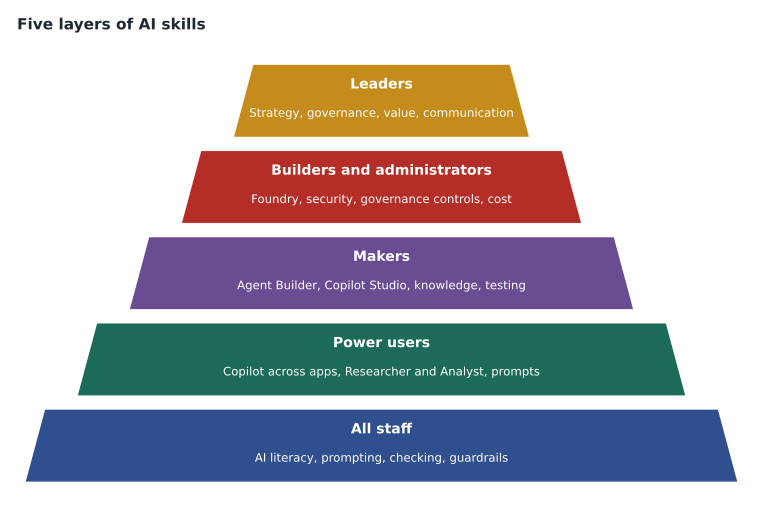
Different people need different depths of skill. The council defined five groups, each building on the one before.
| Group | Who | Core skills | Size at Quillfield |
|---|---|---|---|
| All staff | Everyone with Copilot Chat | What AI is and is not; writing clear prompts; checking output; the guardrails; when not to use AI | 380 |
| Power users | People with Microsoft 365 Copilot licenses | Copilot across Outlook, Teams, Word, Excel and PowerPoint; Researcher and Analyst; saving and sharing prompts | 60, rising to 120 |
| Makers | People who build agents for their teams | Agent Builder and Copilot Studio; preparing knowledge; testing; the launch checklist | About 8 |
| Builders and administrators | IT, security and the solutions architect | Copilot and agent administration; Purview and Entra controls; Microsoft Foundry; cost management | About 5 |
| Leaders | Leadership team and council | Strategy, governance, measuring value, communicating and modeling | About 15 |
Champions sit across these groups. Most were power users with extra coaching skills, and two were also makers.
Teaching tasks, not features
For all staff and power users, the council's rule was "three tasks per team, taught on real work." Each team's manager and champion chose the three tasks that would save the most time or reduce the most frustration, using the Copilot scenario library and Hamish's pilot measurements as a starting point. Training then showed how to do those tasks with Copilot, using the team's own kinds of documents and emails, and gave people time to try them during the session.
| Team | Three tasks taught first |
|---|---|
| Commercial lines | Prepare for a renewal meeting from past correspondence; recap a client meeting with actions; draft a renewal summary |
| Personal lines | Catch up on a long email thread; draft a plain-language explanation of a coverage change; summarize a policy document |
| Contact center | Use the Coverage Explainer agent; draft a follow-up email after a call; summarize a complaint history |
| Finance | Analyze a spreadsheet with Copilot in Excel; draft variance commentary; summarize a supplier contract |
Once those three tasks became habits, people discovered others on their own and through champions. Teaching fewer tasks well beat teaching many tasks briefly: in the second round, the share of trainees still using Copilot weekly a month later was much higher than after the feature webinar.
The essential lessons for everyone
Regardless of role, the council insisted that all staff learn four things in their first session.
Prompting. A good request includes the goal, the context, the sources to use and the expected format. Quillfield's one-page prompt guide showed weak and strong versions of common requests from each department.
Checking. AI output can be wrong, incomplete or out of date while sounding confident. Staff learned to check facts against the sources Copilot cites, to read drafts as an editor would and to be especially careful with numbers, names and anything going to a client.
Guardrails. What the policy allows and forbids, using examples from their own work, and how to report a problem.
When not to use AI. Some tasks need human judgment or care that AI should not replace: a sensitive conversation with a grieving client, a final decision on a claim, or a performance review. Knowing when not to use AI is part of using it well.
Formats that work
People learn AI skills in different ways, and a plan with only one format will miss many of them. Quillfield combined several.
| Format | Best for | Quillfield example |
|---|---|---|
| Short live sessions on real tasks | Starting habits | Forty-five minutes per team, three tasks, hands-on |
| Office hours and drop-ins | Getting unstuck | Weekly lunchtime clinic run by Hamish |
| Champion coaching | Personal help in the flow of work | Twenty minutes side by side on a real task |
| Self-paced learning | Going deeper at one's own pace | Microsoft Learn modules and paths |
| Shared prompt library | Spreading what works | Prompts by team, with owner and last-checked date |
| Certification | Recognizing deeper skill | Microsoft credentials for interested staff |
Microsoft Learn offers free self-paced modules and learning paths on Copilot, Copilot Studio, Microsoft Foundry and the administration and security of Microsoft 365. Microsoft also offers certifications at several levels for AI roles, including the AI Business Professional (AB-730) for people who use Copilot in business work, the AI Transformation Leader (AB-731) for leaders, the AI Agent Builder (AB-620) for makers who build agents, and Copilot and agent administration certifications for IT staff. Quillfield offered to pay exam fees for staff who wanted a credential relevant to their role; Hamish booked AB-730 and Celestine planned AB-731.
Planning the time
The most common reason training plans fail is that they ignore the time people need. Learning a new way of working takes hours, and those hours come from somewhere. A credible plan states how much time each group needs and gets managers to protect it.
Worked problem
Estimating training hours
Quillfield plans the following for next year: all 380 staff take a 45-minute session plus 1 hour of practice; 120 power users take 3 more hours of training and practice; 8 makers take 16 hours of Copilot Studio training; 5 builders and administrators take 24 hours each; and 15 leaders take 4 hours. How many hours does the plan need in total?
Show solution
- All staff: 380 times 1.75 hours = 665 hours.
- Power users: 120 times 3 = 360 hours.
- Makers: 8 times 16 = 128 hours.
- Builders and administrators: 5 times 24 = 120 hours.
- Leaders: 15 times 4 = 60 hours.
- Total: 665 + 360 + 128 + 120 + 60 = 1,333 hours.
Answer: About 1,333 hours, or roughly three and a half hours per employee on average. At Quillfield's average loaded cost, that time was worth more than the year's Copilot Chat agent consumption, which is why Lorne included it in the Investment box.
The figure surprised the leadership team, but it also made the trade-off clear. Pilot users were saving about three hours a week. An employee who reached that level would recover their training time within about two weeks. The plan was therefore easy to justify, but only if the training led to real use, which is why the council linked it to measurement.
Building makers safely
Makers need more than tool skills. A maker who builds an agent is deciding what knowledge it uses, who can use it and how it behaves, which makes them part of the governance system. Quillfield's maker training covered three things beyond Copilot Studio itself: preparing knowledge sources (current, accurate, correctly permissioned), testing an agent on realistic and difficult questions before sharing it, and using the agent launch checklist. Makers also joined a monthly makers' meeting with Bram and Yusra to share designs and avoid duplicate agents.
Measuring skills
Training attendance is easy to count and tells you little. The adoption team tracked three better signals: whether trained people used Copilot regularly a month later, whether they used it for the tasks they were taught, and how confident they said they felt in a short survey. Groups that lagged got follow-up, usually from their champion. Lesson 8 covers how these skills measures fit into the wider measurement plan.
Training leaders
Leaders were the group most likely to skip training, and the council treated that as a risk. A leader who does not use AI cannot model it, cannot judge proposals well and cannot answer the board's questions. Quillfield's four-hour leader program was split into two sessions. The first covered what Microsoft's AI products do and cost, using the leaders' own tasks: preparing for a board meeting with Researcher, analyzing a budget with Analyst and catching up on a month of email. The second covered governance: the responsible AI policy, the risk tiers, how to read the scorecard and how to talk to staff about jobs. Each leader left with three tasks to use Copilot for in the following fortnight and a short check-in with Hamish afterwards.
Celestine went further and asked each leadership team member to bring one example of their own Copilot use to the next leadership meeting. The examples varied in quality, but the habit sent a clear signal to the rest of the company.
Keeping skills current
Microsoft releases new Copilot and agent features every month, and a training plan written in the autumn is partly out of date by the spring. The adoption team handled this in three ways. Champions received a short monthly briefing on changes that mattered to their teams and passed on only those. The prompt library recorded a last-checked date for each prompt, and champions reviewed prompts older than six months. And every six months the adoption team reviewed the three tasks per team, replacing any that had become habits with new ones. The aim was steady growth in skill rather than occasional large training events.
| Channel | Frequency | Content |
|---|---|---|
| Champions briefing | Monthly | New features that matter to each team |
| Prompt library review | Every six months per prompt | Check that prompts still work and are current |
| Task refresh | Every six months per team | Replace established tasks with new ones |
| Leader update | Quarterly | Product and governance changes that affect decisions |
Training for agents and new features
When a new agent is published to a team, its users need a short introduction: what the agent is for, what it can and cannot answer, where its information comes from and how to report a wrong answer. Quillfield attached a one-paragraph description to each published agent and asked owners to introduce new agents in a team meeting. The Coverage Explainer's launch included a ten-minute demonstration in the contact center's morning huddle and a laminated card with three example questions. Usage in its first week was more than double that of an earlier agent launched with only an email, which taught the adoption team that even small agents deserve a small launch.
The same principle applied to major feature changes in Microsoft 365 Copilot. When Microsoft changed where saved prompts lived and how scheduled prompts worked, the champions explained the change in their teams before people discovered it on their own, which avoided a wave of help desk calls.
Common mistakes
MistakeRunning feature tours and calling it training.
InsteadTeach a few real tasks per team, on real work, with time to practice.
MistakeGiving everyone the same training.
InsteadBuild skills in layers for all staff, power users, makers, builders and leaders.
MistakeSkipping checking and guardrails to save time.
InsteadTeach everyone to check output, follow the guardrails and know when not to use AI.
MistakeLeaving training time out of the plan.
InsteadEstimate hours per group and get managers to protect them.
MistakeMeasuring attendance only.
InsteadMeasure later use, task adoption and confidence.
Summary and key terms
- AI skills are closer to judgment than procedure and improve with practice on real work.
- Plan skills in layers: all staff, power users, makers, builders and administrators, and leaders.
- Teach three tasks per team on real work rather than touring features.
- Everyone needs prompting, checking, the guardrails and knowing when not to use AI.
- Combine live sessions, office hours, champion coaching, Microsoft Learn, a prompt library and certification.
- Estimate the hours, protect them, and measure later use rather than attendance.
- AI literacy
- A basic understanding of what AI can and cannot do and how to use it responsibly.
- Power user
- An employee who uses AI deeply in daily work, such as a Microsoft 365 Copilot license holder.
- Maker
- An employee who builds agents or apps for their team with low-code tools.
- Microsoft Learn
- Microsoft's free online platform of training modules, learning paths and certification preparation.
- Prompt library
- A shared collection of prompts that work well, organized by team and kept current.
- Task-based training
- Training organized around the tasks people do rather than the features of a tool.
Practice problems
Work each problem on paper first, then reveal the answer to check.
What four things must all staff learn in their first session?
Show answer
Prompting, checking output, the guardrails and when not to use AI.
200 staff each need 2 hours of training. How many hours is that?
Show answer
400 hours.
Which Microsoft certification is aimed at leaders of AI programs?
Show answer
AB-731, Microsoft Certified: AI Transformation Leader.
Lesson quiz · 5 questions
Score 60% or more to complete this lesson.
Create a free account to save your progress, take quizzes and earn a certificate.