
MSBA-111 · Lesson 8 of 12 · 23 min
Using agents built by others
▶ Video coming soon A video version of this lesson is on the way.
By the eighth clinic, Quillfield had more agents than most staff realized. Microsoft's built-in agents were there for everyone with a license. Yusra Kamaludin had built a Policy Wording Helper that answered questions from the firm's library of standard policy wordings, and the group benefits team had a Plan Change Notice agent based on the template from lesson 5. Several people had made small agents for themselves and shared them with their teams. At the eighth clinic Hamish set out to answer the questions he kept hearing: where are the agents, which ones can I trust, and how do I use them well?
What an agent is, from a user's point of view
For a Copilot user, an agent is a specialized assistant set up for a particular job. It has its own instructions, which tell it how to behave and what to focus on; its own knowledge, such as specific SharePoint sites, files or connected business data; and sometimes capabilities or actions, such as creating documents or, for more advanced agents, carrying out steps in other systems. When you chat with an agent, you get Copilot's language skills plus the agent's setup, so a short prompt can produce an answer that would otherwise need a long one. MSBA-110 introduced the idea; the agent-building courses in this track explain how agents are built in Agent Builder and Copilot Studio.
Where agents come from
Microsoft's support guidance describes several groups of agents available in the Microsoft 365 Copilot app. Built-in agents appear in the left navigation under Agents: Researcher and Analyst, covered in lessons 6 and 7, and Visual Creator, which turns descriptions into visual and interactive content. Optional agents built by Microsoft, such as Idea Coach, Writing Coach, Prompt Coach, Learning Coach and Career Coach, do not appear in the navigation until you add them from the list of all agents. Beyond Microsoft's own, there are agents built by your organization, which administrators can approve and publish so they appear in a section of the Agent Store for the organization, and agents that colleagues have shared directly with you. Depending on your organization's settings, the Agent Store can also list agents from Microsoft partners.
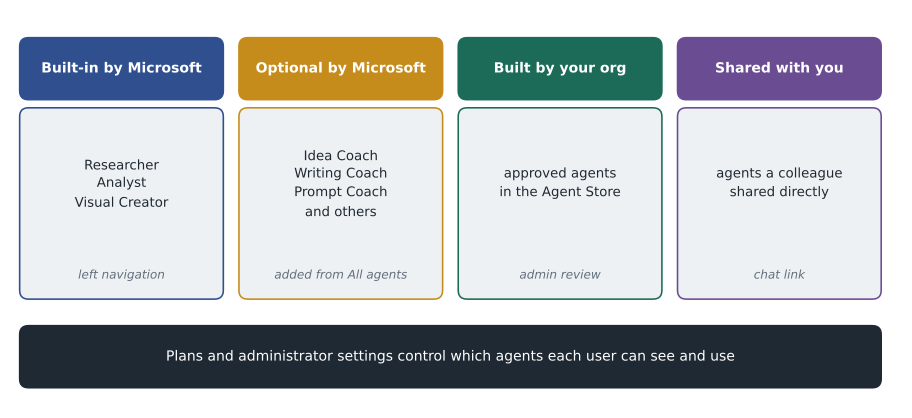
Whether you can see or use a given agent depends on your license and on your administrators. Microsoft notes that you may not see an agent, or may get an error opening it, if you lack the required Copilot license or your administrator has not enabled it. In the Microsoft 365 admin center, administrators decide which users can access agents and who can share agents across the whole organization, and they review agents submitted for the organization's catalog.
Finding and opening agents
Agents you have used recently appear in the left pane of the Microsoft 365 Copilot app. To find others, Microsoft's documentation, updated in November 2026, describes selecting All agents in the left pane or opening the Agent Store, where agents approved by administrators appear in a section for agents built by your organization. An agent someone has shared with you directly usually arrives as a chat link that opens it. In many experiences you can also bring an agent into a Copilot Chat conversation by typing @ and its name, so that one prompt goes to that agent.
Reading an agent before relying on it
An agent is only as good as its instructions and knowledge, and you usually cannot see them. Before relying on an agent for real work, Hamish asked the clinic to find out four things. Who built and maintains it? What knowledge does it use? What is it designed to do, and what does it say it should not be used for? And has it been approved for the kind of work you want to use it for? Agents in the organization's catalog have been through an administrator's review; agents shared directly by a colleague may not have been. That does not make them bad, but it changes how much checking you do.
| Question | Where to look | Why it matters |
|---|---|---|
| Who owns it? | The agent's description or details page, or the person who shared it | Someone should be responsible for keeping it accurate |
| What knowledge does it use? | Description, starter prompts, or ask the agent | Answers come from its sources; out-of-date sources give out-of-date answers |
| What is it for? | Description and starter prompts | Using an agent outside its purpose gives weaker results |
| Is it approved? | Listed in the org catalog, or ask the owner | Catalog agents have been reviewed by administrators |
Asking the agent itself is a reasonable first step. "What sources do you use, and what should I not use you for?" will often get a useful answer, because many builders write that information into the agent's instructions. Yusra's Policy Wording Helper, for example, answered that it used the standard wordings library from January 2026 onward and that it should not be used to interpret a specific client's policy, which needs the actual policy document.
Prompting an agent
Prompting an agent is like prompting Copilot Chat, but with some of the work already done. The agent's instructions supply much of the context and expectations, and its knowledge supplies the source. Your prompt can focus on the goal and on anything specific to your case. Starter prompts, the sample questions an agent shows when you open it, are a quick guide to what the builder expected people to ask. If your task is different, the four parts from lesson 1 still help.
Worked problem
Prompting the Policy Wording Helper
Gus wants to know whether Quillfield's standard commercial auto wording covers hired vehicles. Write a good prompt for the Policy Wording Helper.
Show solution
- The agent already knows its source (the wordings library) and its role.
- Goal: find and explain the relevant clauses.
- Specifics: commercial auto, hired vehicles, the current standard wording.
- Expectations: quote the clause headings, explain in plain language and say if the answer depends on endorsements.
Answer: In our current standard commercial auto wording, which clauses deal with hired vehicles? Give the clause headings, explain what they cover in plain language, and say whether coverage depends on an endorsement. Note: this is a general question, not about a specific client's policy.
Agents and data access
Agents do not give you access to data you could not otherwise see. Microsoft's guidance on sharing agents built in Agent Builder is explicit: access to an agent does not grant access to its knowledge sources. If an agent uses SharePoint or OneDrive files, existing permissions and sensitivity labels still apply, so two people asking the same agent the same question can receive different answers if they have different access. There is one important exception that users and builders should understand. When a builder uploads files directly into an agent, those files become part of the agent's embedded knowledge, and anyone who can use the agent can receive answers based on that content, subject to sensitivity label permissions. That is why builders are told to review uploaded content before sharing an agent, and why users should tell an agent's owner if it reveals something it should not.
Sharing an agent you have built
Exam AB-730 also expects business users to know how simple agents are created and shared, even though building agents in depth belongs to other courses. In the Microsoft 365 Copilot app, Agent Builder lets a user describe an agent in plain language or start from a template, then refine its name, description, instructions, knowledge sources, capabilities and starter prompts. A new agent is private to its creator. The owner can share it with specific people or groups, choosing whether each person can edit, with full rights to change and share it, or can chat, meaning they can only use it. Depending on administrator policy, the owner can also make it available for chat to everyone in the organization. Sharing in this way is different from publishing to the organization's catalog, which requires administrator review and approval.
Worked problem
Choosing sharing roles
Hamish built a Renewal Prep agent. He wants Solveig and Gus to use it, the commercial lines team to use it, and Yusra to help maintain it. What should he set?
Show solution
- Solveig and Gus: can chat.
- The commercial lines team group: can chat (groups can only be added as chat users).
- Yusra: can edit, as a co-owner.
- Before sharing, review any files uploaded as knowledge, because all chat users could receive answers based on them.
Answer: Chat access for Solveig, Gus and the commercial lines group; edit access for Yusra. If the agent becomes widely used, Hamish can submit it for the organization's catalog, where administrators review it.
Microsoft also notes that changes an owner makes are saved but are not visible to users until the owner publishes an update, and that any owner can delete the agent, which removes it for everyone. Those details matter for shared agents: an agent with one owner who leaves the company becomes an orphan, so popular agents should have at least two owners.
The optional Microsoft agents
The optional agents built by Microsoft are easy to overlook because they do not appear until you add them. Several suit everyday work. Writing Coach helps refine tone, grammar and style in emails and reports. Idea Coach helps generate and develop ideas and turn them into plans. Prompt Coach, mentioned in lesson 2, helps you structure prompts. Learning Coach helps you study a subject and build a study plan, which Hamish used for AB-730 itself. Career Coach is aimed at students and educational institutions. Each is a focused assistant with instructions tuned for its job, so a short prompt goes further than it would in general Copilot Chat.
Worked problem
Using Learning Coach for exam preparation
Hamish wants a four-week plan for AB-730 with two hours of study on weekdays. How might he prompt Learning Coach?
Show solution
- Goal: a four-week study plan.
- Context: he is preparing for Exam AB-730, works full time and has finished the foundations course.
- Expectations: two hours each weekday, more time on the prompts and conversations area, a practice session at the end of each week, and short daily review questions.
Answer: Create a four-week study plan for Exam AB-730: Microsoft AI Business Professional. I work full time and can study two hours each weekday. I have finished a generative AI fundamentals course. Give more time to managing prompts and conversations, include a practice session each Friday, and suggest five review questions for each day.
Agents in Teams and other apps
Agents are not limited to the Copilot app. Depending on how an agent was built and published, you may be able to use it in Microsoft Teams chats, in meetings or alongside documents. An agent published to a Teams channel, for example, might answer questions from everyone in the channel about a shared policy library. The principles are the same wherever the agent appears: know who owns it, what it draws on and what it is for. Agents that work in shared spaces such as channels also raise a new consideration: anyone in the channel may see the questions and answers, so sensitive questions belong in a private chat with the agent instead.
Agents that take actions
Most agents a business user meets answer questions and draft content. Some more advanced agents can also take actions, such as creating a record in a business system, sending a message or updating a file, usually through connections their builders configured. These agents should ask for confirmation before acting, and you should read what they propose before approving it. An agent's confident summary of what it is about to do is not a guarantee that it understood the request. The more an agent can do on your behalf, the more its builder, your administrators and you share responsibility for how it is used. The agent-building courses in this track explain how builders limit and govern actions.
When an agent gets something wrong
Agents make mistakes for the same reasons as Copilot Chat, plus a few of their own: out-of-date knowledge sources, instructions that do not cover a situation, or a question outside the agent's purpose. Report problems to the owner with an example: the prompt, the answer and what was wrong. Yusra asked users of the Policy Wording Helper to do exactly that, and in its first month she fixed three problems this way, two of them caused by old wording documents that had not been removed from the library. Feedback to an agent's owner is the fastest way to improve it for everyone.
Common mistakes
MistakeAssuming every agent you find has been reviewed.
InsteadCheck whether it is in the org catalog or shared directly, and who owns it.
MistakeUsing an agent outside the purpose its builder described.
InsteadRead the description and starter prompts, or ask the agent what it is for.
MistakeAssuming an agent lets you see files you cannot open.
InsteadAgent access does not grant access to its SharePoint or OneDrive sources.
MistakeSharing an agent with uploaded files without reviewing them.
InsteadAnyone who can chat with the agent may get answers based on uploaded content.
Summary and key terms
- An agent is a specialized assistant with its own instructions, knowledge and capabilities.
- Agents come built in from Microsoft, as optional Microsoft agents, from the organization's approved catalog in the Agent Store, or shared directly by colleagues.
- Licenses and administrator settings decide which agents a user can see and use.
- Check who owns an agent, what knowledge it uses, what it is for and whether it is approved.
- Agents built in Agent Builder are private until shared; owners can grant edit or chat access, and catalog publishing needs administrator approval.
- Agent
- A specialized Copilot assistant with its own instructions, knowledge and capabilities.
- Agent Store
- The place in the Microsoft 365 Copilot app where users find agents, including those approved for their organization.
- Starter prompt
- A sample prompt an agent shows to suggest what it can help with.
- Agent Builder
- The feature in Microsoft 365 Copilot for creating simple agents from a description or template.
- Chat user
- Someone who can use a shared agent but not change it.
- Embedded knowledge
- Files uploaded directly into an agent, which its users can receive answers from.
Practice problems
Work each problem on paper first, then reveal the answer to check.
Name the three built-in agents Microsoft lists in the left navigation.
Show answer
Researcher, Analyst and Visual Creator.
Does access to a shared agent give you access to its SharePoint knowledge sources?
Show answer
No. Existing file permissions and sensitivity labels still apply.
What is the difference between sharing an agent and publishing it to the org catalog?
Show answer
Sharing gives specific people or the organization chat or edit access; catalog publishing needs administrator review and approval.
Lesson quiz · 5 questions
Score 60% or more to complete this lesson.
Create a free account to save your progress, take quizzes and earn a certificate.