
MSBA-111 · Lesson 3 of 12 · 23 min
Referencing files, emails and meetings
▶ Video coming soon A video version of this lesson is on the way.
At the third clinic Solveig Etxeberria brought a problem every account executive at Quillfield recognized. She had asked Copilot to "summarize what the client said about their new depot" and received a confident paragraph about a depot she had never heard of. The answer had come from a different client's email thread. "It found something," she said, "just not the right something." Hamish used her example to introduce the most practical skill in this course: telling Copilot exactly which content to use.
How Copilot finds work content
When a user with a Microsoft 365 Copilot license asks a work question, Copilot can search content through Microsoft Graph, the service that connects mail, calendars, chats, files and people across Microsoft 365. It only reaches content the user already has permission to open; Copilot does not widen anyone's access. That search is powerful but general. Asked about "the depot", Copilot looks for likely matches across everything Solveig can see, and a depot mentioned in another client's thread is a perfectly reasonable match from the model's point of view. The search has no way to know which client she had in mind.
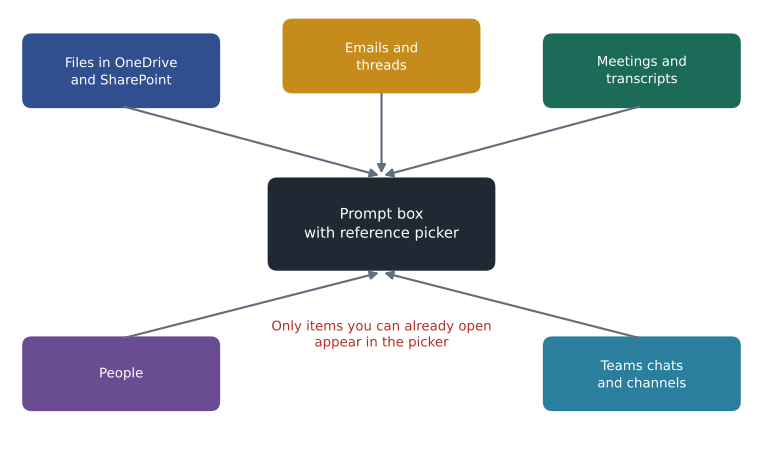
Pointing Copilot at specific items narrows the search to what you intend. In Copilot Chat and in the Copilot experiences inside Microsoft 365 apps, you can reference content directly in the prompt. Typing a forward slash, or using the attach or add-content control in the prompt box, opens a picker where you can search for and select files, emails, meetings, people and other items. The selected item appears in the prompt as a reference, and Copilot treats it as a source for that turn. You can also upload a file from your device when the content is not yet stored in Microsoft 365.
What you can reference
The kinds of item you can point to have grown steadily, and the exact list depends on the app, the license and what your administrators allow. The common ones at work are files stored in OneDrive or SharePoint, such as Word documents, PowerPoint decks, Excel workbooks and PDFs; emails and email threads in Outlook; meetings from your calendar, including the recap and transcript where the meeting was recorded or transcribed; people in your organization, so that Copilot can look for content to or from them; and Teams chats and channel conversations. Some experiences also let you choose whether the answer uses work content, web content or both.
| Item | Useful for | Watch out for |
|---|---|---|
| File | Summaries, comparisons, drafts based on a document | Old versions with similar names |
| Email or thread | What a client asked, agreed or complained about | Long threads that mix several topics |
| Meeting | Decisions and action items from a recap or transcript | Meetings without a transcript give less detail |
| Person | Recent content shared with or by someone | Very broad results for busy colleagues |
| Teams chat or channel | Informal agreements and project updates | Side conversations that are not decisions |
Referencing a meeting is especially useful when the meeting was transcribed. Copilot can then answer questions about who said what, which decisions were made and which tasks were assigned. Without a transcript or recording, the meeting item mostly gives Copilot the invitation, attendees and any shared files. Quillfield's renewal meetings were usually transcribed with client consent, which made "summarize the decisions from the Ridgeline renewal meeting" one of the most popular prompts in the office.
Referencing a person behaves differently from referencing a file. It tells Copilot to look for content connected with that person, such as emails from them or files they shared, and the result can be broad. "What has Celestine asked me to do this week?" with Celestine referenced works well; "summarize everything about Celestine" does not, and it is not a sensible request in any case.
Worked problem
Fixing the depot answer
Rewrite Solveig's prompt, "Summarize what the client said about their new depot", so Copilot uses the right content.
Show solution
- Name the client: Ridgeline Cartage.
- Reference the source: the email thread with Ridgeline's office manager about the depot, and the notes file from last month's site visit.
- Add expectations: three bullet points, each with the date of the email it came from.
Answer: Summarize what Ridgeline Cartage told us about their new depot, using [the email thread "Ridgeline depot plans"] and [Ridgeline site visit notes.docx]. Give three bullet points and the date of the email each point came from.
With the thread and file referenced, Copilot's answer came only from Ridgeline content, and the dates let Solveig open each source in a few seconds. The fix took twenty seconds of extra typing. Hamish made a rule of thumb out of it: for anything about a specific client, case or project, reference the content; for general questions, let Copilot search.
Several sources in one prompt
You can reference more than one item, which opens up comparison and synthesis tasks that would take a person a long time. "Compare the coverage in [last year's policy summary] with [this year's renewal quote] and list every difference" is a typical Quillfield prompt. So is "Using [the claims export] and [the meeting recap from Tuesday], draft the follow-up email I promised." When you combine sources, say how they relate: which one is the baseline, which one is newer, and which one wins if they disagree. Otherwise Copilot has to decide for itself, and it may blend facts from different dates.
There are practical limits. Very large files, or many references at once, may not fit fully into the model's working context, so Copilot may rely on the parts it judges most relevant. If a long document matters, ask about a specific section, or ask Copilot to quote the passage it relied on. Some file types, such as images or complex spreadsheets, may be handled better by a specialist experience such as Copilot in Excel or the Analyst agent, covered in lesson 7.
Permissions and sensitivity
Referencing does not bypass security. The picker only shows content you can open, sensitivity labels and data loss prevention policies still apply, and Copilot's answer inherits the protection of its sources in many experiences. If a file is labeled Confidential, a document Copilot creates from it may carry that label too. Wendell reminded the clinic of the other side of permissions: if someone shared a folder too widely in the past, Copilot can reach it for everyone who can open it. Oversharing is an administrator and data owner problem, covered in the governance courses, but users should report anything surprising they see in a Copilot answer rather than quietly using it.
Uploaded files deserve a moment's thought too. Uploading a document from your device to a Copilot chat keeps it within your organization's Microsoft 365 boundary for a work account, but it does not make the content appropriate to use. A client's medical letter attached to a group benefits question, for example, may be personal health information that your organization's policies restrict. The usual rule applies: only bring content into a prompt that you would be allowed to handle in that way without Copilot.
Referencing inside apps
Inside Word, PowerPoint, Outlook and Teams, Copilot already knows what you are working on. In Word it can use the open document; in Outlook it can use the open email thread; in a Teams meeting it can use the live transcript. In those apps you often reference additional files to bring in other material, such as "draft a summary of this proposal using [last year's report]". MSBA-112 covers the app experiences. The skill is the same everywhere: decide what the answer should be based on, and say so.
Worked problem
Choosing what to reference
Hamish wants a one-page brief on why a client's premium rose. The relevant content is the carrier's renewal letter (a PDF in the client folder), an email from the underwriter explaining the rate change, and a Teams chat where Solveig and Gus discussed a large claim. Which should he reference, and what should he say about how they relate?
Show solution
- Reference all three: the letter, the underwriter email and the Teams chat.
- Say that the renewal letter is the authoritative source for figures.
- Say that the email explains the reasons and the chat gives internal background that must not be quoted to the client.
Answer: He references the three items and adds: "Use the renewal letter for all amounts. Use the underwriter's email for the reasons. Use the Teams chat for background only; do not quote it." Saying how the sources relate keeps internal discussion out of the client brief.
Habits that make referencing reliable
Good file names and tidy folders help Copilot as much as they help people. Solveig's original problem was partly that several clients' files had similar names. Hamish's team began naming files with the client name first and the date in a sortable format, which made the picker results clearer and Copilot's searches more accurate. Keeping meeting recaps and transcripts in the expected places, and closing out old draft copies, has the same effect. A clean information environment is one of the least glamorous and most effective things a team can do to get better Copilot results.
Work content, web content or both
Some Copilot experiences let you choose whether an answer draws on work content, web content or both, and the choice matters. A question such as "What has the client asked us about their depot?" should use work content only; the web has nothing useful to add and could only introduce noise. A question such as "What are typical deductible options for commercial fleet policies?" is general, and web content may help, though the firm's own guidance documents may be better. Many real tasks need both: "Using [our renewal summary], explain to the client how the new provincial rules on electronic logging devices might affect their operations" combines a client document with public information. Hamish encouraged the clinic to make the choice deliberately rather than leaving it to defaults, and to remember that web content needs the same date and source checking as anything else.
Choosing work content only is also a privacy habit. When Copilot searches the web, it creates search queries from your prompt. A prompt that names a client and describes a sensitive claim is a poor candidate for web grounding. Lesson 6 returns to this point in the context of Researcher, where web searches are more extensive.
Referencing content you do not own
Most of the files Quillfield staff referenced belonged to someone else: a carrier's letter, a colleague's notes, a client's spreadsheet. Being able to open a file is not the same as being the right person to use it for a particular purpose. The clinic discussed a case in which Gus could open a folder of another team's client files because of an old sharing link. Copilot would happily have used those files if he had referenced them. The right response was to use only the files relevant to his own work, and to tell the folder's owner that the link was too broad. Wendell called this the difference between access and authorization: permissions tell you what the system allows; your role tells you what is appropriate.
Worked problem
Picking the right version
The Ridgeline folder contains "Ridgeline renewal summary v3.docx", "Ridgeline renewal summary FINAL.docx" and "Ridgeline renewal summary FINAL (2).docx". Solveig wants Copilot to use the current one. What should she do?
Show solution
- Open the files and confirm which one is current, using the modified dates and the content.
- Reference only that file in the prompt.
- Afterward, rename it clearly and move older versions to an archive folder so Copilot and colleagues do not pick them up.
Answer: Referencing the confirmed current file fixes today's prompt; tidying the folder fixes the next ten. Copilot cannot tell which "FINAL" is final any better than a person can.
When a reference does not work
Sometimes a referenced item does not give the expected result. A scanned PDF may contain only an image of text, which limits what Copilot can read. A meeting may have no transcript. A file may be too long for every part to be considered. A shared link may point to a file that has since moved. When an answer ignores a source you referenced, ask directly: "What does [file] say about the deductible?" If Copilot cannot answer, the problem is the source, not the prompt, and the fix is to find a readable version, a transcript or the relevant section.
Common mistakes
MistakeAsking about "the client" or "the project" without naming or referencing it.
InsteadName it and reference the specific files, emails or meetings.
MistakeCombining several sources without saying which one wins.
InsteadState which source is authoritative and how the others relate.
MistakeAssuming referencing gives Copilot access to content you cannot open.
InsteadCopilot only uses content you already have permission to see.
MistakeUploading sensitive personal information because Copilot is secure.
InsteadOnly use content in a prompt that you are allowed to handle that way anyway.
Summary and key terms
- Licensed Copilot searches work content through Microsoft Graph, but only content the user can already open.
- Referencing specific files, emails, meetings, people or chats narrows the sources to what you intend.
- Meetings with transcripts give Copilot decisions and action items; people references give broad results.
- When combining sources, say which is authoritative and how the others relate.
- Permissions, sensitivity labels and data policies still apply to referenced content.
- Microsoft Graph
- The Microsoft 365 service that connects mail, calendars, chats, files and people, and that Copilot uses to find work content.
- Reference
- A specific file, email, meeting, person or chat that you point to in a prompt as a source.
- Grounding
- Basing a response on supplied or retrieved content rather than on the model's general training alone.
- Transcript
- A written record of what was said in a meeting, which Copilot can use for recaps and questions.
- Oversharing
- Content shared with more people than intended, which Copilot can then reach for all of them.
Practice problems
Work each problem on paper first, then reveal the answer to check.
Why did Solveig's depot prompt return the wrong client's information?
Show answer
Copilot searched all her accessible content for "depot" and found a plausible match in another client's thread.
What does a meeting reference add when the meeting was transcribed?
Show answer
Who said what, decisions and action items from the transcript.
Can referencing a file let Copilot read a file you cannot open?
Show answer
No. Copilot only uses content the user already has permission to access.
Lesson quiz · 5 questions
Score 60% or more to complete this lesson.
Create a free account to save your progress, take quizzes and earn a certificate.