
MSBA-111 · Lesson 1 of 12 · 21 min
The parts of a good prompt: goal, context, source, expectations
▶ Video coming soon A video version of this lesson is on the way.
Quillfield Insurance Brokers had switched on Microsoft 365 Copilot for its first two hundred staff in July 2026, and by late August the support desk in the Omaha head office was hearing the same complaint every day: "I asked Copilot something and it gave me a generic answer." Celestine Nwachukwu-Hale, the chief operating officer, asked Hamish Quarrington to do something about it. Hamish was an operations analyst who had finished the foundations course, MSBA-110, and was preparing for Exam AB-730: Microsoft AI Business Professional. He started a weekly lunchtime *prompt clinic* in the boardroom, every Tuesday from September 1, open to anyone, and used it as his own study plan for the exam's largest domain. This course follows those sessions.
MSBA-111 is about the middle of the AB-730 outline: writing prompts, steering conversations, saving and sharing prompts, and using the agents and workspaces that sit around Copilot Chat. MSBA-110 explained what generative AI is and how Microsoft 365 Copilot reaches your data; MSBA-112 applies the same skills inside Word, Excel, PowerPoint, Outlook and Teams; MSBA-119 reviews everything for the exam. This first lesson is about the single habit that changes results the most: giving Copilot a complete request.
Why a prompt needs more than a question
A prompt is everything you send to Copilot in one turn: your words, any files or messages you point to, and the instructions you give about the answer. Copilot then adds its own context, such as the conversation so far and, for a licensed user, content it can find through Microsoft Graph that you already have permission to see. The large language model behind it predicts a useful response from all of that. It cannot read your mind, it does not know which client you mean unless you say so, and it does not know whether you want three bullet points or a two-page memo. When the request is thin, the model fills the gaps with the most average answer it can produce, which is exactly the generic reply Quillfield's staff were complaining about.
At the first clinic Hamish put two prompts on the screen. The first, typed by an account manager the week before, read: "Write an email about the renewal." The second was his rewrite: "Draft a short email to the owner of Ridgeline Cartage confirming that their commercial fleet renewal meeting is on Thursday at 10 a.m. Use the meeting invitation and the renewal summary in my OneDrive as sources. Keep it under 120 words, friendly but professional, and end by asking them to bring their updated driver list." The first prompt produced a template with blanks. The second produced an email that needed one word changed. Nobody had to be told which prompt was better; the point was to see why.
The four parts Microsoft recommends
Microsoft's guidance for Copilot users, repeated in its Copilot adoption material and in the AB-730 learning path, breaks a strong prompt into four parts: goal, context, source and expectations. Not every prompt needs all four, and the order does not matter much, but checking a prompt against the list is the fastest way to find what is missing.
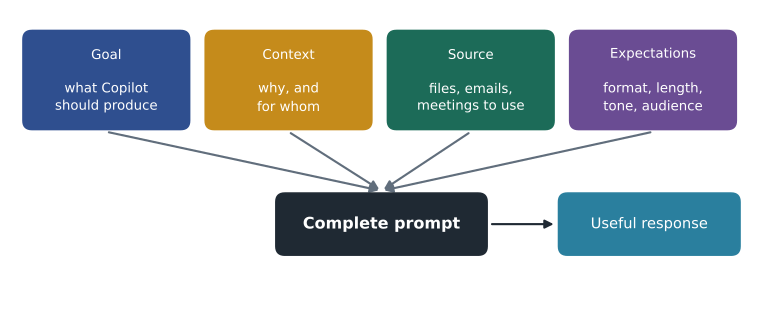
The goal is the output you want, stated as an action: draft, summarize, compare, list, explain, rewrite, plan. "Summarize the claims history" is a goal; "claims history" is only a topic. Starting with a clear verb also tells Copilot what kind of response to produce, which matters because a summary, a comparison and a plan are organized differently.
The context explains why you need the output and who it is for. Context lets Copilot make sensible choices you did not spell out. "For a client who is new to commercial insurance" changes the vocabulary; "for our compliance officer, who will check it against the policy wording" changes the level of precision; "because the client is unhappy about a premium increase" changes the tone. Context is also where you mention constraints that matter in your work: a deadline, a regulator, a house style.
The source tells Copilot what information to use. In Microsoft 365 Copilot you can point to specific files, emails, meetings, chats or people, which lesson 3 covers in detail, and in some experiences you can choose whether Copilot uses work content, the web or both. Naming the source does two things: it grounds the answer in the right material, and it makes the answer easier to check, because you know where the facts were supposed to come from.
The expectations describe the shape of the answer: length, format, tone, reading level and anything to include or leave out. "A table with one row per policy and columns for carrier, premium and renewal date" is an expectation. So are "under 150 words", "in plain language", "use headings", "do not include client names" and "end with three questions I should ask". Expectations are the part most people skip, and the part that saves the most editing afterward.
| Part | Question it answers | Weak version | Strong version |
|---|---|---|---|
| Goal | What should Copilot produce? | Renewal email | Draft an email confirming the renewal meeting |
| Context | Why, and for whom? | (none) | For the owner of a trucking client who prefers short, plain messages |
| Source | What should it use? | (none) | Use the meeting invitation and my renewal summary file |
| Expectations | What shape should the answer take? | (none) | Under 120 words, friendly, ending with a request for the driver list |
Putting the parts together
A complete prompt does not have to be long. Most good business prompts are two to five sentences. Hamish suggested a simple order for beginners: start with the goal, add one sentence of context, name the source, and finish with the expectations. Experienced users often fold the parts together, but the order helps when you are unsure. He also pointed out that the parts can come from earlier in a conversation: if you said who the audience is three turns ago, you do not need to repeat it, as long as you are still in the same chat.
Worked problem
Rewriting a thin prompt
Solveig Etxeberria, a commercial lines account executive, typed: "Tell me about the Ridgeline account." Rewrite it using the four parts so that the answer helps her prepare for a renewal meeting.
Show solution
- Goal: summarize the account, not just "tell me about" it.
- Context: the summary is for her own preparation before a renewal meeting in two days.
- Source: the client folder in SharePoint, the last six months of email with the client, and the notes from last year's renewal meeting.
- Expectations: one page, headings for coverage, claims, open issues and changes since last year, and a short list of questions to ask.
Answer: Summarize the Ridgeline Cartage account so I can prepare for Thursday's renewal meeting. Use the Ridgeline client folder, my emails with their office manager since May, and last year's renewal meeting notes. Keep it to one page with headings for coverage, claims, open issues and changes since last year, and finish with five questions I should ask.
Solveig ran both versions in Copilot Chat. The first gave her a paragraph mixing facts from three different clients whose names contained the word "Ridge". The second gave her a structured page drawn from the right files, with numbered references she could open. "So most of the work is deciding what I actually want," she said. Hamish agreed: writing a good prompt is mostly thinking clearly about the task, and the same thinking would help if she were asking a colleague.
Instructions about how to answer
Expectations can go beyond format. You can ask Copilot to take a role ("act as a reviewer looking for unclear wording"), to follow steps ("first list the facts, then draft the email"), to ask you questions before answering ("ask me up to three clarifying questions first"), or to show uncertainty ("say if the files do not contain the answer"). That last instruction is especially useful at work, because a language model will otherwise try to produce an answer even when the sources are silent. Asking it to say "not found" makes gaps visible.
You can also tell Copilot what to avoid. Negative instructions work best when they are specific: "do not mention the premium amount" is clear, while "do not be boring" is not. Where possible, state what you want rather than what you do not want, because the model responds more reliably to a positive target. "Use plain words a client would use" works better than "no jargon".
Examples inside a prompt
One of the most effective expectations is an example. If you paste a short sample of the style you want, or describe the structure of a previous document, Copilot can match it closely. Quillfield's group benefits team, for instance, had a standard three-paragraph format for plan change notices. Pasting one past notice, with client details removed, and asking Copilot to "follow this structure" produced drafts that needed far less rework than describing the format in words. The technique is sometimes called giving a one-shot or few-shot example, after the number of samples included.
Examples come with one caution that Wendell Pike-Amari, Quillfield's compliance officer, raised at the second clinic: an example can carry personal information or confidential terms into a new document if you are careless. Strip names, policy numbers and amounts from samples unless they are meant to appear in the output. Copilot respects your permissions, but it cannot know that a detail in your sample should not be reused.
How AB-730 tests this
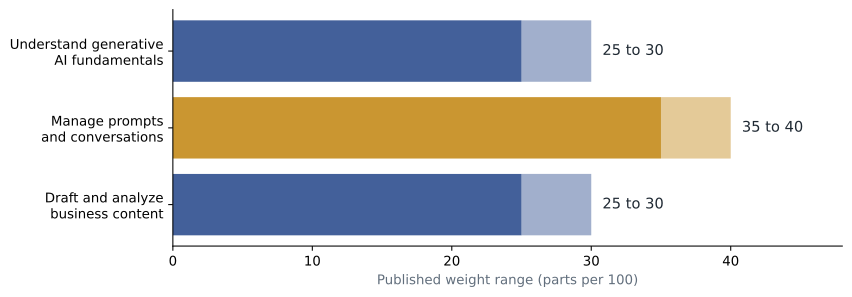
Microsoft's exam page lists three skill areas for AB-730: understanding generative AI fundamentals, managing prompts and conversations by using AI, and drafting and analyzing business content by using AI. Published summaries of the study guide put the prompts and conversations area at about 35 to 40 parts in 100 of the exam, the largest share, with the other two at about 25 to 30 each. The exam is proctored, runs for 45 minutes and is offered in English. Expect scenario questions that describe a worker's goal and ask which prompt, feature or agent best meets it. Questions about prompt structure usually reward the answer that adds the missing goal, context, source or expectation, not the one that simply adds more words.
Worked problem
Planning study time by weight
Hamish has 40 study hours before his exam. If he divides them in proportion to the middle of each weight range (27.5, 37.5 and 27.5 parts in 100), how many hours go to prompts and conversations?
Show solution
- The three midpoints add to 27.5 + 37.5 + 27.5 = 92.5.
- The share for prompts and conversations is 37.5 / 92.5, a little over 0.40.
- Hours: 40 x 37.5 / 92.5 is about 16.2 hours.
Answer: About 16 hours. The ranges are guides, not exact percentages, so Hamish rounds and then adjusts after a practice test shows where he is weak.
A prompt checklist for the wall
By the end of the first clinic the group had produced a checklist that Celestine asked to have printed beside every printer in the five offices. It had four questions, one for each part: What do I want? Why, and for whom? What should it use? What should the answer look like? Below them was a fifth line in smaller type, added by Wendell: Would I be comfortable if a client saw this prompt? That line was not about prompt quality at all, but it became part of the habit, and later lessons return to it.
The same request, three ways
To make the parts concrete, Hamish showed the clinic one task written at three levels. The task was a note to the group benefits team about a carrier's new online claims portal. Level one: "Write about the new portal." Level two: "Write a note to the benefits team about the carrier's new online claims portal." Level three: "Write a short note to Quillfield's group benefits advisors explaining the carrier's new online claims portal, using [the carrier's launch announcement]. They will forward the key points to employer clients, so explain what changes for employees, the launch date and where to find help. Use three short paragraphs and plain language." Level one produced a vague paragraph about portals in general. Level two produced a reasonable internal note with some invented details about features. Level three produced a note that the benefits advisors could use almost unchanged, and every fact in it could be traced to the announcement.
The difference between levels two and three is instructive. Level two had a clear goal and an audience but no source and no expectations, so Copilot drew on general knowledge about claims portals, which is exactly where invented details come from. Adding the source removed the invention; adding the expectations removed the editing. The clinic agreed that "which part is missing?" is a better question to ask of a disappointing answer than "what is wrong with Copilot?"
Common mistakes
MistakeTyping a topic, such as "Ridgeline renewal", and expecting a finished document.
InsteadStart with an action verb that names the output: draft, summarize, compare, list.
MistakeLeaving out who the answer is for.
InsteadAdd one sentence of context about the audience and purpose.
MistakeLetting Copilot choose its own sources for a client-specific task.
InsteadName the files, emails or meetings it should use.
MistakeAccepting whatever length and format appear.
InsteadState the length, format and tone you need before you ask.
Summary and key terms
- A prompt is everything sent in one turn: your request, the content you point to and your instructions about the answer.
- Thin prompts produce generic answers because the model fills gaps with the most average response.
- A complete prompt covers four parts: goal, context, source and expectations.
- Expectations can include role, steps, clarifying questions, uncertainty and examples of the style you want.
- The prompts and conversations skill area is the largest part of Exam AB-730.
- Prompt
- The request and supporting content you send to Copilot in one turn.
- Goal
- The output you want, stated as an action such as draft, summarize or compare.
- Context
- The background that explains why you need the output and who it is for.
- Source
- The files, messages, meetings or sites Copilot should draw on.
- Expectations
- Your requirements for length, format, tone and content of the answer.
- Few-shot example
- One or more samples included in a prompt to show the style or structure you want.
Practice problems
Work each problem on paper first, then reveal the answer to check.
Name the four parts of a good prompt.
Show answer
Goal, context, source and expectations.
Which part does "under 100 words, in a table" belong to?
Show answer
Expectations.
Why is it useful to tell Copilot to say when the sources do not contain an answer?
Show answer
It makes gaps visible instead of letting the model produce a confident answer the sources do not support.
Lesson quiz · 5 questions
Score 60% or more to complete this lesson.
Create a free account to save your progress, take quizzes and earn a certificate.