
MSBA-103 · Lesson 8 of 12 · 21 min
Agent governance in the Power Platform admin center
▶ Video coming soon A video version of this lesson is on the way.
Ama's Help Desk Triage agent was the first Copilot Studio agent at Corvallin, and it raised questions the Microsoft 365 admin center could not answer on its own. Where does the agent actually live? Which connectors may it use? Could another Copilot Studio maker, a year from now, build an agent in the same place that connected to the payroll system? Teodor had used the Power Platform admin center only once, to tidy up a few forgotten Power Automate flows. At the eighth working session he and Ama opened it together.
AB-900 asks candidates to monitor agents, including usage, operational insights and the agent lifecycle, by working with both the Microsoft 365 admin center and the Power Platform admin center. This lesson explains what the Power Platform admin center governs for agents: environments, environment routing and groups, data policies, sharing limits in managed environments, the inventory of agents, and Copilot Studio capacity and billing.
Why Copilot Studio agents have a second home
Agents built in Microsoft Copilot Studio are Power Platform resources. Each one lives in a Power Platform environment, a container that holds apps, flows, agents and data, with its own security, region and policies. The environment decides which connectors the agent may use, who may edit it, where its data is stored and how it moves from development to production. The Microsoft 365 admin center still sees the agent in its registry and approves it for publishing to Microsoft 365, but the rules about how the agent is built and what it can reach are set in the Power Platform admin center.
Microsoft's own guidance, in a November 2026 article on where to govern Copilot Studio agents, divides the work like this: the Power Platform admin center handles environments and routing, connector controls, sharing limits and data policies; the Microsoft 365 admin center handles the agent registry, the agent map and details, tool governance and Copilot Credit cost management; Microsoft Entra handles agent identity and access conditions; and Microsoft Purview handles data security posture, classification, labels, data loss prevention and audit. The article's summary line is a good one to remember: an agent can only act through what its environment allows.
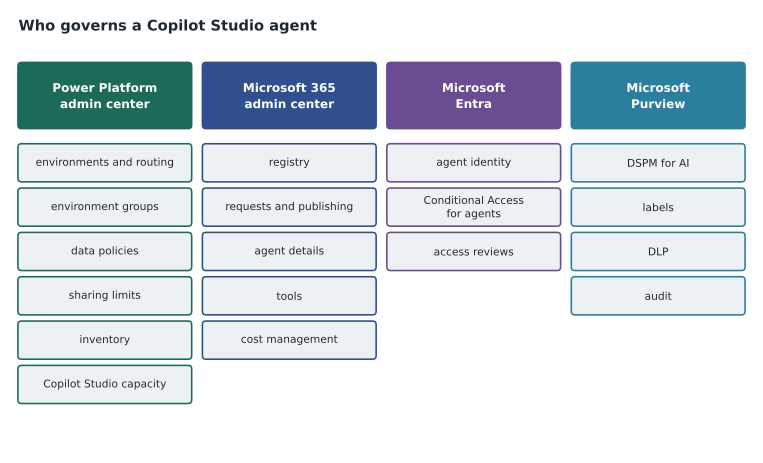
Environments and routing
Every tenant has a default environment, which every licensed user can build in. By default, a Copilot Studio maker who does nothing special builds in the default environment, which is shared by everyone. That is convenient and, for anything beyond personal experiments, a governance problem: everything lands in one place with the same rules.
Two features help. Environment routing sends makers to their own developer environment instead of the default environment when they start building, so personal experiments stay personal. Environment groups, with rules attached, let an administrator apply the same settings, such as sharing limits or data policies, to a set of environments at once, rather than configuring each separately.
Corvallin's environment plan was small, because its maker population was small. Environment routing was turned on, so any future maker would start in a personal developer environment. A single production environment called Corvallin Agents held agents approved for the pilot, with access limited to a security group containing Teodor and Ama as makers and the pilot groups as users. A matching development environment held work in progress. Both were in a Canadian region on the ca site and a US region on the us site, matching each tenant's home geography, and both were made managed environments, which unlock the sharing limits and usage insights described below.
| Environment | Purpose | Who can build | Who can use |
|---|---|---|---|
| Default | Left as it is; nothing new built here | Routed elsewhere | Existing resources only |
| Personal developer environments | Experiments (routing on) | Each maker in their own | The maker only |
| Corvallin Agents Dev (managed) | Building and testing pilot agents | Teodor, Ama | Test users |
| Corvallin Agents (managed) | Approved pilot agents | Deployment by pipeline only | Copilot-Pilot, IT-Team, Schedulers |
Data policies for agents
Data policies, often called data loss prevention or DLP policies in the Power Platform, decide which connectors can be used together and which are blocked. For Copilot Studio they reach further than connectors. Microsoft's Copilot Studio governance guidance lists the things a tenant-level data policy can allow or block for agents: unauthenticated use, channels where agents can be published, knowledge sources, connectors, Azure Bot Service skills, Application Insights integration, and publishing of generative AI agents. Policies can be scoped to include or exclude specific environments. The guidance also mentions advanced connector policies, which allow only approved connectors and block the rest by default.
Teodor and Ama wrote a policy for the two Corvallin Agents environments that allowed only the Microsoft 365 connectors the help desk agent needed and the connector to the help desk ticketing system, blocked every other connector, blocked unauthenticated use, and allowed only the Microsoft Teams and Microsoft 365 Copilot channels. A second, stricter policy applied to every other environment, including personal developer environments: Microsoft 365 connectors only, no custom connectors and no publishing to external channels such as public websites.
Worked problem
Will the payroll agent work?
A year later, a trained maker in finance builds an agent in her personal developer environment that uses a custom connector to the payroll system and tries to publish it to a public website so employees can check pay dates from home. Corvallin's policies are as described above. What happens, and what route should the agent take instead?
Show solution
- Her personal developer environment is covered by the stricter policy, which blocks custom connectors, so the payroll connection is blocked.
- The same policy blocks publishing to external channels such as public websites.
- Unauthenticated use is blocked, which a public website would need.
- If the agent is justified, it belongs in zone 2: a request to IT, a managed environment with a specific data policy allowing the payroll connector, authentication with Microsoft Entra ID, and publication only to Teams or Copilot.
Answer: The agent cannot use the payroll connector or be published to a public site from her environment. Data policies make the safe route the only route.
Authentication and channels
Each Copilot Studio agent has an authentication setting. Microsoft's guidance lists three options: no authentication, authenticate with Microsoft (Microsoft Entra ID, which is what agents in Teams and Copilot use), and manual authentication for other identity providers. An agent with no authentication can be reached by anyone with the link, so organizations normally block unauthenticated use through data policies except for deliberately public agents, such as a website assistant that only answers questions from public pages. Corvallin had no public agents and blocked unauthenticated use everywhere.
Channels are where an agent is published: Teams, Microsoft 365 Copilot, a website, mobile apps and others. Data policies can restrict channels, and publishing to Microsoft 365 Copilot also passes through the Microsoft 365 admin center approval described in lesson 6. That two-step process is intentional: the Power Platform side decides whether an agent may be published to a channel at all, and the Microsoft 365 side decides who in the organization gets it.
Sharing limits
In a managed environment, administrators can set sharing limits for agents: whether makers can share agents at all, whether they can share with security groups or only with individuals, and how many people an agent can be shared with. Microsoft's zoned governance guidance uses sharing limits to keep zone 1 agents private to their maker. In Corvallin's production environment, sharing was limited to security groups and to a maximum number of individuals, so that the help desk agent reached users through groups the pilot team controlled, not through a growing list of people added one by one.
The Power Platform inventory
The inventory in the Power Platform admin center gives a tenant-wide list of agents, apps, flows and other resources. Microsoft's documentation of November 2026 describes it in detail.
| Feature | Detail |
|---|---|
| Where | Manage > Inventory for all resources; Manage > Copilot Studio for agents, agent flows and workflows |
| Agents included | Copilot Studio agents and agents built in Microsoft 365 Copilot Agent Builder |
| Freshness | New, changed and deleted resources appear within about 15 minutes |
| Searching | Filter and sort any column; search across the whole inventory; full environment names for environment filters |
| Export | Download the full inventory as a CSV file |
| Agent details | Overview, Connectors and Usage tabs; the Connectors column shows connectors and operations used |
| Actions | Block can quarantine a published agent; Delete removes it from the inventory |
The Connectors column was the feature Teodor liked best, because it answered a question the Microsoft 365 registry could not answer as directly: which agents use which connectors. When the help desk ticketing vendor announced a change to its connector, he could list every agent that used it in a few seconds.
Microsoft documents one interaction between the two admin centers that is easy to miss. If a Power Platform environment has the Power Platform Firewall in active enforcement mode, administrative actions taken on its agents from the Microsoft 365 admin center fail; in audit-only mode they succeed and generate an alert in Purview. Corvallin did not use the firewall, but Teodor added the fact to his troubleshooting notes.
Capacity, billing and analytics
Copilot Studio usage is billed separately from Microsoft 365 Copilot licenses, through Copilot Studio licenses, prepaid capacity or pay-as-you-go, and in late 2026 increasingly through Copilot Credits. Microsoft's list of admin reports places consumption reporting for consumption-based agents, such as message consumption, sessions and capacity, in the Power Platform admin center under Licensing > Copilot Studio > Summary. Individual makers see per-agent analytics, such as session outcomes, satisfaction and topic performance, inside Copilot Studio. The Cost management dashboard in the Microsoft 365 admin center can also cover Copilot Studio when an organization opts in; Microsoft notes that Copilot Studio environment and agent spending policies there are opt-in, and that existing Power Platform admin center controls apply until a Microsoft 365 spending policy covers that scope.
Worked problem
Estimating capacity for the help desk agent
Ama expects 40 pilot users and 4 IT staff to use Help Desk Triage about three times each per week, with an average of 6 billable messages per conversation. How many billable messages should she plan for in a four-week month?
Show solution
- Users: 40 plus 4 is 44.
- Conversations per month: 44 times 3 times 4 is 528.
- Messages per month: 528 times 6 is 3,168.
Answer: About 3,200 billable messages a month. The rate per message, or per credit, comes from the organization's Copilot Studio agreement; Ama recorded the volume estimate so the cost could be checked against actual consumption after the first month.
Moving agents from development to production
An agent in a production environment should never be edited directly. Corvallin's plan used a pipeline, Power Platform's built-in way to move a solution from one environment to another, so that Help Desk Triage was built and tested in Corvallin Agents Dev and then deployed, as a managed solution, into Corvallin Agents. Microsoft's zoned governance guidance recommends pipelines for versioning in zone 2 and organizational application lifecycle management in zone 3. The benefit for a small team was mainly discipline: every change to the production agent had a version, a date and a person attached, and a bad change could be rolled back by deploying the previous version.
Ama asked whether this was too much process for one agent. Teodor's answer was that the process cost an hour to set up and a few minutes per change, and that it was much easier to start with a pipeline than to add one after the agent had been edited in production for a year. Ines added the point that settled it: if Ama was on holiday, Teodor could see exactly what was deployed and redeploy it, without having to reconstruct her work from memory.
A checklist for a new Copilot Studio environment
The session ended with a checklist Teodor would use whenever a new environment for agents was requested: a clear purpose and owner; region matching the tenant's home geography; managed environment turned on; a security group controlling who can access it; makers given the narrowest security role that lets them build; a data policy that allows only the connectors the purpose needs, blocks unauthenticated use and restricts channels; sharing limits set; the environment added to the right environment group; and an entry in the decision log. A request that could not fill in every line was not ready for an environment.
Common mistakes
MistakeLetting Copilot Studio agents be built in the default environment.
InsteadTurn on environment routing and put production agents in managed environments.
MistakeWriting a data policy that only lists blocked connectors.
InsteadPrefer allowing only approved connectors and blocking the rest, and cover channels, knowledge and unauthenticated use too.
MistakeAssuming Microsoft 365 admin center approval is the only gate.
InsteadThe environment's data policies and sharing limits decide what an agent may be and where it may be published.
MistakeForgetting that Copilot Studio has its own billing.
InsteadPlan capacity or credits for Copilot Studio agents separately from Copilot licenses.
Summary and key terms
- Copilot Studio agents live in Power Platform environments, which decide connectors, editing rights, data location and promotion to production.
- Environment routing sends makers to personal developer environments; environment groups and rules apply settings across environments; managed environments add sharing limits and insights.
- Data policies can control connectors, knowledge sources, channels, unauthenticated use and publishing of generative AI agents, scoped to environments.
- The Power Platform inventory lists agents, apps and flows tenant-wide, with connectors, usage, export, block and delete.
- Copilot Studio capacity and billing are managed in the Power Platform admin center, with optional coverage by Microsoft 365 Cost management spending policies.
- Environment
- A Power Platform container for apps, flows, agents and data with its own security, region and policies.
- Default environment
- The environment every licensed user can build in by default.
- Environment routing
- A setting that directs new makers to personal developer environments instead of the default environment.
- Managed environment
- An environment with extra governance features such as sharing limits and usage insights.
- Data policy
- A Power Platform rule set that allows or blocks connectors and other agent capabilities in environments.
- Sharing limits
- Managed environment settings that restrict how widely makers can share agents.
- Power Platform inventory
- The tenant-wide list of agents, apps, flows and other resources in the Power Platform admin center.
Practice problems
Work each problem on paper first, then reveal the answer to check.
Name four things a Copilot Studio data policy can allow or block.
Show answer
Any four: unauthenticated use, channels, knowledge sources, connectors, Azure Bot Service skills, Application Insights integration, publishing of generative AI agents.
Where in the Power Platform admin center do you see agents in the inventory?
Show answer
Manage > Inventory, or Manage > Copilot Studio.
What does environment routing do?
Show answer
It sends makers to their own developer environment instead of the shared default environment.
Lesson quiz · 5 questions
Score 60% or more to complete this lesson.
Create a free account to save your progress, take quizzes and earn a certificate.