
MSBA-103 · Lesson 3 of 12 · 19 min
Licensing models: per user, monthly and pay-as-you-go
▶ Video coming soon A video version of this lesson is on the way.
Lorna Fitch-Adeyemi, Corvallin's finance manager, came to the third working session with a spreadsheet and one question. "I have read three Microsoft pages and two partner emails," she said, "and I still cannot tell you what the pilot will cost. Is it a license per person, a monthly bill, or a meter that runs whenever someone asks a question?" Teodor admitted that the honest answer was "all three, depending on what we switch on." The session set out to turn that answer into something a finance manager could budget.
AB-900 asks candidates to compare the Copilot monthly license model with pay-as-you-go, including for SharePoint, and to monitor and manage pay-as-you-go billing policies. In late 2026 Microsoft used three billing ideas side by side: a per-user license with a fixed price, pay-as-you-go billing charged to an Azure subscription, and Copilot Credits, a common unit of measure for usage-based services. This lesson explains each, then shows how Corvallin combined them.
The per-user license
The core of Microsoft 365 Copilot is a user subscription license: one license per person, at a fixed price per user per month, assigned like any other Microsoft 365 license. It needs a qualifying base license, such as Microsoft 365 E3, E5, Business Standard or Business Premium, and in 2026 Microsoft offered it in two main forms. Microsoft 365 Copilot is the version for enterprise plans. Microsoft 365 Copilot Business is the version for organizations on the Microsoft 365 Business plans, which are capped at 300 users. Microsoft also sold bundles that combine a Business plan with Copilot Business in a single subscription.
A per-user license is bought for a term, and the way it is paid is a separate choice. With an annual commitment the customer commits to a year of seats and may pay yearly or in monthly installments; with a monthly term the customer can reduce seats at the end of any month but pays a higher price. Microsoft's public price list in late 2026 showed the monthly option costing about 20 percent more than the annual one for its Business offers. Microsoft also ran promotional prices during 2026, for example a reduced first-year annual price on Copilot Business from July 1 to December 31, 2026. Promotions come and go, so finance teams should take prices from the current quote, not from a course or an old email.
The per-user license is attractive for one reason above all: it is predictable. Everything the license includes, such as Copilot in the apps, work-data grounding, Researcher, Analyst and the use of agents, costs the same whether the user asks two questions a month or two hundred. The disadvantage is that it costs the same for a user who never opens Copilot at all.
Pay-as-you-go
Pay-as-you-go billing charges for what is actually used, through an Azure subscription in the same tenant. Microsoft's documentation in November 2026 listed three Copilot services billed this way from the Microsoft 365 admin center: Copilot Chat (for agents that use shared work data), SharePoint agents, and the Copilot Retrieval API, which was in preview. Copilot Studio has its own pay-as-you-go arrangement, managed in the Power Platform admin center.
Pay-as-you-go is off by default. A Global Administrator or the owner of the subscription can turn it on, and the roles Microsoft lists for setting it up are Billing Administrator, AI Administrator and, for emergencies only, Global Administrator. Setup has three parts.
| Step | What happens | Where |
|---|---|---|
| 1. Create a billing policy | Name the policy, choose an Azure subscription and resource group (or create them), add the users or groups it covers, optionally set a budget | Microsoft 365 admin center, Copilot > Billing & usage > Billing policies |
| 2. Connect the policy to a service | Choose Copilot Chat or SharePoint agents and select the billing policy | Copilot > Billing & usage > Pay-as-you-go services |
| 3. Monitor | Review usage and cost; adjust users, budgets or policies | Cost management in the Microsoft 365 admin center, and Microsoft Cost Management in the Azure portal |
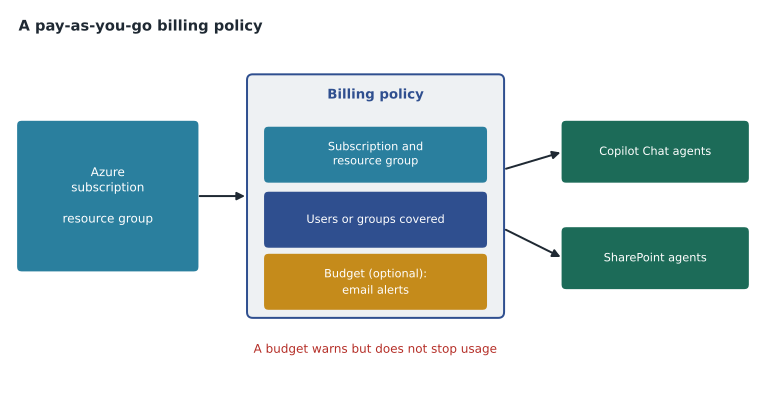
A billing policy is, in Microsoft's words, the billing infrastructure for a pay-as-you-go service: an Azure subscription plus a set of users. It is a way of saying "usage by these people goes on this bill." A tenant can have up to 50 billing policies, which lets an organization charge each department's usage to its own subscription or resource group. A policy can cover all users or specific users and groups, but not both at once for the same service: before connecting a policy for specific users, an administrator must disconnect any "all users" policy. Creating a policy does not complete the setup; it only starts charging once it is connected to a service.
Budgets deserve care. An administrator can add a budget to a billing policy and have Microsoft send email notifications as spending passes percentage milestones. A budget does not stop usage. When it is exceeded, people keep working and the meter keeps running; the budget only warns. If an organization needs a hard stop, it must disconnect the policy, remove users from it or use the spending limits described below. Turning pay-as-you-go off can take up to two hours before users lose access to the agents it paid for.
Copilot Credits and cost management
During 2026 Microsoft introduced Copilot Credits as "a common currency for eligible Microsoft services with usage-based billing." Instead of each service having its own meter and price, usage of many AI services is measured in credits. Microsoft's documentation in November 2026 listed a growing set of services managed this way in the Microsoft 365 admin center, including Copilot Studio, agents that use Work IQ, Copilot Cowork for longer multi-step tasks, advanced work in SharePoint and OneDrive, and Teams Phone agent features. Some require a Microsoft 365 Copilot license as well; others do not. Microsoft summarized the direction of its pricing in a September 2026 post: everyday AI stays at a fixed price per user, while advanced AI runs on Copilot Credits.
Credits can be paid for in several ways: pay-as-you-go, a Copilot Credit Pre-purchase Plan, prepaid capacity packs, or supported combinations. The Cost management dashboard under Copilot in the Microsoft 365 admin center is where administrators see consumption and set spending policies. Unlike a budget on a billing policy, a spending policy sets a spending limit for users, environments or agents, with alerts as limits approach. Spending policies have a setting, Auto-apply new services, that is on by default, so when Microsoft adds a new credit-based service it falls under existing policies automatically. Reader roles can review consumption without being able to change policies.
Microsoft's own test instructions give a feel for the scale. To check that pay-as-you-go works, it suggests having an eligible user ask a Microsoft-built coaching agent "What can you do?", which uses about 12 credits, and then confirming the usage in the credits report.
| Billing idea | What is measured | Typical use | Main control |
|---|---|---|---|
| Per-user license | Seats | People who use Copilot daily in their apps | License assignment |
| Pay-as-you-go (billing policy) | Usage of Copilot Chat agents, SharePoint agents, Retrieval API | Occasional agent use by people without a license | Which users the policy covers; budget alerts |
| Copilot Credits | Credits consumed by advanced and agent services | Copilot Studio agents, long-running tasks, special services | Spending policies and limits in Cost management |
License or meter? Doing the arithmetic
Lorna's question came down to a comparison: for a given person, is a fixed license or metered usage cheaper? The principle is simple. If a person's metered usage would cost less per month than the license, metering is cheaper; above that point, the license is. The difficulty is predicting usage, and the fact that the two options do not buy the same things. Metering pays for agents. The license also buys Copilot in Word, Excel, PowerPoint, Outlook and Teams, work-data grounding in chat, Researcher and Analyst.
Worked problem
Schedulers and the procedures agent
Corvallin has 30 schedulers who would use only the SharePoint procedures agent, about ten questions each per working day. Suppose, for illustration only, that one question costs the organization 6 cents through pay-as-you-go and that a Copilot license costs 30 dollars per user per month. Assume 21 working days a month. Which option is cheaper for the schedulers, and what else should Teodor consider?
Show solution
- Questions per scheduler per month: 10 times 21 is 210.
- Metered cost per scheduler: 210 times 6 cents is 12.60 dollars a month.
- License cost per scheduler: 30 dollars a month, so metering is cheaper by 17.40 dollars per person, or 522 dollars a month for 30 schedulers.
- But metering buys only the agent. If schedulers would also benefit from Copilot in Outlook and Teams, the license buys much more.
- Usage could also grow. At about 24 questions a day, metered cost would pass the license price.
Answer: On these illustrative figures, pay-as-you-go is cheaper for the schedulers while they only use the agent, provided a spending limit or budget alert catches growth. The real rates must come from Microsoft's current meters and the organization's agreement.
Teodor wrote the general rule on the whiteboard: break-even usage equals the monthly license price divided by the cost per unit of usage. On the illustrative numbers, 30 dollars divided by 6 cents is 500 questions a month. Below that, meter; above it, license; and in every case check what else each option buys.
Corvallin's licensing plan
After two sessions the group agreed a plan for the spring pilot, which Lorna took to the leadership team.
| Group | Size | Billing | Reason |
|---|---|---|---|
| Pilot office staff | 40 | Microsoft 365 Copilot license, annual commitment | Daily use in Outlook, Teams and Word; need work-data grounding |
| IT team | 4 | Microsoft 365 Copilot license (already bought) | Must support what pilot users see |
| Schedulers | About 30 | Pay-as-you-go for SharePoint agents through a billing policy for the Schedulers group | Only need the procedures agent |
| Everyone else | About 390 | Copilot Chat (Basic) only | Web-grounded chat with enterprise data protection; no shared-data agents |
Two details mattered to Lorna. First, the billing policy for schedulers would use a separate resource group, so their agent costs appeared as their own line in Cost Management, and it would have a budget with alerts at 50, 75 and 100 percent of the planned amount. Second, because a budget does not stop usage, Teodor would also set a spending limit for the group in Cost management, and the help desk would have a written procedure for removing users from the billing policy if costs ran away. Lorna said it was the first IT budget she had seen that explained what would happen when it was exceeded.
Scheduler agent budget (Schedulers billing policy)
  Azure subscription:  Corvallin-Operations
  Resource group:      rg-copilot-payg-schedulers
  Users:               Schedulers (security group, 30 members)
  Service connected:   SharePoint agents
  Monthly budget:      400 dollars
  Alerts:              50 percent, 75 percent, 100 percent -> it-alerts@corvallincare.example
  Hard stop:           spending limit in Cost management; runbook HD-17 to remove users
Reading the bill
Pay-as-you-go spending shows up in two places, and finance and IT tend to look at different ones. In the Microsoft 365 admin center, the Cost management area under Copilot shows usage and spending by policy, user, service and agent, along with policies and users nearing their limits. In the Azure portal, Microsoft Cost Management shows the same charges as Azure costs against the subscription and resource group named in the billing policy, which is where finance can export them alongside other Azure spending. Microsoft also notes that the Cost management API reports usage in credits and does not include prices, invoices or currency costs, so reports built on it need the organization's own rates to turn credits into dollars.
Two other details helped Lorna. If an organization already has a pay-as-you-go policy in the Power Platform admin center, Microsoft says a policy can also be created in the Microsoft 365 admin center, the two can coexist, and usage is charged only once. And because a tenant can have up to 50 billing policies, a larger organization can give each cost center its own policy, subscription or resource group, so that charges arrive already sorted. Corvallin needed only one, but Teodor named its resource group so that a second, for a future department, would sort beside it.
Common mistakes
MistakeTreating a pay-as-you-go budget as a spending cap.
InsteadBudgets only send alerts; usage continues. Use spending limits, policy membership or disconnection to stop spending.
MistakeComparing a license and a meter on price alone.
InsteadMetering pays for agent use; the license also buys in-app Copilot, work-data grounding, Researcher and Analyst.
MistakeExpecting a billing policy to start charging as soon as it is created.
InsteadIt must be connected to a service, such as Copilot Chat or SharePoint agents.
MistakeQuoting prices from old documents.
InsteadMicrosoft changes prices, names and promotions often; use the current quote and price list.
Summary and key terms
- The per-user Copilot license is a fixed price per user per month on an annual or monthly term and needs a qualifying base license; Copilot Business serves the Business plans.
- Pay-as-you-go charges usage of Copilot Chat agents, SharePoint agents and the Retrieval API to an Azure subscription through billing policies, and is off by default.
- A billing policy combines an Azure subscription with users or groups; it must be connected to a service, and its optional budget only sends alerts.
- Copilot Credits measure usage across advanced and agent services, managed in Cost management with spending policies and limits.
- Choose between license and meter by comparing expected usage with the break-even point and by considering what each option includes.
- User subscription license
- A per-user license at a fixed monthly price, such as Microsoft 365 Copilot.
- Pay-as-you-go
- Billing based on actual usage, charged to an Azure subscription.
- Billing policy
- A configuration that links an Azure subscription and a set of users to a pay-as-you-go service.
- Budget
- An optional amount on a billing policy that triggers email alerts at milestones but does not stop usage.
- Copilot Credits
- A common unit for measuring and billing usage of eligible AI services.
- Spending policy
- A Cost management setting that sets spending limits and alerts for users, environments or agents.
- Break-even usage
- The level of use at which metered cost equals the license price.
Practice problems
Work each problem on paper first, then reveal the answer to check.
Which three Copilot services did Microsoft list as billed through Microsoft 365 pay-as-you-go billing policies in late 2026?
Show answer
Copilot Chat (agents using shared data), SharePoint agents and the Copilot Retrieval API (preview).
What happens when spending under a pay-as-you-go budget passes 100 percent?
Show answer
Email alerts are sent, but usage continues; a budget is not a cap.
A license costs 30 dollars a month and metered use costs 5 cents a question. At what number of questions a month do they cost the same?
Show answer
600 questions.
Lesson quiz · 5 questions
Score 60% or more to complete this lesson.
Create a free account to save your progress, take quizzes and earn a certificate.