
MSAZ-312 · Lesson 7 of 12 · 21 min
Optimizing Direct Lake
▶ Video coming soon A video version of this lesson is on the way.
Thursday, November 5 was the first session about the other model. Sales Overview, the model Keiko had built in MSAZ-311, uses Direct Lake on SQL endpoints over the wh_sales warehouse. It has no import refresh to tune: the pipeline reframes it at about 6:10 a.m., after the nightly load has been reconciled and the security checks have passed. On the trial capacity its pages felt quick. Marisol's question was whether they would still feel quick on the F16 planned for the pilot from January 4, 2027, and whether any growth in the data would push the model past limits that the trial capacity hides.
She started by restating what Direct Lake does differently from import. An import model copies data into its own compressed format during refresh. A Direct Lake model reads the Delta tables in OneLake directly: a refresh, called framing, copies only metadata, telling the model which Parquet files make up the current version of each table. When a query needs a column, the engine loads that column's data from the files into memory, in the same columnar form that import uses, and keeps it there while it is useful. The performance lessons of import still apply, because the same engine answers the queries once the columns are in memory. What is new is the cost of loading columns, and a set of limits that depend on the capacity.
Guardrails
Each Fabric capacity size has guardrails for Direct Lake: the maximum number of Parquet files per table, row groups per table and rows per table, and a maximum model size on OneLake. There is also a maximum memory, which is the most column data the engine can page into memory for one model; exceeding it slows queries through repeated loading and unloading but does not by itself make them fail. The guardrails are much lower on small capacities, and that was the point of the session.
| Limit | F16 | F64 and the trial capacity |
|---|---|---|
| Parquet files per table | 1,000 | 5,000 |
| Row groups per table | 1,000 | 5,000 |
| Rows per table | 300 million | 1,500 million |
| Maximum model size on OneLake | 20 GB | Unlimited |
| Maximum memory (paging limit) | 5 GB | 25 GB |
What happens when a guardrail is exceeded depends on the flavor of Direct Lake. Direct Lake on OneLake has no fallback: if a table exceeds a guardrail, the refresh fails and the model cannot be queried until the Delta table is fixed, typically by compacting it. Direct Lake on SQL endpoints can fall back to DirectQuery through the SQL analytics endpoint, if the model's Direct Lake behavior setting allows it. The refresh then succeeds with a warning and the affected queries return results, more slowly. In MSAZ-311 Keiko had set Sales Overview's behavior to Direct Lake only, so a breach on the F16 would show up as failing visuals, not as a quiet slowdown.
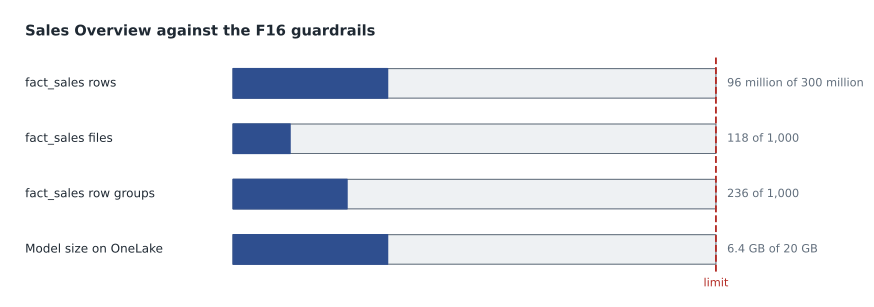
Checking the model against the F16
Keiko collected the numbers. The warehouse's fact_sales table held seven years of sales lines, 96 million rows, the same table Finance History read in lesson 3. It was stored in 118 Parquet files with 236 row groups, because the warehouse compacts its tables automatically. The whole model's tables took 6.4 GB on OneLake. All of these were well inside the F16 limits. The question was how long that would last, since the table grew by about 38,000 rows a day.
# How long until fact_sales reaches the F16 row guardrail?
rows_now = 96_000_000
rows_per_day = 38_000
rows_per_year = rows_per_day * 365
limit_rows = 300_000_000

years_left = (limit_rows - rows_now) / rows_per_year
print("Rows added per year:", f"{rows_per_year:,}")
print("Headroom:", f"{limit_rows - rows_now:,}", "rows")
print("Years until the guardrail:", round(years_left, 1))

# The same check for the 20 GB model-size limit, at the current size per row
size_gb = 6.4
gb_per_year = size_gb / rows_now * rows_per_year
print("Growth per year:", round(gb_per_year, 2), "GB")
print("Years until 20 GB:", round((20 - size_gb) / gb_per_year, 1))Rows added per year: 13,870,000 Headroom: 204,000,000 rows Years until the guardrail: 14.7 Growth per year: 0.92 GB Years until 20 GB: 14.7
What this code does
The block takes the current row count of the sales table and the number of rows added each day, works out a year of growth, and divides the remaining room under the 300 million row limit by it. It repeats the idea for the 20 GB model size limit, assuming the stored size grows in step with the rows, and prints how many years of headroom each limit leaves.
Both limits were more than a decade away at the current rate, even allowing for some extra data. The table that worried Marisol was not fact_sales but a new one. Ines Duarte planned to land till events in a lakehouse table, appended every 15 minutes during store hours, for a planned near-real-time feed. Lakehouse tables are not compacted the way the warehouse's are unless someone sets that up, and each append writes at least one new Parquet file.
Worked problem
Small files and the file guardrail
A lakehouse table is appended 96 times a day, every 15 minutes, and each append writes one Parquet file. Nothing compacts the table. On an F16, after how many days does it exceed the 1,000-file guardrail, and what would Sales Overview do if it included the table?
Show solution
- Files after d days: 96 × d.
- After 10 days: 960 files, still within the limit.
- After 11 days: 1,056 files, over the limit.
- With Direct Lake on SQL endpoints and the behavior set to Direct Lake only, queries that use the table would fail; with Automatic they would fall back to DirectQuery and slow down. With Direct Lake on OneLake the refresh would fail.
Answer: On the eleventh day. The fix is to compact the table regularly with OPTIMIZE, or to append less often, so that the file count stays far below the guardrail.
Ines added a nightly OPTIMIZE step to the pipeline before the reframe, which rewrites small files into a few large ones, and decided that the till events table would not join Sales Overview until it had a compaction schedule and a month of file counts to show for it. Marisol also asked her to write files with V-Order, Fabric's write-time optimization for Parquet that sorts and encodes data so that the Analysis Services engine can load it faster. The warehouse applies V-Order by default; for lakehouse tables it depends on the Spark settings of the workspace, and Microsoft's defaults for new workspaces have changed over time, so the team decided to set it explicitly in the notebook rather than rely on a default.
Cold and warm queries
The second part of the session was about speed. On the trial capacity Keiko opened Sales Overview's store page just after the 6:10 a.m. reframe and timed it with Performance Analyzer: 7.8 seconds. Reloading the page took 1.4 seconds. The difference is the cost of loading columns. After framing, the engine has to read each column a query needs from the Parquet files and transcode it into memory before it can answer; once loaded, the column stays resident and later queries use it directly. Microsoft calls this column's state its temperature: frequently used columns are hot and stay in memory, rarely used ones cool down and can be evicted when memory is needed.
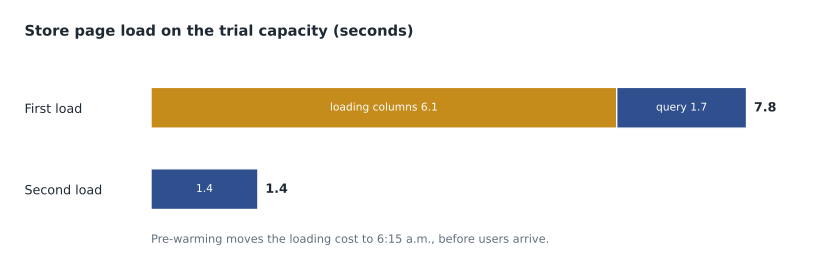
Reframing does not necessarily discard everything in memory: when a table has not changed, its columns can stay resident, and Microsoft's documentation describes how the engine keeps data for unchanged tables. But Sales Overview's fact tables changed every night, so their columns had to be loaded afresh each morning, and the first store manager to open the report at 7:00 a.m. would pay the cost. On the F16, with a quarter of the trial capacity's compute, Marisol expected the cold load to be slower still.
The fix was to pre-warm. Right after the pipeline reframed the model, a notebook step ran the DAX queries behind the busiest pages, which loaded the columns they need. Semantic link makes this simple from a Fabric notebook: it can run a DAX query against a model by name. Keiko captured the queries with Performance Analyzer, saved them in the repository, and added the step. The next morning the first load of the store page at 7:00 a.m. took 1.6 seconds. The pre-warm itself took about 40 seconds of capacity time at 6:15 a.m., when almost nobody used the capacity.
Model design still matters
Because Direct Lake loads columns into the same engine as import, the size of each column in memory still decides how fast it loads and how much memory it uses. High-cardinality columns are costly in both senses. The same splitting of a timestamp into a date key and a time key that lesson 1 used in Finance Margin applies, but it has to be done in the Delta table, because a Direct Lake on SQL model cannot add calculated columns over Direct Lake tables. Ines added a separate SaleTime column to the warehouse table so that the timestamp column could be left out of the model entirely.
Columns that a model does not include are never loaded, so trimming the model's tables to the columns reports use still helps. Keiko ran VertiPaq Analyzer against Sales Overview after the pre-warm and saw 2.3 GB resident for the busiest pages, against the F16's 5 GB maximum memory. Three columns in fact_sales, including a free-text note from the tills, were in the model but used by nothing. Removing them from the model, not from the warehouse, cut the resident size of a full report walk-through to 2.0 GB.
| Tuning step | Where it is done | Effect |
|---|---|---|
| Compact small files (OPTIMIZE) | Delta table, by the pipeline | Keeps files and row groups under guardrails; faster loads |
| Write with V-Order | Delta table, warehouse default or Spark setting | Faster column loading into the engine |
| Split high-cardinality columns | Delta table | Smaller dictionaries and less memory |
| Leave unused columns out of the model | Semantic model | Columns are never loaded |
| Pre-warm after reframe | Notebook step in the pipeline | Moves column loading before users arrive |
| Set the behavior to Direct Lake only | Semantic model property | Turns silent fallback into visible errors |
Detecting fallback
If a model is set to Automatic and a query falls back to DirectQuery, the user sees only a slower report. Marisol showed two ways to find out. Performance Analyzer in Desktop shows a Direct query duration for a visual that used DirectQuery. A trace through the XMLA endpoint, in DAX Studio or SQL Server Profiler, shows DirectQuery events with the SQL sent to the endpoint, which also tells you which table caused the fallback. The common reasons for Direct Lake on SQL endpoints are a table that is really a non-materialized SQL view, SQL-based granular access control such as row-level security defined in the warehouse, a guardrail breach, and a table the engine cannot read directly. Sales Overview used model roles from MSAZ-311, not warehouse security, so none of these applied.
On SQL endpoints or on OneLake
Keiko asked whether they should switch to Direct Lake on OneLake, the newer flavor. Marisol summarized the trade. On OneLake, a model can combine tables from several Fabric items and can be part of a composite model with import tables, and it never sends queries through the SQL analytics endpoint. On SQL endpoints, a model is tied to one warehouse or lakehouse endpoint and can fall back to DirectQuery, which can be a safety net or a hidden cost. Calculated columns and tables over Direct Lake data are not supported on SQL endpoints, and are previews with limits on OneLake. For the pilot the team kept Sales Overview as it was, because it had passed the security sign-off and the rehearsal plan in that form, and put an evaluation of Direct Lake on OneLake on the list for after the pilot's first month.
Common mistakes
MistakeDirect Lake has no refresh, so nothing can go wrong overnight.
InsteadFraming runs and can fail, guardrails can be exceeded, and the first queries after a reframe are slow until columns are loaded.
MistakeIf the trial capacity copes, the F16 will too.
InsteadThe F16's guardrails are a fifth of the F64's, and its maximum memory is 5 GB instead of 25 GB.
MistakeRemoving a column from the model also shrinks OneLake.
InsteadIt only stops the column being loaded; the Delta table is unchanged.
MistakeFallback to DirectQuery is always a safety net.
InsteadIt hides problems as slow queries; Direct Lake only shows them as errors you can fix.
Summary and key terms
- Direct Lake reads Delta tables in OneLake and loads the columns each query needs into memory; framing updates only metadata.
- Each capacity has guardrails for files, row groups, rows and model size, plus a maximum memory for paging.
- On SQL endpoints a breach can fall back to DirectQuery; on OneLake the refresh fails until the table is fixed.
- Compact files with OPTIMIZE and write with V-Order so tables stay under guardrails and load quickly.
- The first queries after a reframe are cold; pre-warming with the main queries moves that cost before users arrive.
- High-cardinality columns are split in the Delta table, and unused columns are left out of the model.
- Direct Lake
- A storage mode that reads Delta tables in OneLake and loads columns into memory on demand.
- Framing
- The metadata-only refresh that points a Direct Lake model at the current version of its Delta tables.
- Guardrail
- A per-capacity limit on files, row groups, rows or model size for Direct Lake tables.
- Fallback
- Answering a Direct Lake on SQL endpoints query through DirectQuery when Direct Lake cannot be used.
- Column temperature
- How recently and often a column is used, which decides whether it stays in memory.
- Pre-warming
- Running representative queries after framing so that columns are loaded before users arrive.
- V-Order
- A write-time optimization of Parquet files that speeds reading by Fabric engines.
Practice problems
Work each problem on paper first, then reveal the answer to check.
What is the rows-per-table guardrail on an F16?
Show answer
300 million.
What does Direct Lake on OneLake do when a guardrail is exceeded?
Show answer
The refresh fails and the model cannot be queried until the table is fixed; it does not fall back.
Why was the first load of the store page slow after the reframe?
Show answer
The engine had to load and transcode the columns from the Parquet files first.
How did Keiko fix the slow first load?
Show answer
A notebook step after the reframe runs the main pages' DAX queries to pre-warm the columns.
Why did Ines add a SaleTime column to the warehouse?
Show answer
So the high-cardinality timestamp could be left out of the model; Direct Lake on SQL cannot add calculated columns.
Lesson quiz · 5 questions
Score 60% or more to complete this lesson.
Create a free account to save your progress, take quizzes and earn a certificate.