
MSAZ-312 · Lesson 11 of 12 · 20 min
Governing self-service analytics
▶ Video coming soon A video version of this lesson is on the way.
Thursday, November 12 was the governance session. With Dana's five analysts building thin reports on Finance Margin, and the pilot due to bring 140 readers to the hub in January, Marisol wanted rules in place before habits formed. Elena Brandt joined, because many of the settings were hers to change, and so did Carmen Ortiz, the privacy officer, who wanted to know how the hub would stop a margin report from turning up in an email outside the company. Marisol opened with her definition: self-service analytics works when the people closest to a question can answer it themselves, using data that someone has made trustworthy, inside rules that everyone knows.
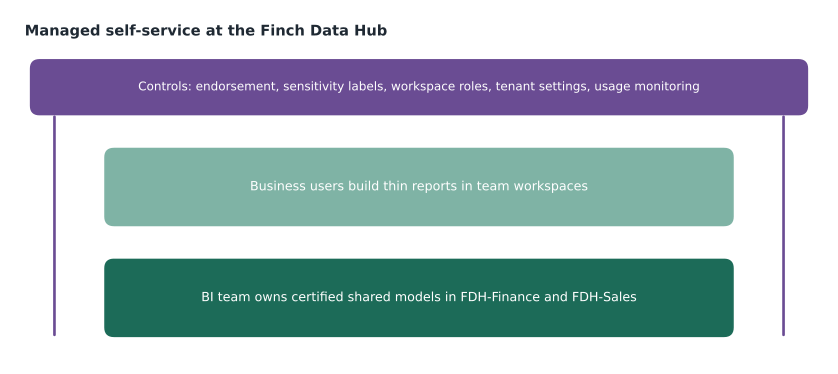
The approach the team chose is often called managed self-service. The BI team owns and publishes the shared semantic models, which hold the business logic and security. Business users build their own reports on top of those models, in their own workspaces if they like, without needing to touch the data. Governance is the set of signals and controls that make that safe: which models are official, which data is sensitive, who can do what, and what is actually being used.
Endorsement
Endorsement is a badge on an item that tells people how far to trust it. Fabric has three kinds. Promoted means the item's owner thinks it is ready for others to use; anyone with write permission on an item can promote it, if the tenant allows it. Certified means that an authorized reviewer has checked the item against the organization's standards; only people whom a Fabric administrator has named in the tenant settings can certify. Master data marks a data item, such as a semantic model, warehouse or lakehouse, as the core single source of truth for a kind of data, such as the list of stores or products; it too is limited to people the administrator names. Endorsed items are labeled in the OneLake catalog and in search, and users can filter to see only endorsed content.
Elena turned on certification and named the BI team's security group as the reviewers for the hub's domain. Marisol wrote the certification standard as a one-page checklist: an owner and a backup owner; a description on every visible table and measure; the Best Practice Analyzer rules from lesson 6 run with no unexplained violations; row-level security tested where it applies; a refresh or reframe schedule with failure notifications; reconciliation to an agreed source, documented; and the model in Git with a deployment pipeline. Sales Overview and Finance Margin both passed and were certified that afternoon. Finance History was promoted, not certified, until its second aggregation had run for a month.
| Badge | Who can apply it | Meaning at the hub |
|---|---|---|
| Promoted | Anyone with write permission on the item | Ready for colleagues; not yet reviewed |
| Certified | Reviewers named by the Fabric administrator | Meets the hub's certification checklist |
| Master data | Users named by the Fabric administrator | The single source for a reference entity, such as dim_store |
Master data went on one item. The store and product dimension tables in wh_sales were not separate items, so Elena endorsed the wh_sales warehouse itself as master data for stores and products, and the security table loaded from HR stayed uncertified because nobody outside the BI team should build on it. Marisol warned that badges lose meaning if they are handed out freely, and that a certified item which goes wrong must lose its badge quickly; the checklist named who removes it.
Sensitivity labels
Carmen's concern was handled by sensitivity labels from Microsoft Purview Information Protection. A label such as Confidential or Internal is applied to an item in Fabric and shows on it wherever it appears. Labels can be inherited: when a semantic model is labeled, the reports and dashboards created from it can inherit the label, and when data is exported from a labeled item to Excel, PowerPoint or PDF, the exported file carries the label and the protection that comes with it, such as encryption that limits who can open it. Harrow & Finch already used labels for email and documents, so the labels and their protections were familiar to staff.
The team labeled Finance Margin and Finance History as Confidential, because they contained supplier costs and margins, and Sales Overview as Internal. Elena enabled downstream inheritance so that thin reports on Finance Margin would pick up its label automatically, and Carmen asked for a policy that made a label mandatory on new content in the finance workspaces. That way an analyst who exported a margin table to Excel would get a file that only people inside the company could open.
Who can do what
Workspace roles were the next control. Admin, Member, Contributor and Viewer give increasing rights from viewing to managing the workspace, and MSAZ-311 had shown that row-level security does not restrict the first three. The hub's rule was that production workspaces have BI team members as Admins and Members, Contributors only for the deployment service principal, and everyone else as Viewers or through apps. The finance analysts got their own workspace, Finance Analysis, as Contributors, with Build permission on the certified models from lesson 9. That gave them a place to build and share reports without any right to change the models.
Tenant settings decide what is possible at all. Elena reviewed a short list with the group. Publish to web, which creates a public link to a report, was already off for the whole organization. Export to Excel and to other formats stayed on, because labels now protected the files. The ability to create workspaces was limited to a security group, so that new workspaces were requested rather than appearing unannounced. And external sharing stayed off. Elena also assigned the hub's workspaces to a Fabric domain for the Finch Data Hub, which groups them in the OneLake catalog and lets her delegate some settings to domain administrators.
| Control | Set by | Hub setting |
|---|---|---|
| Endorsement | Item owners and named reviewers | Certification by the BI team against the checklist |
| Sensitivity labels | Purview policies and item owners | Confidential for finance models, inherited downstream |
| Workspace roles | Workspace admins | BI team in production; analysts as Contributors in their own workspace |
| Build permission | Model owners | Granted to the finance analysts' group on certified models |
| Tenant settings | Fabric administrator | No publish to web; workspace creation limited to a group |
| Domains | Fabric administrator | Finch Data Hub domain for all hub workspaces |
Knowing what is used
The last control is information. Usage metrics reports, available from a report's or dashboard's menu in the service, show views, viewers and how quickly reports open, for the last 90 days. For a broader view, Fabric administrators can use the admin monitoring workspace and the activity log, which records actions such as viewing, exporting and sharing across the tenant. Keiko used the usage metrics for the finance workspaces to find reports that nobody opened, because each unused report is something to maintain, secure and confuse people with.
# Reports with no views in the last 90 days are candidates to retire
reports = [
    ("Margin pack", 1840), ("Store margin detail", 412), ("Supplier cost trend", 96),
    ("Old margin pack v2", 0), ("Budget vs actual", 233), ("Shrink by reason", 51),
    ("Currency test", 0), ("Region margin 2024", 0), ("Promotion margin", 18),
    ("Weekly flash (old)", 0), ("Product margin top 20", 140), ("Store 15 roof leak", 3),
]
unused = [name for name, views in reports if views == 0]
total_views = sum(v for _, v in reports)
top = max(reports, key=lambda r: r[1])
print("Reports:", len(reports), "| unused:", len(unused))
print("Unused:", ", ".join(unused))
print("Share of views going to", top[0] + ":", round(top[1] / total_views * 100), "in 100")Reports: 12 | unused: 4 Unused: Old margin pack v2, Currency test, Region margin 2024, Weekly flash (old) Share of views going to Margin pack: 66 in 100
What this code does
The block lists the finance workspace reports with the number of views each had in the last 90 days. It picks out the reports with no views at all, counts them, and works out what share of all views went to the most-used report, which shows how concentrated real use is.
Four of the twelve reports had no views in 90 days, and the margin pack alone had about 66 views in every 100. Rosa contacted the owners of the four unused reports; three agreed to delete them and one asked to keep Region margin 2024 for the annual audit, so it moved to an archive workspace. Marisol suggested repeating the check every quarter, and pointed out that the hub's semantic link notebook from lesson 6 could list every report's views and endorsement together.
Worked problem
Choosing the control
Four situations: (a) analysts keep building on an old copy of the finance model instead of the official one; (b) a margin table exported to Excel was forwarded outside the company; (c) a new analyst changed a measure in a production model; (d) nobody knows whether a weekly report is still read. Which control addresses each?
Show solution
- (a) is about finding the right model: certify the official model so it stands out in the catalog and search, and retire or demote the copy.
- (b) is about protecting data after export: a sensitivity label on the model, inherited by reports and exported files.
- (c) is about rights: production workspaces should not give analysts Admin, Member or Contributor; they get Build permission and their own workspace instead.
- (d) is about information: the report's usage metrics.
Answer: Endorsement for (a), sensitivity labels for (b), workspace roles and Build permission for (c), usage metrics for (d).
Keeping governance light
Carmen asked whether all this would slow the analysts down. Marisol's answer was that each control was there to make a good path easy rather than to block a bad one. Certified models were the quickest way to a correct number; the template from lesson 9 already connected to them; labels were applied automatically by inheritance; and the analysts had their own workspace from day one. The rules that did say no, such as no publish to web, were few and had reasons the analysts could read. The governance page in the hub's wiki listed every rule with its reason and its owner, and Marisol promised to review it with the analysts after the pilot's first month.
Describing and finding content
Endorsement only helps if people look for it. Marisol showed the analysts the OneLake catalog, where they could browse the items they had access to, filter to endorsed items, and see each item's owner, description, sensitivity label and lineage. Searching for margin returned 14 items before the clean-up and 6 after, with the two certified models at the top. Keiko asked that every certified item's description start with the same three lines: what the item is for, who owns it, and where to ask questions. Analysts reading the catalog would see those lines first.
Carmen raised one more question: what if an analyst built something sensitive from a certified model, such as a list of stores ranked by shrink with named staff? The model contained no staff names, so that list could not be built from it alone, but an analyst could combine the model with a spreadsheet in a composite model. Marisol said the answer was not a technical block but a clear rule and the labels: content combining finance data with personal data must be reviewed by Carmen before it is shared, and the Confidential label inherited from Finance Margin would already limit where the file could go. Elena added that the activity log would show who shared or exported such a report, and that she reviewed exports from the finance workspaces monthly.
The session ended with a short list of what the analysts could do without asking anyone: build and share reports in Finance Analysis, use any certified model they had Build on, export to Excel within the company, and request new measures through Rosa's form. That list, Marisol said, mattered as much as the rules, because people follow rules more readily when they can see what the rules leave open.
Common mistakes
MistakePromoting an item means it has been reviewed.
InsteadPromotion is the owner's own statement; certification is the reviewed badge.
MistakeAnyone with write access can certify an item.
InsteadOnly reviewers named by the Fabric administrator can certify.
MistakeSensitivity labels only change a badge on the item.
InsteadLabels can carry protection, such as encryption, into exported files.
MistakeGovernance means restricting what analysts can do.
InsteadManaged self-service gives analysts trusted models and their own workspace, with a few clear limits.
Summary and key terms
- Managed self-service: the BI team owns shared models; business users build reports on them.
- Endorsement has three badges: promoted by owners, certified by named reviewers, master data for core reference data.
- Sensitivity labels from Purview can be inherited downstream and travel with exported files.
- Workspace roles and Build permission separate building reports from changing models.
- Tenant settings and domains set the organization-wide limits and group workspaces.
- Usage metrics and the activity log show what is actually used, so unused content can be retired.
- Managed self-service
- An approach where a central team owns shared models and business users build their own reports on them.
- Endorsement
- A badge that signals how far an item can be trusted: promoted, certified or master data.
- Certified
- An endorsement applied by reviewers named by the Fabric administrator.
- Master data
- An endorsement for data items that are the core single source of truth for a kind of data.
- Sensitivity label
- A Purview classification applied to items that can carry protection into exported files.
- Domain
- A Fabric grouping of workspaces for a business area, with delegated settings.
- Usage metrics
- A report of views, viewers and performance for a report or dashboard.
Practice problems
Work each problem on paper first, then reveal the answer to check.
Who can certify an item?
Show answer
Reviewers named by the Fabric administrator in the tenant settings.
Why was Finance History promoted, not certified?
Show answer
Its second aggregation had to run for a month first.
How does a sensitivity label protect an exported Excel file?
Show answer
The file carries the label and its protection, such as encryption limiting who can open it.
Which role did the finance analysts get in their own workspace?
Show answer
Contributor, with Build permission on the certified models.
How many of the twelve finance reports had no views in 90 days?
Show answer
Four.
Lesson quiz · 5 questions
Score 60% or more to complete this lesson.
Create a free account to save your progress, take quizzes and earn a certificate.