
MSAZ-311 · Lesson 10 of 12 · 21 min
Row-level and object-level security
▶ Video coming soon A video version of this lesson is on the way.
Grace Oduya's plan for the January pilot had one non-negotiable condition: each store manager would see their own store's numbers and nobody else's, and nobody outside head office finance would see supplier unit costs. The tenth model session, on the morning of Wednesday, November 11, was spent making that true in Sales Overview and proving it. Elena Brandt, who would have to sign off the design, sat in for the last half hour.
Where security can live
MSAZ-310 described the layers of Fabric security: workspace roles, item permissions, OneLake security roles and SQL permissions. A semantic model adds two more of its own. Row-level security, or RLS, restricts which rows of a table a user can see through the model, using roles with DAX filter expressions. Object-level security, or OLS, hides whole tables or columns from members of a role, so that the objects do not even appear in the field list. Both are defined in the model and apply to every report, Excel pivot table and query that uses it, which is why they belong in the shared model rather than in each report.
Keiko asked why the hub did not simply rely on the OneLake security role, StoreOps_Read, that Nikolai had set up. Marisol's answer was that the people would reach the data in different ways. Store managers would only ever see reports through a workspace app, so the model was the right place for their row filter. Analysts with Viewer access who queried the warehouse directly would be covered by SQL and OneLake permissions. Each layer protects one route in, and the routes have to be thought about separately.
Static and dynamic RLS
A static role hard-codes its filter: a role called Prairie Region with the filter dim_store[Region] = "Prairie" lets its members see Prairie stores only. Static roles are simple and fine for a few fixed groups, but for 23 stores they would mean 23 roles, each with its own membership to maintain. Dynamic RLS uses one role whose filter depends on who is signed in. The DAX function USERPRINCIPALNAME() returns the signed-in user's sign-in name, usually their email address, and a security table maps sign-in names to the stores they may see.
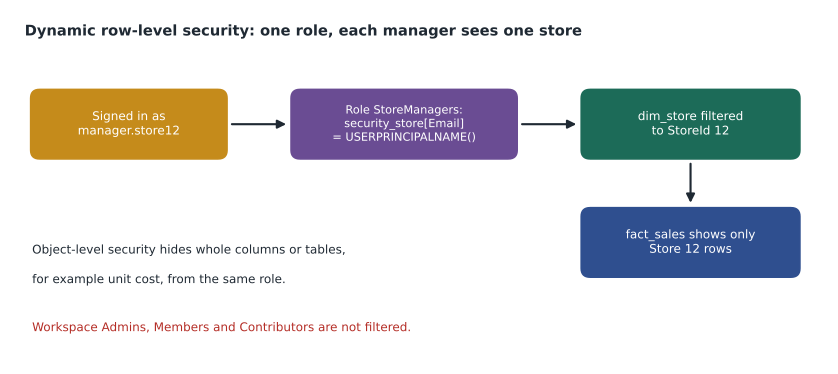
Keiko built a table in wh_sales called security_store with two columns, Email and StoreId, maintained by a small dataflow from the HR system's list of store managers. Some managers covered two stores during vacations, which a security table handles naturally with two rows. In the model, security_store relates to dim_store on StoreId, and the role StoreManagers has one filter, on security_store: [Email] = USERPRINCIPALNAME(). Because the relationship from security_store to dim_store must carry that filter on to the stores, it filters in both directions, and Marisol turned on the option to apply security filters in both directions for that one relationship.
Role: StoreManagers
  Table security_store, filter:
    [Email] = USERPRINCIPALNAME ()

Role: HeadOffice
  (no filter: members see all rows)

-- Testing a role in the DAX query view
EVALUATE
SUMMARIZECOLUMNS ( dim_store[StoreName], "Sales", [Total Sales] )# Simulate the StoreManagers role: which stores does each person see?
security_store = [
("manager.store12@harrowfinch.example", 12),
("manager.store15@harrowfinch.example", 15),
("relief.manager@harrowfinch.example", 12), # covers two stores in December
("relief.manager@harrowfinch.example", 15),
]
sales_by_store = {12: 71_300, 15: 41_000, 16: 38_900}
def visible_sales(user):
stores = {s for email, s in security_store if email == user}
return {s: v for s, v in sales_by_store.items() if s in stores}
for user in ["manager.store12@harrowfinch.example", "relief.manager@harrowfinch.example",
"new.hire@harrowfinch.example"]:
rows = visible_sales(user)
print(user.split("@")[0], rows, "total", sum(rows.values()))manager.store12 {12: 71300} total 71300
relief.manager {12: 71300, 15: 41000} total 112300
new.hire {} total 0What this code does
The example holds a small security table that maps sign-in names to store numbers, with one relief manager listed for two stores, and a set of sales totals by store. For each signed-in user, it keeps only the stores the security table lists for them, which is what the role's filter does in the model. The output shows the Store 12 manager seeing only Store 12, the relief manager seeing Stores 12 and 15, and a new employee who is not in the table seeing nothing at all.
The last line of the output is the important one. A user who is a member of the role but missing from the security table sees an empty report, not every store. That is the safe failure, and Marisol checked it deliberately. The opposite design, a filter that shows everything when the user is not found, fails open, and Elena said she would not sign off any model built that way.
Who RLS applies to
RLS applies to users who read the model with Read permission, such as workspace Viewers and people who reach reports through an app or a share. It does not apply to workspace Admins, Members and Contributors, who can edit the model and therefore see all data, which mirrors the OneLake security rule from MSAZ-310. So the store managers had to reach their reports through the FDH Sales app, never as workspace Contributors, and the people who build the model, Keiko and Marisol, would always see everything. Role membership is assigned in the model's security settings in the service, ideally to groups rather than people: sg-fdh-store-managers for StoreManagers and sg-fdh-headoffice-finance for HeadOffice.
A user who belongs to two roles sees the union of what both roles allow. If Grace's head office finance group were also added to StoreManagers by mistake, its members would still see everything, because HeadOffice has no filter. RLS roles only ever add access; there is no way for one role to take rows away from another.
Testing and validating
Validating security is part of the DP-600 outline, and Marisol treated it as the most important step of the morning. In Power BI Desktop, and in the model's security page in the service, "View as" lets the modeler see reports as a role or as a specific user, which tests both the filter and the security table. Keiko tested five cases: a single-store manager, the relief manager, a head office analyst, a user in no role, and a user in the role but missing from the table. She recorded what each saw in a short table that Elena kept as evidence for the sign-off.
| Test user | Roles | Expected | Seen |
|---|---|---|---|
| manager.store12 | StoreManagers | Store 12 only | Store 12 only |
| relief.manager | StoreManagers | Stores 12 and 15 | Stores 12 and 15 |
| analyst.finance | HeadOffice | All 23 stores | All 23 stores |
| new.hire (in role, not in table) | StoreManagers | No rows | No rows |
| contractor (no role) | None | Cannot open the report | Access denied |
Object-level security
Supplier unit costs were the second condition. Store managers needed the gross margin rate, but the buyers' negotiated unit costs were commercially sensitive. OLS let Marisol hide the CostAmount column and the Total Cost and Gross Margin measures from the StoreManagers role while leaving Gross Margin Pct visible. To members of the role, the hidden objects simply do not exist: they do not appear in the field list, and a report visual that uses them shows an error for those users rather than the values. OLS is set per role and object, with a permission of None for the hidden objects, and is edited in Tabular Editor or the TMDL view rather than in the standard model view.
Hiding a measure with OLS has a consequence that surprised Keiko. Gross Margin Pct was defined as DIVIDE ( [Gross Margin], [Total Sales] ), and Gross Margin depends on Total Cost. A measure that refers to an object hidden by OLS cannot be evaluated for members of that role either. Marisol solved it by giving store managers a separate measure, Margin Pct (Store), that the warehouse calculated from a pre-computed margin column at line level, so that no hidden object was involved. The general lesson: design OLS early, because it changes which measures can depend on which.
Worked problem
How many roles?
Grace's requirements: 69 store managers see their own stores; 71 head office staff split into finance (sees all stores and costs) and merchandising (sees all stores but not supplier costs); regional directors see the stores in their region. Keiko wants the fewest roles that meet the rules with groups and security tables.
Show solution
- Store managers: one dynamic role, StoreManagers, filtered through security_store, with OLS hiding costs.
- Regional directors: the same security table can list each director against every store in their region, so they can share the StoreManagers role.
- Head office finance: a role with no row filter and no OLS.
- Head office merchandising: a role with no row filter but with the same OLS as store managers.
Answer: Three roles: StoreManagers (dynamic rows, costs hidden), HeadOffice (everything) and Merchandising (all rows, costs hidden).
RLS with Direct Lake and the warehouse
Because Sales Overview is a Direct Lake model, the identity it uses to read OneLake matters, as lesson 7 noted. With single sign-on, each store manager's own identity would need permission to read the Delta files, which would defeat the purpose of the model's row filters. Marisol configured the model with a fixed identity through a shareable cloud connection, so it reads OneLake as one account and the model's roles decide what each viewer sees. Microsoft recommends exactly this combination for models that use RLS. The warehouse itself also supports SQL row-level security and column permissions for people who query it directly; in a Direct Lake model built on the SQL endpoint, SQL row-level security would force queries to fall back to DirectQuery, which is another reason to keep report security in the model.
Sign-off
Elena read the test table, opened the report as the relief manager herself, tried to find a unit cost and could not, and approved the design for the pilot. She asked for one addition: a monthly check that the security table matched HR's current list of managers, so that a manager who left would lose access the day HR recorded it, not when someone remembered.
Security and performance
Row-level security has a cost, because the role's filter is applied to every query the user runs. A filter on a small security table that travels through one relationship, as in StoreManagers, is cheap. Filters that use complex DAX, such as searching text or calling LOOKUPVALUE for every row of a large table, can slow every visual for every member of the role. Marisol's guidance was to filter dimension tables rather than fact tables, to put the security logic into a small table in the warehouse rather than into clever DAX, and to test performance with View as, not just correctness, because a report that takes twenty seconds for store managers but two seconds for the people who built it will not be noticed until the pilot starts.
Keeping the security table current
Dynamic security is only as good as its table. The security_store table was loaded nightly from HR's list of current store managers, with the relief assignments added from the store operations rota. Keiko added three checks to the load: every store has at least one manager, no email appears that is not in the company directory, and no manager who has left the company still has rows. When a check fails, the load stops and the previous day's table stays in place, which errs on the side of the security that was already approved. Elena's monthly reconciliation against HR, requested at the sign-off, then catches anything the automatic checks cannot, such as a manager who moved to head office but kept a store assignment in the rota.
Elena also asked how auditors would know who had seen what. Fabric's activity log records report views and model queries by user, and Microsoft Purview audit can search those events, so a question such as which accounts opened the store margin report in December could be answered without any change to the model. Marisol added the audit search to the monthly reconciliation, so that security would be checked from both ends: who is allowed, and who actually looked.
Common mistakes
MistakeWorkspace Contributors are filtered by RLS.
InsteadRLS applies to readers; Admins, Members and Contributors see all data.
MistakeA user in two roles sees only what both roles allow.
InsteadRoles add up: the user sees the union of what each role allows.
MistakeIf a user is missing from the security table, show them everything.
InsteadFail closed: a missing user should see no rows.
MistakeOLS can be added at the end without affecting measures.
InsteadMeasures that depend on hidden objects cannot be evaluated for that role; plan OLS early.
Summary and key terms
- RLS filters rows through DAX role filters; OLS hides tables or columns from a role.
- Dynamic RLS uses USERPRINCIPALNAME() and a security table, so one role serves many users.
- RLS applies to readers such as Viewers and app users, not to Admins, Members or Contributors.
- Multiple roles combine as a union; a user missing from the security table should see nothing.
- Validate with View as for realistic test users, and record the results.
- Direct Lake models with RLS should use a fixed identity; keep report security in the model.
- Row-level security
- Restricting which rows a user sees through a semantic model, using roles with DAX filters.
- Object-level security
- Hiding tables or columns from members of a role.
- Dynamic RLS
- A role whose filter depends on the signed-in user, usually through a security table.
- USERPRINCIPALNAME
- A DAX function that returns the signed-in user's sign-in name.
- Security table
- A table mapping users to the data they may see.
- View as
- A feature for testing a model or report as a role or a particular user.
Practice problems
Work each problem on paper first, then reveal the answer to check.
Why does one dynamic role replace 23 static roles?
Show answer
Its filter uses the signed-in user and a security table, so each user sees their own stores.
Who is not filtered by RLS?
Show answer
Workspace Admins, Members and Contributors.
What should a user in the role but missing from the security table see?
Show answer
No rows.
What happens to a measure that depends on a column hidden by OLS, for members of that role?
Show answer
It cannot be evaluated for them.
Which identity setting suits a Direct Lake model with RLS?
Show answer
A fixed identity through a shareable cloud connection.
Lesson quiz · 5 questions
Score 60% or more to complete this lesson.
Create a free account to save your progress, take quizzes and earn a certificate.