
MSAZ-309 · Lesson 8 of 12 · 21 min
Reading T-SQL in questions
▶ Video coming soon A video version of this lesson is on the way.
DP-800 is a developer exam, and many of its questions contain T-SQL. Some show a complete statement and ask what it returns or whether it meets a goal. Some show a statement with gaps and ask the candidate to fill them from drop-down lists. Some show four statements that look alike and ask which one is correct. Hana writes T-SQL every day, but reading someone else's code under time pressure is a different skill. In the diagnostic she lost most of her time on the three longest code questions, and got one of them wrong because she missed a single keyword near the end.
This lesson teaches a reading method for code in questions, then applies it to the kinds of statements DP-800 is likely to show: JSON, regular expressions, window functions, vector search, permissions and REST calls. None of the listings run in this course; they are for reading, exactly as they would appear on the exam.
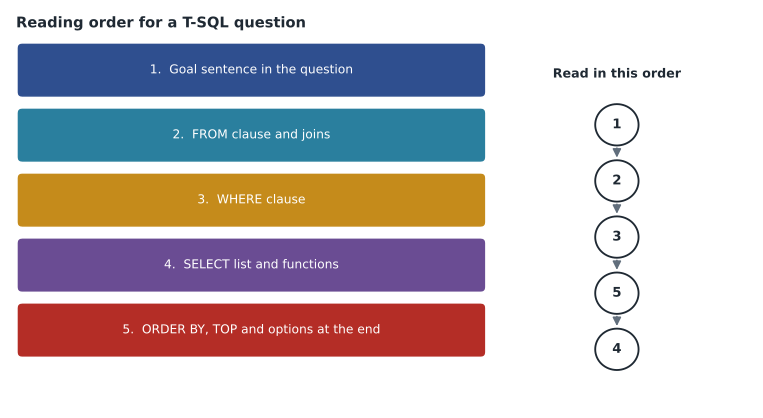
A reading method
Elena's method has five steps. First, read the goal sentence in the question and say in plain words what the result should be. Second, read the FROM clause and joins: which tables or functions supply the rows? Third, read the WHERE clause: which rows survive? Fourth, jump to the end and read ORDER BY, TOP, OFFSET and any WITH options, because these often decide the answer. Only then, fifth, read the SELECT list and the functions in it. This order follows the way the engine logically processes a query, and it puts the decisive details in front of the reader before the eye gets lost in long expressions.
For code with gaps, the same method applies with one addition: before choosing a value for any gap, read the whole statement. The first gap might be a function name, and the clue to it is in the last line. When comparing four similar statements, Hana should find the line where they differ and read only that line closely, rather than reading all four from top to bottom.
Small words that change everything
Many code questions turn on a single small word. A table of the most common ones is worth memorizing, because the exam setters know these are where readers slip.
| Word or symbol | Where it appears | Why it matters |
|---|---|---|
| DISTINCT | SELECT, COUNT(DISTINCT ...) | Changes counts and can hide duplicates |
| LEFT JOIN vs JOIN | FROM clause | A left join keeps rows with no match; a filter on the right table in WHERE can turn it back into an inner join |
| IS NULL vs = NULL | WHERE clause | = NULL is never true; only IS NULL finds nulls |
| WITH APPROXIMATE | TOP clause with VECTOR_SEARCH | Marks the query as approximate; requires ORDER BY on the distance only |
| PARTITION BY | OVER clause | Restarts a window function for each group |
| ROWS vs RANGE | OVER clause frame | RANGE treats ties as one step; ROWS counts each row |
| THROW vs RAISERROR | CATCH block | THROW with no arguments re-raises the original error |
| DENY | Permission statements | Overrides any GRANT, even through a role |
| lax vs strict | JSON path | Lax returns NULL for a missing path; strict raises an error |
Reading JSON queries
JSON questions often show OPENJSON with a WITH clause that maps paths to columns, or JSON_VALUE in a WHERE clause. The details to check are the path, whether the path is lax or strict, the data type in the WITH clause, and whether a value is a scalar (JSON_VALUE) or an object or array (JSON_QUERY, or AS JSON in OPENJSON). Building JSON is the other direction: FOR JSON PATH turns rows into JSON, and JSON_OBJECT, JSON_ARRAY and JSON_ARRAYAGG build JSON from values.
SELECT m.MemberId,
       JSON_OBJECT('tier': m.TierCode,
                   'offers': JSON_ARRAYAGG(o.Title)) AS context
FROM rewards.Member AS m
JOIN rewards.Redemption AS r ON r.MemberId = m.MemberId
JOIN rewards.Offer AS o ON o.OfferId = r.OfferId
WHERE m.MemberId = @MemberId
GROUP BY m.MemberId, m.TierCode;
Reading it with the method: the goal is one JSON document per member. FROM joins members to their redemptions and the offers. WHERE keeps one member. GROUP BY gives one row per member, which is what lets JSON_ARRAYAGG collect the offer titles into an array. The SELECT builds an object with the tier and that array. A wrong option might drop GROUP BY, which would make JSON_ARRAYAGG invalid alongside the non-aggregated columns, or use JSON_ARRAY, which builds an array from listed values rather than from rows.
Reading regular expressions
Regular expression questions usually ask whether a pattern matches given strings, or which function returns what is wanted. Keep three facts in mind: REGEXP_LIKE returns a boolean and is used in WHERE or CHECK; REGEXP_SUBSTR returns the matching text; REGEXP_COUNT returns the number of matches. An anchor at the start (^) and one at the end (written with the dollar sign) together mean the whole string must match, not just part of it. In a pattern, the dollar sign is an anchor, not currency. In the constraint below, 'SKU-48213' matches the pattern and 'Old SKU-48213' does not, because of the start anchor.
ALTER TABLE catalog.Product
ADD CONSTRAINT CK_Product_Sku CHECK (REGEXP_LIKE(Sku, '^SKU-[0-9]{5}$'));
Reading window functions
Window function questions ask what a column will contain. Read the OVER clause carefully: PARTITION BY sets the groups, ORDER BY sets the order within each group, and the frame (ROWS or RANGE BETWEEN...) sets which rows are included. Without an explicit frame, an aggregate with ORDER BY uses RANGE BETWEEN UNBOUNDED PRECEDING AND CURRENT ROW, which treats rows with equal ORDER BY values as one step. That is why a running total can jump by two rows at once when two transactions have the same timestamp. ROW_NUMBER gives 1, 2, 3 even for ties; RANK gives 1, 1, 3; DENSE_RANK gives 1, 1, 2.
Reading error-handling code
Error-handling questions show a procedure with TRY and CATCH blocks and ask what happens when something fails. Four details decide most of them. First, whether the transaction is begun inside the TRY block, so that the CATCH block can roll it back. Second, whether the CATCH block checks XACT_STATE(): a value of -1 means the transaction cannot be committed and must be rolled back; 1 means it is still committable; 0 means there is no transaction. Third, whether the error is re-raised with THROW, so the caller knows something failed, or swallowed, which hides the problem. Fourth, whether XACT_ABORT is on, which makes most runtime errors roll back the whole transaction automatically.
CREATE OR ALTER PROCEDURE rewards.uspRedeemOffer @MemberId bigint, @OfferId int
AS
BEGIN
    SET XACT_ABORT ON;
    BEGIN TRY
        BEGIN TRANSACTION;
            INSERT rewards.Redemption (MemberId, OfferId) VALUES (@MemberId, @OfferId);
            UPDATE rewards.MemberBalance SET Points -= (SELECT Cost FROM rewards.Offer WHERE OfferId = @OfferId)
            WHERE MemberId = @MemberId;
        COMMIT TRANSACTION;
    END TRY
    BEGIN CATCH
        IF XACT_STATE() <> 0 ROLLBACK TRANSACTION;
        THROW;
    END CATCH
END;
Reading it with the method: the goal is that a redemption and its balance change happen together or not at all. The transaction begins inside TRY. If the unique constraint on MemberId and OfferId rejects a second redemption, control passes to CATCH, which rolls back if a transaction is open and re-raises the original error with THROW, so the app sees the duplicate. An option that replaces THROW with a PRINT statement would leave the app believing the redemption worked, and an option that commits in the CATCH block would keep a half-finished change. Both are typical distractors.
A last point about error handling in questions: errors raised inside a function cannot be caught there, because functions cannot contain TRY and CATCH blocks, and a function cannot change data. If an option proposes catching and logging an error inside a scalar function, it is wrong for that reason alone. Logging belongs in the calling procedure's CATCH block, ideally after the rollback, so that the log row is not rolled back with the failed work. That ordering detail, rollback first and then log, is exactly the kind of thing a build-a-list question can test.
Worked problem
Predicting a window function result
A member has four points transactions with these timestamps and points: 09:00, 100; 09:00, 50; 10:00, 25; 11:00, 40. The query computes SUM(Points) OVER (ORDER BY PostedAt) as RunningTotal. What value appears on the second 09:00 row?
Show solution
- There is no frame clause, so the default is RANGE BETWEEN UNBOUNDED PRECEDING AND CURRENT ROW.
- RANGE includes every row with the same ORDER BY value as the current row.
- Both 09:00 rows are peers, so each sees 100 + 50.
- \[100 + 50 = 150\]
Answer: Both 09:00 rows show 150, not 100 and 150. Adding ROWS BETWEEN UNBOUNDED PRECEDING AND CURRENT ROW, together with a tie-breaking column in ORDER BY, would give a row-by-row running total.
Reading vector queries
Vector questions often show either an exact query with VECTOR_DISTANCE in ORDER BY, or an approximate query with VECTOR_SEARCH. For VECTOR_SEARCH, check four things: that the TABLE is a base table (not a view); that the METRIC matches the vector index; that the query uses SELECT TOP (n) WITH APPROXIMATE in current syntax rather than the older TOP_N parameter; and that ORDER BY is on the distance column alone, ascending. Each of those is a rule the engine enforces, so an option that breaks one of them is wrong even if everything else looks fine.
For VECTOR_DISTANCE, check the metric and the direction. Smaller distances mean more similar, so ORDER BY distance ASC is right; DESC returns the least similar rows first. A dot-product result returned by VECTOR_DISTANCE is negated so that smaller still means closer, which is a detail that can appear as a distractor.
Reading permission and security code
Permission statements are short, but each word counts. GRANT EXECUTE ON SCHEMA::api TO app_role gives execute on every procedure in the api schema, including future ones. DENY SELECT ON rewards.Member TO app_role blocks reading the table directly, but does not stop reading through a view with an unbroken ownership chain, because permissions on the table are not checked in that case. CREATE USER [fn-finch-notify] FROM EXTERNAL PROVIDER creates a database user for a managed identity or Entra principal. When the question asks for least privilege, prefer the narrowest scope that still works: a single procedure over a schema, a schema over the database.
Reading REST calls
Calls to sp_invoke_external_rest_endpoint show a URL, a method, headers, a payload, a credential and an output parameter. Check that the method is POST for a chat or embeddings call; that the credential name matches the endpoint URL, as database scoped credentials for this procedure are named after the URL they serve; that the payload is valid JSON built with FOR JSON or JSON_OBJECT rather than string concatenation; and that the response is read from the output parameter with JSON_VALUE at the right path, such as the content of the first choice in a chat response.
DECLARE @response nvarchar(max), @payload nvarchar(max) =
    JSON_OBJECT('messages': JSON_ARRAY(
        JSON_OBJECT('role': 'system', 'content': 'Answer using only the offers provided.'),
        JSON_OBJECT('role': 'user', 'content': @question + ' Offers: ' + @offersJson)));

EXEC sp_invoke_external_rest_endpoint
     @url = N'https://finch-ai.openai.azure.com/openai/deployments/chat/chat/completions?api-version=2024-10-21',
     @method = 'POST',
     @credential = [https://finch-ai.openai.azure.com],
     @payload = @payload,
     @response = @response OUTPUT;

SELECT JSON_VALUE(@response, '$.result.choices[0].message.content') AS answer;
Read with the method: the goal is one text answer. The payload is built with JSON functions. The call uses POST and a credential named for the endpoint. The response wraps the model's reply in a result object, so the path starts with result. An option that reads from the top level, without result, would return NULL.
Common mistakes
MistakeRead a long statement from the top, line by line.
InsteadRead the goal, the sources, the filters and the ending clauses first; then the select list.
MistakeA running total with ORDER BY always adds one row at a time.
InsteadWithout a frame clause the default RANGE treats ties as one step.
MistakeWHERE x = NULL finds rows with null values.
InsteadOnly IS NULL finds nulls; = NULL is never true.
MistakeVECTOR_SEARCH can be run over a view.
InsteadThe TABLE argument must be a base table.
MistakeConcatenating strings is a fine way to build a JSON payload.
InsteadUse FOR JSON or JSON_OBJECT so the payload is valid and safely escaped.
Summary and key terms
- Read code in this order: goal, FROM and joins, WHERE, ending clauses such as ORDER BY and TOP, then the SELECT list.
- For gap-filling questions, read the whole statement before choosing any value; for look-alike options, find the line that differs.
- Watch small words: DISTINCT, LEFT JOIN, IS NULL, WITH APPROXIMATE, PARTITION BY, ROWS versus RANGE, DENY and lax versus strict.
- In JSON code check paths, scalar versus object, and GROUP BY with JSON_ARRAYAGG; in regular expressions check anchors.
- In vector code check base table, matching metric, TOP WITH APPROXIMATE and ascending ORDER BY on distance.
- In REST calls check POST, the credential named for the URL, a JSON payload and the response path.
- Frame clause
- The ROWS or RANGE part of an OVER clause that sets which rows a window function includes.
- Peer rows
- Rows with equal ORDER BY values in a window, which RANGE treats as one step.
- Anchor
- A regular expression symbol, such as ^ or the end-of-string sign, that ties a match to the start or end of the text.
- Lax path
- A JSON path mode that returns NULL instead of an error when the path is missing.
- Output parameter
- A procedure parameter that returns a value to the caller, such as the response of a REST call.
Practice problems
Work each problem on paper first, then reveal the answer to check.
What should be read first in a code question?
Show answer
The goal sentence in the question.
Why can a running total jump by two rows at once?
Show answer
The default RANGE frame treats rows with the same ORDER BY value as peers.
What does the ^ anchor do in a regular expression?
Show answer
It requires the match to start at the beginning of the string.
What four things should be checked in a VECTOR_SEARCH query?
Show answer
Base table, matching metric, TOP (n) WITH APPROXIMATE and ascending ORDER BY on distance only.
How is the database scoped credential for sp_invoke_external_rest_endpoint named?
Show answer
After the endpoint URL it serves.
Lesson quiz · 5 questions
Score 60% or more to complete this lesson.
Create a free account to save your progress, take quizzes and earn a certificate.