
MSAZ-130 · Lesson 6 of 12 · 18 min
Identity providers, federation and directories
▶ Video coming soon A video version of this lesson is on the way.
Harrow & Finch has run its own directory for almost twenty years. When Ama Boateng opened the head office Active Directory console with Theo Marchand on November 16, 2026, she found organizational units for every store, groups created for projects that ended a decade ago and 140 user accounts belonging to people who had left the company. It was also the place where every staff password actually lived: Microsoft 365 had been connected to it since 2021, so when someone changed their Windows password at a store PC, the same password worked for email. "Before we redesign anything," Sunil Rao said, "you two need to be able to explain what a directory is, what an identity provider is and how federation lets different systems trust each other. Those are the bones the rest of Entra hangs on."
This lesson covers three identity concepts from the SC-900 outline: identity providers, directory services and Active Directory, and federation. Together they explain how one sign-in can be trusted by many applications and even by other organizations.
Identity providers
Lesson 5 introduced the idea that modern applications often do not check passwords themselves. An identity provider (IdP) is a service that creates, maintains and manages identity information and provides authentication to applications that trust it. When a user wants to open an application, the application sends them to the identity provider, the identity provider authenticates them, and it then returns a signed token that the application accepts as proof. The application never sees the user's password.
This approach, often called modern authentication, has several advantages. Users can have one identity for many applications, which enables single sign-on. Security controls such as MFA and Conditional Access are applied once, at the identity provider, rather than separately in every application. Administrators can disable a departing employee's access everywhere by disabling one account. Applications become simpler, because they rely on a trusted provider for the hard work of authentication. Microsoft Entra ID is Microsoft's cloud identity provider; other well-known identity providers include Google, Apple, Okta and many social and government identity services.
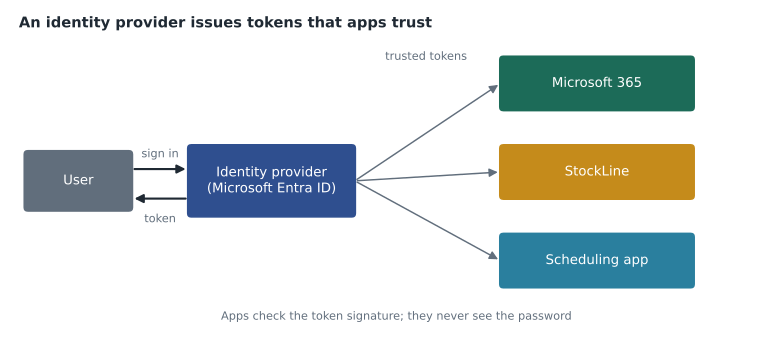
The relationship between an application and an identity provider is one of trust. The application is configured to accept tokens signed by a particular identity provider, usually by knowing the provider's public signing keys, an idea from lesson 3. When a token arrives, the application checks that the signature is valid, that the token was issued for that application, and that it has not expired. If all three checks pass, the application accepts the claims in the token, such as the user's name, email address and group memberships.
Directories and directory services
A directory is a hierarchical store of information about the objects in a network, such as users, groups, computers, printers and applications, along with their attributes, such as names, phone numbers, group memberships and passwords. A directory service stores that information, makes it available to users and applications and provides ways to manage it. The best-known directory service in business networks is Active Directory Domain Services (AD DS), introduced with Windows 2000 Server and used by most organizations that run Windows networks.
AD DS is built around domains, which hold objects and share a security boundary, and domain controllers, the servers that store the directory and authenticate users. Domains can be grouped into trees and forests. Inside a domain, objects are arranged in organizational units (OUs), which administrators use to group objects and apply Group Policy, a way of pushing settings such as password rules or desktop restrictions to computers and users. AD DS authenticates users mainly with the Kerberos protocol and lets applications query the directory with LDAP, the Lightweight Directory Access Protocol.
AD DS was designed for networks where users and computers were inside the organization's buildings, joined to its domain and connected to its domain controllers. It was not designed for SaaS applications on the internet, for phones and personal devices that never join a domain, or for modern web protocols such as OpenID Connect and OAuth 2.0. That gap is why cloud identity providers were developed, and why most organizations today run a combination of both.
Microsoft Entra ID is not AD DS in the cloud
It is easy to assume that Microsoft Entra ID, which used to be called Azure Active Directory, is simply Active Directory moved to the cloud. It is not. Microsoft Entra ID is a cloud identity and access management service built for internet-scale applications and modern protocols. It has users, groups and devices, but it has no organizational units, no Group Policy and no domain controllers that you manage, and it does not use Kerberos or LDAP for its main sign-in flows. Devices can be joined to Microsoft Entra ID and managed with tools such as Microsoft Intune instead of Group Policy.
Microsoft also offers Microsoft Entra Domain Services, a managed service that provides traditional domain features such as domain join, Group Policy, LDAP and Kerberos in Azure, without the customer running domain controllers. It is used to support older applications that need those features when they move to Azure. For Harrow & Finch, the warehouse management system's vendor application still expected Kerberos, so Theo noted Entra Domain Services as one option to evaluate for 2027.
| Active Directory Domain Services | Microsoft Entra ID | |
|---|---|---|
| Designed for | Networks of domain-joined computers on premises | Cloud applications, SaaS and devices anywhere |
| Main protocols | Kerberos, LDAP, NTLM | OpenID Connect, OAuth 2.0, SAML |
| Structure | Domains, forests and organizational units | A flat tenant with users, groups, devices and administrative units |
| Device management | Group Policy | Microsoft Intune and Entra join |
| Servers to run | Domain controllers managed by the organization | None; Microsoft runs the service |
Most organizations connect the two. Users and groups are created in AD DS, then synchronized to Microsoft Entra ID so the same people can sign in to cloud services. This arrangement is called hybrid identity and is the subject of lesson 8. Harrow & Finch already works this way, which is why a password changed on a store PC also changes the Microsoft 365 password.
Federation: trust across boundaries
Federation is a trust relationship between separate identity systems that lets users authenticated by one system access resources managed by another, without the second system holding their credentials. With federation, a user signs in once with their home identity provider, and the other party accepts the resulting token because it trusts that provider. Federation can connect an organization's own directory to a cloud service, two organizations to each other, or an organization to external identity providers such as Google or a social account.
A federation trust can be one-way or two-way. In a one-way trust, organization A accepts identities from organization B, but not the reverse. Trusts are also generally not transitive across federations unless configured that way: if A trusts B and B trusts C, A does not automatically trust C. Exam questions often test these two points.
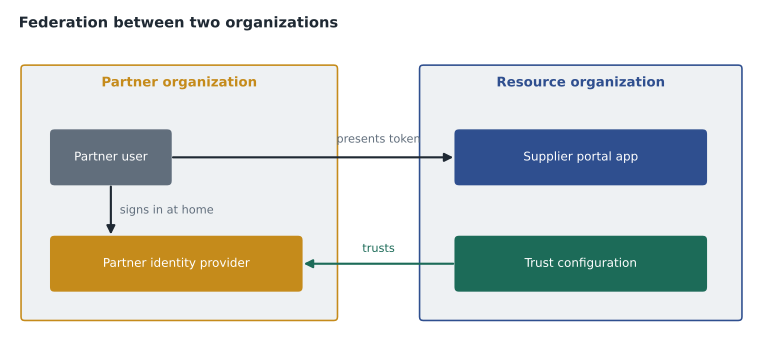
Federation appears in several forms in the Microsoft world. Before cloud identity was widespread, many organizations used Active Directory Federation Services (AD FS), an on-premises server role, to federate their AD DS with Microsoft 365 and other services using SAML or WS-Federation. Many organizations have since moved away from AD FS toward cloud authentication with Microsoft Entra ID, because AD FS servers must be run, patched and kept highly available. Microsoft Entra ID can also federate with external identity providers, and its B2B collaboration feature lets partner users sign in to a company's apps with their own work or personal accounts, a form of federation covered in lesson 7.
Ama wrote a small model of the trust check an application performs. It accepts a token only if the issuer is on its trusted list, the token was meant for this application and it has not expired. A token from a partner the application does not trust is rejected, even if it is otherwise valid.
from datetime import datetime, timedelta

trusted_issuers = {"login.harrowfinch-tenant", "login.supplier-cedarline"}   # illustrative names
app_id = "stockline-supplier-portal"
now = datetime(2026, 11, 16, 10, 0)

tokens = [
    {"issuer": "login.harrowfinch-tenant", "audience": app_id, "expires": now + timedelta(hours=1), "user": "theo"},
    {"issuer": "login.supplier-cedarline", "audience": app_id, "expires": now + timedelta(minutes=20), "user": "rep at Cedarline"},
    {"issuer": "login.unknown-company", "audience": app_id, "expires": now + timedelta(hours=1), "user": "stranger"},
    {"issuer": "login.harrowfinch-tenant", "audience": "payroll", "expires": now + timedelta(hours=1), "user": "theo"},
    {"issuer": "login.supplier-cedarline", "audience": app_id, "expires": now - timedelta(minutes=5), "user": "old session"},
]
def accept(t):
    if t["issuer"] not in trusted_issuers: return "rejected: untrusted issuer"
    if t["audience"] != app_id: return "rejected: token meant for another app"
    if t["expires"] <= now: return "rejected: expired"
    return "accepted"
for t in tokens:
print(f"{t['user']:18s} {accept(t)}")theo accepted rep at Cedarline accepted stranger rejected: untrusted issuer theo rejected: token meant for another app old session rejected: expired
What this code does
Validates sign-in tokens the way an application should, by checking that each was issued by a trusted identity provider, is meant for this specific app, and has not expired. Tokens that fail any check are rejected with the reason. This mirrors how apps trust Microsoft Entra ID tokens, including those from a partner organisation.
Real token validation also checks the digital signature with the issuer's public key, but the logic is the same: trust is configured explicitly, not assumed. That is federation's link to Zero Trust from lesson 2. A federated partner's token is accepted only because the organization decided to trust that partner, and Conditional Access policies can still require extra checks.
Why directories still matter in the cloud
Even in a cloud-first organization, a directory remains the foundation of identity. Every access decision depends on attributes stored in it: the user's department and manager, the groups they belong to, whether the account is enabled and which devices are registered to them. If those attributes are wrong, the best Conditional Access policy will make the wrong decision. Dynamic groups, covered in lesson 7, rely on attributes such as department or job title being accurate, and access reviews, covered in lesson 11, often ask managers to confirm access, which only works if the manager attribute is correct.
Ama found that about one in eight user accounts in AD DS had no manager recorded and that store numbers were stored in three different attributes depending on who created the account. She added a data clean-up task for HR and the service desk to the Skylight plan, because the identity work would depend on it. Theo agreed to add a check to the account creation procedure so that new accounts would always include a manager, a department and the store number in one agreed attribute.
Worked problem
Choosing the right concept
Renata listed four needs for Skylight: (1) a place that stores each employee's department, manager and group memberships; (2) a single service that authenticates employees and issues tokens to StockLine, Microsoft 365 and the scheduling app; (3) letting staff at Cedarline Lumber, a key supplier, sign in to the supplier portal with their own company accounts; (4) supporting an old vendor application that needs Kerberos and LDAP after it moves to Azure. Which concept or service fits each need?
Show solution
- Need 1 is a store of objects and attributes: a directory, such as AD DS, synchronized to Microsoft Entra ID.
- Need 2 is authentication plus token issuing for many apps: an identity provider, Microsoft Entra ID.
- Need 3 is trust across organizations without creating new passwords: federation, through B2B collaboration.
- Need 4 is traditional domain features in Azure: Microsoft Entra Domain Services.
Answer: Directory; identity provider; federation; Entra Domain Services.
Before the session ended, Ama and Theo agreed on one clean-up task that would help everything that followed: removing the 140 accounts of former employees from AD DS, after confirming with HR, so they would stop being synchronized to the cloud. An identity that should not exist cannot be protected; it can only be removed. Theo scheduled the clean-up for the last week of November.
Common mistakes
MistakeCalling Microsoft Entra ID "Active Directory in the cloud".
InsteadEntra ID is a cloud identity provider using modern protocols; it has no OUs, Group Policy or domain controllers to manage.
MistakeAssuming federation trusts pass along automatically.
InsteadFederation trusts are configured explicitly and are not transitive unless set up to be.
MistakeThinking an application stores user passwords when it uses an identity provider.
InsteadThe identity provider authenticates the user; the application receives and validates a token.
MistakeForgetting stale accounts in the on-premises directory.
InsteadSynchronized directories copy their problems to the cloud, so clean up AD DS first.
Summary and key terms
- An identity provider authenticates users and issues signed tokens that applications trust, enabling single sign-on and central security controls.
- A directory stores information about users, groups and devices; Active Directory Domain Services is the traditional on-premises directory, built around domains, domain controllers, organizational units, Group Policy, Kerberos and LDAP.
- Microsoft Entra ID is a cloud identity provider, not AD DS in the cloud, and Microsoft Entra Domain Services provides managed domain features in Azure.
- Federation creates explicit trust between identity systems so users can access another party's resources with their home identity.
- Identity provider
- A service that authenticates identities and issues tokens to applications that trust it.
- Directory service
- A service that stores and manages information about network objects such as users and devices.
- Active Directory Domain Services
- Microsoft's on-premises directory service, using domains, domain controllers, Kerberos and LDAP.
- Microsoft Entra Domain Services
- A managed Azure service that provides domain join, Group Policy, Kerberos and LDAP without running domain controllers.
- Federation
- A trust relationship that lets one system accept identities authenticated by another.
- AD FS
- Active Directory Federation Services, an on-premises server role for federating AD DS with other services.
Practice problems
Work each problem on paper first, then reveal the answer to check.
Which protocol does AD DS mainly use to authenticate users on a Windows network?
Show answer
Kerberos.
If organization A trusts B and B trusts C, does A automatically trust C?
Show answer
No. Federation trusts are not transitive unless configured to be.
Name one feature of AD DS that Microsoft Entra ID does not provide.
Show answer
Any one of: organizational units, Group Policy, domain controllers you manage, Kerberos or LDAP for main sign-in.
Lesson quiz · 5 questions
Score 60% or more to complete this lesson.
Create a free account to save your progress, take quizzes and earn a certificate.