
MSAZ-130 · Lesson 11 of 12 · 18 min
Identity governance and access reviews
▶ Video coming soon A video version of this lesson is on the way.
In early December 2026, Harrow & Finch's external auditor sent a short list of requests ahead of the year-end audit. One line read: "Provide evidence that access to the payroll system and to financial approval roles was reviewed during the year, and that leavers' access was removed promptly." Ama Boateng read it twice. The truth was that nobody had ever reviewed access systematically. People were added to groups when they joined or changed jobs, and they were removed, eventually, when someone noticed. The 140 former employees still in Active Directory and the 61 unexplained guests in Microsoft Entra ID were proof. Sunil Rao forwarded the email to Renata Kowal with one word: "Governance."
Lessons 9 and 10 were about getting the right people in securely. Identity governance is about making sure the right people have the right access, to the right resources, for the right length of time, and being able to prove it. This lesson covers Microsoft Entra ID Governance, the identity life cycle, entitlement management, lifecycle workflows and access reviews, which are all part of the SC-900 outline's identity protection and governance section.
Why access drifts
Access tends to grow over time unless something pushes it back. A new hire gets the access her job needs. When she moves to another team, she gets new access for the new role, but nobody removes the old access because she might still need it for a few weeks, and then everyone forgets. A contractor's project ends, but his account stays active until his manager remembers. A guest invited to a single meeting keeps access to the team's files for years. This gradual build-up is called access creep or privilege creep, and it directly undermines least privilege from lesson 2.
Microsoft Entra ID Governance addresses access creep by helping organizations answer four questions continuously: who has access to what, who should have it, how they got it and whether it is still needed. The answers support both security and compliance, because auditors and regulations, such as financial reporting controls and many privacy laws, expect organizations to show that access is controlled.
The identity life cycle: joiner, mover, leaver
Identity governance starts with the identity life cycle, often described as joiner, mover, leaver. A joiner is a new person who needs an identity and initial access. A mover changes role, department or location and needs access to change with them. A leaver departs and must lose access promptly. Each stage is a point where mistakes create risk: joiners given too much, movers keeping old access and leavers keeping any access at all.
The most reliable way to manage the life cycle is to drive it from an authoritative source, usually the human resources system. Microsoft Entra ID can receive users from HR systems through HR-driven provisioning, or from AD DS through synchronization, and can provision accounts into SaaS applications automatically, often using the SCIM standard, so accounts are created and removed in those apps as people join and leave. Harrow & Finch's HR and payroll system was already a hosted SaaS product, and Renata added a project to connect it as the source of joiner, mover and leaver events in 2027.
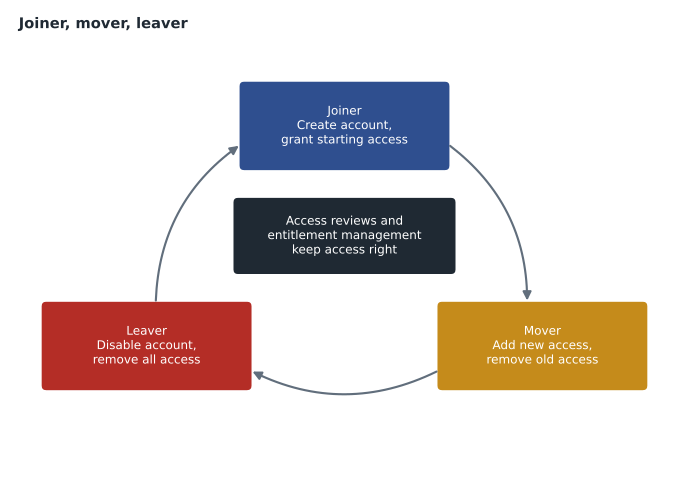
Lifecycle workflows, a feature of Microsoft Entra ID Governance, automate tasks at each stage. A joiner workflow can generate a Temporary Access Pass and email it to the new hire's manager before the first day, add the user to groups and send a welcome message. A leaver workflow can disable the account on the last day, remove group memberships and licenses and notify the manager. Workflows run on schedules and triggers based on attributes such as hire date and leave date, so they happen on time without relying on someone to remember.
Entitlement management and access packages
Not all access can be decided in advance from an HR record. People often need access for projects, temporary assignments or collaboration with partners. Entitlement management lets organizations bundle the resources needed for a purpose into an access package: for example, the Teams team, SharePoint site, security groups and app roles needed by everyone working on Project Skylight. Access packages live in catalogs, which can be delegated to the business owners who know who should have access.
Each access package has policies that define who can request it, who must approve the request, whether a business justification is needed and, importantly, how long access lasts. Access can expire automatically after a set number of days, or require renewal. Policies can also allow users from connected organizations, partner tenants that the company works with, to request access, which creates guest accounts automatically when approved and can remove them when their last access package expires. That would replace the ad hoc guest invitations behind Ama's 61 unexplained guests.
| Feature | What it does | Harrow & Finch example |
|---|---|---|
| Lifecycle workflows | Automates joiner, mover and leaver tasks | Disable accounts at 5 p.m. on the leave date and remove licenses |
| Entitlement management | Bundles resources into access packages with approval and expiry | Skylight project package, approved by Renata, expiring after 180 days |
| Connected organizations | Lets partner users request packages as guests | Cedarline Lumber staff request the supplier portal package |
| Access reviews | Asks reviewers to confirm or remove access regularly | Quarterly review of payroll and finance approval groups |
| Terms of use | Requires users to accept terms before access | Guests accept the supplier code of conduct |
Access reviews
Even with good processes, access needs to be checked. Access reviews in Microsoft Entra ID ask chosen reviewers to confirm whether people still need their access to a group, an application, an access package or a privileged Microsoft Entra or Azure role. Reviewers can be the resource owners, the users' managers, the users themselves through self-review, or specific people such as the security team. Reviews can be one-off or recurring, for example quarterly for sensitive groups.
Microsoft Entra ID helps reviewers decide by showing recommendations, such as suggesting removal for users who have not signed in for a long time or whose access differs from their peers'. When the review period ends, results can be applied automatically, removing access that was denied or not reviewed, depending on the settings. Every decision is recorded with the reviewer's name and reason, which is exactly the evidence the auditor asked for. Reviews of guest users are especially useful: they can remove guests' access to groups and teams, or remove inactive guests from the tenant entirely.
Licensing matters here. Access reviews and entitlement management for member users generally need Microsoft Entra ID Governance licenses, although some long-standing capabilities also work with P2, and lifecycle workflows need ID Governance. The Microsoft Entra licensing page lists exactly which features need which license, and it changes over time.
Before running a real review, Ama simulated one with data exported from the sign-in logs. Her rule of thumb matched Microsoft's recommendations: suggest removal for anyone who has not signed in for 90 days, and flag anyone whose department is not one that normally needs the access.
from datetime import date
today = date(2026, 12, 7)
members = [   # payroll group members: (user, department, last sign-in)
    ("p.nguyen", "Payroll", date(2026, 12, 4)),
    ("r.singh", "Payroll", date(2026, 11, 30)),
    ("k.tanabe", "Analytics", date(2026, 12, 1)),
    ("former.temp", "Payroll", date(2026, 6, 12)),
    ("m.feldt", "E-commerce", date(2025, 10, 2)),
]
expected = {"Payroll", "Finance"}
for user, dept, last in members:
    idle = (today - last).days
    reasons = []
    if idle > 90: reasons.append(f"no sign-in for {idle} days")
    if dept not in expected: reasons.append(f"department {dept} does not usually need payroll")
    rec = "deny" if reasons else "approve"
print(f"{user:12s} {rec:8s} {'; '.join(reasons)}")p.nguyen approve r.singh approve k.tanabe deny department Analytics does not usually need payroll former.temp deny no sign-in for 178 days m.feldt deny no sign-in for 431 days; department E-commerce does not usually need payroll
What this code does
Simulates an access review for the payroll group: for each member it checks their department and how long since they last signed in. Members outside payroll or inactive for a long time get a deny recommendation with the reason, and the rest are approved. Regular reviews like this remove access people no longer need.
Three of the five members needed a closer look. Keiko Tanabe, the data analyst, signed in often, but her department did not usually need payroll access; it turned out she had been given access for a one-time report in 2025. The temporary worker had left in June. Marcus Feldt had not opened payroll in over a year. All three were removed after their managers confirmed, and the decisions were recorded for the auditor.
Putting governance into practice
Sunil and Renata agreed on a phased approach. In December 2026, the team would run one-off access reviews of the payroll group, the finance approval groups, all guests and every Microsoft Entra administrator role, so the auditor would see evidence for the year. From the first quarter of 2027, those reviews would recur quarterly. The Skylight project's resources would move into an access package with 180-day expiry. Connecting the HR system and building lifecycle workflows for joiners and leavers was planned for the second half of 2027, once ID Governance licenses for staff were approved in the budget.
Governance also involves ownership. Every group and application should have an owner who understands what it grants and who can act as a reviewer. Ama's inventory found 129 groups with no owner at all. Before any recurring reviews could work, each needed a named owner, and groups with no members or no clear purpose were scheduled for deletion.
Separation of duties
Governance is also about combinations of access, not only individual permissions. Separation of duties means that no single person should be able to complete a sensitive process alone. At Harrow & Finch, for example, the person who adds a new supplier to the payment system should not also be able to approve payments to that supplier. Entitlement management can enforce this with incompatible access packages or groups: a user who holds the supplier setup package cannot request the payment approval package, and an access review can flag anyone who already holds both.
Dana Whitcombe was particularly interested in this after October. The forged email had asked suppliers to change the company's bank details, but the same kind of fraud can work in the other direction, by changing a supplier's details inside the company's own system. Two people, with two separate sets of access, are much harder to fool or to compromise than one. The finance team agreed to define its incompatible combinations in January so the security team could configure them.
Terms of use and attestation
Some access needs more than a technical check. Terms of use in Microsoft Entra ID can require users or guests to accept a document, such as an acceptable use policy or a supplier code of conduct, before they reach an application, and record who accepted and when. Combined with Conditional Access, terms of use can be required only for certain apps or for guests. Harrow & Finch planned to require suppliers to accept its supplier conduct terms before using the new supplier portal, giving the compliance team a record that each supplier user had agreed.
Governance features work best together. An access package can grant a guest access, require them to accept terms of use, expire after a set period and be included in a quarterly access review, all without the security team handling each request by hand.
Worked problem
Choosing the right governance feature
Four requests came in during December: (1) the auditor wants proof that someone checked who can approve supplier payments; (2) Renata wants a single request form for Skylight project access, approved by her and expiring after six months; (3) HR wants accounts disabled automatically on each leaver's last day; (4) Sunil wants inactive guests removed from the tenant. Which Microsoft Entra feature fits each?
Show solution
- Request 1 needs a recorded check of existing access: an access review of the finance approval group.
- Request 2 needs bundled resources, approval and expiry: an access package in entitlement management.
- Request 3 needs automation based on a leave date: a leaver lifecycle workflow.
- Request 4 needs periodic confirmation of guest access with automatic removal: a recurring access review of guests.
Answer: Access review; entitlement management access package; lifecycle workflow; guest access review.
Common mistakes
MistakeTreating governance as a one-time clean-up.
InsteadAccess drifts continuously, so reviews and expiry need to recur.
MistakeLeaving groups and apps without owners.
InsteadAssign owners who understand the access and can review it.
MistakeInviting guests one at a time with no end date.
InsteadUse access packages with expiry for partner access, and review guests regularly.
MistakeRemoving access manually when people leave.
InsteadDrive joiner, mover and leaver changes from HR and automate them with lifecycle workflows.
Summary and key terms
- Identity governance ensures the right people have the right access for the right time, and proves it.
- The identity life cycle has joiners, movers and leavers, ideally driven from HR and automated with lifecycle workflows and app provisioning.
- Entitlement management bundles resources into access packages with approval, expiry and access for connected organizations.
- Access reviews ask reviewers to confirm access to groups, apps, access packages, roles and guests, with recommendations and automatic removal, producing evidence for audits.
- Most of these features are part of Microsoft Entra ID Governance licensing.
- Identity governance
- Processes and tools that keep access appropriate over time and provide evidence of control.
- Access creep
- The gradual build-up of unneeded access as people change roles.
- Joiner, mover, leaver
- The stages of the identity life cycle: arriving, changing roles and departing.
- Lifecycle workflows
- Automated tasks run at joiner, mover and leaver events.
- Access package
- A bundle of resources that users can request, with approval and expiry policies.
- Access review
- A scheduled check in which reviewers confirm or remove people's access.
- Connected organization
- A partner organization whose users can request access packages as guests.
Practice problems
Work each problem on paper first, then reveal the answer to check.
What problem do access reviews mainly address?
Show answer
Access creep: people keeping access they no longer need.
What is an access package?
Show answer
A bundle of resources, such as groups, sites and app roles, that users can request with approval and expiry rules.
Which stage of the life cycle is a person changing departments?
Show answer
Mover.
Lesson quiz · 5 questions
Score 60% or more to complete this lesson.
Create a free account to save your progress, take quizzes and earn a certificate.