
MSAZ-120 · Lesson 7 of 12 · 21 min
Views, stored procedures and indexes
▶ Video coming soon A video version of this lesson is on the way.
StockLine is more than a collection of tables. When Walt opens it in SQL Server Management Studio for the data hour, the tree on the left shows folders labeled Views, Programmability, Stored Procedures and Indexes, each holding dozens of items. "Tables hold the data," he says. "These are the things that make the data useful, safe and fast." The DP-900 skills outline calls them common database objects, and this lesson covers the three the exam focuses on: views, stored procedures and indexes, with a short look at a few others.
Views
A view is a saved query that behaves like a virtual table. It has a name and columns, and you can SELECT from it exactly as you would from a table, but it stores no data of its own. Each time someone queries the view, the database runs the underlying query and returns the current results. A view is like a window onto the tables: it shows a particular arrangement of the data without copying it.
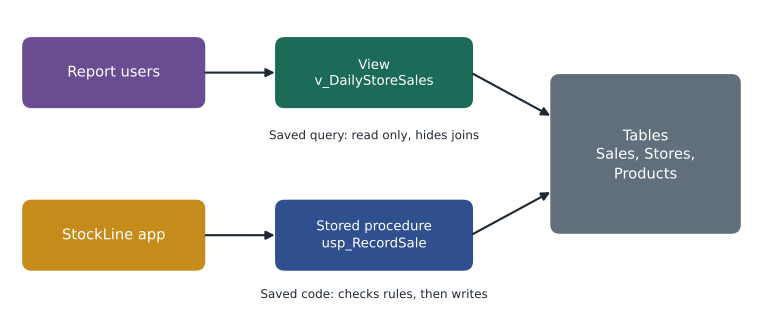
Views solve several practical problems. They hide complexity: Keiko's store comparison joins Sales, Stores, Products and a calendar table, and wrapping that join in a view called v_DailyStoreSales means report writers can query one simple object. They provide consistency: everyone who uses the view gets the same definition of a store's daily sales, rather than five slightly different versions in five reports. And they support security: a view can expose only certain columns or rows, such as sales without customer details, and users can be given permission to read the view without any permission on the underlying tables.
import sqlite3
db = sqlite3.connect(":memory:")
db.executescript("""
CREATE TABLE Stores (StoreID INTEGER PRIMARY KEY, City TEXT NOT NULL);
CREATE TABLE Sales (SaleID INTEGER PRIMARY KEY, StoreID INTEGER REFERENCES Stores(StoreID),
                    SaleDate TEXT NOT NULL, SKU TEXT NOT NULL, Qty INTEGER NOT NULL, Amount REAL NOT NULL);
INSERT INTO Stores VALUES (12, 'North'), (15, 'West'), (18, 'South');
INSERT INTO Sales VALUES
 (1, 12, '2026-11-02', 'PNT-114', 2, 69.98), (2, 12, '2026-11-02', 'BRS-030', 1, 16.42),
 (3, 15, '2026-11-02', 'PNT-114', 1, 34.99), (4, 15, '2026-11-03', 'HMR-200', 1, 24.50),
 (5, 12, '2026-11-03', 'PNT-114', 3, 104.97), (6, 18, '2026-11-03', 'BRS-030', 4, 65.68);
""")

db.execute("""
CREATE VIEW v_DailyStoreSales AS
SELECT st.City, s.SaleDate, ROUND(SUM(s.Amount), 2) AS Total
FROM Sales AS s JOIN Stores AS st ON st.StoreID = s.StoreID
GROUP BY st.City, s.SaleDate
""")
# Query the view as if it were a table.
for row in db.execute("SELECT * FROM v_DailyStoreSales WHERE SaleDate = '2026-11-03' ORDER BY Total DESC"):
    print(row)
# Add a new sale; the view reflects it immediately because it stores no data itself.
db.execute("INSERT INTO Sales VALUES (7, 18, '2026-11-03', 'PNT-114', 1, 34.99)")
print(db.execute("SELECT Total FROM v_DailyStoreSales WHERE City = 'South' AND SaleDate = '2026-11-03'").fetchone())('North', '2026-11-03', 104.97)
('South', '2026-11-03', 65.68)
('West', '2026-11-03', 24.5)
(100.67,)What this code does
Creates a view, a saved query, that totals sales per store and day, then queries it. After a new sale is added, querying the view again shows the updated total without changing the view. This shows that a view always reflects current data because it runs its query each time.
Some database engines can also store the results of a view physically and keep them up to date as the tables change. SQL Server calls these indexed views, and other products call them materialized views. They trade storage and some extra work on every change for much faster reads, which can help heavy reports. Ordinary views, the kind on the exam, store nothing.
Try it yourself
Create a view of product totals
The database db holds a Sales table (StoreID, SaleDate, SKU, Qty, Amount). Execute a CREATE VIEW statement that creates a view named v_ProductUnits with two columns, SKU and Units, where Units is the total quantity sold for each SKU.
# Replace the statement below with a CREATE VIEW statement
db.execute("SELECT 1")
print(db.execute("SELECT * FROM v_ProductUnits ORDER BY SKU").fetchall())
Stored procedures
A stored procedure is a named block of SQL code saved in the database, which applications and users can run by calling its name and passing parameters. Where a view packages a query for reading, a stored procedure packages a task, which can include several statements, conditions, error handling and changes to data. In T-SQL a procedure is created with CREATE PROCEDURE and run with EXEC.
CREATE PROCEDURE dbo.usp_RecordSale
    @StoreID int,
    @SKU     varchar(20),
    @Qty     int
AS
BEGIN
    SET NOCOUNT ON;
    IF @Qty <= 0
        THROW 50001, 'Quantity must be positive.', 1;

    BEGIN TRANSACTION;
        INSERT INTO dbo.Sales (StoreID, SaleDate, SKU, Qty, Amount)
        SELECT @StoreID, CAST(GETDATE() AS date), @SKU, @Qty, @Qty * p.ListPrice
        FROM dbo.Products AS p
        WHERE p.SKU = @SKU;

        UPDATE dbo.StoreStock
        SET Qty = Qty - @Qty
        WHERE StoreID = @StoreID AND SKU = @SKU;
    COMMIT TRANSACTION;
END;

EXEC dbo.usp_RecordSale @StoreID = 12, @SKU = 'PNT-114', @Qty = 2;
StockLine's tills do not write directly to the Sales table. They call a procedure much like this one, which checks the input, inserts the sale and reduces the stock count inside one transaction. Keeping that logic in the database has several advantages.
- Consistency: every till, the website and the warehouse use the same rules for recording a sale, because they all call the same procedure.
- Security: applications can be given permission to run the procedure without any permission to change the tables directly, which limits what a compromised or buggy application can do.
- Protection against SQL injection: parameters are passed as values, not glued into SQL text, which blocks a common attack where crafted input tricks a program into running unintended SQL.
- Efficiency: one call from the application can do several steps in the database, reducing network round trips.
There are trade-offs. Business logic split between application code and stored procedures can be harder to test and version, and procedures written in T-SQL are not portable to PostgreSQL or MySQL without rewriting. Some development teams prefer to keep all logic in the application and use the database only for storage. Many established systems, like StockLine, rely heavily on procedures, and DBAs need to understand them.
Indexes
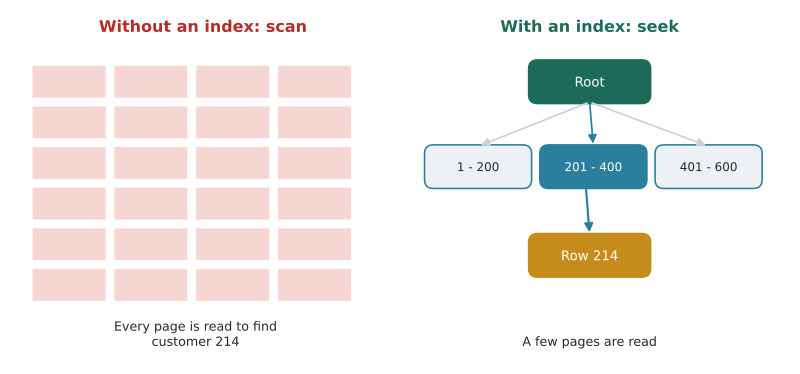
An index is a structure that helps the database find rows quickly without reading the whole table, much like the index at the back of a book helps you find a topic without reading every page. Without a suitable index, a query for one customer's orders must scan every row of the Orders table. With an index on CustomerID, the database follows a short path through a sorted structure, usually a balanced tree, straight to the matching rows.
Indexes make reads faster but have costs. Each index takes storage space, and every INSERT, UPDATE or DELETE must also update every index on the table, which slows writes slightly. A table with too many indexes becomes slow to change. Choosing indexes is a balancing act, and it depends on the workload: transactional tables get a few carefully chosen indexes that support their most frequent lookups, while analytical stores may use different structures altogether, such as columnstore indexes that store data by column, as described in lesson 2.
SQL Server distinguishes two main kinds. A clustered index defines the order in which the table's rows are physically stored, so each table can have only one; it is usually built on the primary key. A nonclustered index is a separate structure holding the indexed column values with pointers back to the rows, and a table can have many. The exam may mention these terms; the key idea is that indexes speed up searching at the cost of space and write speed.
import sqlite3, random, time
db = sqlite3.connect(":memory:")
db.execute("CREATE TABLE Orders (OrderID INTEGER PRIMARY KEY, CustomerID INTEGER, Total REAL)")
random.seed(1)
db.executemany("INSERT INTO Orders (CustomerID, Total) VALUES (?, ?)",
               [(random.randint(1, 50000), round(random.uniform(5, 300), 2)) for _ in range(200000)])
q = "SELECT COUNT(*) FROM Orders WHERE CustomerID = 214"

def timed():
    t = time.perf_counter()
    for _ in range(50):
        db.execute(q).fetchone()
    return (time.perf_counter() - t) * 1000

print("plan:", db.execute("EXPLAIN QUERY PLAN " + q).fetchall()[0][-1])
before = timed()
db.execute("CREATE INDEX IX_Orders_CustomerID ON Orders (CustomerID)")
print("plan:", db.execute("EXPLAIN QUERY PLAN " + q).fetchall()[0][-1])
after = timed()
print("50 lookups without the index took more than", int(before / max(after, 0.001)), "times as long")plan: SCAN Orders plan: SEARCH Orders USING COVERING INDEX IX_Orders_CustomerID (CustomerID=?) 50 lookups without the index took more than 4652 times as long
What this code does
Fills an in-memory table with 200,000 random orders and times 50 lookups of one customer's orders before and after adding an index on the customer column. The query plan changes from scanning the whole table to searching the index, and the lookups become thousands of times faster. Exact timings depend on the device.
Worked problem
Is this index worth it?
The Orders table gets about 40,000 new rows a day and is searched by CustomerID about 300,000 times a day, mostly from the website's "my orders" page. Should Walt add a nonclustered index on CustomerID?
Show solution
- Reads by CustomerID are very frequent, and without an index each one scans the whole growing table.
- Writes are also frequent, but each insert adds only a small extra cost to update one more index.
- The read benefit, many fast lookups instead of many full scans, far outweighs the small write cost.
- He should still check that no existing index already starts with CustomerID, to avoid duplicates.
Answer: Yes. A frequently searched column on a busy table is a classic case for an index, as long as an equivalent index does not already exist.
A practical rule of thumb helps beginners: index the columns used to find rows and to join tables. Primary keys are indexed automatically in most databases. Foreign keys usually are not, yet they are used in almost every join, so adding an index on each foreign key, such as CustomerID in Orders, is one of the most common and effective tuning steps. Walt checks for missing foreign key indexes before any other tuning, because they so often explain a slow report.
Other common objects
A few more objects appear in relational databases and occasionally on the exam.
- Functions return a value or a table and can be used inside queries. Built-in functions include ROUND, UPPER and GETDATE; databases also let you write user-defined functions.
- Triggers are code that runs automatically when data changes, such as writing an audit row whenever a price is updated. They are powerful but can make behavior surprising, so they are used sparingly.
- Sequences generate numbers in order, for keys such as order numbers.
- Synonyms give an alternative name to an object, which can help when objects move between schemas or databases.
| Object | What it stores | Main purpose |
|---|---|---|
| Table | Data, in rows and columns | Holding the facts |
| View | A saved query; no data of its own | Simplifying and securing access for reading |
| Stored procedure | Saved SQL code with parameters | Performing tasks consistently and securely |
| Index | A sorted structure of column values with row pointers | Speeding up searches |
| Trigger | Code attached to a table event | Reacting automatically to changes |
What moves to Azure
All of these objects move with the database when StockLine migrates. Views, stored procedures, functions, triggers and indexes are part of the database itself, so they come along whether the target is Azure SQL Managed Instance, Azure SQL Database or SQL Server on a virtual machine. Lesson 9 notes a few features that behave differently in Azure SQL Database. Azure also adds help: Azure SQL Database can recommend indexes based on the actual workload and, if allowed, create or drop them automatically, a feature Walt says he will trust once he has watched it for a few months.
Keiko's homework from this lesson is practical: she turns her store comparison query into a view, so the store managers' new report and her own spreadsheet both read the same definition. Walt grants the report users permission on the view only. Two problems solved with one object.
Common mistakes
MistakeA view stores a copy of the data.
InsteadAn ordinary view stores only its query and reads the tables each time it is used.
MistakeMore indexes always make a database faster.
InsteadIndexes speed up reads but take space and slow every insert, update and delete.
MistakeA stored procedure can only read data.
InsteadA stored procedure can run many statements, including inserts, updates and deletes, often inside a transaction.
Summary and key terms
- A view is a saved query that acts like a virtual table; it simplifies queries, standardizes definitions and can restrict access.
- A stored procedure is saved SQL code, run with parameters, that performs a task consistently and securely.
- Procedures can limit direct table access and help protect against SQL injection.
- An index speeds up searches, at the cost of storage and slower writes.
- A clustered index sets the physical order of rows (one per table); nonclustered indexes are separate structures (many per table).
- Other objects include functions, triggers, sequences and synonyms.
- View
- A named, saved query that can be queried like a table but stores no data.
- Stored procedure
- A named block of SQL code saved in the database and run with parameters.
- Index
- A structure that lets the database find rows without scanning the whole table.
- Clustered index
- An index that defines the physical order of a table's rows; one per table.
- Nonclustered index
- A separate index structure with pointers to rows; a table can have many.
- Trigger
- Code that runs automatically when data in a table changes.
- SQL injection
- An attack where crafted input causes a program to run unintended SQL.
Practice problems
Work each problem on paper first, then reveal the answer to check.
Does a view store data?
Show answer
An ordinary view does not; it runs its query each time it is used.
Give two benefits of stored procedures.
Show answer
Any two of: consistent logic, tighter security, protection against SQL injection, fewer network round trips.
What is the cost of adding an index?
Show answer
Extra storage and slower inserts, updates and deletes, because the index must be maintained.
How many clustered indexes can a SQL Server table have?
Show answer
One, because it defines the physical order of the rows.
Lesson quiz · 5 questions
Score 60% or more to complete this lesson.
Create a free account to save your progress, take quizzes and earn a certificate.