
MSAZ-120 · Lesson 2 of 12 · 21 min
File formats and data stores
▶ Video coming soon A video version of this lesson is on the way.
At the second data hour, Ines brings a list. In her first three weeks she has found Harrow & Finch data in at least nine places: the StockLine database, a folder of CSV exports on a file share, Excel workbooks on Keiko's laptop, JSON files the website vendor drops on a server every night, XML price files from two suppliers, log files from the tills, a shared mailbox where stores send photos, a vendor's warehouse database, and a USB drive in Walt's desk that he describes as "just in case." Elena laughs and says that is a normal list for a company of this size. The job of this lesson is to understand the formats those files use and the kinds of stores that can hold them, so the team can decide what moves where.
Files and formats
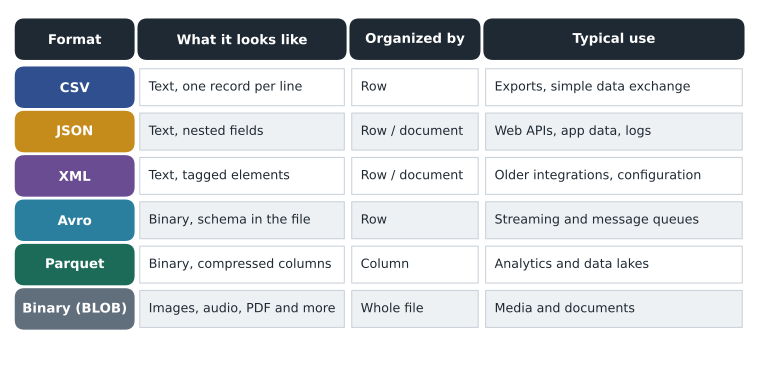
Much of the world's data lives in files, and a file format is an agreement about how the bytes inside a file are arranged. Some formats are text, meaning a person can open them in a plain text editor and read them. Others are binary, meaning the bytes are packed for a program to read efficiently and look like noise to a person. The DP-900 exam expects you to recognize the common formats and know roughly what each is good for.
Delimited text: CSV and its relatives
Comma-separated values, or CSV, is the simplest common format. Each line is one record, and fields are separated by a comma. The first line usually holds the field names. Variations use tabs, semicolons or vertical bars instead of commas, and are called delimited text files in general. CSV is everywhere because almost every program can read and write it, from Excel to databases to data pipelines.
CSV's simplicity is also its weakness. The file does not say what type each field is, so the reader must guess whether 00123 is a number or a code with leading zeros. If a value contains a comma, such as an address, it has to be wrapped in quotation marks, and programs do not always agree on the rules. Dates are a constant source of trouble: is 03/04/2026 the third of April or the fourth of March? Keiko has been caught by this more than once when a supplier's file arrived in a different date style.
import csv, io
# A small CSV export, held in memory instead of a file on disk.
text = """store,date,sales
12,2026-11-02,4210.00
15,2026-11-02,3880.00
12,2026-11-03,4055.00
"""
rows = list(csv.DictReader(io.StringIO(text)))
print(rows[0])                      # every value arrives as text
total = sum(float(r["sales"]) for r in rows)
print("Total:", total){'store': '12', 'date': '2026-11-02', 'sales': '4210.00'}
Total: 12145.0What this code does
Reads a small CSV export held in memory and adds up the sales column. Every value in a CSV arrives as text, so the code converts each sales value to a number before adding. Forgetting that step is a common source of errors when loading CSV files.
Try it yourself
Total sales for one store
The variable text holds a CSV export of daily sales. Write a function store_total(text, store) that returns the total sales for the given store number (a string such as "12"), as a float.
import csv, io

def store_total(text, store):
    # Read the rows with csv.DictReader and add up "sales" where "store" matches
    return 0.0

text = """store,date,sales
12,2026-11-02,4210.00
15,2026-11-02,3880.00
12,2026-11-03,4055.00
"""
print(store_total(text, "12"))
JSON and XML
JSON, introduced in lesson 1, writes data as objects of named values, which can contain lists and other objects. It is the standard format for web APIs and for many applications' own data, and it is easy for both people and programs to read. A file can hold one large JSON document or, very commonly in data work, one JSON object per line, sometimes called JSON Lines, which lets a program read a huge file one record at a time.
XML, the Extensible Markup Language, wraps each value in named opening and closing tags, such as a price tag around a number. It was the dominant format for data exchange between businesses before JSON, and many older systems, invoices and configuration files still use it. Two of Harrow & Finch's suppliers send their price lists as XML. XML is wordier than JSON for the same data, but it has mature tools for checking a file against a published schema, which some industries rely on.
Binary formats built for big data
When files hold millions of rows for analysis, text formats become slow and large. Several binary formats were designed for this.
- Avro is a row-based binary format that stores its schema inside the file, in JSON form. Because each record is written as a unit and the schema travels with the data, Avro suits streaming and messaging, where records arrive one at a time and readers need to know their structure.
- Parquet is a column-based binary format. Instead of storing each row together, it stores all the values of one column together, compressed. It is the most common format for analytical data in data lakes, and services such as Microsoft Fabric and Azure Databricks use it heavily.
- ORC, the Optimized Row Columnar format, is another column-based format from the Hadoop world, similar in purpose to Parquet.
The difference between row-based and column-based storage is worth understanding, because it explains why the same data might be stored twice in different shapes: once for running the business and once for analyzing it.
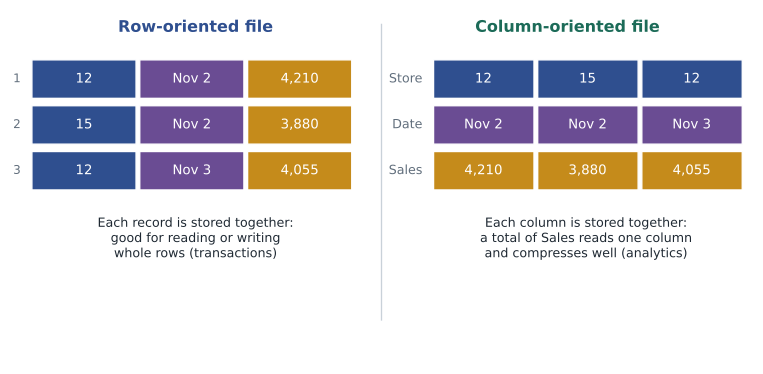
In a row-oriented layout, everything about one sale sits together, so reading or writing a single complete record is fast. That suits a till saving a sale. In a column-oriented layout, all the sales amounts sit together, so a query that totals sales for a year reads only that one column and skips the rest. Values in one column are also similar to each other, such as many repeats of the same store number, so they compress very well. A year of Harrow & Finch sales as CSV might be several gigabytes; the same data as Parquet is often a fraction of that size and much faster to query.
Worked problem
Why columns help analytics
A sales table has 20 columns of roughly equal size and 50 million rows. A report needs only the date and sales amount columns. Roughly what share of the data does a column-based file need to read, compared with a row-based file that must read whole rows?
Show solution
- A row-based file stores complete rows, so reading two columns still means reading all 20 columns of every row.
- A column-based file can read just the 2 columns the query needs.
- 2 out of 20 columns is one tenth of the data, before counting any extra benefit from compression.
Answer: About one tenth of the data, and usually less after compression. This is why analytical stores favor column-based formats.
Binary large objects
Some files are not records at all: photos, videos, audio, PDFs, backup files and executable programs. In storage terminology these are often called binary large objects, or BLOBs. A store treats each one as a single opaque item with a name and some metadata. Azure Blob Storage takes its name from this idea. The pallet photos in the shared mailbox, the scanned invoices and the training videos are all BLOBs.
Data stores
A data store is anywhere data is kept so it can be retrieved later. The DP-900 skills outline groups stores into two big families, which the rest of this course and the next one explore in detail.
- Relational databases store structured data in tables with a schema, and use SQL to query it. They enforce rules, support transactions and are the backbone of business systems such as StockLine. Lessons 5 to 12 of this course are about them.
- Non-relational databases, often called NoSQL databases, store data in other shapes: key-value pairs, JSON documents, wide column families or graphs of connected items. They trade some of the guarantees and query power of relational databases for flexibility, scale or speed in particular patterns. MSAZ-121 covers them.
Alongside databases sit file stores, which hold files in folders, and object stores, which hold BLOBs in flat containers addressed by name. A data lake is a large object or file store that holds raw data in many formats, from CSV and JSON to Parquet and images, so it can be analyzed later. A data warehouse is a relational store organized for analysis rather than for running transactions. Both appear again in lesson 3 and in MSAZ-121.
| Need | Kind of store | Azure service examples |
|---|---|---|
| Business transactions with strict rules | Relational database | Azure SQL Database, Azure SQL Managed Instance, Azure Database for PostgreSQL or MySQL |
| Flexible documents at large scale, low latency worldwide | Non-relational (document) database | Azure Cosmos DB |
| Shared folders that programs and people open like a network drive | File store | Azure Files |
| Photos, videos, backups and raw files of any type | Object store | Azure Blob Storage |
| Raw data of many formats kept for analytics | Data lake | Azure Data Lake Storage, Microsoft Fabric OneLake |
| Historical data organized for reporting | Data warehouse | Microsoft Fabric warehouse, Azure Synapse Analytics |
Mapping Ines's list
With the vocabulary in place, the team labels Ines's nine locations. StockLine is a relational database. The CSV exports and the website's nightly JSON files are files that belong in a data lake rather than on a shared drive, where they can be cataloged and processed. The supplier XML files are semi-structured inputs that a pipeline should read and load into tables. The till logs are semi-structured text, again a data lake candidate. The photos are BLOBs for object storage. The Excel workbooks are a mixture: some are really little databases that should become tables, and some are reports that should be rebuilt from the central data. The vendor's warehouse database stays relational. Walt's USB drive is quietly retired once he sees that the database backups will be kept in Azure with copies in a second region.
Elena points out that none of these choices is about technology for its own sake. Each one answers practical questions: who needs this data, how often, how quickly, how much of it there will be, and what happens if it is lost. Those questions come back in every lesson.
Choosing a format in practice
When the team creates new files, a few rules of thumb help. For exchanging small amounts of data with another organization or a person with a spreadsheet, CSV is usually the safest choice, with a documented date format and character encoding, preferably UTF-8 so that accented names such as Lindqvist or Bélanger survive the trip. For data that one program sends to another program, JSON is usually best. For large amounts of data that will be analyzed repeatedly, Parquet or a table format built on it is the norm. For anything that is a document, image or recording, the original file is kept as a BLOB, with its useful facts extracted into tables.
Character encoding deserves a special mention, because it causes more mysterious errors than almost anything else in data work. A file is just bytes, and the encoding is the rule that turns those bytes into letters. If a program writes a file in one encoding and another reads it in a different one, a name such as Bélanger can come out as a jumble of strange symbols. UTF-8 can represent every character in every language and is now the default almost everywhere, so new files should use it and say so.
A related habit is to record the schema of every file the company receives regularly: which fields it has, what type each one is, what the date format is and what a missing value looks like. Ines starts a simple catalog in a shared spreadsheet, one row per incoming file, which later becomes the starting point for a proper data catalog on the new platform.
Keiko tests herself with one more question before the hour ends. The website vendor wants to send order data to Harrow & Finch every few seconds rather than once a night. Which format suits that? Ines answers: JSON or Avro messages, one per order, sent to a streaming service rather than a file share. Streaming is a topic for MSAZ-121, but the format choice follows directly from this lesson: small records, sent one at a time, each carrying its own structure.
Common mistakes
MistakeParquet is a text format that people can read in Notepad.
InsteadParquet is a binary, column-based format designed for programs that analyze large data sets.
MistakeCSV files record the type of every field.
InsteadCSV holds only text; the reader decides whether a value is a number, a date or a code.
MistakeA data lake and a data warehouse are the same thing.
InsteadA data lake holds raw files of many formats; a warehouse is a relational store organized for analysis.
Summary and key terms
- CSV and other delimited text files are simple and universal but carry no type information.
- JSON and XML are text formats that name their fields and support nesting.
- Avro is a row-based binary format with its schema inside the file, suited to streaming.
- Parquet and ORC are column-based binary formats suited to analytics because queries read only the columns they need and data compresses well.
- BLOBs are whole files such as images, video and documents, stored as opaque objects.
- Data stores include relational databases, non-relational databases, file stores, object stores, data lakes and data warehouses.
- CSV
- Comma-separated values: a text format with one record per line and fields separated by commas.
- Delimited text
- Any text file where a chosen character separates the fields of each record.
- Avro
- A row-based binary file format that stores its schema with the data.
- Parquet
- A column-based, compressed binary file format widely used for analytics.
- BLOB
- A binary large object, such as an image, video or document, stored as a single item.
- Data lake
- A large store of raw data files in many formats, kept for later analysis.
- Character encoding
- The rule for turning bytes into characters; UTF-8 is the common modern choice.
Practice problems
Work each problem on paper first, then reveal the answer to check.
Why is Parquet faster than CSV for totaling one column of a large data set?
Show answer
It stores each column together and compressed, so the query reads only that column instead of every whole row.
Which format stores its schema in the file and suits streaming?
Show answer
Avro.
Name two problems that commonly arise with CSV files.
Show answer
Any two of: no type information, commas inside values, ambiguous date formats, inconsistent character encoding.
What Azure service would you choose for product photos and video?
Show answer
Azure Blob Storage, an object store.
Lesson quiz · 5 questions
Score 60% or more to complete this lesson.
Create a free account to save your progress, take quizzes and earn a certificate.