
MSAZ-120 · Lesson 1 of 12 · 19 min
Structured, semi-structured and unstructured data
▶ Video coming soon A video version of this lesson is on the way.
On the first Wednesday of November 2026, Elena Brandt, Harrow & Finch's new data platform lead, books a meeting room at the Des Moines head office and calls it the data hour. Three people come. Keiko Tanabe is the data analyst who produces the nightly sales report that every store manager reads with their morning coffee. Walt Hadley has looked after the StockLine database for seventeen years and knows every table by heart. Ines Duarte joined three weeks ago as the company's first data engineer. Elena's plan is simple: before Project Skylight moves any data to Azure, everyone on the team should share the same vocabulary. Keiko has an extra reason to listen. She plans to sit the DP-900 Azure Data Fundamentals exam in March 2027, and this course follows her preparation.
Elena starts by putting three things on the table: a printout of yesterday's sales for store 12, a page of text copied from the website's order system, and a photo of a damaged pallet that a store sent in with a claim. "All three are data," she says. "But we would store each one differently, query it differently and protect it differently. The first thing to ask about any data is how much structure it has."
What data is
Data is any recorded fact: a sale, a price, a temperature reading, a customer's email address, a scanned invoice. On its own a single fact means little; data becomes useful when it is organized so people and programs can find it, combine it and draw conclusions from it. The way data is organized is often called its shape or its structure, and it is the first thing a data professional looks at, because it decides almost everything else: which kind of store holds it, which tools read it, and how hard it is to answer a question about it.
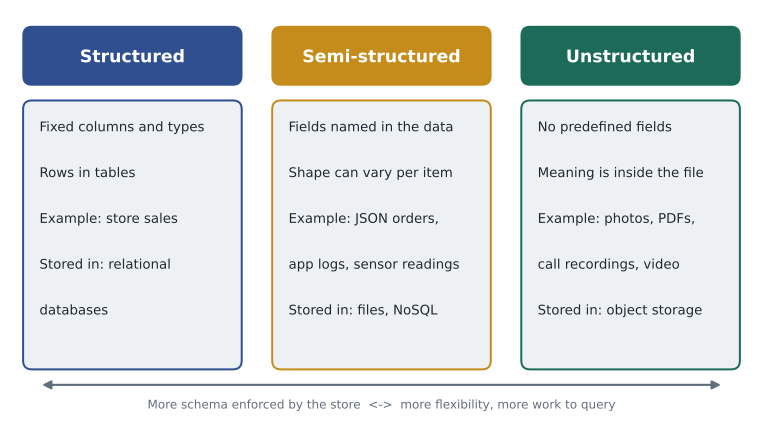
The DP-900 exam, like most textbooks, sorts data into three broad kinds: structured, semi-structured and unstructured. The boundaries are not perfectly sharp, and a single business process usually produces all three, but the categories are useful because each points toward a family of storage and analysis tools.
Structured data
Structured data follows a fixed design that is decided before any data arrives. That design is called a schema. It lists the fields, often called columns, and says what type of value each one holds: a whole number, a date, a short piece of text, a currency amount. Every record, often called a row, has the same fields in the same order. A spreadsheet that everyone fills in the same way is structured data, and so is a table in a relational database.
Keiko's sales printout is a good example. Each row records one store, one day and one total, and every row has exactly those three fields. Because the structure is known in advance, a computer can answer questions quickly and reliably: total sales for all stores last Tuesday, the best day for store 15 in October, the average sale per store. The database also enforces the structure. If someone tries to save the word "Tuesday" in a column defined as a number, the database refuses.
Structured data is the oldest and still the most common kind of business data. Payroll, invoices, bank balances, inventory counts and booking systems all depend on it. Its strength is consistency. Its weakness is rigidity: changing the schema, for example to add a loyalty number to every sale, takes planning, because existing rows, programs and reports all expect the old shape.
# Structured data: every row has the same fields in the same order.
sales = [
    ("12", "2026-11-02", 4210.00),
    ("15", "2026-11-02", 3880.00),
    ("12", "2026-11-03", 4055.00),
]
total = sum(row[2] for row in sales)
store12 = sum(row[2] for row in sales if row[0] == "12")
print("Rows:", len(sales))
print("Total sales:", round(total, 2))
print("Store 12 sales:", round(store12, 2))Rows: 3 Total sales: 12145.0 Store 12 sales: 8265.0
What this code does
Holds three sales records that all have the same three fields in the same order: store, date and amount. Because the layout is fixed, the code can total the amount column directly and also total one store's sales by filtering on the store field. This is what makes structured data easy to query.
Semi-structured data
Semi-structured data has structure, but the structure travels with the data rather than being fixed by the store in advance. Each record names its own fields, and different records can have different fields. The most common format today is JSON, short for JavaScript Object Notation, which writes data as names and values inside curly braces, with lists in square brackets. XML, which uses tags in angle brackets, is an older format that works the same way. Log files where each line holds name-and-value pairs are also semi-structured.
The website order Elena printed is semi-structured. One order lists two products; another lists eleven. One customer typed a delivery note and another did not, so one record has a field the other lacks. A website order also nests information: the order contains a list of lines, and each line contains a product code and a quantity. A relational table would spread that across two tables, but a JSON document keeps the whole order together in one piece.
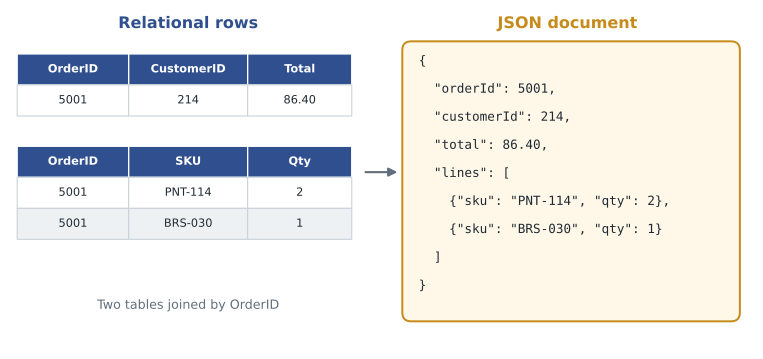
Semi-structured data is flexible. A developer can add a new field to new orders without changing old ones, and an application can read a whole order in one request. The cost is that the store does less checking for you. If one program writes the quantity as the number 2 and another writes it as the text "two", a JSON store may accept both, and the problem surfaces later when someone tries to add them up. Programs that read semi-structured data have to be written defensively, checking that fields exist and have sensible values.
import json
# Two website orders as JSON text. The second has a delivery note the first lacks.
raw = [
    '{"orderId": 5001, "customerId": 214, "lines": [{"sku": "PNT-114", "qty": 2}, {"sku": "BRS-030", "qty": 1}]}',
    '{"orderId": 5002, "customerId": 216, "note": "Leave at side door", "lines": [{"sku": "BRS-030", "qty": 3}]}',
]
for text in raw:
    order = json.loads(text)                  # text becomes a Python dictionary
    items = sum(line["qty"] for line in order["lines"])
    note = order.get("note", "(no note)")      # .get copes with a missing field
print(order["orderId"], "items:", items, "note:", note)5001 items: 3 note: (no note) 5002 items: 3 note: Leave at side door
What this code does
Reads two online orders written as JSON text. The second order has a delivery note the first does not, so the code checks whether the note exists before printing it and adds up the item quantities in each order. This shows that semi-structured data can vary from record to record, and programs must allow for missing fields.
Look at the use of get in that example. Asking for a field that is missing would stop a program with an error, so code that reads JSON usually supplies a default value. That small habit is the everyday price of flexibility.
Try it yourself
Count items in an order
The variable text holds one website order as JSON. Write a function item_count(text) that returns the total quantity across all of the order's lines. If the order has no lines field, return 0.
import json

def item_count(text):
    # Turn the text into a dictionary, then add up each line's "qty"
    pass

text = '{"orderId": 5001, "lines": [{"sku": "PNT-114", "qty": 2}, {"sku": "BRS-030", "qty": 1}]}'
print(item_count(text))
Unstructured data
Unstructured data has no fields that a database can see. Its meaning is inside the content: the pixels of a photo, the sound of a recorded phone call, the words in a contract stored as a PDF, the frames of a security video. The photo of the damaged pallet is unstructured. A computer can store it, copy it and send it, but it cannot answer "how many pallets were damaged in October?" by looking at the file alone.
Unstructured data is now the largest kind by volume in most organizations. Harrow & Finch has years of scanned supplier invoices, product photos for the website, training videos, store floor plans and recordings from the customer contact center. Storing it is cheap and easy, typically as files or objects in services such as Azure Blob Storage, which the next course covers. Getting value from it is harder. The usual approach is to extract structured facts: an AI service reads an invoice and returns the supplier, date and total as fields, or a speech service turns a call recording into text that can then be searched.
Files also carry some structured information about themselves, called metadata: the file name, size, creation date, the camera model that took a photo, or tags added by a person. Metadata is often the first thing that makes a pile of unstructured files usable, because it can be stored in a table and searched like any other structured data.
| Kind | Where the structure is defined | Examples at Harrow & Finch | Typical Azure home |
|---|---|---|---|
| Structured | In the store, before data arrives (the schema) | StockLine sales, inventory counts, payroll | Azure SQL Database, Azure SQL Managed Instance |
| Semi-structured | In each record, as named fields | Website orders in JSON, app logs, sensor readings from freezers | Azure Cosmos DB, JSON files in a data lake |
| Unstructured | Nowhere; meaning is in the content | Product photos, scanned invoices, call recordings | Azure Blob Storage, Azure Files |
Schema on write and schema on read
Two phrases capture the difference between structured and semi-structured stores. A relational database applies schema on write: data must fit the design when it is saved, and anything that does not fit is rejected. Many file-based and NoSQL stores apply schema on read: data is saved as it arrives, and the program that reads it decides how to interpret the fields. Schema on write catches mistakes early and keeps queries simple. Schema on read makes it easy to collect data whose shape is still changing, at the cost of more work and more surprises when the data is used.
Walt has spent his career with schema on write and is suspicious of anything else. "If the database doesn't check it, nobody checks it," he says. Ines points out that the freezer sensors in the stores send readings in slightly different formats depending on the model, and that forcing them into one table today would mean throwing away fields the newer models send. Elena's answer is that both are right for different data: StockLine's sales belong in a strict schema, and the sensor readings can land as JSON first and be cleaned into a table later.
Why the label matters for the exam and the job
On the DP-900 exam, many questions describe a situation in a sentence or two and ask which kind of data it is or which store suits it. The clues are usually in the description: fixed fields and types point to structured data; documents, key-value pairs or records with optional fields point to semi-structured data; images, audio, video and free text point to unstructured data. In the job, the same label guides real decisions. It tells you whether a relational database will enforce your rules, whether a document store will let different records evolve, and whether you need an AI service before anyone can query the content at all.
Elena also warns against forcing data into the wrong shape. Storing photos inside a relational table makes backups slow and expensive, while storing sales as loose JSON files invites inconsistent totals. Choosing the right shape first saves a great deal of rework later.
One business, all three kinds
A single sale at a Harrow & Finch store touches all three kinds of data. The till records the sale as structured rows in StockLine. If the customer ordered online, the website keeps the order as a JSON document. If the customer later returns a damaged item, the store attaches a photo, which is unstructured, and a staff member types a short description, which is text inside a structured return record. Understanding which part of a process produces which kind of data helps the team choose where each piece should live in Azure, a decision this course and the next will keep returning to.
Elena ends the first data hour by asking each person to list five data sets they work with and label each one. Keiko's list is mostly structured: the sales report, the store targets spreadsheet, the price file from the buyers. Ines's list is mostly semi-structured: logs, sensor readings and the website's order feed. Walt adds, with a small smile, that his runbook binder is unstructured.
Common mistakes
MistakeSemi-structured data has no structure.
InsteadIt does have structure, but each record describes its own fields, and records can differ.
MistakeUnstructured data cannot be stored in a database.
InsteadIt can be stored, usually as files or objects; what a database cannot do is query the content directly without first extracting facts from it.
MistakeJSON is unstructured because it is text.
InsteadJSON is semi-structured: the text contains named fields and nesting that programs can read.
Summary and key terms
- Structured data follows a schema fixed in advance: the same fields and types in every row.
- Semi-structured data names its fields inside each record, can nest, and lets records differ; JSON and XML are common formats.
- Unstructured data has no fields a store can see; its meaning is in the content, such as images, audio, video and documents.
- Relational databases apply schema on write; many file and NoSQL stores apply schema on read.
- Metadata, such as file names, sizes and tags, is structured information about unstructured files.
- One business process usually produces all three kinds of data.
- Schema
- A definition of the fields in a data set and the type of value each one holds.
- Structured data
- Data that follows a fixed schema, with the same fields in every record.
- Semi-structured data
- Data where each record names its own fields, such as JSON or XML documents.
- Unstructured data
- Data with no predefined fields, such as images, audio, video and free-form documents.
- JSON
- JavaScript Object Notation, a text format of named values, nested objects and lists.
- Metadata
- Data that describes other data, such as a file's name, size, date or tags.
- Schema on read
- An approach where data is stored as it arrives and interpreted when it is read.
Practice problems
Work each problem on paper first, then reveal the answer to check.
Give one example each of structured, semi-structured and unstructured data from a retail business.
Show answer
For example: till sales in a table; website orders as JSON; product photos.
Why is JSON called semi-structured?
Show answer
Each record contains named fields and nesting, but records can differ and the store does not enforce one fixed design.
What does schema on write mean?
Show answer
Data must fit the defined structure when it is saved, or it is rejected.
How can unstructured data be made easier to search?
Show answer
Extract structured facts from it, for example with AI services, and record metadata such as names, dates and tags.
Lesson quiz · 5 questions
Score 60% or more to complete this lesson.
Create a free account to save your progress, take quizzes and earn a certificate.