
MSAZ-120 · Lesson 5 of 12 · 20 min
Relational concepts: tables, keys and normalization
▶ Video coming soon A video version of this lesson is on the way.
Walt has been waiting for this data hour. "Finally," he says, "something I actually know about." For the next eight lessons the course turns to relational databases, the kind of store that runs StockLine and most business systems in the world. Elena asks Walt to teach the first part himself, with her filling in the vocabulary the exam uses. He begins by drawing two boxes on the whiteboard and labeling them Customers and Orders.
The relational model
A relational database stores data in tables, also called relations, which is where the name comes from. A table holds data about one kind of thing, called an entity: customers, products, stores, orders. Each row in the table represents one instance of that thing, such as one customer, and each column represents one attribute, such as the customer's name or city. Every row in a table has the same columns, and each column has a data type that every value in it must match. This is structured data in its purest form.
The relational model was described by Edgar F. Codd at IBM in 1970, and it has dominated business data ever since because it is simple to reason about, it enforces rules, and it lets people ask new questions of existing data without rewriting programs. The language used to work with relational data is SQL, which the next lesson covers.
Rows, columns and data types
Each column is defined with a data type. Common types include whole numbers (int), numbers with a fixed number of decimal places such as money amounts (decimal), text of varying length (varchar or nvarchar, the second supporting all languages), dates and times (date, datetime2), and true-or-false values (bit). Choosing the right type matters. Storing prices as decimal rather than as floating-point numbers avoids rounding errors that would make totals drift by a cent. Storing dates as a date type rather than as text lets the database sort them correctly and calculate the days between them.
A column can also be defined as allowing or forbidding missing values. A missing value is called NULL, and it means unknown or not applicable, which is different from zero or an empty piece of text. A customer's phone number might be NULL if they did not give one, but an order's date should never be NULL, so that column is defined as NOT NULL and the database refuses any order without one.
Primary keys
Every table needs a way to identify each row uniquely, so that one customer is never confused with another, even if two customers share a name. A primary key is a column, or a combination of columns, whose value is unique for every row and never missing. In the Customers table, CustomerID is the primary key: customer 214 is always A. Lindqvist, no matter how many other customers are called Lindqvist.
Many primary keys are surrogate keys: numbers or codes the database generates that have no meaning outside the system, such as an order number that simply counts up. Others are natural keys that come from the real world, such as a product's SKU code. Surrogate keys are usually preferred because real-world values change: a product code can be reissued, an email address can change, and a key that changes causes trouble for every table that refers to it.
Foreign keys and relationships
The power of the relational model comes from relationships between tables. The Orders table does not repeat each customer's name and address. Instead, each order stores the CustomerID of the customer who placed it. A column that refers to the primary key of another table is called a foreign key. The foreign key links each order to exactly one customer, while one customer can have many orders. This is called a one-to-many relationship, the most common kind.
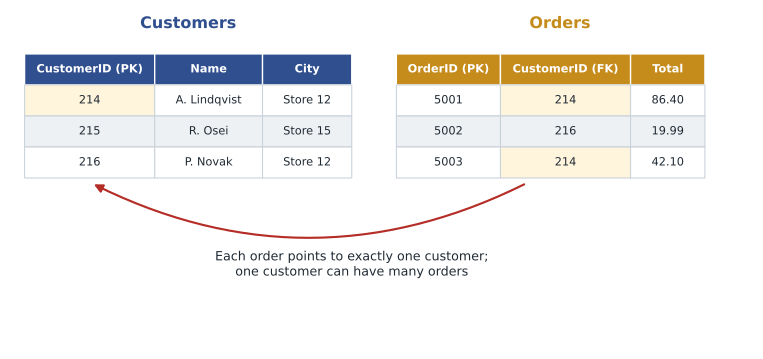
The database can enforce relationships. If the foreign key is declared, the database will refuse to save an order for customer 999 if there is no customer 999, and it will refuse to delete a customer who still has orders, unless told what to do with those orders. This protection is called referential integrity. It is one of the main reasons businesses trust relational databases with critical data: the rules are enforced by the database itself, not left to each program that writes data.
Other relationships exist too. One-to-one relationships, such as an employee and their single locker, are less common. Many-to-many relationships, such as products and suppliers where each product can come from several suppliers and each supplier provides many products, are handled with a third table, often called a junction or bridge table, that holds pairs of keys: ProductID and SupplierID.
import sqlite3
db = sqlite3.connect(":memory:")
db.execute("PRAGMA foreign_keys = ON")   # SQLite enforces foreign keys only when asked
db.execute("CREATE TABLE Customers (CustomerID INTEGER PRIMARY KEY, Name TEXT NOT NULL)")
db.execute("""CREATE TABLE Orders (
    OrderID INTEGER PRIMARY KEY,
    CustomerID INTEGER NOT NULL REFERENCES Customers(CustomerID),
    Total REAL NOT NULL)""")
db.execute("INSERT INTO Customers VALUES (214, 'A. Lindqvist')")
db.execute("INSERT INTO Orders VALUES (5001, 214, 86.40)")
print("Order for customer 214 saved")
for sql in ["INSERT INTO Orders VALUES (5002, 999, 19.99)",      # no customer 999
            "INSERT INTO Customers VALUES (214, 'Someone Else')",  # duplicate primary key
            "DELETE FROM Customers WHERE CustomerID = 214"]:       # customer still has an order
    try:
        db.execute(sql)
        print("allowed:", sql)
    except sqlite3.IntegrityError as e:
print("refused:", e)Order for customer 214 saved refused: FOREIGN KEY constraint failed refused: UNIQUE constraint failed: Customers.CustomerID refused: FOREIGN KEY constraint failed
What this code does
Creates customer and order tables in an in-memory database with a primary key and a foreign key, then tries to insert rows that break the rules. The database itself refuses an order for a customer who does not exist and a customer with a duplicate ID. This shows that keys protect data integrity without the application having to check.
Why not one big table?
Keiko asks the obvious question. Her sales report in Excel is one wide sheet: order number, customer name, phone number, product code, product name, quantity and price, all on one row. Why split it into several tables? Walt answers by showing what happens when the same customer orders twice.
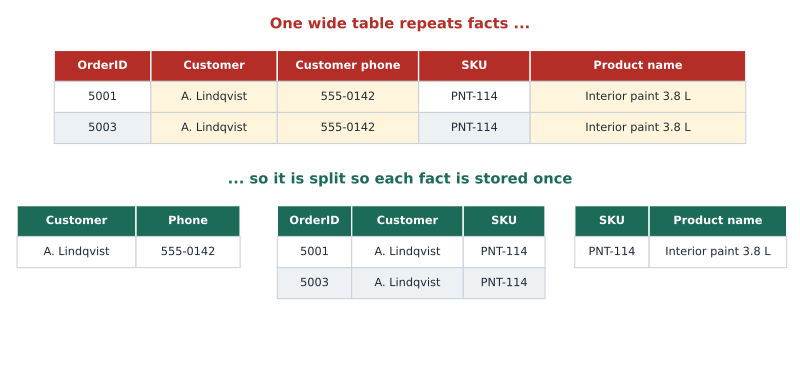
In the wide table, the customer's phone number appears on every order. If the customer changes their number, every one of those rows must be updated; miss one and the database now holds two different phone numbers for the same person, and nobody knows which is right. This is called an update anomaly. There are related problems: you cannot record a new customer until they place an order (an insert anomaly), and deleting a customer's only order deletes the only record of the customer (a delete anomaly). Repeated data also wastes space.
Normalization
Normalization is the process of organizing tables to reduce repeated data and the anomalies it causes. The general idea is simple: each table should be about one thing, and each fact should be stored in exactly one place. Database designers describe progressive levels, called normal forms. The exam does not expect detailed definitions, but the first three are worth knowing in plain terms.
- First normal form: each column holds a single value, not a list, and each row is unique. A column holding "PNT-114, BRS-030" breaks first normal form; each product should be its own row.
- Second normal form: every non-key column depends on the whole primary key. In an order-lines table keyed on OrderID and SKU together, the product name depends only on SKU, so it belongs in the Products table instead.
- Third normal form: non-key columns depend only on the key, not on other non-key columns. If a Stores table holds both a city and that city's province or state, the region belongs in a separate table of cities. A common summary is that every column should depend on the key, the whole key and nothing but the key.
Transactional databases such as StockLine are usually normalized to third normal form, because they handle constant small updates and must stay correct. Analytical stores often do the opposite on purpose. A data warehouse may denormalize, copying product names and store regions into wide tables so that reports can read them without joining many tables together. Because the warehouse is loaded in controlled batches rather than updated by many users, the anomalies that normalization prevents are much less of a risk there. MSAZ-121 describes this star-schema design.
Worked problem
Normalizing an order sheet
Keiko's sheet has these columns: OrderID, OrderDate, CustomerName, CustomerPhone, SKU, ProductName, UnitPrice, Quantity. A single order can contain several products. Propose a normalized set of tables.
Show solution
- Customer facts (name, phone) depend only on the customer, so create Customers(CustomerID, Name, Phone).
- Product facts (name, current price) depend only on the product, so create Products(SKU, ProductName, UnitPrice).
- Order-level facts (date, customer) depend only on the order, so create Orders(OrderID, OrderDate, CustomerID), with CustomerID as a foreign key.
- Facts about each product within an order (quantity, and the price actually charged, which may differ from today's price) go in OrderLines(OrderID, SKU, Quantity, PriceCharged), with a primary key of OrderID and SKU together.
Answer: Four tables: Customers, Products, Orders and OrderLines. Each fact now lives in one place, and the price charged is kept on the order line so history stays correct when list prices change.
The last step in that example is subtle and important. It might seem that storing the price on the order line repeats the product's price. But the price charged on a past order is a different fact from today's list price. If the line only pointed to Products, raising the price of paint next spring would silently change the value of every old order. Good normalization is about facts, not just about removing anything that looks repeated.
Try it yourself
Pull customers out of wide rows
Each row in rows is a tuple (order_id, customer_name, phone). Write a function customer_table(rows) that returns a dictionary mapping each customer name to their phone number, with each customer appearing once. If the same customer appears with two different phone numbers, raise a ValueError (this is the update anomaly in action).
def customer_table(rows):
    customers = {}
    # add each customer; complain if a known customer has a different phone
    return customers

rows = [(5001, "A. Lindqvist", "555-0142"), (5002, "P. Novak", "555-0177"), (5003, "A. Lindqvist", "555-0142")]
print(customer_table(rows))
Other relational features
Besides keys, relational databases offer other ways to enforce rules on data. A unique constraint guarantees that no two rows share a value in a column that is not the primary key, such as an email address. A check constraint enforces a condition, such as a quantity greater than zero, which you saw in lesson 3's stock table. A default value fills in a column automatically when none is supplied, such as today's date on a new order. Together with data types and NOT NULL, these constraints let the database act as a guardian of data quality, which is why Walt trusts it more than any program.
Keys in StockLine
Walt shows the team how StockLine uses these ideas. Every main table has a surrogate primary key generated by the database: SaleID, CustomerID, StoreID. Products are the exception, keyed by SKU, a decision made twenty years ago that Walt now regrets, because two suppliers once reused a code and he spent a weekend untangling it. Every foreign key in StockLine is declared, so the database refuses a sale for a store that does not exist. Keiko realizes that the relationships she has been joining in her reports for years are written down inside the database itself.
Relational data on Azure
All the concepts in this lesson apply equally to SQL Server in Walt's server room, to Azure SQL Database and to the open-source databases PostgreSQL and MySQL. The engines differ in details of syntax and features, but tables, keys, relationships, constraints and normalization are common to all of them. That is good news for the migration: StockLine's design does not need to change to move to Azure, and Keiko's knowledge of it carries over directly.
Common mistakes
MistakeA foreign key must be unique in its table.
InsteadA foreign key usually repeats: many orders can hold the same CustomerID. It is the primary key it refers to that must be unique.
MistakeNULL means zero.
InsteadNULL means unknown or not applicable; zero is a known value.
MistakeNormalization is always the right choice for every data store.
InsteadTransactional databases are usually normalized; analytical stores often denormalize on purpose to make reading faster.
Summary and key terms
- Relational databases store data in tables of rows and columns, each column with a data type.
- A primary key uniquely identifies each row; a foreign key refers to a primary key in another table.
- Relationships are usually one-to-many; many-to-many relationships use a junction table.
- Referential integrity means the database refuses rows that break key relationships.
- Normalization reduces repeated data and avoids update, insert and delete anomalies; transactional databases are typically normalized to third normal form.
- Constraints such as NOT NULL, unique, check and default values let the database enforce data quality.
- Table
- A set of rows with the same columns, holding data about one kind of entity.
- Primary key
- A column or set of columns whose value uniquely identifies each row.
- Foreign key
- A column whose values refer to the primary key of another table.
- Referential integrity
- The guarantee that foreign keys always refer to rows that exist.
- Normalization
- Organizing tables so each fact is stored once, reducing repeated data and anomalies.
- NULL
- A marker meaning a value is unknown or not applicable.
- Constraint
- A rule the database enforces on data, such as NOT NULL, unique or check.
Practice problems
Work each problem on paper first, then reveal the answer to check.
What is the difference between a primary key and a foreign key?
Show answer
A primary key uniquely identifies each row in its own table; a foreign key refers to a primary key in another table.
What is an update anomaly?
Show answer
An inconsistency caused when a repeated fact is changed in some rows but not others.
How is a many-to-many relationship represented?
Show answer
With a junction table holding pairs of keys from the two related tables.
Why might a data warehouse be denormalized?
Show answer
To make large reads faster by avoiding many joins; controlled batch loading reduces the risk of anomalies.
Lesson quiz · 5 questions
Score 60% or more to complete this lesson.
Create a free account to save your progress, take quizzes and earn a certificate.