
JS-110 · Lesson 9 of 12 · 27 min
Timers and animation
▶ Video coming soon A video version of this lesson is on the way.
Some of what Rosa and Lucy want depends on time rather than on clicks. When a trainee taps Add, Rosa wants a short message, such as Lentil soup added, to appear for a few seconds and then fade away. If the tablet is left alone in the middle of an order, it should warn the trainee and then clear the order, so that the next customer does not inherit someone else's lunch. Lucy's shift list gets a search box, and she has noticed that some sites flicker and stutter when they search on every keystroke.
The session planned for Tuesday, February 9, 2027, covers the browser's timers, two techniques built from them called debouncing and throttling, and animation: when to leave it to CSS, how to drive it from JavaScript with requestAnimationFrame, and how to respect people who have asked their devices for less motion.
setTimeout and setInterval
You met setTimeout in JavaScript Programming II. It schedules a function to run once, after at least the given number of milliseconds, and returns a numeric timer id. setInterval schedules a function to run repeatedly, every so many milliseconds, until it is stopped. clearTimeout(id) and clearInterval(id) cancel them. Timers are part of the standard environment, not of the DOM, so they work in the runner exactly as they do in a page.
let left = 3;
console.log('Order will clear in...');
const id = setInterval(() => {
  console.log(left);
  left -= 1;
  if (left === 0) {
    clearInterval(id);
    console.log('Order cleared');
  }
}, 20);

const toast = setTimeout(() => console.log('this never prints'), 10);
clearTimeout(toast);Order will clear in... 3 2 1 Order cleared
What this code does
setInterval calls the arrow function every 20 milliseconds, and the function counts down from 3, stopping the interval with clearInterval when it reaches zero. A one-off timeout is scheduled and then canceled straight away, so its message never appears. The run ends when no timers are left, which is why the program finishes after the countdown.
The delay is a minimum, not a promise. A timer's function cannot run while other JavaScript is running, because a page's main thread does one thing at a time. When the delay has passed, the function joins a queue and runs at the next opportunity, after whatever is running now has finished. The next course, Asynchronous JavaScript and APIs, explains this queue, the event loop, in detail; for now the rule is that long-running code delays every timer, every event listener and every screen update on the page.
Browsers also bend timers on purpose. Timers nested more than five levels deep are delayed to at least 4 milliseconds each. Tabs in the background have their timers slowed to about once a second, or even less often after a while, to save battery. Code that needs to know how much time has really passed must therefore measure it, with Date.now() or the more precise performance.now(), instead of counting how many times a timer has fired.
| Function | What it does | Canceled with |
|---|---|---|
| setTimeout(fn, ms) | Runs fn once, after at least ms milliseconds | clearTimeout(id) |
| setInterval(fn, ms) | Runs fn repeatedly, about every ms milliseconds | clearInterval(id) |
| requestAnimationFrame(fn) | Runs fn just before the browser next draws the page | cancelAnimationFrame(id) |
| queueMicrotask(fn) | Runs fn as soon as the current code finishes, before timers | (cannot be canceled) |
A message that hides itself
Rosa's added message is a classic toast: a short notice that appears and disappears by itself. The page keeps one toast element, changes its text and shows it, and a timer hides it again. If a trainee adds three items quickly, each new message should restart the clock, so the code cancels the previous timer before starting a new one.
const toast = document.querySelector('#toast');
let hideTimer = null;

function showToast(message) {
  toast.textContent = message;
  toast.classList.add('shown');
  clearTimeout(hideTimer);                      // restart the clock
  hideTimer = setTimeout(() => toast.classList.remove('shown'), 3000);
}
What this code does
Each call puts the new message in the toast and shows it by adding a class. The previous timer is canceled first, so a quick series of messages keeps the toast visible until three seconds after the last one. clearTimeout accepts null and ids of timers that have already run, so no check is needed.
The toast element in the page is marked up with role="status", which makes it a live region: screen readers read out text that appears in it without moving the user's focus. Lesson 10 explains live regions; the important point here is that the message must be in the page long enough to be read, and three seconds is a minimum, not a target.
Debouncing
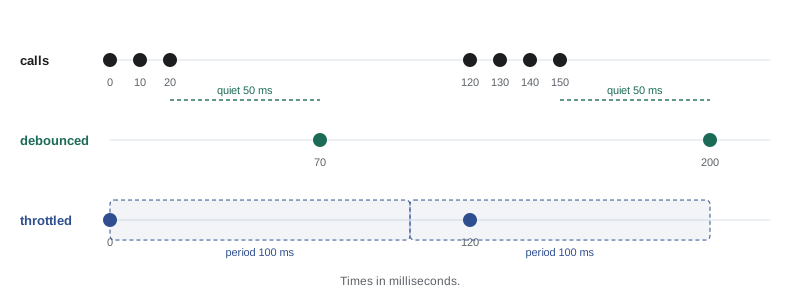
Lucy's search box filters the shift list as a volunteer types. Filtering eight shifts is instant, but the planned version will ask Theo's server for matching shifts, and sending a request on every keystroke of kitchen would send seven requests, six of them useless. Debouncing solves this: the function runs only after the input has been quiet for a set time. Each new keystroke cancels the waiting call and starts the wait again, so a burst of typing produces one call at the end.
function debounce(fn, wait) {
  let timer = null;
  return (...args) => {
    clearTimeout(timer);
    timer = setTimeout(() => fn(...args), wait);
  };
}

const search = debounce((text) => console.log('search for', JSON.stringify(text)), 50);

// simulate typing "kit", a pause, then "chen" quickly
const keys = [['k', 0], ['ki', 10], ['kit', 20], ['kitc', 120], ['kitch', 130], ['kitche', 140], ['kitchen', 150]];
for (const [text, at] of keys) setTimeout(() => search(text), at);search for "kit" search for "kitchen"
What this code does
debounce returns a new function that remembers one timer in a closure. Every call cancels the pending timer and starts a fresh one, so the wrapped function runs only when 50 milliseconds pass with no new call. The seven simulated keystrokes come in two bursts separated by a pause, so the search runs twice, once for kit and once for kitchen.
Throttling
Throttling is the sibling of debouncing. A throttled function runs at most once in each period: the first call in a period runs at once, and later calls in the same period are ignored, or saved for the end of the period. It suits events that fire continuously, such as scroll or pointermove, where you want regular updates while the activity goes on, not one update after it stops. To show the logic exactly, the model below uses a fake clock passed in with each call instead of real time.
function throttle(fn, period) {
  let last = -Infinity;
  return (now, ...args) => {
    if (now - last >= period) {
      last = now;
      fn(now, ...args);
    }
  };
}

const update = throttle((now) => console.log('update progress bar at', now, 'ms'), 100);
for (const t of [0, 16, 33, 50, 100, 116, 180, 199, 200, 350]) update(t);update progress bar at 0 ms update progress bar at 100 ms update progress bar at 200 ms update progress bar at 350 ms
What this code does
The throttled function remembers when it last ran. A call runs only if at least 100 milliseconds have passed since then, so the first call in each period runs and the others are dropped. Using a time passed in as an argument makes the behavior easy to test, and a real version reads performance.now() instead.
| Technique | Runs | Good for |
|---|---|---|
| Debounce | Once, after the calls stop for a set time | Search boxes, saving a draft, resizing a layout once the window settles |
| Throttle | At most once per period while calls continue | Scroll position, pointer tracking, progress updates |
An idle timeout
The counter's idle rule combines timers and events. After 90 seconds without a tap or a key press, the page shows a warning, Still there? The order will clear in 30 seconds, with a Keep order button; after 30 more seconds it clears the order. Any activity resets both timers. Mira writes the rule as a small state machine with a fake clock first, then wires it to real timers and events.
const WARN_AFTER = 90, CLEAR_AFTER = 120;   // seconds since the last activity

function idleState(lastActivity, now) {
  const idle = now - lastActivity;
  if (idle >= CLEAR_AFTER) return 'clear the order';
  if (idle >= WARN_AFTER) return `warn: clears in ${CLEAR_AFTER - idle} s`;
  return 'ok';
}

let last = 0;
const events = [[30, 'tap'], [100, null], [125, null], [130, 'tap'], [230, null], [251, null]];
for (const [t, ev] of events) {
  if (ev) last = t;
  console.log(String(t).padStart(3), 's', (ev ?? '').padEnd(4), idleState(last, t));
}30 s tap ok 100 s ok 125 s warn: clears in 25 s 130 s tap ok 230 s warn: clears in 20 s 251 s clear the order
What this code does
idleState decides what the page should do from two times: when the last activity happened and what time it is now. A tap resets the last activity time, so at 100 seconds the page is only 70 seconds idle and all is well, while at 125 seconds the warning appears. A tap at 130 seconds cancels it; with no taps after that, the warning returns at 230 seconds with 20 seconds left, and by 251 seconds the order is cleared.
let lastActivity = performance.now();
const resetIdle = () => { lastActivity = performance.now(); hideWarning(); };
for (const type of ['pointerdown', 'keydown']) document.addEventListener(type, resetIdle, { passive: true });

setInterval(() => {
  const state = idleState(lastActivity / 1000, performance.now() / 1000);
  if (state === 'clear the order') { clearOrder(); resetIdle(); }
  else if (state.startsWith('warn')) showWarning(state);
}, 1000);
What this code does
Any pointer or key activity anywhere on the page records the current time, using passive listeners because they never cancel anything. Once a second, an interval asks the pure function what to do, using the real elapsed time, so a delayed or throttled timer cannot make the page wrong. The warning and clearing are left to small helper functions.
Animation with CSS
Most interface animation should be done by CSS, with JavaScript only changing classes. A transition animates a property smoothly when its value changes, for example the toast's opacity and position when the shown class is added. A CSS animation, defined with @keyframes, runs a sequence of steps, such as a gentle pulse on the Pay button. The browser can run both efficiently, often on the graphics hardware, and they keep the design in the stylesheet.
.toast {
  opacity: 0;
  translate: 0 1rem;
  transition: opacity 200ms ease-out, translate 200ms ease-out;
}
.toast.shown {
  opacity: 1;
  translate: 0 0;
}
@media (prefers-reduced-motion: reduce) {
  .toast { transition: opacity 200ms linear; translate: none; }
}
What this code does
The toast starts invisible and slightly lower, and adding the shown class changes both values, which the transition animates over 200 milliseconds. JavaScript only adds and removes the class. The media query gives people who have asked their device for less motion a simple fade with no movement.
Animating opacity and transform properties such as translate and scale is cheap, because the browser can move an already-drawn layer without redoing layout. Animating width, height, top or margin forces layout on every frame and can stutter on slower devices such as the counter tablet. When JavaScript needs to know that a transition has finished, for example to remove an element after it fades out, it can listen for the transitionend or animationend event.
Animation with requestAnimationFrame
Some animation depends on values only JavaScript knows, such as a running total that counts up to the new amount when an item is added. For those, use requestAnimationFrame(fn), which asks the browser to call fn just before it next draws the screen, usually 60 times a second, or more on fast displays. The function receives a timestamp, and to keep the animation going it calls requestAnimationFrame again. Unlike setInterval, it stops automatically in background tabs and stays in step with the display.
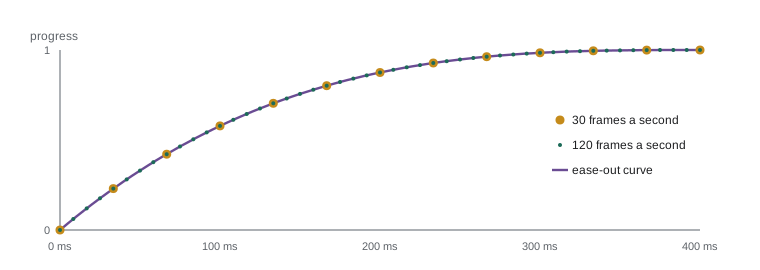
The key rule is to base each frame on elapsed time, not on the number of frames. A device that draws 120 frames a second and one that manages only 30 should both finish a 400-millisecond animation in 400 milliseconds. Each frame works out how far through the animation it is, as a fraction from 0 to 1 called the progress, and from that the value to show. An easing function changes the progress curve so that motion starts quickly and slows down, which looks more natural.
const easeOut = (p) => 1 - (1 - p) ** 3;

function valueAt(from, to, start, duration, now) {
  const p = Math.min(Math.max((now - start) / duration, 0), 1);
  return from + (to - from) * easeOut(p);
}

// total counting up from 12.50 to 18.00 over 400 ms, sampled at two frame rates
for (const fps of [30, 120]) {
  const frames = [];
  for (let t = 0; t <= 400; t += 1000 / fps) frames.push(valueAt(12.5, 18, 0, 400, t).toFixed(2));
  console.log(`${fps} fps: ${frames.length} frames, last ${frames.at(-1)}, middle ${frames[Math.floor(frames.length / 2)]}`);
}
console.log('at 200 ms:', valueAt(12.5, 18, 0, 400, 200).toFixed(2));30 fps: 13 frames, last 18.00, middle 17.31 120 fps: 49 frames, last 18.00, middle 17.31 at 200 ms: 17.31
What this code does
valueAt works out the progress from the elapsed time, clamps it between 0 and 1 and applies a cubic ease-out curve before scaling it to the range from the old total to the new one. Sampling the same animation at 30 and 120 frames a second gives very different numbers of frames but the same values at the same moments. Halfway through the time, the eased value is already most of the way to 18.00, because ease-out moves fast at the start.
function countUp(el, from, to, duration = 400) {
  if (matchMedia('(prefers-reduced-motion: reduce)').matches) {
    el.textContent = to.toFixed(2);        // no motion: jump straight to the result
    return;
  }
  const start = performance.now();
  function frame(now) {
    el.textContent = valueAt(from, to, start, duration, now).toFixed(2);
    if (now - start < duration) requestAnimationFrame(frame);
  }
  requestAnimationFrame(frame);
}
What this code does
Before animating, the function checks the reduced-motion preference with matchMedia and simply shows the final total for people who have asked for less motion. Otherwise it records the start time and asks for a frame, and each frame shows the value for that moment and asks for another until the duration has passed. The calculation is the same valueAt function tested in the runner.
Reduced motion and other courtesies
Some people experience dizziness, nausea or headaches from motion on screens, and others simply find it distracting. Operating systems let users ask for reduced motion, and the prefers-reduced-motion media feature exposes that choice to CSS and, through matchMedia, to JavaScript. WCAG 2.2, published by the W3C in 2023 and approved as the international standard ISO/IEC 40500:2025 in October 2025, includes a success criterion at level AAA that motion triggered by interaction can be turned off, and level A criteria on pausing moving content and on flashing. Brightwater treats reduced motion as a requirement on every project.
Two more rules apply to timed content. Anything that moves, scrolls or updates by itself for more than five seconds needs a way to pause it, under WCAG's Pause, Stop, Hide criterion. And time limits, such as the idle timeout, must warn users and let them extend the time, which is exactly why the counter's warning has a Keep order button and gives 30 seconds to press it.
Worked problem
Debounce or throttle, and the result
Calls arrive at 0, 40, 80, 300 and 320 milliseconds. How many times, and at what times, does the function run if it is (a) debounced with a 100 ms wait, or (b) throttled with a 100 ms period?
Show solution
- (a) Debounce: the calls at 0, 40 and 80 are each less than 100 ms apart, so each cancels the last; the call at 80 fires at 80 + 100 = 180 ms.
- The next call, at 300, starts a new burst; the call at 320 cancels it and fires at 320 + 100 = 420 ms. Two runs: at 180 and 420 ms.
- (b) Throttle: the call at 0 runs. The calls at 40 and 80 are within 100 ms of it and are dropped.
- The call at 300 is more than 100 ms after the last run, so it runs; the call at 320 is dropped. Two runs: at 0 and 300 ms.
Answer: Debounced: 180 and 420 ms. Throttled: 0 and 300 ms. Both run twice, but debouncing runs after each burst and throttling at its start.
Try it yourself
An ease-out progress table
Complete progressAt(elapsed, duration) so that it returns the eased progress for a cubic ease-out: first work out p = elapsed / duration, clamped between 0 and 1, then return 1 - (1 - p) ** 3.
The starter prints the progress, rounded to three decimals, at several times for a 400 ms animation.
function progressAt(elapsed, duration) {
  // clamp, then apply the ease-out curve
  return 0;
}

for (const t of [-50, 0, 100, 200, 300, 400, 500]) {
  console.log(t, progressAt(t, 400).toFixed(3));
}
Try it yourself
When does a debounced call fire?
Write debounceFires(times, wait), which takes the times of calls in milliseconds, in increasing order, and returns the times at which a debounced function with that wait would actually run.
A call runs at t + wait only if no other call comes before that moment.
function debounceFires(times, wait) {
  // return the firing times
  return [];
}

console.log(debounceFires([0, 40, 80, 300, 320], 100).join(', '));
console.log(debounceFires([0, 200, 400], 100).join(', '));
console.log(debounceFires([0, 99, 198], 100).join(', '));
Common mistakes
MistakesetTimeout(fn, 1000) runs fn after exactly one second.
InsteadThe delay is a minimum. fn runs when the page is next free, and background tabs delay timers further.
MistakeAn animation should move a fixed distance on every frame.
InsteadFrame rates vary. Work out each frame's value from the elapsed time.
MistakeDebouncing and throttling are the same.
InsteadDebouncing waits for a pause and runs once; throttling runs at most once per period while calls continue.
MistakeJavaScript animation is better than CSS transitions.
InsteadCSS transitions and animations are simpler and efficient. Use requestAnimationFrame only when values must be calculated in JavaScript.
MistakeReduced motion is an optional extra.
InsteadMotion can make people unwell. Respect prefers-reduced-motion and let moving content be paused.
Summary and key terms
- setTimeout runs a function once after at least a delay, setInterval runs one repeatedly, and both return ids for clearTimeout and clearInterval.
- Delays are minimums because timers wait for the main thread to be free, and browsers slow nested and background timers, so measure elapsed time with Date.now or performance.now.
- A toast restarts its hide timer on each message.
- Debouncing runs a function once after calls stop for a set time, suiting search boxes, while throttling runs it at most once per period, suiting scroll and pointer updates.
- An idle timeout is a pure rule about elapsed time wired to events and an interval.
- CSS transitions and animations, triggered by classes, are the first choice for interface motion; transform and opacity are cheap to animate. requestAnimationFrame runs code before each repaint, and each frame should compute its value from elapsed time, often with an easing function. prefers-reduced-motion and WCAG's rules on motion, pausing and time limits must be respected.
- timer
- A scheduled call to a function after a delay, created by setTimeout or setInterval.
- timer id
- The number returned by setTimeout or setInterval, used to cancel the timer.
- main thread
- The single thread on which a page's JavaScript, events and rendering take turns.
- toast
- A short message that appears and disappears by itself.
- debounce
- To delay a function until calls to it have stopped for a set time.
- throttle
- To limit a function to at most one run in each period of time.
- idle timeout
- An action taken after a period with no user activity.
- transition
- A CSS feature that animates a property smoothly when its value changes.
- requestAnimationFrame
- A function that schedules code to run just before the browser next draws the screen.
- progress
- How far through an animation it is, as a fraction from 0 to 1.
- easing function
- A function that reshapes progress so that motion speeds up or slows down naturally.
- prefers-reduced-motion
- A media feature that reports whether the user has asked for less motion.
Practice problems
Work each problem on paper first, then reveal the answer to check.
Why is the delay in setTimeout a minimum?
Show answer
The function can run only when the main thread is free, and browsers may slow timers further.
Which technique suits a search box, and why?
Show answer
Debouncing, because it waits until typing pauses and then searches once.
Why does a requestAnimationFrame animation use elapsed time?
Show answer
Frame rates differ between devices, so counting frames would make the animation run at different speeds.
Which CSS properties are cheapest to animate?
Show answer
transform properties such as translate and scale, and opacity.
How should the counter's total animation behave when reduced motion is requested?
Show answer
It should show the new total immediately, without counting up.
Lesson quiz · 5 questions
Score 60% or more to complete this lesson.
Create a free account to save your progress, take quizzes and earn a certificate.