
JS-110 · Lesson 8 of 12 · 27 min
Browser storage
▶ Video coming soon A video version of this lesson is on the way.
Two problems arrived on the same day. Lucy reported that volunteers were annoyed by the reminder banner on the Volunteer page, the one about bringing closed-toe shoes for kitchen shifts, because it came back on every visit even after they had closed it. And at the lunch counter, a trainee testing Mira's draft order page accidentally swiped back to the previous page in the middle of a large order, and the whole order was gone. Both problems have the same cause: when a page reloads, every variable in its scripts starts again from nothing.
Browsers offer several ways to keep data between page loads, on the visitor's own device. The session planned for Thursday, February 4, 2027, compares them, concentrates on the two simplest, localStorage and sessionStorage, and covers the habits that make stored data safe to rely on: turning it into text with JSON, giving it a version, coping when it is missing or broken, and not storing what should not be stored.
Where a page can keep data
Data a page stores in the browser belongs to the page's origin: the combination of scheme, host and port, such as https and riverside-food-hub.example. Pages from other origins cannot read it. It stays on that device and in that browser only; a volunteer who closes the banner on their phone will still see it on their laptop. And it can disappear at any time, because users can clear it, private browsing windows discard it and browsers may remove it when the device runs short of space.
| Mechanism | Lifetime | Typical size limit | Sent to the server | Interface |
|---|---|---|---|---|
| Cookies | Until an expiry date, or the end of the session | About 4 KB each | Yes, with every request | document.cookie string, or the server sets them |
| localStorage | Until cleared by the page or the user | About 5 MB per origin | No | Synchronous; strings only |
| sessionStorage | Until the tab is closed | About 5 MB per origin | No | Synchronous; strings only; one tab |
| IndexedDB | Until cleared | Hundreds of MB or more, depending on disk space | No | Asynchronous; structured data |
| Cache API | Until cleared | Shares the IndexedDB quota | No | Stores whole HTTP responses for offline use |
Cookies are the oldest mechanism and the only one sent to the server automatically, which makes them the right tool for sign-in sessions, set by the server with the HttpOnly flag so that scripts cannot read them. They are a poor tool for data that only the page needs, because they travel with every request. IndexedDB is a full database in the browser for large amounts of structured data and offline apps, with an asynchronous interface that the next course, Asynchronous JavaScript and APIs, makes much easier to work with. For small, simple values that only the page needs, the Web Storage API, made up of localStorage and sessionStorage, is the right fit.
localStorage and sessionStorage
Both objects have the same small interface. setItem(key, value) stores a value under a key; getItem(key) returns it, or null if there is nothing under that key; removeItem(key) deletes one entry; clear() deletes everything for the origin; length and key(index) let you list what is there. The only difference is lifetime. localStorage keeps data until something deletes it. sessionStorage keeps data only for the life of one browser tab: it survives reloads and back and forward navigation, but each tab has its own, and closing the tab discards it.
// Lucy's banner: remember that it was closed, on this device, for good
const banner = document.querySelector('.reminder');
if (localStorage.getItem('shoeReminderClosed') === 'yes') banner.hidden = true;
banner.querySelector('button.close').addEventListener('click', () => {
  banner.hidden = true;
  localStorage.setItem('shoeReminderClosed', 'yes');
});

// The counter: keep the order in progress, for this tab only
sessionStorage.setItem('orderDraft', JSON.stringify(order));
What this code does
When the page loads, the banner is hidden at once if the stored value says it was closed before. Closing the banner hides it and records that fact in localStorage, so it stays closed on later visits. The order in progress goes into sessionStorage instead, because it matters only while this tab is open and should not linger after the tablet's browser is closed.
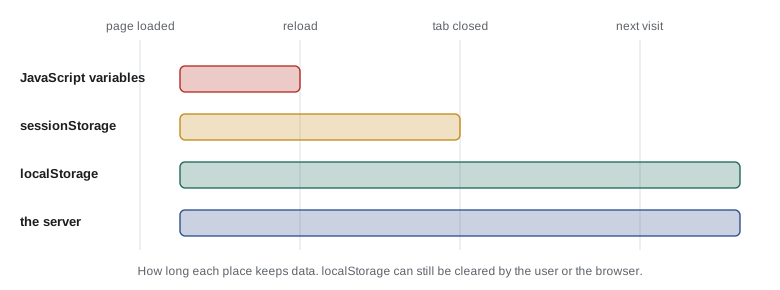
Choosing between them is a question about how long the data should live. A preference, such as a closed banner, a chosen language or a dark-mode setting, belongs in localStorage. Work in progress that matters only until the task is done, such as a half-built order or the step reached in a long form, belongs in sessionStorage. Anything that the Food Hub needs to keep, such as a completed order or a sign-up, belongs on Theo's server.
Everything is a string
Web Storage stores strings and only strings. Any value passed to setItem is converted to a string first, using the same rules as String(value): the number 3 becomes '3', true becomes 'true', an array becomes its items joined with commas and an ordinary object becomes the unhelpful '[object Object]'. Reading it back gives the string, not the original value. The runner has no localStorage, but the conversion is easy to model with a Map.
function makeStorage() {
  const data = new Map();
  return {
    setItem: (k, v) => { data.set(String(k), String(v)); },
    getItem: (k) => (data.has(String(k)) ? data.get(String(k)) : null),
    removeItem: (k) => { data.delete(String(k)); },
    clear: () => data.clear(),
    get length() { return data.size; },
  };
}

const store = makeStorage();
store.setItem('qty', 3);
store.setItem('paid', false);
store.setItem('codes', ['SOUP', 'TEA']);
store.setItem('order', { SOUP: 2 });

for (const k of ['qty', 'paid', 'codes', 'order', 'missing']) {
  const v = store.getItem(k);
  console.log(k.padEnd(8), JSON.stringify(v), typeof v);
}
console.log('paid is truthy?', store.getItem('paid') ? 'yes' : 'no');qty "3" string paid "false" string codes "SOUP,TEA" string order "[object Object]" string missing null object paid is truthy? yes
What this code does
The model converts every key and value with String, as real Web Storage does. Numbers and booleans come back as strings, the array comes back joined with a comma and the object comes back as the text [object Object], with its contents lost. The last line shows a classic bug: the string 'false' is not empty, so it counts as true in an if statement.
The fix is to convert values to JSON text before storing them and to parse them when reading them, as in JavaScript Programming II. JSON keeps numbers, booleans, arrays and plain objects intact. It does not keep Dates, Maps, Sets or class instances, so those must be converted to plain data first, such as a Map to an array of pairs.
const saved = new Map();
const store = { setItem: (k, v) => saved.set(k, String(v)), getItem: (k) => saved.get(k) ?? null };

const order = new Map([['SOUP', 2], ['COOKIE', 1]]);
const draft = { version: 1, items: [...order], tipRate: 0.15, savedAt: '2027-02-04T17:20:00Z' };
store.setItem('orderDraft', JSON.stringify(draft));
console.log(store.getItem('orderDraft'));

const back = JSON.parse(store.getItem('orderDraft'));
const restored = new Map(back.items);
console.log(restored.get('SOUP'), back.tipRate, new Date(back.savedAt).toISOString());{"version":1,"items":[["SOUP",2],["COOKIE",1]],"tipRate":0.15,"savedAt":"2027-02-04T17:20:00Z"}
2 0.15 2027-02-04T17:20:00.000ZWhat this code does
The Map of order lines is spread into an array of pairs, because JSON cannot store a Map directly, and the save time is stored as an ISO date string. JSON.stringify turns the whole draft into one string for storage. Parsing it gives plain data again, from which the Map and the Date are rebuilt.
When storage fails
Code that reads storage must expect three kinds of trouble. The value may be missing, because this is the first visit or the user cleared their data, so getItem returns null. The value may be broken, because an older version of the page stored something different or someone edited it in the developer tools, so JSON.parse throws a SyntaxError. And storage itself may be unavailable: some browsers throw an error from setItem in private windows or when the quota is full, and a page with storage blocked by the user's settings can throw just from touching localStorage.
The safe pattern wraps every access in a small function with try and catch, falls back to a default when anything goes wrong and never lets a storage problem stop the page. A lost preference is a small annoyance; a counter page that crashes because storage is full stops lunch service.
function makeStorage({ full = false } = {}) {
  const data = new Map();
  return {
    getItem: (k) => data.get(k) ?? null,
    setItem: (k, v) => {
      if (full) throw new DOMException('The quota has been exceeded.', 'QuotaExceededError');
      data.set(k, String(v));
    },
  };
}

function load(store, key, fallback) {
  try {
    const text = store.getItem(key);
    return text === null ? fallback : JSON.parse(text);
  } catch {
    return fallback;
  }
}
function save(store, key, value) {
  try { store.setItem(key, JSON.stringify(value)); return true; }
  catch (e) { console.log('not saved:', e.name); return false; }
}

const ok = makeStorage();
ok.setItem('broken', '{"items": [');
console.log(load(ok, 'settings', { tipRate: 0.1 }));
console.log(load(ok, 'broken', { items: [] }));
console.log(save(ok, 'settings', { tipRate: 0.15 }), load(ok, 'settings', null));
console.log(save(makeStorage({ full: true }), 'settings', { tipRate: 0.15 }));{ tipRate: 0.1 }
{ items: [] }
true { tipRate: 0.15 }
not saved: QuotaExceededError
falseWhat this code does
load returns the fallback when the key is missing and also when the stored text is not valid JSON, because the catch block swallows the SyntaxError. save reports whether it worked instead of letting an error escape, and the full storage throws a QuotaExceededError just as a browser does. The page can carry on in every case, only without the remembered value.
Versioning stored data
Stored data outlives the code that wrote it. If next month's version of the counter page stores the draft order differently, a trainee's tablet may still hold a draft in the old shape, and code that expects the new shape will misread it. The cure is to store a version number with the data and, when reading, either upgrade older versions or discard them.
function readDraft(text) {
  let d;
  try { d = JSON.parse(text); } catch { return null; }
  if (d?.version === 1) {                       // v1 stored { SOUP: 2 } and a tip in whole numbers
    d = { version: 2, items: Object.entries(d.order), tipRate: d.tipPercent / 100 };
  }
  if (d?.version !== 2) return null;            // unknown or missing version: start fresh
  return d;
}

const stored = [
  '{"version":1,"order":{"SOUP":2,"TEA":1},"tipPercent":15}',
  '{"version":2,"items":[["EGG",1]],"tipRate":0.1}',
  '{"version":7,"items":[]}',
  'not json',
];
for (const s of stored) console.log(JSON.stringify(readDraft(s)));{"version":2,"items":[["SOUP",2],["TEA",1]],"tipRate":0.15}
{"version":2,"items":[["EGG",1]],"tipRate":0.1}
null
nullWhat this code does
Each stored draft carries a version number. A version 1 draft is upgraded to the version 2 shape by converting its order object into pairs and its whole-number tip into a rate, a version 2 draft is used as it is, and anything else is discarded so that the page starts with an empty order. The function never throws, so a strange value in storage cannot break the page.
Worked problem
Choosing a storage mechanism
For each item, choose cookies, localStorage, sessionStorage or the server: (a) the volunteer closed the shoe reminder; (b) the half-built order on the counter tablet; (c) a completed sign-up; (d) the fact that a staff member is signed in to the planned admin pages.
Show solution
- (a) A preference that should last across visits on this device and that only the page needs: localStorage.
- (b) Work in progress for this tab, which should survive a reload but not outlive the task: sessionStorage.
- (c) A record the Food Hub must keep and Lucy must see: the server. Browser storage stays on one device and can vanish at any time.
- (d) A sign-in session that the server must check on every request and that scripts should not be able to read: a cookie set by the server with the HttpOnly, Secure and SameSite flags.
Answer: localStorage, sessionStorage, the server and a server-set cookie.
Keeping tabs in step
localStorage is shared by every tab and window open on the same origin. When one tab changes it, the others receive a storage event on their window, with the key, the old value and the new value. The tab that made the change does not receive the event. A page can use this to keep its tabs consistent, for example closing the reminder banner in every open tab at once.
window.addEventListener('storage', (event) => {
  if (event.key === 'shoeReminderClosed' && event.newValue === 'yes') {
    document.querySelector('.reminder').hidden = true;
  }
});
What this code does
The listener runs in every other tab when one tab changes localStorage. It checks which key changed and what the new value is, and hides the banner if the reminder has been closed elsewhere. event.key is null when another tab called clear.
What not to store
Anything a page stores in the browser can be read by any script running on that page, including a script injected through an XSS hole, and by anyone with access to the device. On the counter tablet, which many trainees share, that matters a great deal. Brightwater's rules are: never store passwords, payment details or sign-in tokens in Web Storage; store as little personal information as possible; and store nothing about one person on a device that others use.
The privacy laws covered in Web Development I apply to this data as much as to data on a server. The Food Hub's own privacy notice promises to collect only what it needs and to protect it, and a list of volunteers' names and phone numbers left in a shared tablet's storage would break that promise. For the counter, Mira's design stores the draft order, which contains dishes and quantities but no names, in sessionStorage, and a tally of the day's sales by dish in localStorage, cleared at closing time.
function addToTally(tally, order) {
  const next = { ...tally, orders: tally.orders + 1, items: { ...tally.items } };
  for (const [code, qty] of order) next.items[code] = (next.items[code] ?? 0) + qty;
  next.totalCents = tally.totalCents + order.reduce((s, [code, qty]) => s + qty * PRICES[code], 0);
  return next;
}
const PRICES = { SOUP: 550, EGG: 625, DRINK: 200, COOKIE: 150 };

let tally = { day: '2027-02-04', orders: 0, items: {}, totalCents: 0 };
tally = addToTally(tally, [['SOUP', 2], ['DRINK', 1]]);
tally = addToTally(tally, [['EGG', 1], ['COOKIE', 2]]);
console.log(JSON.stringify(tally));
console.log('stored size:', JSON.stringify(tally).length, 'characters');{"day":"2027-02-04","orders":2,"items":{"SOUP":2,"DRINK":1,"EGG":1,"COOKIE":2},"totalCents":2225}
stored size: 97 charactersWhat this code does
The tally counts orders, dishes and money for one day, with no names or other personal details, so it is safe to keep on a shared tablet. addToTally returns a new tally object rather than changing the old one, which makes it easy to save the result straight back to storage. The stored text is only around a hundred characters, far below the storage limit.
The tally function is pure, so it can be tested in the runner, and the page wraps it in the safe load and save functions from earlier: load the tally, add the order, save the result. At closing time, the counter's Close day button shows the totals and then removes the tally from storage.
Try it yourself
Load settings with defaults
Write loadSettings(text). text is what getItem returned: a JSON string or null. Return an object with tipRate (default 0.1) and sound (default true), using any valid stored value of the right type and the default otherwise.
Broken JSON gives all the defaults. A stored tipRate must be a number from 0 to 0.2, and sound must be a boolean.
function loadSettings(text) {
  // return { tipRate, sound }
  return {};
}

for (const t of [null, '{"tipRate":0.15}', '{"tipRate":"0.15","sound":false}', '{"tipRate":0.5,"sound":"no"}', '{oops']) {
  console.log(JSON.stringify(loadSettings(t)));
}
Try it yourself
A reminder that expires
Lucy wants the closed reminder to come back after 30 days. The stored value is JSON like {"closedAt":"2027-02-04T15:00:00Z"}, or null. Write showReminder(text, now), which returns true if the reminder should be shown at the Date now: when nothing is stored, the value is broken, or 30 days (30 × 24 hours) or more have passed since closedAt.
Print the result as show or hide.
const DAY = 24 * 60 * 60 * 1000;

function showReminder(text, now) {
  // return true or false
  return false;
}

const saved = '{"closedAt":"2027-02-04T15:00:00Z"}';
for (const [text, when] of [[null, '2027-02-05T09:00:00Z'], [saved, '2027-02-20T09:00:00Z'],
                            [saved, '2027-03-06T15:00:00Z'], ['oops', '2027-02-05T09:00:00Z']]) {
  console.log(when.slice(0, 10), showReminder(text, new Date(when)) ? 'show' : 'hide');
}
Common mistakes
MistakelocalStorage.setItem('order', order) stores the order object.
InsteadIt stores the string [object Object]. Store JSON.stringify(order) and parse it when reading.
MistakegetItem('sound') returns false when the stored value is 'false'.
InsteadIt returns the string 'false', which is truthy. Parse JSON or compare with the exact string.
MistakesessionStorage is shared by all tabs.
InsteadEach tab has its own sessionStorage; only localStorage is shared across tabs of an origin.
MistakeStored data is always there on the next visit.
InsteadUsers, private windows and browsers can clear it. Always handle a missing or broken value.
MistakelocalStorage is a safe place for a sign-in token.
InsteadAny script on the page, including injected ones, can read it. Use a server-set HttpOnly cookie.
Summary and key terms
- Pages can keep data in the browser, per origin and per device, using cookies, localStorage, sessionStorage, IndexedDB or the Cache API.
- Cookies are sent to the server and suit sign-in sessions; IndexedDB suits large structured data; Web Storage suits small values only the page needs. localStorage lasts until cleared and is shared by an origin's tabs; sessionStorage lasts for one tab. setItem, getItem, removeItem and clear make up the interface, and getItem returns null for a missing key.
- Values are stored as strings, so convert data to JSON and back, turning Maps and Dates into plain data first.
- Storage can be missing, broken or unavailable, so wrap reads and writes in try and catch with defaults, and store a version number so that old data can be upgraded or discarded.
- The storage event tells other tabs about changes.
- Never store secrets, and keep personal information out of shared devices.
- origin
- The scheme, host and port of a page; stored data belongs to one origin.
- cookie
- A small piece of data stored by the browser and sent to the server with each request.
- Web Storage
- The API made up of localStorage and sessionStorage.
- localStorage
- Storage for an origin that lasts until it is cleared and is shared by its tabs.
- sessionStorage
- Storage for one tab that lasts until the tab is closed.
- IndexedDB
- An asynchronous database in the browser for large amounts of structured data.
- quota
- The amount of storage a browser allows an origin to use.
- QuotaExceededError
- The error thrown when a write would go over the storage quota.
- serialization
- Turning data into a string, such as JSON, so it can be stored or sent.
- schema version
- A number stored with data that tells later code which shape the data has.
- storage event
- An event fired in other tabs of the same origin when localStorage changes.
- HttpOnly
- A cookie flag that stops scripts from reading the cookie.
Practice problems
Work each problem on paper first, then reveal the answer to check.
What does getItem return for a key that has never been set?
Show answer
null.
Where should a half-built order on a shared tablet be kept, and why?
Show answer
sessionStorage, because it should survive a reload but not outlive the tab or the task.
Why store a version number with saved data?
Show answer
So that a newer page can recognize older data and upgrade or discard it.
What two things should a load function do when JSON.parse throws?
Show answer
Catch the error and return a sensible default.
Which tabs receive a storage event when one tab changes localStorage?
Show answer
Every other tab and window open on the same origin, but not the one that made the change.
Lesson quiz · 5 questions
Score 60% or more to complete this lesson.
Create a free account to save your progress, take quizzes and earn a certificate.