
GCP-210 · Lesson 9 of 12 · 19 min
Admin roles and delegated administration
▶ Video coming soon A video version of this lesson is on the way.
In Exchange and Active Directory, Birchline had a problem that Sofia calls "admin creep". Over eleven years, 31 people had been given domain admin rights, usually to fix one urgent problem, and most of them still had those rights. Two were consultants who had not worked for Birchline since 2021. "In Workspace we start clean," she tells Owen at the ninth session. "Every admin right has a reason, a scope and an owner. Today we decide who can do what."
Admin roles
An admin role is a set of privileges, permissions to perform specific actions in the Admin console or through the Admin APIs. Assigning a role to a user (or, in many cases, to a group) makes that user an administrator with exactly those privileges. Anyone without a role is a normal user who cannot open the Admin console at all.
Google provides prebuilt roles for common jobs and lets super admins create custom roles by choosing privileges from a long list. Roles can be assigned for the whole organization or limited to specific OUs, so that an admin can manage only some users. Some roles can also be assigned to groups, which makes it easy to grant and remove admin rights through group membership; the console shows when group assignment is possible, and the group usually needs the security label.
| Prebuilt role | What it can do | Typical holder |
|---|---|---|
| Super Admin | Everything, including creating admins, billing and deleting the account | Two or three named people, using dedicated accounts |
| User Management Admin | Create, update, suspend and delete users (not other admins), reset passwords | Identity team, or regional IT for their OUs |
| Groups Admin | Create and manage groups and memberships | Communications or IT staff who maintain lists |
| Help Desk Admin | View user information and reset passwords for non-admin users | Help desk staff |
| Services Admin | Manage settings for Workspace services such as Gmail and Drive | Service owners, for example the email administrator |
| Mobile Admin | Manage mobile devices and their policies | Device or endpoint team |
The principle of least privilege
The rule behind every role decision is least privilege: give each admin the smallest set of privileges, over the smallest set of users, that lets them do their job. A help desk agent who resets passwords for store staff needs Help Desk Admin scoped to /Stores, not User Management Admin for the whole company, and certainly not super admin. Least privilege limits the damage from mistakes, from a compromised admin account and from insiders.
Least privilege also improves the audit trail. When each role is narrow, the admin audit log shows clearly who could have made a change. When half the IT team is super admin, every change has 15 possible authors.
Super admin accounts in practice
Lesson 1 introduced Birchline's super admin accounts. Now Sofia sets out the full rules, which follow Google's published recommendations.
Keep the number small: enough super admins that the organization is never locked out (Google recommends more than one, so that one person's absence or a lost key does not block recovery) but few enough that each is closely protected. Birchline has three: sa-sofia, sa-owen and the emergency account. Use dedicated accounts for super admin work, with no mailbox use, no browsing and no other roles. Protect them with security keys or passkeys and enroll at least two keys each. Set up account recovery carefully: super admins can be allowed to recover their own accounts by email or phone, but the recovery details must be accounts and numbers only that person controls, and Birchline's policy turns self-recovery off in favor of recovery by another super admin. And review every super admin sign-in; the emergency account's sign-ins trigger an alert to Teresa.
Delegating to the help desk and regional IT
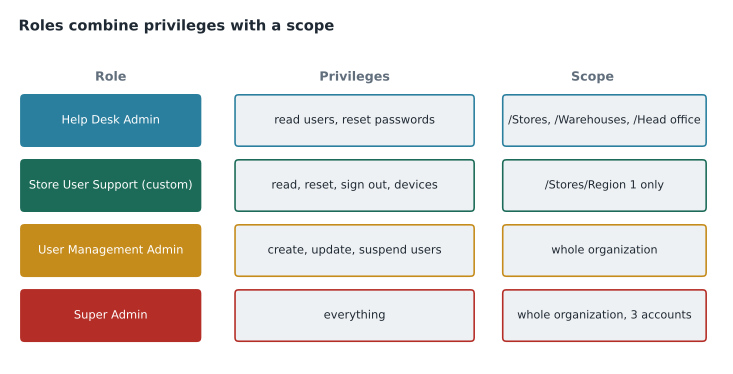
Most admin work at Birchline is routine, and the people best placed to do it are not in head office. Each region of 10 stores has a regional IT coordinator, and the four help desk agents handle store calls. Owen's design gives each group exactly what its job needs.
| Who | Role | Scope | Why |
|---|---|---|---|
| Four help desk agents | Help Desk Admin | /Stores, /Warehouses and /Head office | Reset passwords and look up users; no changes to settings |
| Four regional IT coordinators | Custom role: Store User Support | Their region's stores (assigned to /Stores until regions are separate OUs) | Reset passwords, sign users out, manage store mobile devices |
| Sofia and Owen (everyday accounts) | User Management Admin and Groups Admin | Whole organization | Routine directory work without super admin |
| Email administrator | Services Admin (custom: Gmail only) | Whole organization | Gmail settings only |
| Finance billing team | Custom role: Billing viewer | Whole organization | See subscriptions and invoices; no user changes |
| Information security (Teresa) | Custom role: Security reviewer | Whole organization | Read reports, logs and the security center; no changes |
The regional coordinators raise a design question. Scoping a role to an OU means the OU tree has to match the boundaries of administration, which is one of lesson 4's reasons for creating an OU. Today all 40 stores are in /Stores because they share settings, so a regional coordinator's role would cover all stores, not just their ten. Owen has two options: create /Stores/Region 1 to /Stores/Region 4 so that roles can be scoped by region, or accept that coordinators can support any store, which is how the help desk already works. Sofia lets the business decide; the store operations director chooses the region OUs, because regional coordinators should not reset passwords in other regions. Because the four region OUs share the same settings, they add no complexity to the settings model; they exist purely to scope admin roles.
Custom roles
When no prebuilt role fits, a super admin creates a custom role in Account, Admin roles. The console lists privileges in groups: Admin console privileges (such as Users: read, update, reset password, force sign-out), service privileges (such as Gmail settings or Drive settings) and Admin API privileges (for scripts that call the APIs). The administrator ticks the privileges needed, saves the role with a clear name and description, and assigns it.
Custom role: Store User Support
Description: Regional IT coordinators. Password resets, sign-outs and store mobile devices.
Privileges (Admin console):
  Users > Read
  Users > Reset password
  Users > Force sign-out
  Services > Mobile Device Management > Manage devices and settings
Not included: create or delete users, change OUs, groups, any service settings, billing, admin roles
Assigned to: sec-it-region-1 ... sec-it-region-4, each scoped to its /Stores/Region OU
Naming matters, because roles are listed and reviewed by people who were not in the room when they were created. Birchline writes each role's purpose and its exclusions in the description, and keeps a matching entry in the change log with the approver.
Privileges that need extra care
Some privileges are effectively as powerful as super admin, even if the role is not called that, because they let the holder reach anyone's data or grant themselves more access. Sofia keeps a short list and reviews any role that contains one of them.
| Privilege | Why it is sensitive |
|---|---|
| Manage admin roles or assign roles | The holder can make themselves super admin |
| Reset passwords for admins | The holder can take over an admin account |
| Data transfer or Drive ownership changes | The holder can move anyone's files to themselves |
| Gmail delegation or content compliance settings | The holder can read or redirect other people's mail |
| Vault access (search and export) | The holder can search and export any user's data |
| API access with domain-wide delegation | An app can act as any user (GCP-211 covers API controls) |
Vault is a good example. Birchline's legal counsel needs Vault to answer litigation holds, but Vault search lets the holder read any covered user's mail. The Vault role is therefore given to two named people in the legal team, and Vault's own audit log, which records every search and export, is reviewed monthly by Teresa. GCP-212 covers Vault.
Reviewing admin access
Roles drift. People change jobs, consultants finish, and an emergency grant becomes permanent. Birchline schedules a quarterly access review: Owen exports the list of admin role assignments from the console (Account, Admin roles shows assignments per role), and each role's owner confirms who should keep it. Anyone not confirmed loses the role. The admin audit log, under Reporting, shows what each admin actually did in the period, which helps spot roles that are never used and could be removed.
# Quarterly review: flag admin role assignments that break Birchline's rules.
assignments = [
    ("sa-sofia", "Super Admin", "/", "2026-11-12"),
    ("sa-owen", "Super Admin", "/", "2026-11-12"),
    ("sa-breakglass", "Super Admin", "/", "2026-11-12"),
    ("owen.mitchell", "Super Admin", "/", "2026-11-20"),
    ("helpdesk.amara", "Help Desk Admin", "/Stores", "2026-11-30"),
    ("consultant.lee", "User Management Admin", "/", "2026-12-01"),
    ("it.region1", "Store User Support", "/Stores/Region 1", "2026-12-02"),
]
last_admin_activity = {"sa-sofia": 14, "sa-owen": 9, "sa-breakglass": 0, "owen.mitchell": 3,
                       "helpdesk.amara": 61, "consultant.lee": 0, "it.region1": 22}
super_admins = [a for a in assignments if a[1] == "Super Admin"]
print("super admins:", len(super_admins))
for user, role, scope, granted in assignments:
    flags = []
    if role == "Super Admin" and not user.startswith("sa-"):
        flags.append("super admin on an everyday account")
    if last_admin_activity[user] == 0 and user != "sa-breakglass":
        flags.append("no admin activity this quarter")
    if user.startswith("consultant."):
        flags.append("external person: confirm the contract is current")
    if flags:
print(f"{user:16} {role:22} {scope:18} ->", "; ".join(flags))super admins: 4 owen.mitchell Super Admin / -> super admin on an everyday account consultant.lee User Management Admin / -> no admin activity this quarter; external person: confirm the contract is current
What this code does
The review takes the list of admin role assignments, each with the person, role, scope and date granted, plus a count of admin actions each person performed this quarter. It counts the super admins, then checks every assignment against three of Birchline's rules: super admin only on dedicated sa- accounts, no unused roles except the emergency account, and an extra check for consultants. It prints only the assignments that break a rule, giving the reviewer a short list to act on instead of the whole table.
The review finds two problems. Someone gave Owen's everyday account super admin during the pilot (it turns out to have been a quick fix for a billing error), and a consultant's User Management Admin role has not been used all quarter. Both are removed. The emergency account's zero activity is expected and is excluded from the unused-role check.
Delegation beyond admin roles
Not every delegation needs an admin role. Many routine tasks are better handled by giving users ownership of their own resources. Group owners manage group membership (lesson 5). Shared drive managers manage who can access a shared drive (GCP-211). Calendar resource managers decide who can book a room. Gmail delegation lets an assistant manage an executive's mail. These are permissions within the services, not admin roles, and they reduce the number of people who need the Admin console at all.
Owen also writes down what happens when a role holder leaves. Because admin roles are attached to user accounts or groups, suspending a leaver removes their admin access automatically, but the role itself remains assigned to the suspended account until someone removes it. The leaver checklist from lesson 3 therefore gains a line: remove admin roles and check that every role still has at least one active holder.
Common mistakes
MistakeMaking everyone in IT a super admin to save time.
InsteadAssign the narrowest prebuilt or custom role, scoped to the OUs the person supports.
MistakeUsing an everyday account as a super admin.
InsteadUse dedicated super admin accounts with security keys and no other use.
MistakeCreating custom roles without descriptions.
InsteadName each role clearly, describe what it includes and excludes, and log the approval.
MistakeNever reviewing admin assignments.
InsteadReview admin roles quarterly with the role owners and remove anything unconfirmed or unused.
Worked problem
Designing a role for a new team
Birchline's new e-commerce support team (five people) needs to reset passwords for the 30 contractors in /Contractors who update product listings, and to suspend a contractor immediately if their contract ends early. They must not touch any other users or any settings. What should Owen create?
Show solution
- No prebuilt role fits exactly: Help Desk Admin cannot suspend users, and User Management Admin includes creating and deleting users.
- Create a custom role, Contractor Support, with Users: Read, Users: Reset password, Users: Suspend and Users: Force sign-out, and nothing else.
- Assign the role to a security group, sec-ecommerce-support, containing the five people, scoped to /Contractors only.
- Record the role, its scope and approver in the change log, and include it in the quarterly access review.
Answer: A custom role with read, reset, suspend and sign-out privileges, assigned to a security group and scoped to /Contractors.
Summary and key terms
- An admin role is a set of privileges; assigning it makes a user an administrator.
- Google provides prebuilt roles such as Super Admin, User Management Admin, Groups Admin, Help Desk Admin, Services Admin and Mobile Admin, and super admins can create custom roles.
- Roles can be scoped to OUs and, in many cases, assigned to groups.
- Apply least privilege: the smallest privileges over the smallest set of users.
- Keep few super admins on dedicated accounts with security keys and careful recovery settings.
- Treat role management, admin password resets, data transfer, mail delegation, Vault and domain-wide API access as highly sensitive.
- Review admin assignments regularly, and delegate routine work through group, shared drive and resource ownership where possible.
- Admin role
- A set of privileges that lets a user administer parts of the account.
- Privilege
- A permission to perform a specific admin action.
- Prebuilt role
- An admin role supplied by Google for a common job.
- Custom role
- An admin role created by choosing specific privileges.
- Role scope
- The set of users, usually OUs, that an admin role applies to.
- Least privilege
- Giving only the privileges and scope needed for a job.
- Access review
- A periodic check that every admin assignment is still needed.
Practice problems
Work each problem on paper first, then reveal the answer to check.
Why does Birchline create region OUs under /Stores even though they share settings?
Show answer
So that the regional coordinators' custom role can be scoped to their own stores only.
Which privilege lets a holder effectively become super admin?
Show answer
Managing or assigning admin roles (also resetting admin passwords).
What does the quarterly access review check?
Show answer
That every admin role assignment is confirmed by its owner, still used and consistent with the rules.
Lesson quiz · 5 questions
Score 60% or more to complete this lesson.
Create a free account to save your progress, take quizzes and earn a certificate.