
GCP-210 · Lesson 2 of 12 · 20 min
Domains, verification and DNS records
▶ Video coming soon A video version of this lesson is on the way.
Sofia's second session starts with a question for Owen: "How many email domains does Birchline actually receive mail for?" Owen guesses one. The answer, after an hour with the Exchange accepted-domains list and the company's domain registrar account, is three. There is birchline.example, the company's main domain since 2009. There is birchlineoutfitters.example, the old domain from before a 2009 rebrand, which still receives a trickle of mail from long-standing suppliers and appears on some warranty cards. And there is trailheadrentals.example, the domain of Trailhead Rentals, a 48-person kayak and bike rental business Birchline bought in September 2026. Each will be handled differently in Google Workspace, and choosing the right type for each is the subject of this lesson.
Why domains matter in Workspace
A Google customer account is built around domains. Every user's sign-in name is an email address at a domain the organization has proved it owns, and Google will not deliver mail for, or create accounts at, a domain until that proof is in place. Domain decisions are also hard to undo. Changing the primary domain later is possible but disruptive, and a domain that is verified in one Google account cannot be added to another until it is removed from the first. Getting the design right before users are created saves weeks of clean-up.
Primary domain, secondary domains and domain aliases
Workspace has three kinds of domain, and the exam expects you to know when to use each.
The primary domain is the one the account was created with. It cannot be removed while the account exists, and every user and group needs an address at some domain in the account; most will use the primary one. Birchline's primary domain is birchline.example, set when Farah created Cloud Identity for Google Cloud. That choice carries over to Workspace.
A secondary domain is an additional domain whose users are separate people with their own accounts. Someone at a secondary domain has a sign-in address such as maya.lund@trailheadrentals.example, their own mailbox and their own license. Secondary domains suit a company that runs several brands or businesses with different identities, such as Trailhead Rentals, whose staff and customers know the Trailhead name.
A domain alias gives every user in the primary domain an extra address at another domain automatically. If birchlineoutfitters.example is a domain alias of birchline.example, then mail sent to owen.mitchell@birchlineoutfitters.example arrives in Owen's normal mailbox, without anyone creating anything per user. Domain aliases suit old domains, regional variants and common misspellings that should simply land in the same mailboxes.
| Type | What it gives you | Birchline example | Use when |
|---|---|---|---|
| Primary domain | The account's main domain; users and groups usually have addresses here | birchline.example | Always: it is set when the account is created |
| Secondary domain | A separate domain with its own users, each with their own account and license | trailheadrentals.example | A separate brand or business whose people need their own identities |
| Domain alias | An extra address for every user of the primary domain, delivered to the same mailbox | birchlineoutfitters.example | Old domains, variants and spellings that should reach the same people |
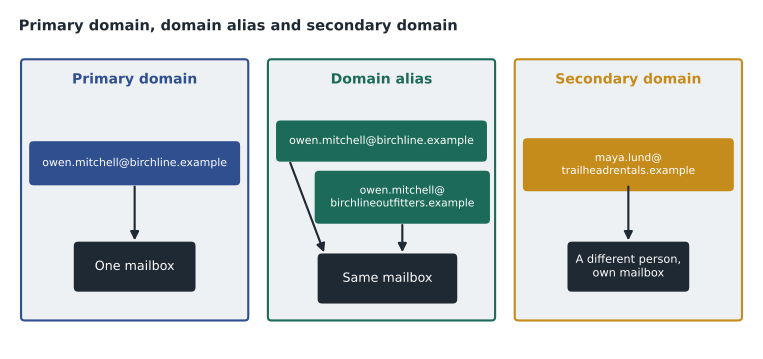
Two details trip up new administrators. First, a domain alias applies to users at the primary domain only; users at secondary domains do not automatically get alias addresses, though a secondary domain can have its own alias. Second, a domain alias does not create sign-in names. Owen still signs in as owen.mitchell@birchline.example; the alias address only receives mail. If someone wants to send mail from an alias address, they set it up in Gmail's send-mail-as settings.
There is also a per-user version. A user alias (sometimes called an email alias) is an extra address for one user, such as jobs@birchline.example on the recruiter's account. Each user can have a number of aliases, which Google's documentation lists. Lesson 3 shows how to add them. When a shared address is needed by several people, a group or collaborative inbox (lesson 5) is usually better than an alias on one person's account, because it survives that person leaving.
Proving you own a domain
Before Google will accept a domain, an administrator must verify it: prove control of the domain's DNS by publishing a value that Google asks for. The standard method is a TXT record, a text entry in the domain's DNS zone. Google shows a unique verification string in the console, the administrator adds it at the DNS host (the registrar or DNS provider), and Google checks for it. Other methods, such as a CNAME record or, for some cases, a file or tag on the domain's website, also exist; the TXT method is the one to know first.
birchlineoutfitters.example. 3600 IN TXT "google-site-verification=Xb7…(unique string from the Admin console)…"Each part of the record means something. The name is the domain itself (many DNS hosts write it as an @ sign). 3600 is the time to live (TTL), the number of seconds other DNS servers may cache the answer. TXT is the record type, and the quoted value is the string Google issued. Leaving the verification record in place after verification is recommended; Google may check it again later, and removing it can cause the domain to become unverified.
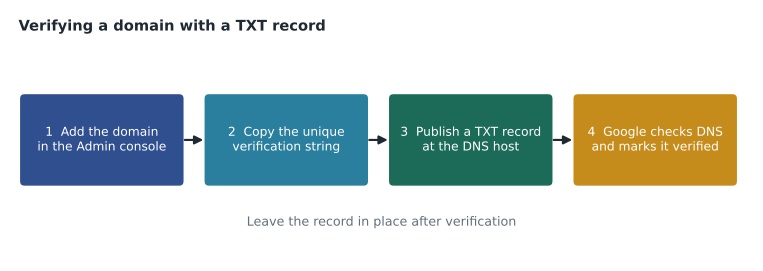
Verification usually succeeds within minutes, but DNS changes can take time to spread, and Google's help pages allow up to about 48 hours. If verification fails, the usual causes are a typo in the string, the record added to the wrong domain or subdomain, the record added at a DNS host that is not actually authoritative for the domain (for example, the registrar's DNS when the domain's name servers point elsewhere), or a stale cached answer that a lower TTL would have avoided.
Finding who controls DNS
Owen's first real task is not in the Google console at all. Birchline's domains were registered over fifteen years by three different people, and he needs to know where each domain's DNS is actually hosted. He looks up each domain's name servers (NS records), which point to the DNS provider that answers for it, and compares them with the accounts Birchline has.
| Domain | Registrar | Authoritative DNS (from NS records) | Who can edit |
|---|---|---|---|
| birchline.example | Registrar A | Cloud DNS in the bl-shared-net project | Network team |
| birchlineoutfitters.example | Registrar A | Registrar A's DNS | IT, through the registrar account |
| trailheadrentals.example | Registrar B | A web host chosen by Trailhead's former owner | Only the former owner, until access is transferred |
The inventory explains why Trailhead has to wait. Until Birchline takes over the registrar and DNS accounts for trailheadrentals.example, nobody can publish a verification record, so the domain cannot be added. Owen opens a ticket with the acquisition team to transfer the accounts, and Sofia notes that this is the most common reason Workspace projects slip: someone outside IT controls the DNS.
The DNS records Workspace cares about
Verification is only the first record. A domain that will send and receive mail through Gmail needs several more, and Owen will set them up in GCP-211. Here is the overview, so that he can plan the DNS work with the network team now.
| Record | Type | Purpose | Where covered |
|---|---|---|---|
| Verification | TXT (or CNAME) | Proves to Google that you control the domain | This lesson |
| MX | MX | Tells other mail servers where to deliver mail for the domain; for Gmail, Google's current guidance uses a single record pointing to smtp.google.com | GCP-211 |
| SPF | TXT | Lists the servers allowed to send mail for the domain | GCP-211 |
| DKIM | TXT | Publishes the public key used to check Gmail's message signatures | GCP-211 |
| DMARC | TXT at _dmarc | Tells receivers what to do with mail that fails SPF and DKIM checks | GCP-211 |
| Custom URLs | CNAME | Optional friendly addresses, such as mail.birchline.example for Gmail | GCP-211 |
The MX records are the ones that move mail, so they are the ones Sofia will not touch until the migration plan says so. Today, Birchline's MX records point to its Exchange servers. If Owen changed them to Google during the pilot, all mail for all 1,100 staff would start arriving in Gmail, where only 14 people have mailboxes. Adding and verifying a domain does not change mail flow; changing MX records does. Lesson 11 explains how organizations keep both systems working during a migration.
Adding domains in the Admin console
Domains are managed in the console's account settings, on the page for domains. To add one, an administrator chooses whether it is a secondary domain or a domain alias, enters the name and follows the verification steps. Owen adds birchlineoutfitters.example as a domain alias in about ten minutes: he enters the domain, copies the string, publishes the TXT record at Registrar A and waits. Twenty minutes later it shows as verified.
He then checks the result with a test. A message sent from his personal email to owen.mitchell@birchlineoutfitters.example does not arrive in Gmail. That is expected: the alias exists in Google, but the domain's MX records still point to Exchange, so the mail went to Exchange. The alias will start delivering to Gmail only when the domain's MX records change during the migration.
# Check a planned list of domains for clashes before adding them to the account.
planned = [
    ("birchline.example", "primary"),
    ("birchlineoutfitters.example", "alias"),
    ("trailheadrentals.example", "secondary"),
    ("shop.birchline.example", "secondary"),
]
verified_elsewhere = {"trailheadrentals.example"}   # still in the former owner's Google account
dns_editable = {"birchline.example", "birchlineoutfitters.example"}

primary = [d for d, kind in planned if kind == "primary"]
print("primary domains:", len(primary))
for domain, kind in planned:
    issues = []
    if domain in verified_elsewhere:
        issues.append("remove from the other Google account first")
    if domain not in dns_editable and not any(domain.endswith("." + p) for p in dns_editable):
        issues.append("no DNS access yet")
    if kind != "primary" and any(domain.endswith("." + p) for p in primary):
        issues.append("subdomain of the primary; a plain subdomain may be all you need")
print(f"{domain:30} {kind:10}", "; ".join(issues) or "ready")primary domains: 1 birchline.example primary ready birchlineoutfitters.example alias ready trailheadrentals.example secondary remove from the other Google account first; no DNS access yet shop.birchline.example secondary subdomain of the primary; a plain subdomain may be all you need
What this code does
The script takes Owen's planned list of domains, each marked primary, alias or secondary, plus two short lists: domains already claimed by another Google account and domains whose DNS Birchline can edit. It checks that there is exactly one primary domain, then looks at each planned domain in turn and writes down any obstacle, such as missing DNS access or a domain still held by a former owner. The output is a one-line status for each domain, so the problems surface before anyone starts clicking in the console.
The check surfaces two problems at once. Trailhead's domain is blocked twice over: Birchline cannot edit its DNS yet, and the former owner had once signed up for a free Google trial with it, so it is still verified in someone else's Google account. The domain must be removed from that account (or the account closed) before Birchline can add it. The shop subdomain raises a design question rather than a blocker, discussed next.
Subdomains and when to use them
A subdomain such as shop.birchline.example can be added as a secondary domain if separate users really need addresses there. Often, though, a subdomain is better left to DNS alone. Jules Baptiste's e-commerce team wanted shop.birchline.example for order confirmation emails, but those are sent by the shop's mail service, not by people with mailboxes. Sofia's view is that the subdomain belongs in DNS with its own SPF and DKIM records for the sending service, not in Workspace as a secondary domain.
The general rule: add a domain to Workspace only when people (or groups) need addresses there. Domains used only by websites or by automated sending services stay in DNS.
Planning domain changes safely
Sofia closes with three rules she has learned from earlier migrations. Lower the TTL on any record you plan to change a day or two in advance, so that a mistake can be corrected quickly. Never change MX records until the mailboxes they will point to exist and have been tested. And keep a written record of every DNS change, with the old value, because the old value is what you need when something has to be rolled back.
Common mistakes
MistakeAdding an old domain as a secondary domain so that existing users receive mail at it.
InsteadUse a domain alias; a secondary domain is for separate users.
MistakeExpecting a domain alias address to work as a sign-in name.
InsteadUsers sign in with their primary address; alias addresses receive mail.
MistakeChanging MX records as soon as a domain is verified.
InsteadVerification does not move mail; change MX records only when mailboxes are ready, as part of the migration plan.
MistakeDeleting the verification TXT record after the domain is verified.
InsteadLeave it in place; Google may check it again.
Worked problem
Choosing domain types for an acquisition
Suppose the marketing team buys birchlinegear.example for a new product line and wants every employee to receive mail there, and that a separate charity foundation with five staff, the Birchline Trail Fund, will use trailfund.example with its own staff. Which domain type fits each, and what must happen first?
Show solution
- birchlinegear.example should reach every existing employee's mailbox with no new accounts: a domain alias of the primary domain.
- trailfund.example will have its own five people with their own accounts and identities: a secondary domain.
- For both, Birchline must control DNS, publish the verification TXT record and wait for Google to verify the domain.
- Neither should have its MX records changed to Google until the relevant mailboxes are ready.
Answer: Domain alias for birchlinegear.example, secondary domain for trailfund.example; both need DNS control and verification first.
Summary and key terms
- Every Google customer account has one primary domain, set at creation.
- Secondary domains hold separate users with their own accounts and licenses.
- Domain aliases give every primary-domain user an extra address that delivers to the same mailbox.
- User aliases add addresses to one user.
- Domains must be verified, usually with a TXT record at the authoritative DNS host.
- A domain verified in another Google account must be removed there first.
- Verification does not change mail flow; MX records do.
- SPF, DKIM, DMARC and MX records are needed for mail and are configured in GCP-211.
- Add a domain only when people or groups need addresses there.
- Primary domain
- The main domain of a Google customer account, set when the account is created.
- Secondary domain
- An added domain whose users are separate accounts with their own licenses.
- Domain alias
- An added domain that gives every primary-domain user an extra address delivered to the same mailbox.
- User alias
- An extra email address on one user's account.
- TXT record
- A DNS record holding text, used for domain verification, SPF, DKIM and DMARC.
- MX record
- A DNS record that tells other servers where to deliver mail for a domain.
- TTL
- Time to live: how many seconds DNS answers may be cached.
- Name server (NS) record
- A DNS record that identifies which DNS service is authoritative for a domain.
Practice problems
Work each problem on paper first, then reveal the answer to check.
What is the difference between a domain alias and a user alias?
Show answer
A domain alias gives every primary-domain user an address at another domain; a user alias adds one address to one user.
Verification of a domain keeps failing although the TXT record is correct. What should Owen check?
Show answer
That the record is at the DNS host that is actually authoritative (from the NS records), on the right name, and allow time for caching.
Why does adding a domain alias not immediately deliver mail to Gmail?
Show answer
Delivery follows the domain's MX records; until they point to Google, mail goes to the old server.
Lesson quiz · 5 questions
Score 60% or more to complete this lesson.
Create a free account to save your progress, take quizzes and earn a certificate.