
GCP-112 · Lesson 1 of 12 · 19 min
Finding high-value generative AI use cases
▶ Video coming soon A video version of this lesson is on the way.
In the first week of September 2026, Birchline Outfitters' steering committee gave Jules Baptiste, the e-commerce product manager, a new job on top of the old one: lead the company's generative AI program for the next year. Jules has a list on the first page of a notebook. Over the summer, staff sent in 31 ideas through an internal form, ranging from "write product descriptions" to "an AI that answers every customer email" to "predict which hiking boots will sell out". Some are excellent, some are already solved by ordinary software, and a few would be risky. Farah Qureshi, the cloud architect who mentored Owen through the Cloud Digital Leader material, agrees to coach Jules too, because Jules is preparing for the Google Cloud Generative AI Leader exam. "The exam asks the same thing your steering committee will ask," she says. "Out of all these ideas, which ones are worth doing first, and why?"
This course is the strategy part of that preparation. GCP-110 explained what generative AI is and how models work, and GCP-111 surveys Google Cloud's products. GCP-112 is about decisions: which problems to solve, how to prove value, how to make outputs good enough, how to keep people, data and customers safe, and how to move from a promising pilot to something the business depends on. This first lesson is about choosing the work.
What generative AI is good at
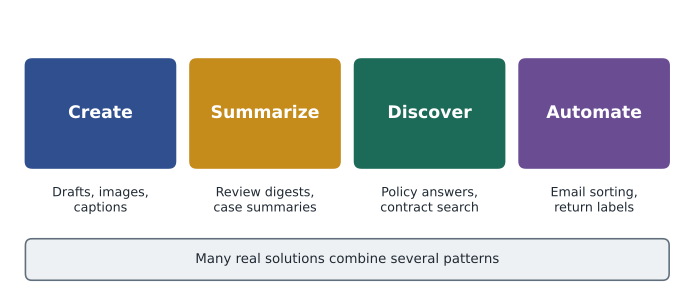
A useful way to sort ideas is by the kind of work the model does. Google's materials for the Generative AI Leader exam group use cases into four broad patterns, and most real projects are one of them or a combination.
| Pattern | What the model does | Birchline examples |
|---|---|---|
| Create | Produces new text, images, code, audio or video from instructions | First drafts of product descriptions; lifestyle images for email campaigns; social media captions |
| Summarize | Condenses long or many inputs into something shorter | Weekly digest of customer reviews per product; summary of a long return dispute for a supervisor |
| Discover | Finds and explains information, often across many documents | Staff assistant that answers questions from the store policy manual; search over supplier contracts |
| Automate | Carries out multi-step tasks, often through tools and agents | Sorting and drafting replies to customer emails; an agent that checks order status and books a return label |
The patterns overlap. A customer-email assistant discovers the relevant order and policy, summarizes the customer's problem, creates a draft reply and automates the routing. Naming the patterns still helps, because each has typical risks. Creation risks inaccurate or off-brand content; summarization risks leaving out the one important detail; discovery risks confident answers built on stale or wrong documents; automation risks the system taking an action nobody intended.
What generative AI is not the right tool for
Jules's list includes "predict which boots will sell out". That is a forecasting problem with years of structured sales data behind it. A classical machine learning model, such as the BigQuery ML demand forecast that Ravi Menon's data team built in GCP-102, is usually cheaper, more accurate and easier to explain for that kind of numeric prediction. Generative AI is strongest with language, images and loosely structured information, and with tasks where a good first draft saves a person time.
Farah gives Jules three quick tests for each idea. First, does the task involve unstructured content such as text, images, audio or documents? Second, would a capable new employee with the right documents do it well, or does it need precise calculation or a single correct answer every time? Third, is there a person or a check who can catch a wrong answer before it causes harm? If all three answers point the right way, the idea is a natural fit. If the task needs exact arithmetic, guaranteed consistency or an auditable rule, a conventional system or a classical model is often the better tool, perhaps with generative AI explaining the result in plain language.
| Idea from the staff form | Better fit | Reason |
|---|---|---|
| Write first drafts of product descriptions | Generative AI | Language task; an editor reviews every draft |
| Predict which boots will sell out | Classical ML forecast | Numeric prediction from structured history |
| Calculate staff overtime pay | Conventional software | Exact rules; one right answer; legal obligation |
| Answer staff questions about store policies | Generative AI with grounding | Discovery over documents; answers cite the source |
| Flag fraudulent orders | Classical ML and rules | Pattern detection on transactions; needs measurable error rates |
| Summarize long return disputes for supervisors | Generative AI | Summarization; supervisor reads the full file before deciding |
Value: what would success be worth?
A use case is valuable when it changes an outcome the business cares about. For Birchline, the outcomes that matter are revenue, cost, customer experience, staff time, speed and risk. Jules asks each idea's sponsor to describe value in concrete terms, not as "saves time" but as "the copy team writes about 2,400 product descriptions a year at about 40 minutes each; a good first draft could cut that to 15 minutes." That sentence can be checked later, which is the point.
Value comes in a few common shapes. Efficiency value saves staff time on repetitive work. Quality value makes work more consistent or complete, such as a review digest that never skips a product. Experience value makes customers or staff happier, such as faster email replies. Growth value creates something new, such as personalized product suggestions in each customer's preferred language. Risk value reduces exposure, such as spotting policy breaches in supplier contracts. Efficiency value is usually the easiest to measure, which is one reason many organizations start there, but the larger long-term gains are often in experience and growth.
Feasibility: can we actually do it?
An idea with high value can still be a poor first project. Feasibility asks whether the organization has what the idea needs.
- Data: Are the documents, product facts or examples available, current and allowed to be used? The store policy manual exists, but three versions disagree; that must be fixed first.
- Technology: Does an existing product already do most of it, or does it need custom work? Drafting emails in Gmail is available in Gemini for Google Workspace; an order-status agent needs integration with the order API.
- Risk: What happens if the output is wrong? A weak social caption is embarrassing; a wrong refund amount costs money and trust.
- People: Is there a business owner who wants it, staff who will use it, and someone who can review outputs?
- Cost and time: Can a pilot show results in weeks rather than a year?
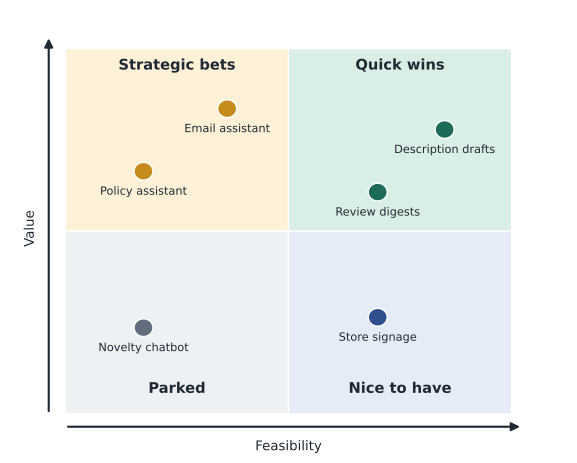
Farah suggests plotting each idea on a simple chart with value on one axis and feasibility on the other. Ideas in the high-value, high-feasibility corner are quick wins to start with. High value but low feasibility ideas are strategic bets that need preparation, such as cleaning data first. Low value, high feasibility ideas are nice to have and can wait, or be covered by tools staff already have. Low value, low feasibility ideas are parked.
Scoring the shortlist
A chart is a picture of judgments, so Jules makes the judgments explicit with a scoring sheet. Each idea gets a score from 1 to 5 on value and on four feasibility factors, and the team agrees weights before scoring so that nobody tunes the weights to favor a pet project. Value counts for 40 out of every 100 points of the total, data readiness 20, technical fit 15, risk 15 (where 5 means low risk) and people readiness 10.
weights = {"value": 0.40, "data": 0.20, "tech": 0.15, "risk": 0.15, "people": 0.10}
ideas = {
    "Product description drafts": {"value": 4, "data": 5, "tech": 5, "risk": 4, "people": 5},
    "Customer email assistant":   {"value": 5, "data": 3, "tech": 3, "risk": 3, "people": 4},
    "Store policy Q&A for staff": {"value": 4, "data": 2, "tech": 4, "risk": 4, "people": 4},
    "Review digests per product": {"value": 3, "data": 4, "tech": 5, "risk": 5, "people": 3},
    "AI-generated store signage": {"value": 2, "data": 3, "tech": 4, "risk": 3, "people": 2},
}
def score(s):
    return sum(weights[k] * v for k, v in s.items())
for name, s in sorted(ideas.items(), key=lambda kv: -score(kv[1])):
print(f"{score(s):.2f} {name}")4.45 Product description drafts 3.90 Customer email assistant 3.80 Review digests per product 3.60 Store policy Q&A for staff 2.65 AI-generated store signage
What this code does
Five AI use-case ideas are scored from 1 to 5 on value, data readiness, technical fit, risk and people readiness, and each score is multiplied by its weight and added up. Product description drafts rank first at 4.45, and AI-generated store signage ranks last at 2.65. A weighted score like this helps a team pick a first project that is both valuable and easy to deliver.
The scores are not a verdict, only a structured conversation starter. The customer email assistant scores high on value but only 3 on data readiness, because order data and policy documents are scattered, and 3 on risk, because a wrong reply reaches a customer. The store policy assistant scores 2 on data because of the three conflicting manuals. Product description drafts come out on top: high value, good data in the product catalog, an existing editorial review step, and low harm if a draft is weak because an editor fixes it before it is published.
Worked problem
Weighted score for one idea
Using the weights above, what is the score for an idea rated value 5, data 3, tech 3, risk 3 and people 4?
Show solution
- Value: 0.40 × 5 = 2.00.
- Data: 0.20 × 3 = 0.60.
- Technology: 0.15 × 3 = 0.45.
- Risk: 0.15 × 3 = 0.45.
- People: 0.10 × 4 = 0.40.
- Total: 2.00 + 0.60 + 0.45 + 0.45 + 0.40 = 3.90.
Answer: The score is 3.90 out of 5.
Starting points that usually work
Across many industries, a handful of starting points recur because they combine clear value with manageable risk. Internal productivity tools come first for many organizations: drafting, summarizing meetings and documents, and answering questions over internal knowledge. They reach many staff, the users are employees who can be trained, and a wrong answer is usually caught before it matters. Customer-facing uses such as chat assistants come later for most organizations, once grounding, monitoring and review are proven, because mistakes are public. Uses that make or influence consequential decisions about people, such as hiring, credit or discipline, need the most care of all, and in some jurisdictions carry legal duties, which lesson 9 covers.
Jules also checks what Birchline already pays for. Several staff ideas, such as "help me write emails" and "summarize this long document", are already covered by the Gemini app that office staff have under Birchline's Workspace agreement, and by the Gemini features in Gmail and Docs that a 60-person pilot will test from January 2027. Building a custom tool for those would waste effort. The better move is training and encouragement, which lesson 6 covers. Custom work should go where Birchline's own data, processes or customers make the difference, which is the build, buy or customize question in lesson 10.
Writing a use-case brief
Every shortlisted idea gets a one-page brief before any pilot starts. Jules's template has eight lines, and an idea that cannot fill them in is not ready.
| Brief field | Product description drafts |
|---|---|
| Problem | Copywriters spend about 40 minutes per new product description; the backlog delays launches. |
| Users | Six copywriters and two merchandising editors. |
| Pattern | Create, grounded in catalog data. |
| Data | Product catalog fields, supplier spec sheets, brand style guide, 200 approved past descriptions. |
| Success measure | Editing time per description; editor quality rating; time to publish new products. |
| Risks | Invented specifications; wrong sizing claims; off-brand tone; supplier text copied verbatim. |
| Human review | An editor approves every description before publishing. |
| Owner | Head of merchandising (business); Jules (program lead); Farah (technical). |
Look at how the risks line connects to the review line. Because the main risk is an invented specification, such as claiming a jacket is waterproof when it is only water-resistant, the review step checks every technical claim against the spec sheet. That link between a named risk and a named control is the habit the rest of this course builds.
Common mistakes
MistakeStarting with the most exciting idea rather than the most suitable one.
InsteadScore value and feasibility openly, and start with a quick win that can show results.
MistakeUsing generative AI for exact calculations or rule-based decisions.
InsteadUse conventional software or classical ML for those, and generative AI for language and content.
MistakeBuilding custom tools for tasks an existing product already does.
InsteadCheck licensed tools first and put custom work where your own data makes the difference.
MistakeDescribing value vaguely, as "saves time".
InsteadState a measurable baseline and target, such as minutes per task.
By the end of that week, Jules's 31 ideas have become a shortlist of five, with product description drafts as the first pilot, review digests as a second quick win, the store policy assistant as a strategic bet that waits on cleaning up the manuals, and the customer email assistant planned for later in 2027 once the first pilots have proved the review and monitoring approach. The overtime calculator and fraud flags go back to the IT and data teams, where they belong.
Summary and key terms
- Generative AI use cases usually create, summarize, discover or automate, often in combination.
- It fits work with unstructured content where a good draft or answer saves time and a person or check can catch errors; exact calculations and rule-based decisions suit conventional software or classical ML.
- Value should be stated in measurable terms: efficiency, quality, experience, growth or risk reduction.
- Feasibility covers data, technology, risk, people, cost and time.
- A value-feasibility chart and a weighted score make prioritization explicit, and quick wins with low harm make good first pilots.
- Check existing licensed tools before building, and write a brief that links each named risk to a control.
- Use case
- A specific business problem that a solution addresses, with users, data and a success measure.
- Create pattern
- Use cases where the model produces new content.
- Summarize pattern
- Use cases where the model condenses long or many inputs.
- Discover pattern
- Use cases where the model finds and explains information across sources.
- Automate pattern
- Use cases where the model carries out multi-step tasks, often with tools.
- Feasibility
- Whether the organization has the data, technology, people, risk tolerance and time an idea needs.
- Quick win
- An idea high in both value and feasibility, suited to an early pilot.
- Strategic bet
- A high-value idea that needs preparation, such as data work, before it is feasible.
- Use-case brief
- A one-page summary of problem, users, data, success measures, risks, review and owners.
Practice problems
Work each problem on paper first, then reveal the answer to check.
Which pattern best describes an assistant that answers staff questions from the policy manual?
Show answer
Discover, ideally grounded so answers cite the manual.
Why is "predict which boots will sell out" a poor first generative AI project?
Show answer
It is a numeric forecast from structured data, which classical ML handles better and more explainably.
What makes product description drafts a good quick win?
Show answer
High value, good catalog data, an existing editorial review step, and low harm because every draft is checked before publishing.
Lesson quiz · 5 questions
Score 60% or more to complete this lesson.
Create a free account to save your progress, take quizzes and earn a certificate.