
GCP-111 · Lesson 3 of 12 · 18 min
Gemini Enterprise and enterprise search
▶ Video coming soon A video version of this lesson is on the way.
The returns team at Birchline answered the same questions all day. Can a customer return a tent that was used once? What if the receipt is from a different store? Does the 60-day rule apply to online orders shipped to a store? The answers were spread across a policy library on the intranet, a folder of memos in Drive, the ticketing system's knowledge base and the head of returns' memory. New staff took weeks to learn where to look. "Gemini in Gmail won't fix this," Owen said at the third session. "The answers aren't in anyone's inbox."
"Right," Farah said. "This is a different problem. People need to ask a question once and get an answer drawn from all the places the company keeps its knowledge, with links so they can check it. That's what Gemini Enterprise is for." This lesson explains Gemini Enterprise, enterprise search and the agents that come with it, and how it differs from both Gemini in Workspace and a custom build.
What Gemini Enterprise is
Gemini Enterprise is Google Cloud's workplace product that gives employees a single place to chat with Gemini, search across company data and use agents. It connects to many sources, including Google Workspace, Microsoft 365, common business systems such as customer relationship management and ticketing tools, intranets and databases, through connectors. It then answers questions using that data and shows where each answer came from. The exam guide lists Gemini Enterprise as a prebuilt offering and highlights three capabilities: multimodal search, custom agent capabilities and the Gemini Notebook API, which brings notebook-style research over chosen sources into the product.
Farah placed it on the stack: Gemini Enterprise is an application, but one that is designed to be assembled. An administrator connects data sources, sets who can use which agents, and can let staff build simple agents of their own without code. It needs more setup than Gemini in Gmail and much less than a custom build.
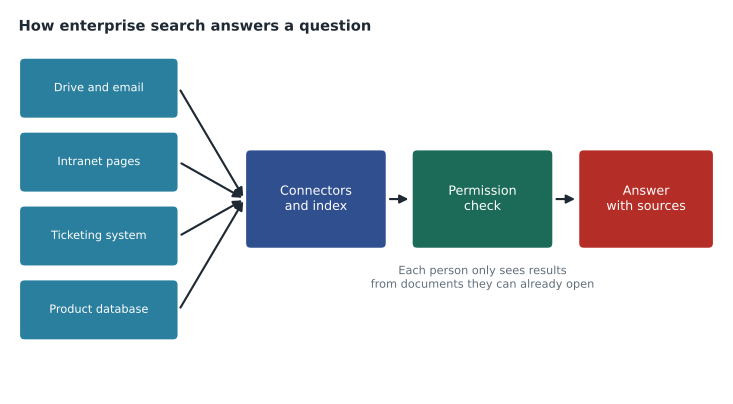
How enterprise search works
Ordinary web search finds public pages. Enterprise search finds company information that is spread across many private systems, and it must respect who is allowed to see what. Gemini Enterprise does this in four broad steps.
- Connect. Connectors link each source system. Some connectors copy content into an index that Google manages; others query the source live when a question is asked. The choice affects freshness, speed and where data is held.
- Index and understand. Content is processed so that it can be searched by meaning, not only by exact words. A question about returning a used tent can match a policy that talks about opened camping equipment.
- Check permissions. Results are filtered by the person's access in the original system, so a store associate does not see a document that only head office can open.
- Answer with sources. Gemini writes an answer from the most relevant passages and lists the documents it used, so the person can open them and check.
That last step is grounding, which GCP-110 introduced: anchoring a model's answer in specific, trusted sources rather than in whatever the model learned during training. Grounding reduces made-up answers and makes answers checkable. Lesson 8 explores grounding in more depth, including grounding with Google Search.
Multimodal search
Company knowledge is not all text. Birchline's product team keeps photos of every item, the warehouse has scanned delivery forms, and training material includes videos. Multimodal search means searching across these kinds of content together and asking questions that combine them, such as "show me the setup video and the instruction sheet for the two-person dome tent". For the exam, the key idea is that Gemini models understand images, audio and video as well as text, so enterprise search can draw on them too.
Agents in Gemini Enterprise
Gemini Enterprise is also where employees find and use agents. Some are made by Google, such as agents for deep research across many sources or for analyzing data. Some come from partners. Some are built by the company itself, either by developers on Agent Platform or by business users with a no-code designer inside Gemini Enterprise. Administrators decide which agents are available to whom.
| Kind of agent | Who builds it | Birchline example |
|---|---|---|
| Google-made agent | A research agent that reads the policy library and recent tickets and writes a briefing | |
| Partner agent | A software partner | An agent supplied with Birchline's ticketing system |
| No-code agent | A business user, in Gemini Enterprise | A returns helper that answers from the policy library and drafts customer replies |
| Custom agent | Developers, on Agent Platform | An agent that checks stock across stores and creates a transfer request |
Farah's rule was to start with the simplest kind that works. A returns helper that only reads policies and drafts replies can be built by the returns lead in an afternoon. An agent that changes data in another system, such as creating stock transfers, needs developers, testing and security review, because a mistake has real consequences.
Gemini Enterprise compared with Gemini in Workspace
Owen found the overlap confusing, and the exam tests it. Both use Gemini and both respect access. The difference is scope and purpose.
| Gemini for Google Workspace | Gemini Enterprise | |
|---|---|---|
| Main purpose | Help with the file or email in front of you | One place to search, chat and use agents across company data |
| Data reach | Mainly Workspace content the user can access | Many connected systems, including non-Google ones |
| Agents | Limited, inside the apps | A catalog of Google, partner and company agents |
| Setup | Assign licenses, adjust settings | Connect sources, configure search and agents, assign access |
| Best for | Drafting, summarizing and organizing in the apps | Finding answers spread across systems and automating tasks |
Search for customers is a different product family
Jules asked whether the same search could power the search box on the online shop. Farah explained the distinction the exam guide draws. Gemini Enterprise is for a company's own employees. Search for external users, such as customers browsing a website, is built with Agent Search on Gemini Enterprise Agent Platform, which lets developers create search and recommendation experiences for websites and apps using company data such as a product catalog. Lesson 8 covers it with other grounding tools. "Same idea, different audience," Farah said. "Employees get Gemini Enterprise. Customers get something we build with Agent Search."
Setting it up well
A good enterprise search project is mostly about the content, not the model. Farah gave Owen her checklist, built from a project at her previous employer.
- Choose a first use case with clear value. The returns questions were ideal: frequent, costly when wrong, and answerable from documents that already existed.
- Fix the sources first. Out-of-date or contradictory documents produce out-of-date or contradictory answers. The returns team retired 23 old memos before connecting the library.
- Check permissions in the source systems. Search inherits whatever access the source allows, including mistakes.
- Decide how fresh data must be. Live queries are always current but slower; indexed content is faster but updated on a schedule.
- Measure answer quality. Keep a list of real questions with known correct answers and test regularly.
- Tell people how to check answers. Sources are shown for a reason; staff should open them for anything unusual.
# A quick quality check: compare search answers with known correct answers.
test_questions = [
    ("Return window for online orders", "60 days", "60 days"),
    ("Used tent, unopened box missing", "Store credit only", "Store credit only"),
    ("Receipt from another store", "Accepted at any store", "Accepted at any store"),
    ("Bike helmet after a crash", "Not returnable; crash replacement offer", "Not returnable"),
    ("Gift card refund", "Not refundable for cash", "Refund to original payment"),
]
correct = 0
for question, expected, answer in test_questions:
    ok = expected.lower().startswith(answer.lower()) or answer.lower().startswith(expected.lower())
    correct += ok
    print(f"{'OK ' if ok else 'BAD'} {question}")
print(f"{correct} of {len(test_questions)} answers acceptable")OK Return window for online orders OK Used tent, unopened box missing OK Receipt from another store OK Bike helmet after a crash BAD Gift card refund 4 of 5 answers acceptable
What this code does
Five test questions each have a known correct answer and the answer the search returned. The program counts an answer as acceptable when it matches the start of the expected answer, and labels each one OK or BAD. Four of the five pass, and the gift card answer is flagged as wrong.
The illustrative test above shows the habit, not a real result: a short list of questions with agreed answers, rerun after every change to the sources. The wrong gift card answer would send the team back to the source documents, where they might find two policies that disagree.
Costs and licenses
Gemini Enterprise is sold per user, in editions with different features and limits. Dana asked how to decide who needed it. Farah suggested starting with the teams that spend the most time looking things up: returns, customer service, store support and the buying office, about 140 people, rather than all 1,100 staff. Staff who mainly need help writing in Gmail and Docs would be served by Gemini in Workspace. Editions, prices and included features change, so the course does not list them; a leader should compare the current editions against the actual use case.
Common mistakes
MistakeConnecting every source on day one.
InsteadStart with one well-maintained source and a clear use case, then add sources.
MistakeExpecting search to fix bad documents.
InsteadClean up out-of-date and contradictory content before connecting it.
MistakeAssuming Gemini Enterprise powers customer-facing search on the website.
InsteadExternal search for customers is built with Agent Search on Agent Platform.
MistakeLetting a no-code agent change records in other systems without review.
InsteadAgents that take actions need testing, limits and security review.
Who owns enterprise search
Enterprise search touches many systems, so ownership is easy to leave unclear. Farah asked Birchline to name three owners before the pilot. A business owner, here the head of returns, decides which questions the search must answer well, approves the test set and signs off on quality. Content owners, one for each source system, keep their documents accurate and current and retire outdated ones; the policy library has an editor, and the ticketing knowledge base has a team lead. A technical owner on the IT team manages connectors, licenses and settings, watches usage reports and handles problems. Teresa's security team reviews access settings before each new source is connected.
Owners matter most when something goes wrong. When the search gives a wrong answer, the technical owner checks whether the right document was retrieved; if it was, and the document itself is wrong, the content owner fixes it; if the wrong document was retrieved, the technical owner adjusts the source settings or reports the case. Every wrong answer becomes a new test question, so the same mistake is caught next time.
Farah added a warning about expectations. Search across company data feels like magic in a demonstration, because demonstrations use clean, well-chosen documents. Real collections contain duplicates, drafts, outdated versions and documents that disagree. The first weeks of any enterprise search project are usually spent finding and fixing these problems, and that work has value of its own: the returns team discovered that two policies gave different time limits for opened camping stoves, a conflict that had been confusing staff for a year.
Worked problem
Choosing between three options for the returns team
The returns team wants staff to get accurate answers about returns policy, drawn from the intranet library, memos in Drive and the ticketing knowledge base. Options: Gemini in Gmail; Gemini Enterprise with connectors; a custom application on Agent Platform. Which fits best?
Show solution
- The answers live in three systems, one of which is not Google Workspace. Gemini in Gmail mainly reaches the user's own Workspace content, so it would miss the intranet and ticketing sources.
- Gemini Enterprise connects to all three, filters results by each person's access and shows sources. A returns lead can add a no-code helper agent for drafting replies.
- A custom build on Agent Platform could do the same but would take months of developer time with no extra benefit for an internal search need.
Answer: Gemini Enterprise with connectors: it meets the need at the highest suitable layer, with sources and permissions handled.
The returns pilot is scheduled for February 2027, after the old memos are cleaned out. The head of returns had already written down forty questions that new staff ask most often, and those would become the test set.
Summary and key terms
- Gemini Enterprise is Google Cloud's workplace product for searching, chatting and using agents across company data.
- Connectors link Google and non-Google sources; content is indexed or queried live; results are filtered by each person's access; and answers are grounded in sources that are shown.
- It supports multimodal search, custom agents and the Gemini Notebook API.
- Agents can come from Google, partners, no-code builders or developers.
- Gemini in Workspace helps with the file in front of you; Gemini Enterprise answers across many systems.
- Search for customers is built with Agent Search on Agent Platform.
- Good results depend on clean sources, correct permissions and regular testing.
- Gemini Enterprise
- A workplace product for search, chat and agents across company data.
- Enterprise search
- Search across private company systems that respects each user's access.
- Connector
- A link that lets a product search or index a source system.
- Grounding
- Anchoring a model's answer in specific, trusted sources.
- Multimodal search
- Searching across text, images, audio and video together.
- No-code agent
- An agent a business user builds without writing code.
- Agent Search
- The Agent Platform service for building search and recommendations for external users.
Practice problems
Work each problem on paper first, then reveal the answer to check.
What does Gemini Enterprise do that Gemini in Gmail does not?
Show answer
It searches and answers across many connected company systems, including non-Google ones, and offers a catalog of agents.
Why must permissions be checked in the source systems?
Show answer
Search results inherit the source's access settings, including mistakes.
Which product would power search on a public shopping website?
Show answer
Agent Search on Gemini Enterprise Agent Platform.
Lesson quiz · 5 questions
Score 60% or more to complete this lesson.
Create a free account to save your progress, take quizzes and earn a certificate.