
GCP-111 · Lesson 1 of 12 · 19 min
The Google Cloud generative AI stack
▶ Video coming soon A video version of this lesson is on the way.
Two weeks after Owen Mitchell finished his Cloud Digital Leader preparation, Farah Qureshi put a new item on his calendar: "Gen AI product tour, every Tuesday and Thursday until the holidays." Birchline Outfitters' steering committee had approved three generative AI ideas for 2027: a shopping assistant for the online shop, help for store and head-office staff with everyday writing and searching, and a faster way for the customer service team to answer email and chat. Each idea would use different Google Cloud products, and Owen was going to be the person who could explain which product did what.
"The hard part isn't any single product," Farah told him at the first session, in the small meeting room beside the Columbus warehouse. "It's that Google sells generative AI at several levels at once. Some of it is a finished app that a store manager can open tomorrow. Some of it is a platform that only developers will touch. If you can place every product on the right level, the Generative AI Leader exam questions mostly answer themselves." Jules Baptiste, the e-commerce product manager, joined them, because the shopping assistant was his project.
This course follows those sessions. GCP-110 covered how generative AI works: models, tokens, prompting, grounding, agents and responsible use. This course, GCP-111, is the product course. It maps Google Cloud's generative AI portfolio, explains what each major offering is for, and practices matching products to business needs. GCP-112 then covers strategy and adoption, and GCP-191 prepares for the exam itself.
Why a stack is the right picture
A technology stack is a set of layers in which each layer relies on the one below it. Google describes its generative AI offerings in this way, and the picture helps a leader in two ways. First, it shows how much building effort each choice needs: a product near the top is ready to use, while a product near the bottom is raw capacity that someone has to assemble. Second, it shows where responsibility sits: the higher a company buys, the more Google manages for it; the lower it builds, the more it controls and the more it must look after itself.
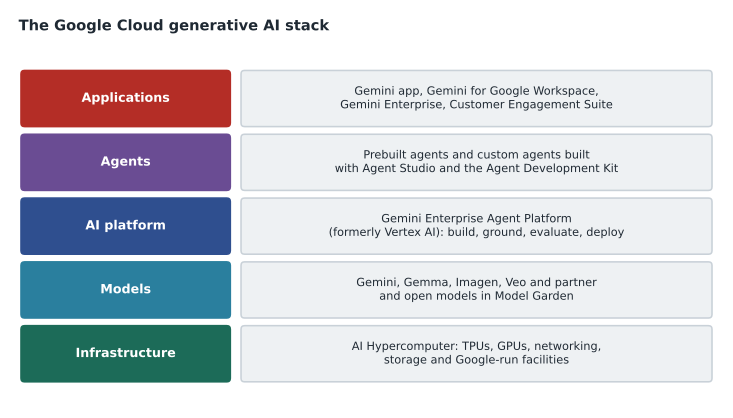
Farah drew the same five layers on the whiteboard, from the bottom up, and gave each one a sentence.
| Layer | What it provides | Main Google Cloud names |
|---|---|---|
| Infrastructure | The computers, chips, networks and storage that train and run models | AI Hypercomputer, Tensor Processing Units (TPUs), GPUs |
| Models | The trained models that generate text, code, images, video and audio | Gemini, Gemma, Imagen, Veo, plus partner and open models |
| AI platform | Tools to choose, test, ground, tune, evaluate, deploy and govern models and agents | Gemini Enterprise Agent Platform (formerly Vertex AI), Model Garden, Agent Studio |
| Agents | Systems that use a model plus tools to carry out tasks | Prebuilt agents, agents built with Agent Studio or the Agent Development Kit |
| Applications | Finished products that people use directly | Gemini app, Gemini for Google Workspace, Gemini Enterprise, Customer Engagement Suite |
A note on product names
Product names in generative AI change faster than in any other part of cloud computing, and Owen noticed this straight away. The AI platform that many books, courses and blog posts call Vertex AI was relaunched in April 2026 as the Gemini Enterprise Agent Platform, often shortened to Agent Platform. The current Generative AI Leader exam guide uses the new names, such as Agent Search on Gemini Enterprise Agent Platform and Agent Platform AutoML, so this course uses them too. Where the course catalog still says Vertex AI in a lesson title, the lesson explains the current name.
"Learn what a product does, not just what it is called," Farah said. "The name on the box will change again. The job it does will not." A sensible habit for any leader is to check Google's current documentation before a purchase or an exam, because a feature described here as new may have been renamed or folded into another product by the time you read it.
Layer 1: infrastructure
At the bottom are the machines. Training a large model means running enormous numbers of calculations across thousands of chips for weeks; serving a model to millions of users means answering requests quickly and cheaply around the clock. Google designs its own AI chips, called Tensor Processing Units (TPUs), and also offers graphics processing units (GPUs) from other makers. Google packages chips, high-speed networking, storage, software and flexible ways to buy capacity into what it calls AI Hypercomputer. Lesson 9 covers this layer.
Most companies, Birchline included, never touch this layer directly for generative AI. They benefit from it because the models and services above run on it. The exam still expects a leader to know it exists and why it matters: it is part of why Google can offer large models at scale, and it is the layer a company would use if it wanted to train or host its own models.
Layer 2: models
The second layer holds the models themselves. Google's flagship family is Gemini, which is multimodal: it can take text, images, audio, video and code as input and produce text and code as output. Gemma is a family of smaller, openly available models that a company can download, run and adapt on its own infrastructure. Imagen generates images from text, and Veo generates video. Beyond Google's own models, Google Cloud offers many partner and open models from other companies through Model Garden, which lesson 5 covers.
Jules asked why Birchline would ever want a model other than Gemini. Farah's answer was the theme of lesson 5: different tasks reward different models. A small, fast model may be the right choice for tagging thousands of product reviews cheaply, while the largest model may be worth its cost for drafting a complicated policy. Having one place to compare them is part of the value.
Layer 3: the AI platform
The middle layer is where builders work. The Gemini Enterprise Agent Platform is Google Cloud's managed platform for machine learning and generative AI. It brings together model access, prompt design and testing, grounding with company data, tuning, evaluation, deployment, monitoring and governance. Developers and data scientists use it to build custom applications and agents. Lessons 4, 6 and 8 explore it.
The platform's main value for a business is that the pieces work together under the same security, billing and access controls as the rest of Google Cloud. Teresa Okonjo, Birchline's information security manager, cared about exactly that: if the shopping assistant ran on the platform inside Birchline's own projects, it would inherit the organization policies, IAM roles and audit logs she had already set up during the migration.
Layer 4: agents
An agent uses a model to reason about a goal and then takes actions with tools, such as searching a catalog, calling an order system or booking an appointment, until the goal is met or it needs a person. Google offers prebuilt agents inside its applications and several ways to build custom agents, from no-code designers for business users to the open-source Agent Development Kit (ADK) for developers. Lesson 7 covers agents in detail.
For Birchline, the shopping assistant is an agent: it will answer product questions, check stock at nearby stores and suggest gear for a trip. In GCP-102 Farah's team had already decided it would have no permission to change orders. Where that rule is enforced, and how, is a question for the platform and security layers.
Layer 5: applications
At the top are finished products. The Gemini app is Google's assistant for individuals, with business editions available to companies. Gemini for Google Workspace brings Gemini into Gmail, Docs, Sheets, Slides, Meet and Drive. Gemini Enterprise gives employees one place to search and chat across company data and to use and build agents. The Customer Engagement Suite provides conversational agents and help for human agents in contact centers. Lessons 2, 3 and 11 cover these.
Applications need the least building. A store manager can start using Gemini in Gmail the day a license is assigned. The trade-off is control: an application does what its designers decided, with the settings an administrator can change. When Birchline needs behavior that no application provides, it moves down the stack.
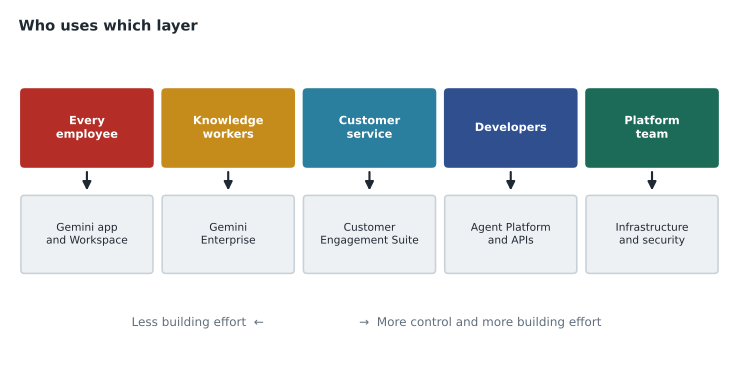
Buy, assemble or build
Farah gave Owen a simple test for any generative AI request: can we buy it, assemble it, or must we build it? Buying means using an application as it comes. Assembling means configuring a product that is designed to be extended, such as connecting Gemini Enterprise to company data or building an agent from prebuilt parts. Building means writing a custom application on the AI platform, choosing models, writing prompts, grounding, testing and deploying.
| Approach | Effort and time | Control | Birchline example |
|---|---|---|---|
| Buy | Low; days to weeks | Settings only | Gemini in Gmail and Docs for head-office staff |
| Assemble | Moderate; weeks | Data sources, agents, policies | Gemini Enterprise connected to the policy library and the returns system |
| Build | Highest; months | Full control over behavior | The shopping assistant on Agent Platform |
The exam often describes a business situation and asks which offering fits. The best answer is usually the highest layer that meets the need, because it is faster, cheaper to run and needs fewer specialist skills. Moving down the stack is justified when there is a real need for custom behavior, unusual data, strict control or scale that an application cannot provide.
# A tiny helper that applies Farah's rule: pick the highest layer that meets every need.
layers = [
    ("Application", {"ready to use", "admin settings"}),
    ("Assembled product", {"ready to use", "admin settings", "company data", "simple agents"}),
    ("AI platform build", {"ready to use", "admin settings", "company data", "simple agents",
                           "custom logic", "custom model choice", "own user interface"}),
]

def choose(needs):
    for name, offers in layers:
        if needs <= offers:
            return name
    return "Needs a closer look"

requests = {
    "Draft emails faster": {"ready to use"},
    "Search our policy library": {"company data"},
    "Shopping assistant on the website": {"company data", "custom logic", "own user interface"},
}
for request, needs in requests.items():
print(f"{request:34} -> {choose(needs)}")Draft emails faster -> Application Search our policy library -> Assembled product Shopping assistant on the website -> AI platform build
What this code does
Three solution layers are listed with the capabilities each offers, from a ready-made application up to a full AI platform build. For each need, the helper picks the first, simplest layer that covers every requirement. Drafting emails needs only an application, searching the policy library needs an assembled product, and a website shopping assistant needs a full platform build.
Google Cloud's strengths, as the exam frames them
The exam guide expects candidates to explain why an organization might choose Google Cloud for generative AI. Farah summarized the themes for Owen, with the caution that a leader should weigh them against other providers rather than repeat them as slogans.
- An AI-first approach. Google has built AI into its own products for many years, and its research teams developed many of the techniques that modern models rely on.
- An enterprise-ready platform. Security, privacy, governance, access control and compliance tools come with the platform rather than being added later.
- A broad ecosystem and an open approach. Customers can use Google's models, partner models and open models, and can connect to tools and data outside Google.
- AI-optimized infrastructure. Google designs its own TPUs and offers GPUs, networking and data center capacity tuned for AI.
- Data control. Business editions are designed so that a company's data stays under its control; lesson 10 covers what that means in practice.
- Tools for every skill level. Low-code and no-code tools, prebuilt models and APIs let people without data science training build useful things.
Common mistakes
MistakeTreating every generative AI request as a development project.
InsteadCheck first whether an existing application or an assembled product already meets the need.
MistakeMemorizing product names without knowing their layer.
InsteadPlace each product on the stack; the layer tells you who uses it and how much effort it needs.
MistakeAssuming the platform from an older book is still called Vertex AI.
InsteadCheck current documentation; it was relaunched as Gemini Enterprise Agent Platform in 2026.
MistakeChoosing the lowest layer because it offers the most control.
InsteadControl has a cost in skills, time and responsibility; choose the highest layer that meets the need.
Worked problem
Placing three requests on the stack
Birchline has three requests: the finance team wants help summarizing long vendor contracts in Docs; the returns team wants staff to ask questions about the returns policy in plain language; the web team wants an assistant on the shop that checks store stock. Where does each belong?
Show solution
- Summarizing documents that already live in Docs is a built-in capability of Gemini for Google Workspace. That is a buy decision at the application layer.
- Answering questions from a specific policy library needs company data connected and permissions respected. Gemini Enterprise, connected to the library, does this. That is an assemble decision.
- An assistant on Birchline's own website that calls the inventory system needs a custom interface, custom tools and custom rules. That is a build on the AI platform, as an agent.
Answer: Contracts: Gemini for Workspace (buy). Returns questions: Gemini Enterprise with connected data (assemble). Shop assistant: a custom agent on Agent Platform (build).
By the end of the session Owen had copied the five layers into his notebook and written a product name in each. Jules took a photo of the whiteboard for his project plan. "Next time," Farah said, "we start at the top, with the things every employee could use next week."
Summary and key terms
- Google Cloud's generative AI offerings form a stack of five layers: infrastructure, models, the AI platform, agents and applications.
- AI Hypercomputer, with TPUs and GPUs, is the infrastructure.
- Gemini, Gemma, Imagen and Veo are Google models, and Model Garden offers partner and open models too.
- The Gemini Enterprise Agent Platform, formerly Vertex AI, is the platform for building, grounding, evaluating and deploying.
- Agents use models and tools to complete tasks.
- Applications such as the Gemini app, Gemini for Google Workspace, Gemini Enterprise and the Customer Engagement Suite are ready to use.
- Choose the highest layer that meets the need: buy, then assemble, then build.
- Technology stack
- A set of layers in which each relies on the one below.
- AI Hypercomputer
- Google Cloud's integrated system of AI chips, networking, storage, software and purchasing options.
- Tensor Processing Unit (TPU)
- A chip designed by Google to speed up machine learning calculations.
- Gemini
- Google's family of multimodal models.
- Gemma
- A family of smaller, openly available Google models.
- Gemini Enterprise Agent Platform
- Google Cloud's managed AI platform, formerly called Vertex AI.
- Agent
- A system that uses a model and tools to work toward a goal.
- Buy, assemble, build
- A test for choosing how far down the stack a solution must go.
Practice problems
Work each problem on paper first, then reveal the answer to check.
Which layer would a developer use to build a custom chatbot for a website?
Show answer
The AI platform, Gemini Enterprise Agent Platform, usually as an agent.
Name two Google model families other than Gemini.
Show answer
Any two of Gemma, Imagen and Veo.
Why is the highest suitable layer usually the best choice?
Show answer
It needs the least time, skill and maintenance, and Google manages more of it.
Lesson quiz · 5 questions
Score 60% or more to complete this lesson.
Create a free account to save your progress, take quizzes and earn a certificate.