
GCP-102 · Lesson 6 of 12 · 19 min
Modernizing infrastructure: virtual machines, containers and serverless
▶ Video coming soon A video version of this lesson is on the way.
Birchline's old data center room holds about sixty servers. Some run the online shop, some the store inventory system, some the nightly batch jobs that tally sales, and a surprising number run things nobody can quite explain. Before anything could move, Farah asked Owen to lead the discovery and assessment step: build a list of every workload, what it does, who owns it, what it depends on and how busy it is. A workload is any application, service or job that consumes computing resources, from the online shop to a script that emails a sales report every Monday. Owen's spreadsheet grew to eighty-three workloads, including eleven that turned out to be unused. This lesson follows what Birchline decided to do with them, and explains the compute options Google Cloud offers.
Six ways to move a workload
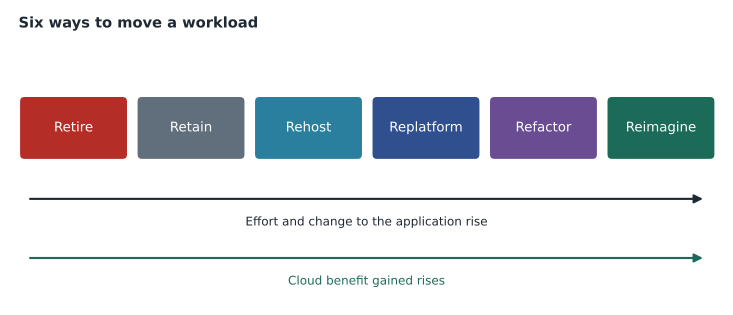
The exam guide lists six migration approaches. They are often called the six Rs, and every workload ends up on one of them. To retire is to switch a workload off because it is no longer needed. To retain is to leave it where it is for now, perhaps because a contract, a regulation or a vendor makes moving it impractical. To rehost, often called lift and shift, is to move it as it is onto cloud virtual machines with no changes to the application. To replatform, sometimes called lift and optimize, is to make modest changes that take advantage of managed services, such as moving a database to Cloud SQL while leaving the application unchanged. To refactor is to change the application's code and structure substantially, for example breaking it into smaller services that run in containers. To reimagine is to rethink the business process itself and build something new, often cloud-native from the start.
| Approach | What happens | Effort and risk | Birchline example |
|---|---|---|---|
| Retire | Switch it off | Lowest | Eleven unused servers, including an old intranet |
| Retain | Leave it on premises for now | Low now, revisit later | A vendor's warehouse scanner software tied to local hardware |
| Rehost | Move as-is to virtual machines | Low to moderate | The store inventory system on Compute Engine |
| Replatform | Small changes to use managed services | Moderate | Shop catalog database to Cloud SQL |
| Refactor | Restructure the code, often into containers | High | Order API split into services on Cloud Run |
| Reimagine | Redesign the process and build new | Highest | A new store-pickup service built cloud-native |
Moving along the list from rehost to reimagine usually costs more time and money up front but delivers more of the cloud's benefits afterwards. Rehosting retires the hardware quickly but keeps every old habit, including manual patching. Refactoring takes longer but produces a system that scales on its own and can be changed safely many times a day. Most organizations mix approaches, rehosting many workloads quickly to meet a deadline, such as Birchline's lease expiry, and refactoring the few that matter most to customers. Retiring and retaining are real choices too: every workload switched off is one less to migrate, secure and pay for.
Compute terms every leader should know
A virtual machine (VM) is a software-defined computer running on a physical server, with its own operating system and allocated processor, memory and disk. Many VMs can share one physical machine, each isolated from the others. A container packages an application with the libraries and settings it needs, but shares the host's operating system kernel rather than carrying a full operating system of its own. Containers are therefore smaller and start in seconds rather than minutes, and the same container runs identically on a laptop, in a test environment and in production. Microservices is a design in which an application is built from many small, independent services, each responsible for one job and communicating with the others through APIs. Containers are the usual way to package microservices.
Kubernetes is an open-source system, originally developed at Google, that runs and manages containers across a cluster of machines: starting them, restarting them when they fail, spreading them across servers and scaling them up and down. Autoscaling automatically adds or removes capacity, such as VMs or containers, in response to demand. Load balancing spreads incoming requests across many instances so that none is overloaded and a failed instance is bypassed. Managed services are services that the provider operates on the customer's behalf, such as Cloud SQL, so the customer does not patch or maintain the underlying systems. Serverless computing goes furthest: the customer supplies code or a container, and the platform handles all servers, scales to zero when idle and charges only while the code runs.
| Term | In one sentence |
|---|---|
| Virtual machine | A software-defined computer with its own operating system. |
| Container | An application packaged with its dependencies, sharing the host's kernel. |
| Microservices | An application built from small independent services that talk through APIs. |
| Kubernetes | Open-source software that runs and manages containers across many machines. |
| Autoscaling | Adding and removing capacity automatically as demand changes. |
| Load balancing | Spreading requests across instances and routing around failures. |
| Spot VMs | Spare capacity at a large discount that can be reclaimed at short notice. |
| Serverless | Running code without managing servers, paying only while it runs. |
Compute Engine
Compute Engine is Google Cloud's IaaS service for virtual machines. Customers choose a machine type (how many processors and how much memory), an operating system image and the disks, and can run almost anything that runs on a physical server today. Its business value is that existing applications can move with little or no change, which is why it is the destination for most rehosted workloads. Compute Engine also offers pricing options that matter to the finance team: discounts for running a VM steadily, discounts for committing to use a certain amount for one or three years, and Spot VMs, which use Google's spare capacity at a steep discount but can be stopped with short notice when Google needs the capacity back. Spot VMs suit work that can be interrupted and restarted, such as Birchline's nightly batch jobs and image processing for the photo library, and do not suit the checkout page.
Birchline's store inventory system is a classic rehost. The vendor supports it only on a particular Windows Server version, and rewriting it would take years. On Compute Engine it runs on the same operating system as today, but on hardware Birchline no longer has to buy, with snapshots for backup and the ability to resize the VM if stores add more products. The team will still patch Windows itself, as the shared responsibility model in lesson 2 predicts for IaaS.
Google Kubernetes Engine
Google Kubernetes Engine (GKE) is Google Cloud's managed Kubernetes service. Running Kubernetes yourself is complex; GKE has Google operate the control plane, apply upgrades and security patches, and, in its Autopilot mode, manage the underlying machines as well, so the customer focuses on deploying containers. GKE suits organizations running many containerized services that need fine control over networking, scheduling and resources, and it supports both long-running services and batch jobs. Because Kubernetes is open source and runs in other clouds and on premises, applications built for GKE are also more portable, a theme lesson 8 develops.
Serverless: Cloud Run and Cloud Run functions
Cloud Run runs containers without the customer managing any servers or clusters. A team deploys a container image, and Cloud Run gives it a web address, scales the number of instances with incoming requests, including down to zero when nothing is happening, and bills only for the resources used while requests are being handled. Cloud Run functions, formerly Cloud Functions, run small pieces of code in response to events, such as a new file arriving in a Cloud Storage bucket or a message published to Pub/Sub, without the team even building a container. Serverless suits web applications, APIs and event-driven tasks with variable or unpredictable traffic, and teams that want to spend their time on code rather than infrastructure.
The order API is moving to Cloud Run. On a quiet weekday morning a couple of instances handle all the traffic; during the holiday sale Cloud Run adds instances in seconds. A Cloud Run function will resize each new product photo the moment it lands in Cloud Storage, a job that used to run in a nightly batch on a server that sat idle the rest of the day.
# How many instances does an autoscaled service need through a sale day?
# Invented figures: each instance handles about 80 requests per second.
per_instance = 80
hourly_load = {"06:00": 40, "09:00": 300, "12:00": 900, "15:00": 1400, "19:00": 2600, "23:00": 500}
for hour, rps in hourly_load.items():
    needed = max(1, -(-rps // per_instance))   # round up, keep at least one
    print(f"{hour}  {rps:5} requests/s -> {needed:3} instances")
peak = max(hourly_load.values())
print("A fixed-size setup would need", -(-peak // per_instance), "instances running all day.")06:00 40 requests/s -> 1 instances 09:00 300 requests/s -> 4 instances 12:00 900 requests/s -> 12 instances 15:00 1400 requests/s -> 18 instances 19:00 2600 requests/s -> 33 instances 23:00 500 requests/s -> 7 instances A fixed-size setup would need 33 instances running all day.
What this code does
Expected requests per second at different times of a sale day are divided by what one instance can handle, rounding up and keeping at least one instance. The program prints the number of instances needed each hour. It then shows that a fixed setup sized for the evening peak would need 33 instances running all day.
The output shows the case for elasticity in miniature. A fixed setup sized for the evening peak runs more than thirty instances at six in the morning for no reason; an autoscaled service runs one. Load balancing spreads the requests across whatever instances exist at the moment.
| Option | Customer manages | Scales by | Best for |
|---|---|---|---|
| Compute Engine | Operating system and everything above | Managed instance groups and autoscaling rules | Rehosted and specialized workloads |
| GKE | Containers and Kubernetes configuration | Kubernetes autoscaling of pods and nodes | Many containerized services needing control |
| Cloud Run | The container only | Requests, automatically, down to zero | Web apps and APIs with variable traffic |
| Cloud Run functions | A function's code only | Events, automatically | Small tasks triggered by events |
The business value of modern infrastructure
The exam guide asks why infrastructure modernization matters to the business, not just to the IT team. Modern infrastructure lets an organization release changes faster and more safely, because containers and automated deployment make each change small and reversible. It improves resilience, because autoscaling and load balancing across zones keep services running through spikes and failures. It changes cost, because capacity follows demand and spare-capacity options such as Spot VMs cut the price of flexible work. And it frees people, because less time spent patching servers means more time spent on things customers notice. None of these benefits arrives automatically with a rehost, which is why Birchline's plan treats rehosting as the first step for many workloads, not the last.
Common mistakes
MistakeRefactoring every workload before moving anything.
InsteadRehost or replatform many workloads quickly, and refactor the few where the benefit justifies the effort.
MistakeRunning customer-facing checkout on Spot VMs to save money.
InsteadUse Spot VMs for interruptible work such as batch jobs; keep critical services on standard capacity.
MistakeAssuming containers and VMs are the same thing.
InsteadA VM carries a full operating system; a container shares the host kernel and is smaller and faster to start.
MistakeForgetting to retire unused workloads.
InsteadEvery workload switched off during discovery is one less to migrate, secure and pay for.
Moving in waves
With eighty-three workloads and a lease that ends in late 2027, Birchline cannot move everything at once. Farah grouped the workloads into migration waves, each a set of systems that can move together safely. The first wave holds low-risk internal systems with few dependencies, such as the returns portal and the file shares, so the team can practice its process, its backups and its rollback plans where mistakes cost little. Later waves carry the systems customers notice, such as the online shop, and each is scheduled away from the holiday season and the spring rush.
Dependencies decide much of the order. The nightly sales batch jobs read from the inventory database, so they cannot move far ahead of it without slowing down every night as data crosses the link between the old room and Google Cloud. Owen's discovery spreadsheet now has a column listing what each workload talks to, and the waves were drawn so that chatty systems move together. Every wave ends with a short review of what went well, what went wrong and what to change next time, which is how the team gets faster and safer as the project goes on.
Worked problem
Placing four workloads
Owen must recommend an approach for four workloads: an unused old intranet, the vendor-locked inventory system, the shop's MySQL database, and a new store-pickup service. What should he suggest?
Show solution
- Nobody uses the intranet, so retire it.
- The inventory system cannot be changed and depends on a specific operating system, so rehost it on Compute Engine.
- The database engine can stay MySQL while Google manages it, so replatform it to Cloud SQL.
- The pickup service is new and customer-facing with variable traffic, so reimagine it as a cloud-native service on Cloud Run.
Answer: Retire, rehost, replatform and reimagine respectively, choosing the least effort that delivers what each workload needs.
Summary and key terms
- Discovery and assessment lists every workload before migration.
- The six approaches are retire, retain, rehost, replatform, refactor and reimagine, with effort and cloud benefit rising from left to right.
- Virtual machines carry full operating systems; containers package applications more lightly; microservices split applications into small services; Kubernetes runs containers at scale.
- Compute Engine provides VMs, including discounted Spot VMs for interruptible work.
- GKE is managed Kubernetes.
- Cloud Run and Cloud Run functions are serverless and scale automatically, even to zero.
- Modern infrastructure speeds change, improves resilience, aligns cost with demand and frees staff.
- Workload
- Any application, service or job that consumes computing resources.
- Rehost
- Moving a workload as-is to cloud virtual machines.
- Replatform
- Moving with small changes to use managed services.
- Refactor
- Restructuring an application's code, often into containers or microservices.
- Container
- An application packaged with its dependencies, sharing the host operating system kernel.
- GKE
- Google Kubernetes Engine, Google Cloud's managed Kubernetes service.
- Cloud Run
- A serverless platform that runs containers and scales with requests.
- Spot VM
- A discounted VM using spare capacity that can be reclaimed at short notice.
Practice problems
Work each problem on paper first, then reveal the answer to check.
What is the difference between rehosting and replatforming?
Show answer
Rehosting moves a workload unchanged to VMs; replatforming makes small changes to use managed services, such as moving a database to Cloud SQL.
Which kind of work suits Spot VMs?
Show answer
Work that can be interrupted and restarted, such as batch processing.
Why does Cloud Run cost little when no one is using a service?
Show answer
It scales to zero instances and bills only while requests are being handled.
Lesson quiz · 5 questions
Score 60% or more to complete this lesson.
Create a free account to save your progress, take quizzes and earn a certificate.