
GCP-102 · Lesson 10 of 12 · 19 min
Identity, compliance and data sovereignty
▶ Video coming soon A video version of this lesson is on the way.
Two weeks after Birchline's first projects went live in Google Cloud, Teresa ran an access review and found something that worried her. During the rush to set things up, eleven people had been given the broad Owner role on the production shop project, including two contractors whose work had finished. Nothing bad had happened, but any one of those accounts, if stolen, could have deleted the online shop. The fix took an afternoon. The lesson, as Teresa told Owen, would last the whole migration: in the cloud, identity is the front door, and every decision about who can do what is a security decision. This lesson covers how Google Cloud handles identity and access, how organizations demonstrate compliance, and what data sovereignty and residency mean in practice for an organization like Birchline.
Identities in Google Cloud
Every action in Google Cloud is taken by a principal, an identity that can be granted access. Principals include individual user accounts, groups of users, and service accounts, which are identities used by applications and automated jobs rather than people. Birchline's staff sign in with their company identities, managed centrally through Cloud Identity and the same directory as their email, so that when someone leaves, disabling one account removes their access everywhere. Groups make administration manageable: instead of granting access to fifty people one by one, Teresa grants it to a group such as shop-developers and manages membership in one place.
Service accounts deserve special care because nobody types their passwords and nobody notices if they are misused. The order API running on Cloud Run uses a service account that can read the catalog database and publish order events to Pub/Sub, and nothing else. If an attacker ever tricked the API into doing something unexpected, the damage would be limited to what that service account can reach.
Identity and Access Management
Identity and Access Management (IAM) controls who can do what on which resources. It works by attaching policies to resources. Each policy grants roles to principals, and each role is a collection of permissions, the individual actions such as reading a storage object or creating a virtual machine. There are three kinds of role. Basic roles (Owner, Editor and Viewer) are very broad and date from Google Cloud's early days; they are convenient but usually grant far more than anyone needs. Predefined roles are created and maintained by Google for specific jobs, such as Cloud SQL Client or Storage Object Viewer. Custom roles are created by an organization when no predefined role fits exactly.
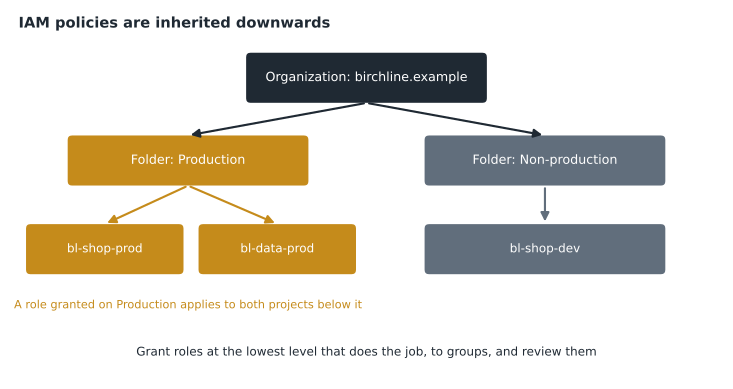
Policies can be set at each level of the resource hierarchy introduced in GCP-101: the organization node, folders, projects and individual resources. Access granted at a higher level is inherited by everything below it. A role granted on the Production folder applies to every project inside it; a role granted on the organization applies everywhere. Inheritance makes administration efficient but also makes mistakes powerful, which is why broad roles should be granted at the lowest sensible level.
| Role type | Who creates it | Scope | Use |
|---|---|---|---|
| Basic (Owner, Editor, Viewer) | Very broad | Small experiments; avoid in production | |
| Predefined | One service or job | The default choice for most access | |
| Custom | The organization | Exactly the permissions chosen | When no predefined role fits |
The guiding principle is least privilege, introduced in lesson 9: grant only the permissions needed, at the lowest level of the hierarchy, to groups rather than individuals, and review access regularly. After Teresa's review, the Owner role on the production shop project belongs to a group of two senior administrators who must use security keys, developers have predefined roles on the development project, and the contractors' access is gone. Google Cloud also offers tools that recommend removing permissions a principal has not used, which made the review faster.
# A toy least-privilege check: which granted permissions were never used in 90 days?
granted = {"owen@birchline.example": {"storage.objects.get", "storage.objects.delete", "compute.instances.create",
                                       "bigquery.jobs.create", "iam.roles.update"},
           "order-api service account": {"cloudsql.instances.connect", "pubsub.topics.publish", "storage.buckets.delete"}}
used = {"owen@birchline.example": {"storage.objects.get", "bigquery.jobs.create"},
        "order-api service account": {"cloudsql.instances.connect", "pubsub.topics.publish"}}
for who, perms in granted.items():
    unused = sorted(perms - used[who])
print(f"{who}: {len(unused)} unused -> {unused}")owen@birchline.example: 3 unused -> ['compute.instances.create', 'iam.roles.update', 'storage.objects.delete'] order-api service account: 1 unused -> ['storage.buckets.delete']
What this code does
For each user or service account, the set of permissions it was granted is compared with the set it actually used in the last 90 days. The difference is the list of unused permissions. Those are candidates for removal under the principle of least privilege.
The output makes the point visually: the order API's account can delete storage buckets, a permission it has never used and should never need. Removing it costs nothing and closes a door an attacker could use.
Strong authentication
Access control is only as strong as the proof of identity behind it. Lesson 9 introduced 2-step verification (2SV), Google's term for multi-factor authentication. Birchline requires 2SV for every staff account and security keys, small physical devices that resist phishing, for every administrator. Google also supports context-aware access, which considers factors such as the device and its security status before granting access, and Identity-Aware Proxy, which lets staff reach internal applications based on identity and context rather than a network location, the zero-trust approach from lesson 9.
Compliance
Compliance means meeting the laws, regulations, industry standards and contracts that apply to an organization. For Birchline these include US federal rules for particular kinds of data and the state privacy laws that apply to its customers, which vary from state to state, the Payment Card Industry Data Security Standard (PCI DSS) for card payments, and the security terms in its contracts with suppliers and partners. A healthcare organization would add health information rules; a bank, financial regulations.
Under the shared responsibility model, compliance is shared too. Google is responsible for the compliance of its infrastructure and services, and it proves this through third-party audits and certifications against standards such as ISO/IEC 27001 for information security management, SOC 2 reports on security controls and PCI DSS for payment services. The customer is responsible for using those services in a compliant way: configuring access correctly, choosing appropriate locations, keeping records and meeting its own legal duties. A certified service does not make an organization compliant on its own any more than a certified lock makes a house secure if the door is left open.
Google provides several resources to help. The Compliance Resource Center explains how Google Cloud supports major standards and regulations in different countries. The Compliance Reports Manager gives customers access to audit reports and certificates they can share with their own auditors. Transparency reports publish information such as how often governments request user data and how Google responds. These help Birchline answer auditors and customers without commissioning its own audit of Google's data centers.
| Responsibility | Birchline | |
|---|---|---|
| Infrastructure certified against standards | Yes, through third-party audits | Relies on Google's reports |
| Choosing where data is stored | Offers regions and controls | Chooses locations and enforces them |
| Access to data | Restricts and logs its own staff access | Grants and reviews IAM access |
| Card payment handling | Certifies services it offers | Keeps card data out of scope or follows PCI DSS for its systems |
| Privacy duties to customers | Provides tools and contract terms | Meets its own legal obligations |
Digital sovereignty and data residency
Data residency is about where data is physically stored. Digital sovereignty is broader: an organization's or a country's ability to control its data, its technology and its operations, including who can access data, under which laws and with which safeguards. Sovereignty concerns arise when data is subject to the laws of the country where it is stored or the country of the company storing it, when governments require certain data to stay within their borders, or when organizations want assurance that no one, including the provider, can access their data without permission.
Google Cloud offers several ways to meet these needs. Customers choose the region where each resource is created, and an organization policy can restrict resource locations so that no one in the organization can accidentally create storage or databases outside approved regions. Customer-managed and externally held encryption keys, described in lesson 9, give organizations technical control over who can read their data. Google also offers controls and partner-operated offerings for public sector and regulated customers with stricter sovereignty requirements; the details vary by country and change over time, so a digital leader should check the current options for their jurisdiction.
Birchline's decision was straightforward: all customer personal data stays in US regions, Columbus as the primary and Iowa for backups, enforced by an organization policy, with customer-managed keys for the customer database. Because state privacy laws differ, Birchline's privacy team keeps a short register of the obligations that apply to customers in each state where it sells. Teresa added a monthly check that no resource has appeared outside the approved locations.
Common mistakes
MistakeGranting basic Owner or Editor roles for convenience.
InsteadUse predefined roles at the lowest level of the hierarchy, granted to groups, and review them regularly.
MistakeForgetting that roles are inherited downwards.
InsteadRemember that a role on a folder or the organization applies to every project beneath it.
MistakeAssuming a certified provider makes the customer compliant.
InsteadGoogle's certifications cover its side; the customer must still configure and use services compliantly.
MistakeRelying on staff to remember which regions are allowed.
InsteadEnforce approved locations with an organization policy.
Separation of duties
Least privilege limits what any one person can do; separation of duties makes sure that no single person can complete a sensitive action alone. The classic example comes from finance: the person who approves a payment should not be the person who sends it. In Google Cloud the same idea applies to access and money. At Birchline, the people who can grant IAM roles are not the people who build and run the shop, so a developer cannot quietly give themselves more access. The billing administrators who manage budgets cannot change production systems, and the production administrators cannot change the billing account. Changes to the organization-wide policies, such as the location restriction, need approval from both Teresa and Farah.
Separation of duties slows a few tasks down, and Farah admits it occasionally annoys the developers. The trade-off is worth it because it protects against mistakes as well as misuse: an error that would need two people to make is far less likely than one that a single tired administrator could make late on a Friday. It also helps with compliance, because auditors for payment card standards and financial controls expect sensitive duties to be divided.
Knowing who did what
The third step of access control from lesson 9, auditing, depends on good records. Google Cloud keeps audit logs that record administrative actions, such as who created a virtual machine or changed an IAM policy, and, when an organization turns them on, who read or changed particular data. These logs flow into Cloud Logging, where they can be searched, kept for as long as policy requires and sent to Google Security Operations for analysis.
Audit logs answer the questions that matter after an incident: what changed, who changed it, from where and when. They also deter misuse, because staff know their actions are recorded. Birchline keeps administrative audit logs for longer than the default, in a separate project that only the security team can manage, so that someone who compromised a production account could not erase the evidence of what they did. Teresa reviews a short report of the week's most sensitive changes every Monday morning, which takes ten minutes and has twice caught a mistake before it caused trouble.
Worked problem
Fixing the access review
Teresa's review found eleven people with the Owner role on the production shop project, including two contractors who had finished their work. What should she do?
Show solution
- Remove the contractors' access immediately, since they no longer need it.
- Replace individual Owner grants with predefined roles that match each person's job.
- Keep the Owner role only for a small group of administrators who use security keys.
- Grant roles to groups rather than individuals, and schedule regular reviews using Google's recommendations for unused permissions.
Answer: Remove unneeded access, move to predefined roles granted to groups at the lowest sensible level, protect the few administrators with security keys, and review access regularly.
Summary and key terms
- Principals in Google Cloud include users, groups and service accounts, managed centrally through Cloud Identity.
- IAM policies grant roles, made of permissions, to principals on resources; roles are basic, predefined or custom, and policies are inherited down the resource hierarchy.
- Least privilege means granting only what is needed, at the lowest level, to groups, with regular review. 2SV, security keys and context-aware access strengthen authentication.
- Compliance is shared: Google proves its side through third-party audits and provides the Compliance Resource Center, Compliance Reports Manager and transparency reports, while customers use services compliantly.
- Data residency concerns where data is stored, and digital sovereignty concerns control over data and operations; regions, location policies and customer-managed keys help meet both.
- Principal
- An identity that can be granted access, such as a user, group or service account.
- Service account
- An identity used by an application or automated job.
- IAM role
- A collection of permissions granted to a principal.
- Predefined role
- A Google-maintained role for a specific job.
- Inheritance
- Access granted at a higher level of the hierarchy applying to everything below.
- Third-party audit
- An independent assessment of controls against a standard.
- Data residency
- Where data is physically stored.
- Digital sovereignty
- Control over data, technology and operations, including under which laws.
Practice problems
Work each problem on paper first, then reveal the answer to check.
Why are predefined roles usually better than basic roles?
Show answer
They grant only the permissions needed for a specific job, while basic roles are very broad.
A role is granted on the Production folder. Which resources does it apply to?
Show answer
Every project and resource inside the Production folder.
How can an organization prevent staff from creating storage outside approved regions?
Show answer
With an organization policy that restricts resource locations.
Lesson quiz · 5 questions
Score 60% or more to complete this lesson.
Create a free account to save your progress, take quizzes and earn a certificate.