
FILM-210 · Lesson 8 of 12 · 29 min
Screenplay format and software
Screenplay format can look fussy at first: a single font, specific margins, scene headings in capitals, character names centered above their dialogue. But format is not decoration. It makes scripts quick to read, makes page count a reliable estimate of screen time, and lets every department find what it needs. A script that ignores format signals inexperience, and many readers stop reading. This lesson covers the elements of standard format, the conventions for scene headings, action, dialogue and transitions, the special formats used for television and other media, and the software writers use.
Why format matters
Standard format grew out of studio practice in the early sound era and was refined over decades. Its main purposes are practical.
- Timing: in standard format, one page averages about one minute of screen time, which makes budgeting and scheduling possible.
- Readability: readers can scan quickly, see who speaks and where scenes change.
- Production: the first assistant director breaks the script into eighths of a page to schedule each day's shooting.
- Professionalism: correct format tells readers you know the craft.
The core of standard feature format is a 12-point Courier or Courier-style monospaced font. Monospacing gives each character the same width, which keeps page density consistent.
The elements of a screenplay page
A screenplay page combines a small number of element types, each with its own position and style.
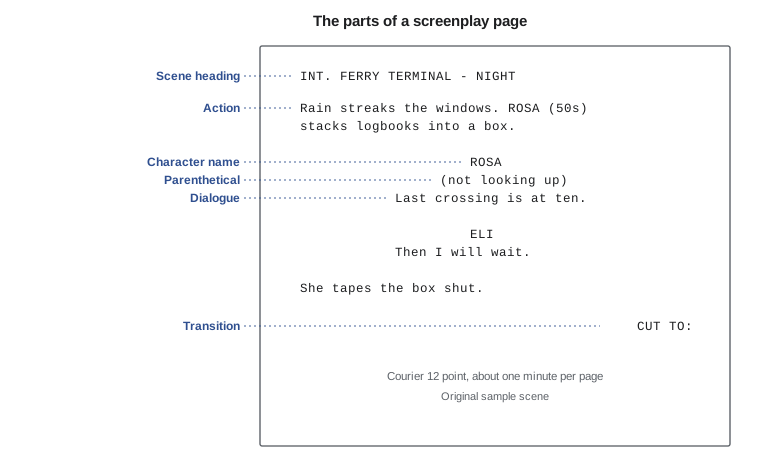
| Element | Purpose | Typical style |
|---|---|---|
| Scene heading (slugline) | Says where and when a scene takes place | INT. or EXT., location, time of day, in capitals |
| Action | Describes what we see and hear | Present tense, full width, short paragraphs |
| Character name | Shows who speaks | Capitals, indented toward the center |
| Parenthetical | Brief delivery or address note | In parentheses under the name |
| Dialogue | What the character says | Narrower block under the name |
| Transition | Notes an unusual cut or effect | Capitals at the right, such as CUT TO: or MATCH CUT TO: |
| Shot | Calls attention to a specific image | Capitals, used sparingly, such as CLOSE ON or INSERT |
Scene headings
Every scene starts with a scene heading, also called a slugline. It has three parts: interior or exterior, location and time of day.
- INT. (interior) or EXT. (exterior). Some scenes that move between inside and outside use INT./EXT.
- Location: specific enough for the production team, such as "ROSA'S KITCHEN" or "FERRY TERMINAL - PARKING LOT".
- Time of day: usually DAY or NIGHT; some writers use DAWN, DUSK or CONTINUOUS. Avoid exact clock times unless they matter to the story.
Example: EXT. HARBOR ROAD - NIGHT. When a character moves continuously from one place to another, the next heading may use CONTINUOUS. Minor sub-locations within a larger location can use shorter headings, such as "KITCHEN" after "INT. FARMHOUSE - DAY".
Action lines
Action lines describe what the audience sees and hears, in the present tense. Write vividly but briefly. Most professional scripts keep action paragraphs to three or four lines, using white space to create pace. A long block of description slows reading and suggests a slow film.
- Write only what can be seen and heard.
- Use active verbs: "Rosa yanks the rope" rather than "the rope is being pulled by Rosa".
- Capitalize a character's name the first time they appear.
- Some writers capitalize key sounds or props for the production team; use this sparingly.
- Break action into short paragraphs to suggest separate shots without writing camera directions.
Worked problem
Tightening an action paragraph
A draft action paragraph reads: "Rosa, who has worked on the ferry for thirty years and is feeling very tired and worried about her future, slowly walks across the deck in the rain, thinking about her job and the new automated system the company is installing next month." Rewrite it for the screen.
Show solution
- Remove what cannot be filmed: "worked for thirty years", "worried about her future" and "thinking about her job" are internal or backstory.
- Keep what can be seen: Rosa crossing the deck in the rain, slowly.
- Add a visual detail that suggests the inner state: perhaps she passes a new sign announcing the automated system.
- Rewrite: "Rain hammers the deck. ROSA (50s) crosses it slowly, one hand on the rail. She stops at a bright new sign: AUTOMATED DOCKING - COMING SOON. Looks at it a long moment."
Answer: The new version shows the same situation in filmable terms, gives the actor something to play and lets the audience infer her worry. It also turns one long sentence into short, readable lines.
Dialogue blocks, extensions and continued lines
Dialogue appears in a narrower block under the character's name. Extensions next to the name indicate where the voice comes from: (V.O.) for voice-over, (O.S.) or (O.C.) for off-screen, and sometimes (CONT'D) when the same character continues speaking after an action line. When a speech breaks across pages, writers mark (MORE) at the bottom of the first page and (CONT'D) on the next, though screenwriting software handles this automatically.
Transitions and camera directions
Older scripts used transitions such as CUT TO: after every scene. Today most writers omit them, since a cut is assumed. Use transitions only when they matter: MATCH CUT TO:, SMASH CUT TO:, DISSOLVE TO: for a passage of time, or FADE OUT. at the end. Similarly, avoid camera directions such as PAN or DOLLY unless an image is essential to the story. Writers suggest shots through the way they write action: a new paragraph implies a new image, and a short line such as "Her hand. Trembling." implies a close-up without saying so.
Special formats and conventions
- Montage: a series of brief images showing time passing or a process, often headed MONTAGE and listed with dashes or letters.
- Series of shots: similar to a montage but within one continuous action.
- Intercut: when two locations alternate, such as both ends of a phone call, writers establish each location and then write INTERCUT to avoid repeating headings.
- Flashbacks and dreams: marked in the heading, such as "INT. CLASSROOM - DAY (FLASHBACK)".
- Text on screen: written as SUPER: or TITLE: followed by the text.
- Inserts: close views of written material or small objects, such as "INSERT - THE LETTER".
Television formats
Television scripts follow similar rules with a few differences. One-hour dramas usually look much like features but include act breaks, marked ACT ONE, END OF ACT ONE and so on, and often a TEASER. Traditional multi-camera sitcoms filmed before an audience use a distinct format with double-spaced dialogue, scenes lettered A, B and C, and action in capitals, so a multi-camera page plays in roughly half a minute. Single-camera comedies use a format close to feature style. Writers should follow the format of the specific show they are writing for.
Worked problem
Estimating screen time from eighths of a page
A shooting schedule lists a day's scenes as 2 4/8, 1 3/8, 6/8 and 3 1/8 pages. How many pages and approximate minutes of screen time will the crew shoot?
Show solution
- Convert to eighths: \( 20 + 11 + 6 + 25 = 62 \) eighths.
- Pages: \( 62 \div 8 = 7.75 \) pages, written as 7 6/8.
- Screen time: about 7.75 minutes using one page per minute.
Answer: About 7 6/8 pages, or nearly 8 minutes of screen time. Low-budget features often aim for 4 to 8 pages a day, so this is a full but achievable day.
Title pages and drafts
A title page includes the title, "Written by" and the writer's name, and contact details in the lower corner. It should be simple: no images, no dates on spec scripts, no draft numbers that suggest a long rewrite history. Writing credits use specific conventions: "and" between writers who worked separately, an ampersand-style joint credit for writing teams, and "Story by" when one writer created the story and another wrote the screenplay. Guilds determine final credits on covered productions.
Screenwriting software
Screenwriting software formats automatically, so writers can concentrate on the story. Programs typically switch elements with the tab and return keys, track characters and locations, manage revisions, produce reports for scheduling and export to PDF.
| Kind | What it offers | Examples (at the time of writing) |
|---|---|---|
| Industry-standard desktop software | Full formatting, revision tracking, production reports | Final Draft, Fade In |
| Collaborative cloud tools | Real-time co-writing and comments in a browser | WriterDuet, Arc Studio |
| Free and open tools | Basic formatting at no cost | Trelby, Celtx's free tier |
| Plain-text formats | Write in any text editor; convert to formatted script | Fountain syntax with converters |
Production companies often prefer a particular file format, especially once a script enters production and revision pages must be tracked. Always deliver PDFs for reading, since they preserve layout on any device.
Common formatting errors
Readers notice formatting errors quickly, and a few are especially common in student scripts.
- Camera directions in every scene: replace them with precise action writing.
- Character names that change: if a character is "MOM" in one scene and "LINDA" in another, readers get confused; choose one.
- Missing scene headings: every change of location or time needs a new heading.
- Unfilmables: lines such as "she remembers her childhood" or "he realizes the truth" describe thoughts that cannot be seen.
- Overlong parentheticals: if a parenthetical runs more than a few words, it probably belongs in action.
- Numbered scenes in a spec script: scene numbers are added only when a script goes into production.
- Inconsistent time of day: a scene marked NIGHT following continuously from a DAY scene in the same place needs explanation.
White space and pace
Experienced readers can sense a script's pace from the look of the page. Dense blocks of action suggest a slow, heavy film; short paragraphs with plenty of white space suggest momentum. This is not just style. Because one page is about a minute, the visual density of a page tells producers and directors how the film will feel. Action sequences in particular benefit from short lines that mirror quick cuts, while emotional moments may slow down with a single line on its own.
Worked problem
Measuring action density
Page A has 42 lines of action and 6 lines of dialogue. Page B has 14 lines of action and 26 lines of dialogue, arranged in short exchanges. Which page will usually read faster, and why might page A still be right for its scene?
Show solution
- Page A is about \( 42 \div 48 \approx 88 \% \) action, in long blocks.
- Page B is about \( 14 \div 40 = 35 \% \) action, with brisk dialogue.
- Page B will usually read faster because short exchanges create white space.
- Page A might suit a slow, tense sequence, but it should still be broken into short paragraphs.
Answer: Page B reads faster. Page A can work for a deliberate, atmospheric scene, but splitting its action into short paragraphs will keep a reader moving through it.
Common mistakes
MistakeUsing non-standard fonts and margins
InsteadUse 12-point Courier-style type and standard margins so pages time correctly
MistakeLong blocks of action description
InsteadKeep action paragraphs short, in the present tense, showing only what can be seen and heard
MistakeWriting CUT TO: after every scene
InsteadOmit routine transitions and use them only when an unusual cut matters
MistakeDirecting the camera in every line
InsteadSuggest shots through paragraphing and precise images rather than camera directions
MistakeIgnoring a show's specific format
InsteadMatch the format of the series or medium you are writing for
Summary and key terms
- Standard format makes scripts readable, timeable and usable by every department.
- The main elements are scene headings, action, character names, parentheticals, dialogue, transitions and occasional shots.
- Scene headings give interior or exterior, location and time of day.
- Action is written in the present tense, briefly, showing only what can be seen and heard.
- Most writers omit routine transitions and camera directions, suggesting shots through paragraphing.
- Television formats add act breaks and, for multi-camera comedies, a distinct double-spaced layout.
- Screenwriting software automates format and supports revisions, collaboration and production reports.
- Slugline
- A scene heading giving interior or exterior, location and time of day
- Action
- Present-tense description of what is seen and heard
- Extension
- A note next to a character name, such as V.O. or O.S.
- Transition
- A note about how one scene moves to the next, such as DISSOLVE TO
- Montage
- A series of brief images showing time passing or a process
- Intercut
- Alternating between two locations without repeating headings
- Insert
- A close view of written material or a small object
- Eighths
- Units of one-eighth of a page used to schedule shooting
- Title page
- The front page giving title, writer credit and contact details
- Fountain
- A plain-text markup syntax for writing screenplays
Practice problems
Work each problem on paper first, then reveal the answer to check.
What are the three parts of a scene heading?
Show answer
Interior or exterior, location and time of day.
Why do screenplays use a monospaced font?
Show answer
Each character has the same width, so page density and timing stay consistent.
How many pages are 2 4/8 plus 3 6/8?
Show answer
6 2/8 pages.
Why omit CUT TO: in modern scripts?
Show answer
A cut is assumed; routine transitions waste space.
How do writers suggest a close-up without a camera direction?
Show answer
With a short separate line focusing on a detail, such as "Her hand. Trembling."
What does INTERCUT do?
Show answer
Lets a scene alternate between two locations without repeating headings.
What does (CONT'D) mean?
Show answer
The same character continues speaking after an interruption such as action.
Name one difference in multi-camera sitcom format.
Show answer
Dialogue is double-spaced, so pages run shorter in time.
Why deliver scripts as PDFs?
Show answer
PDFs preserve layout on any device.
What tense is action written in?
Show answer
The present tense.
Lesson quiz · 5 questions
Score 60% or more to complete this lesson.
Create a free account to save your progress, take quizzes and earn a certificate.