
ELEC-330 · Lesson 10 of 12 · 25 min
Industrial networks, HMIs and SCADA
A modern machine or plant is a network of devices: PLCs exchange data with drives, remote I/O, robots, barcode readers, power meters and other PLCs, and operators interact through touchscreen HMIs and plant-wide SCADA systems. Networks replace thousands of individual wires with a few cables, provide diagnostics that hard-wiring cannot, and let information flow from the machine to maintenance and business systems. They also bring new failure modes, configuration work and security risks. Electricians install industrial network cabling and devices, set addresses, read diagnostic indicators and help troubleshoot communication faults. This lesson covers network layers and topologies, serial fieldbuses such as Modbus RTU, industrial Ethernet protocols (EtherNet/IP, PROFINET, Modbus TCP, EtherCAT), real-time and determinism, network design and cabling, HMIs and their design, SCADA and data systems, and network troubleshooting.
Network levels
Industrial communication is often described in levels:
- Device or field level: sensors, actuators and I/O connected to controllers, using IO-Link, fieldbuses or industrial Ethernet with fast, deterministic cycle times.
- Control level: PLCs, drives, robots and HMIs exchanging data in real time.
- Supervisory level: SCADA, historians and engineering workstations.
- Enterprise level: business systems such as manufacturing execution systems (MES) and enterprise resource planning (ERP).
The trend is toward Ethernet at every level, with protocols that add real-time behavior, and toward standard data models (such as OPC UA) for exchanging information between levels and vendors.
Serial fieldbuses
Before Ethernet dominated, serial networks connected devices. Many remain in service:
- Modbus RTU runs over RS-485 two-wire (plus common) networks, with one master polling up to 247 slave addresses. It is simple, open and widely supported by meters, drives, controllers and instruments. RS-485 networks are wired as daisy chains (not stars), with 120 Ω termination resistors at both ends and biasing, using shielded twisted-pair cable; baud rate, parity and address must match on all devices.
- PROFIBUS DP, DeviceNet, CANopen and others served as device-level fieldbuses, each with specific cabling, termination and addressing rules.
Most serial communication problems are wiring and configuration errors: swapped A and B lines, missing or extra terminations, star wiring, mismatched baud rates or duplicate addresses.
Industrial Ethernet
Industrial Ethernet uses standard Ethernet physical layers with protocols designed for real-time control:
- EtherNet/IP (Ethernet Industrial Protocol), using the Common Industrial Protocol (CIP), widely used in North America with many PLC and drive brands. Devices exchange cyclic I/O data at configured requested packet intervals (RPIs) and explicit messages for configuration.
- PROFINET, widely used with European PLC brands and globally, with real-time classes including isochronous real-time for motion control.
- Modbus TCP, the Ethernet version of Modbus, simple and widely supported, though without built-in determinism.
- EtherCAT, which processes frames "on the fly" as they pass through each device, achieving very fast cycle times for motion control and high-speed I/O.
- OPC UA, a vendor-neutral information model and protocol for data exchange between controllers, SCADA and IT systems, with built-in security; with Time-Sensitive Networking (TSN), it is moving toward real-time control as well.
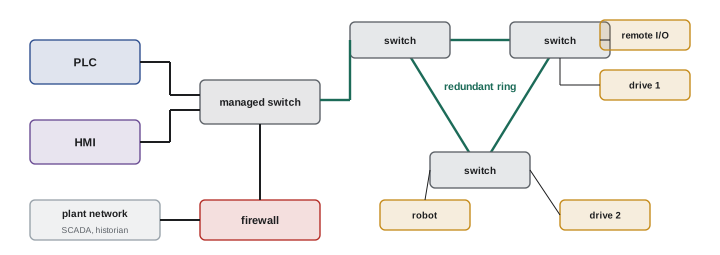
Industrial Ethernet devices often support switches with ring redundancy (such as Device Level Ring, Media Redundancy Protocol or Parallel Redundancy Protocol) so that a single cable break does not stop communication.
| Protocol | Physical layer | Typical use | Notes |
|---|---|---|---|
| Modbus RTU | RS-485 serial | Meters, drives, instruments | Simple, open, master polling |
| Modbus TCP | Ethernet | Data exchange, gateways | Simple, not deterministic |
| EtherNet/IP | Ethernet | PLC I/O, drives, HMIs | CIP objects, RPI-based I/O |
| PROFINET | Ethernet | PLC I/O, drives, motion | Real-time classes |
| EtherCAT | Ethernet | Motion, high-speed I/O | On-the-fly processing |
| OPC UA | Ethernet | Supervisory and IT integration | Information models, security |
Determinism and timing
Control requires predictable timing: an I/O update must arrive within a known time, every time. Office networks are designed for throughput, not guaranteed timing. Industrial protocols achieve determinism through scheduled cyclic updates, prioritization (VLANs and quality of service), managed switches, and network designs that keep control traffic separate from heavy IT traffic such as video or file transfers. Network loading, number of devices, update rates and switch performance must be considered in design; overloading a network with too-fast update rates or broadcast traffic causes intermittent I/O faults that are hard to diagnose.
Network design and cabling
Good industrial network installations follow these practices:
- Use industrial-rated cable and connectors suitable for the environment: shielded or unshielded Category 5e or 6 cable as specified by the protocol organization, M12 D-coded or X-coded connectors on machines, and robust RJ45 connectors in cabinets.
- Observe maximum segment lengths (100 m for copper Ethernet between switches or devices), and use fiber for longer distances, between buildings, and through electrically noisy areas.
- Separate network cables from power cables, crossing at right angles, and follow the shield grounding rules for the protocol.
- Use managed industrial switches for control networks, enabling diagnostics, VLANs, port security and redundancy protocols.
- Segment networks into zones with firewalls between them (Lesson 12), and never connect control networks directly to the internet or corporate networks without proper security architecture.
- Plan and document IP addresses, device names, topology and switch configurations, and label cables at both ends.
- Test cabling after installation with a certification tester when required.
Human-machine interfaces
HMIs are the operator's window into the machine: touchscreen panels or PC-based displays showing process status, alarms, trends and controls. Well-designed HMIs help operators run equipment efficiently and respond correctly to abnormal situations; poorly designed ones contribute to errors and incidents. Modern HMI design guidance (such as the high-performance HMI approach and ISA-101) recommends:
- Muted gray backgrounds with color reserved for abnormal conditions and alarms, so problems stand out.
- A hierarchy of displays, from overview to detail, with consistent navigation.
- Values shown with context, such as trends, normal ranges and targets, rather than isolated numbers.
- Clear, prioritized alarms with guidance on response.
- Confirmation for critical actions, and role-based access control.
- Accessibility: readable fonts, sufficient contrast, and not relying on color alone (red and green are indistinguishable to many people).
SCADA and data systems
Supervisory control and data acquisition (SCADA) systems monitor and control processes spread over large areas, such as water and wastewater systems, pipelines, electrical distribution and building campuses, collecting data from PLCs and remote terminal units (RTUs) over plant networks, radios, cellular links or fiber. SCADA provides operator displays, alarm management, historical data (historians) and reporting. Plant data increasingly flows to MES, analytics and cloud platforms for energy management, predictive maintenance and production analysis, often through edge devices and protocols such as OPC UA and MQTT. Each connection must be designed securely, because control systems are attractive targets (Lesson 12).
Troubleshooting networks
Network problems often appear as intermittent device faults or I/O timeouts. A systematic approach:
- Check status indicators on devices and switches (link and activity lights, module and network status LEDs).
- Read diagnostics in the PLC (connection faults, timeouts), in managed switches (port errors, CRC errors, link speed and duplex), and in device web pages.
- Verify physical layer: cables, connectors, terminations, shield connections, segment lengths and routing near noise sources.
- Verify configuration: IP addresses, subnet masks, device names, duplicate addresses, update rates and firmware versions.
- Use network analysis tools, such as a laptop with protocol analysis software on a mirrored switch port, for difficult problems.
Worked problem
Troubleshooting an intermittent drive fault
A drive on EtherNet/IP faults with "connection lost" two or three times per shift, always when a nearby welder operates. The drive is connected by a 60 m unshielded cable running in the same tray as the welder supply. What should be checked and changed?
Show solution
- Correlation with the welder points to electrical noise coupling into the network cable.
- Check the switch port for CRC errors, which would confirm corrupted frames.
- Reroute the cable away from the welder supply, or replace it with shielded industrial cable with proper shield bonding, or with fiber.
- Check that the drive's connection timeout (a multiple of the RPI) is not set unrealistically short.
- After changes, monitor port errors and faults over several shifts to confirm the fix.
Answer: Noise from the welder is the likely cause. Separation, shielded cable or fiber, and checking error counters will resolve and confirm it.
Wireless in industrial systems
Wireless communication is growing in industrial settings: Wi-Fi for mobile HMIs, tablets and automated guided vehicles; industrial wireless sensor networks (such as WirelessHART and ISA100.11a) for monitoring instruments in hard-to-wire locations; private LTE and 5G networks for large sites; and radios for SCADA links between remote sites. Wireless avoids cabling costs and reaches moving equipment, but it introduces latency variation, interference and security challenges. It is generally used for monitoring and non-critical control, while safety functions and fast control loops remain wired or use certified wireless safety solutions with careful design.
Network documentation and spares
Industrial networks need documentation as much as electrical circuits. A network drawing shows every switch, device, port, cable number, IP address and VLAN, with switch configurations backed up. Spare switches should be stocked with configurations ready to load. Device replacement procedures should describe how to set addresses and names so a new device joins the network correctly; some protocols assign names automatically to replacement devices based on their position in the topology, which simplifies maintenance. When troubleshooting, an up-to-date network drawing saves hours.
Converging IT and OT
Operational technology (OT) networks in plants increasingly connect with information technology (IT) networks for data analysis, remote support and business integration. The two worlds have different priorities: IT emphasizes confidentiality and frequent updates, while OT emphasizes availability and safety, where an unplanned reboot can stop production or create hazards. Successful projects bring IT and OT staff together, with clear responsibilities, a layered architecture (such as the Purdue model with a demilitarized zone between plant and business networks), and change procedures that respect the needs of both.
For electricians, this means working with network and security specialists when installing or modifying networked equipment, following the plant's rules for connecting devices, and never adding unauthorized connections such as cellular modems or personal Wi-Fi access points to control networks.
HMI alarms and operator response
Alarms on HMIs deserve special attention. Each alarm should have a clear message that says what is wrong and where, a priority that reflects the consequence and urgency, and guidance on the operator's response. Alarms that are always active (standing alarms) or that trigger frequently without action (chattering alarms) train operators to ignore the alarm system. Regular reviews of alarm logs identify bad actors to fix, through better limits, deadbands, delays or repairs to faulty instruments. Standards such as ISA-18.2 describe the alarm management life cycle, and a well-managed alarm system helps operators respond correctly during upsets.
Network commissioning
Commissioning a new network includes verifying cable installation and test results, setting device addresses and names, loading switch configurations, checking that each device communicates at the required update rate without errors, testing redundancy by disconnecting ring cables and confirming recovery, and recording a baseline of error counters and loading. This baseline makes it much easier to recognize problems later.
Finally, treat the network as critical infrastructure. Label it, protect it physically, monitor it, and include it in maintenance plans and inspections, just like the power distribution system that feeds the plant. A failed switch or damaged cable can stop a whole production line as surely as a tripped breaker, and it deserves the same attention from maintenance teams.
Electricians who understand both the electrical and network sides of these systems are increasingly valuable, because so many faults now sit at the boundary between the two.
Common mistakes
MistakeWiring RS-485 networks as stars without terminations.
InsteadDaisy-chain with terminations at both ends.
MistakeConnecting control networks directly to corporate networks.
InsteadSegment with firewalls and secure architecture.
MistakeUsing office switches and cables in plants.
InsteadUse managed industrial switches and rated cable.
MistakeSetting all I/O update rates as fast as possible.
InsteadChoose rates appropriate to the process and network load.
MistakeDesigning HMIs with bright colors everywhere.
InsteadUse muted displays with color reserved for abnormal states.
Summary and key terms
- Industrial communication spans device, control, supervisory and enterprise levels.
- Modbus RTU over RS-485 needs daisy chains, terminations and matching settings.
- EtherNet/IP, PROFINET, Modbus TCP, EtherCAT and OPC UA serve different needs.
- Determinism requires scheduled traffic, managed switches and separation from IT traffic.
- Good design uses industrial cabling, segment limits, fiber where needed, segmentation and documentation.
- High-performance HMIs use muted colors, hierarchy, context and clear alarms.
- SCADA and data systems extend control data across plants; troubleshoot networks systematically.
- Fieldbus
- A network connecting field devices to controllers.
- RS-485
- A differential serial physical layer for multi-drop networks.
- Termination resistor
- A resistor at network ends preventing reflections.
- EtherNet/IP
- An industrial Ethernet protocol using CIP.
- PROFINET
- An industrial Ethernet protocol with real-time classes.
- Determinism
- Predictable, guaranteed communication timing.
- Managed switch
- A switch with configuration and diagnostics.
- HMI
- Human-machine interface.
- SCADA
- Supervisory control and data acquisition.
- OPC UA
- A vendor-neutral information exchange standard.
Practice problems
Work each problem on paper first, then reveal the answer to check.
Name the four network levels.
Show answer
Device, control, supervisory and enterprise.
How many slave addresses does Modbus RTU support?
Show answer
Up to 247.
What termination does RS-485 need?
Show answer
120 Ω at both ends.
Which protocol processes frames on the fly?
Show answer
EtherCAT.
What is the maximum copper Ethernet segment?
Show answer
100 m.
Why use managed switches?
Show answer
Diagnostics, VLANs, security and redundancy.
Name three high-performance HMI principles.
Show answer
Muted colors, display hierarchy, values with context, clear alarms.
What does SCADA provide?
Show answer
Wide-area monitoring, control, alarms and historical data.
What do CRC errors on a switch port indicate?
Show answer
Corrupted frames, often from noise or cabling faults.
Name two fixes for network noise problems.
Show answer
Separation from power, shielded cable or fiber.
Lesson quiz · 5 questions
Score 60% or more to complete this lesson.
Create a free account to save your progress, take quizzes and earn a certificate.