
DCT-210 · Lesson 6 of 12 · 19 min
MPO connectors, trunks and cassettes
On Jamal's first day in the Hall D network row, Nadia opens a panel and pulls out a cassette the size of a paperback book. On its back are two multi-fiber connectors; on its front, twelve duplex LC ports. Next to it is a panel with no cassettes at all, just rows of plain MPO adapters. Most of the fiber in Stonebridge's newer halls runs on multi-fiber connectors, and a technician who cannot read them, count them and handle them will not last long in a modern data center. This lesson covers the connectors themselves, the trunks that carry them and the cassettes and panels that terminate them.
The MPO connector
MPO stands for multi-fiber push-on. An MPO connector holds a row of fibers in a single rectangular ferrule, with the fiber ends polished flat or angled across the whole face. MTP is a well-known brand of MPO connector with tighter tolerances and some mechanical refinements; it mates with standard MPO connectors, and many people use the two names loosely. The connector standards are IEC 61754-7 and TIA-604-5.
Three features of an MPO connector matter every time a technician handles one:
- The key. A raised bump on one side of the housing shows its orientation. Looking at the end face with the key up, position 1 is on the left. Adapters are either key-up to key-down, the usual type, which flips the order across the joint, or key-up to key-up.
- The pins. Two steel guide pins on one connector fit into holes in the other, aligning the fibers to within a micron or so. A mated pair must have one pinned connector, often called male, and one unpinned, female. Two pinned connectors will not mate; two unpinned ones mate badly and lose light. Transceivers are usually pinned, so the cord that plugs into one is unpinned.
- The fiber count and polish. MPO-12 has twelve positions in one row, MPO-16 has sixteen in a slightly wider row and a different key position so that it cannot be confused with MPO-12, and MPO-24 has two rows of twelve. Single-mode MPO connectors for parallel optics are usually angle-polished, APC, and multimode usually flat, UPC.
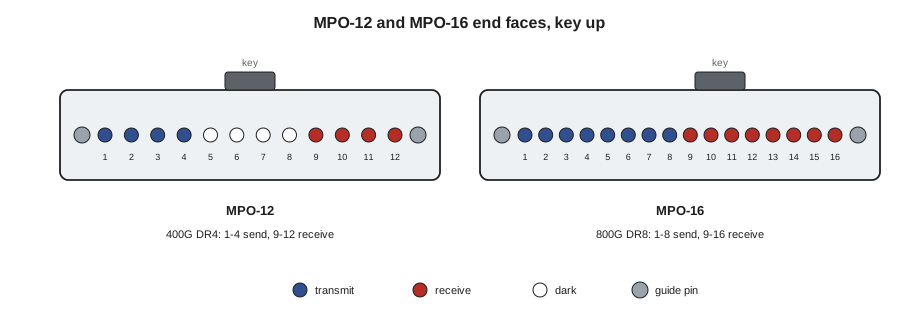
Which positions a link uses
A parallel-optic transceiver assigns its lanes to fixed positions. A 400GBASE-DR4 or SR4 module on an MPO-12 transmits on positions 1 to 4 and receives on positions 9 to 12; positions 5 to 8 are dark. An eight-lane 800 Gb/s module on an MPO-16 transmits on positions 1 to 8 and receives on 9 to 16, so every position is used. This is why fiber counts in data center plants are often multiples of eight or sixteen rather than twelve.
Trunk and cassette designs are described by their base: base-12 systems group fibers in twelves, base-8 in eights, base-16 in sixteens. A base-12 trunk feeding 400G-DR4 links wastes a third of its fibers, because each twelve-fiber leg carries only eight live fibers. A base-8 trunk feeding the same links uses every fiber. Corvid's Hall D backend is base-16, matched to its 800 Gb/s optics, while Hall A's older multimode plant is base-12, built for 10 Gb/s duplex links through cassettes.
# How well does a trunk's base match the links it feeds?
# (name, strands per leg, lit strands per link, links per leg)
designs = [("base-12 trunks for duplex 10G links", 12, 2, 6), ("base-12 trunks for 400G-DR4", 12, 8, 1),
           ("base-8 trunks for 400G-DR4", 8, 8, 1), ("base-16 trunks for 800G-DR8", 16, 16, 1)]
links_needed = 72
for name, base, per_link, per_leg in designs:
    legs = -(-links_needed // per_leg)
    strands = legs * base
    used = links_needed * per_link
print(f"{name:38} {strands:5} strands installed, {used:5} lit, {used / strands:5.0%} used")base-12 trunks for duplex 10G links 144 strands installed, 144 lit, 100% used base-12 trunks for 400G-DR4 864 strands installed, 576 lit, 67% used base-8 trunks for 400G-DR4 576 strands installed, 576 lit, 100% used base-16 trunks for 800G-DR8 1152 strands installed, 1152 lit, 100% used
The code is deliberately simple: it assumes one trunk leg per parallel link, or per six duplex links in the base-12 case, and shows the fraction of installed fiber that carries light. Unused fiber is not wasted forever, since a later upgrade may light it, but in a dense hall every unused strand is tray space and money.
Trunks
A trunk is a factory-made cable with many fibers and MPO connectors on each end, made to an ordered length and tested at the factory. Trunks are described by fiber count, fiber type, connector type at each end and whether each end is pinned. A 144-fiber trunk might be built as twelve MPO-12 legs at each end, nine MPO-16 legs, or six MPO-24 legs. The legs fan out from the cable in a breakout at each end, usually staggered in length so that they plug into a panel neatly, and each leg is numbered.
Trunks arrive on reels or in boxes with a pulling grip protecting the connectors. LVT-210 covered pulling and bend radius; in a data center, trunks are laid into overhead trays rather than pulled through conduit, so the main dangers are crushing, kinking at the tray edge and connectors swinging into steelwork as the trunk is lowered into place. The factory test report, which lists the loss of every fiber, goes into the records with the trunk's serial number.
# How many trunks and legs does a group of links need?
links = 72                 # parallel links between a rack and its leaf cabinet
strands_per_link = 16      # MPO-16, 800G-DR8
trunk_strands = 144
legs_per_trunk = trunk_strands // strands_per_link
trunks = -(-links // legs_per_trunk)
spare_legs = trunks * legs_per_trunk - links
print(f"{trunk_strands}-strand trunk = {legs_per_trunk} MPO-16 legs")
print(f"{links} links need {trunks} trunks, leaving {spare_legs} spare legs")
print(f"Total installed strands {trunks * trunk_strands:,}, lit {links * strands_per_link:,}")144-strand trunk = 9 MPO-16 legs 72 links need 8 trunks, leaving 0 spare legs Total installed strands 1,152, lit 1,152
Cassettes and pass-through panels
At the end of a trunk, the MPO legs plug into a panel. What happens next depends on the links. For duplex links, each leg plugs into the back of a cassette, a sealed module with short fibers inside that fan the MPO out to six duplex LC ports on the front for a twelve-fiber leg. Equipment then connects with duplex LC cords. For parallel links, the leg plugs into the back of an MPO adapter in a pass-through panel, and an MPO cord on the front runs to the transceiver, so the parallel link passes straight through without being split.
A third option is a breakout, or fan-out: an MPO on one end splitting to several duplex connectors on the other, either as a harness cord or inside a cassette. A 400G-DR4 port can be run as four separate 100G links this way, each on its own duplex LC pair, to four different servers. Breakouts appear often in the cloud halls, where a switch's 400G ports feed groups of 100G servers. Lesson 7 shows how the fiber order works through a breakout.
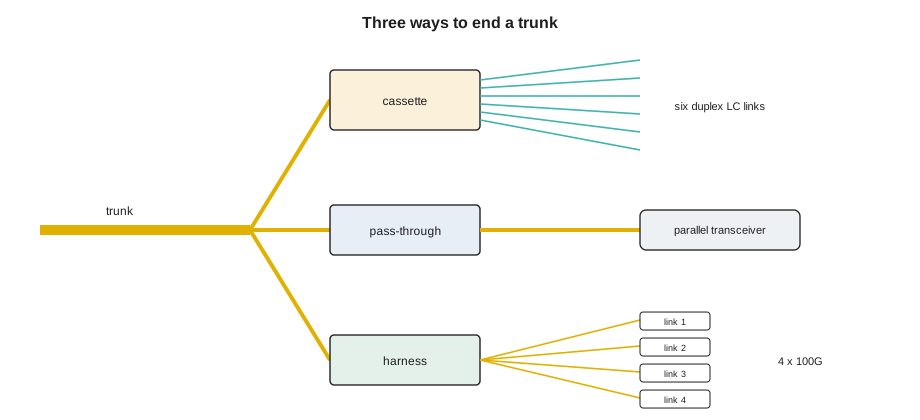
Cassettes add one more mated MPO pair and their internal fan-out to the loss of a link, and they fix the polarity of the link inside a sealed box. Pass-through panels keep the loss low and the polarity simple. That is why Corvid chose pass-through MPO panels for its backend and saved cassettes for the frontend and management links that need duplex connectors.
Handling MPO connectors
Nadia's handling rules are short:
- Never touch the end face. Hold the connector by its housing and keep the dust cap on until the moment it is inspected and mated.
- Inspect and clean every MPO end face before mating, both the cord and the adapter or transceiver side. Lesson 8 shows how.
- Check the key orientation and the pin gender before pushing. If it will not go in easily, stop: forcing two pinned connectors together bends the pins.
- Push until the latch clicks, and pull out by the housing's sleeve, never by the cable.
- Do not let a loose MPO leg hang by its fibers, and do not bend the leg sharply where it leaves the breakout.
- Keep spare legs capped and stored in the panel's leg holder, not loose in the tray.
Worked problem
A trunk that would not mate
During the installation of the Hall D pod trunks, Jamal tries to plug leg 3 of a new trunk into the rear of a pass-through panel in cabinet D-4-02. It will not seat.
Show solution
- He stops pushing and looks at the end face with the scope: the leg is pinned.
- He checks the panel: the rear of the adapter already has a pinned connector, a short pinned jumper installed by mistake during the panel build.
- He checks the design: trunks are pinned at the network end, and panel jumpers unpinned. The panel builder had used the wrong jumpers in one row of adapters.
- Nadia stops the trunk installation on that panel. The jumpers are replaced with unpinned ones, all end faces are inspected, and the trunk is connected.
Answer: Pushing harder would have bent the pins of both connectors. Recognizing the pinned-to-pinned mismatch saved two connectors and found a panel build error before it affected other trunks.
Very small form factor connectors
A newer family of connectors is starting to appear in the densest equipment: very small form factor duplex connectors such as SN and MDC, and small multi-fiber connectors such as SN-MT and MMC. They fit two, three or four links in the space of one LC duplex port, so that a single transceiver can serve several breakouts with separate connectors, and a panel can hold far more ports. TIA-942-C now allows any connector that meets TIA-568.3 outside the equipment outlet, which opens the way for them in panels. They are not interchangeable with LC or MPO, they need their own cleaning tips and inspection adapters, and their small size makes labeling and handling harder. Stonebridge has a test panel of them in the workshop so that technicians can learn their latches and cleaners before they meet them in a hall.
Ordering and receiving trunks
Because trunks are made to order, every detail of a trunk has to be right on the order: fiber type and count, connector type and polish at each end, pin gender at each end, polarity type, breakout length and stagger, overall length and pulling grip. A mistake in any of them is found only when the trunk arrives, and a replacement takes weeks. Nadia checks each order line against the design before it goes out, and Tomás Reyes's receiving team checks each delivered trunk against its order and its factory report before it is accepted. A trunk with a damaged reel, missing caps or a report that does not match the serial number goes into quarantine until it is inspected.
# Check a delivered trunk's label against its order line
order = {"strands": 144, "type": "OS2", "connector": "MPO-16 APC", "pins_a": "pinned", "pins_z": "pinned",
         "polarity": "Type B", "length": "55 ft"}
label = {"strands": 144, "type": "OS2", "connector": "MPO-16 APC", "pins_a": "pinned", "pins_z": "unpinned",
         "polarity": "Type B", "length": "55 ft"}
wrong = [k for k in order if order[k] != label[k]]
print("Accept" if not wrong else "Quarantine: " + ", ".join(f"{k} ordered {order[k]}, received {label[k]}" for k in wrong))Quarantine: pins_z ordered pinned, received unpinned
The trunk in the example would have mated badly at its network end. Catching the pin mismatch at receiving costs a phone call; catching it on the night of the installation costs the night.
Inside a cassette or pass-through panel, each adapter position is numbered, and the trunk legs are plugged in by leg number so that the port map stays simple. A leg plugged into the wrong adapter position produces a link that tests perfectly but connects the wrong ports, the same kind of fault as the swapped rail in Lesson 3, which is why legs are always checked against the panel layout before they are seated.
Common mistakes
MistakeMating two pinned MPO connectors, or two unpinned ones.
InsteadEvery mated pair needs exactly one pinned connector.
MistakeConfusing MPO-12 and MPO-16 cords.
InsteadCheck the fiber count on the label and the key position; they are not interchangeable.
MistakeUsing base-12 trunks for 400G-DR4 without knowing a third of the fibers go unused.
InsteadMatch the trunk base to the links: base-8 for DR4, base-16 for DR8.
MistakeLeaving trunk legs hanging loose in a tray.
InsteadCap them and store them in the leg holder.
MistakePulling an MPO out by its cable.
InsteadPull by the housing's sleeve.
Summary and key terms
- An MPO connector holds a row of fibers; MTP is a brand of MPO.
- Key up, position 1 is on the left; one connector in each mated pair must be pinned.
- DR4 and SR4 use positions 1–4 and 9–12 of an MPO-12; eight-lane 800G uses all sixteen of an MPO-16.
- Base-8, base-12 and base-16 systems group fibers to match the links they feed.
- Cassettes fan MPO out to duplex LC; pass-through panels carry parallel links straight through; harnesses break a port out to several links.
- Inspect, clean and check key and pins before every mating.
- MPO
- Multi-fiber push-on connector with a row of fibers in one ferrule.
- MTP
- A brand of MPO connector with tighter tolerances.
- Pinned and unpinned
- MPO connectors with or without guide pins; each mated pair needs one of each.
- Trunk
- A factory-terminated multi-fiber cable with MPO legs at each end.
- Cassette
- A sealed module that fans MPO legs out to duplex connectors.
- Base-8 and base-16
- Cabling systems that group fibers in eights or sixteens to match parallel optics.
Practice problems
Work each problem on paper first, then reveal the answer to check.
Which MPO-12 positions does a 400GBASE-DR4 link leave dark?
Show answer
Positions 5 to 8.
A 144-strand trunk is built with MPO-16 legs. How many legs does it have?
Show answer
Nine.
Why did Corvid choose pass-through panels for its backend?
Show answer
They keep loss low and polarity simple for parallel links.
An MPO cord will not go into a transceiver port. What do you check first?
Show answer
The pin gender and the key orientation; do not force it.
Lesson quiz · 5 questions
Score 60% or more to complete this lesson.
Create a free account to save your progress, take quizzes and earn a certificate.