
DCT-210 · Lesson 1 of 12 · 20 min
Cabling in the data center
Jamal Pierce has spent a year at Stonebridge Data learning the halls, the safety rules and how to put equipment into racks. Now the campus cabling lead, Nadia Okoro, takes him for his cabling term. Nadia is a registered communications distribution designer who started as an installer, and she has looked after the campus cable plant since Hall B opened. On his first morning she walks Jamal from the carrier entrance at the edge of the building to a single server in Hall A and makes him name every piece of cable and every panel on the way.
This course is about the cabling inside a data center, from the point where a carrier's cable enters the building to the port on a server, switch or GPU tray. It assumes the structured cabling basics from LVT-120, the copper skills from LVT-130 and the optical fiber installation and testing skills from LVT-210, which are part of this program. Where a topic was covered there, this course refers back to it and concentrates on what is different in a data center: the density, the speed, the parallel optics, the meet-me room and the very large numbers of links in an AI cluster. The design side of the same subject, how a cabling engineer chooses media, sizes pathways and lays out a hall, is covered in the Data Center Engineering course DCE-320; this course is the technician's view.
Why cabling matters so much here
In an office building, a cable fault takes one desk off the network. In a data center, one damaged trunk can take down hundreds of links, a mislabeled cross-connect can put a bank's traffic on the wrong carrier, and a dirty connector on an AI fabric can slow a training job that is costing a customer thousands of dollars an hour. The cabling is also the part of the facility that changes most often. Power and cooling are installed once and maintained; cabling is added, moved and removed every day, by technicians, while the equipment it serves keeps running. Nadia tells Jamal that most of the outages she has seen in twenty years were caused not by failed equipment but by people working on cables next to equipment that was running.
Three things make data center cabling different from what Jamal learned in the low-voltage courses:
- Density. A single Hall D rack can have more than seventy optical links leaving it, each carrying 800 gigabits per second, and a row of network cabinets can terminate thousands of fibers.
- Structure. Almost everything is cabled in a planned hierarchy of spaces, with permanent trunks between panels and short patch cords at the ends, so that changes are made by moving cords, not by pulling new cable.
- Ownership. In a colocation campus, the building cabling belongs to Stonebridge, the equipment and often the cords in a cage belong to the customer, and the carriers own their own fibers up to the meet-me room. Who may touch which cable is part of every ticket.
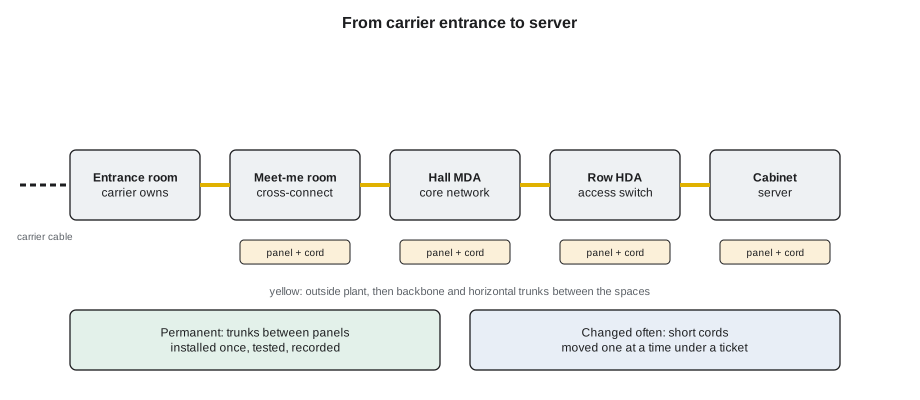
The pieces of the plant
Nadia names the pieces as they walk, and Jamal writes them down:
- The entrance room, where carriers' outside plant cables enter and are spliced to the building's cabling. At Stonebridge there are two, on opposite sides of each campus, so that one backhoe cannot cut every route.
- The meet-me room, where carriers and customers connect to each other through cross-connects. At YUL-2 it sits next to the north entrance room; at IAD-3 it is a large secured room between Halls A and B. Lesson 9 is about it.
- Main and horizontal distribution areas, rows of network cabinets full of patch panels and the switches that serve a hall or part of a hall. Lesson 2 covers these spaces and their names.
- Trunks, factory-terminated cables with many fibers and multi-fiber connectors on each end, which run in overhead trays between panels. They are installed once and tested.
- Cassettes and panels, which turn the multi-fiber connectors of trunks into the duplex connectors used by many devices, or pass parallel-optic links straight through.
- Patch cords and jumpers, the short cables from panels to equipment, which are changed often.
- Direct-attach copper cables, active copper cables and active optical cables, which connect equipment directly over short distances without passing through a panel.
- Copper twisted-pair cabling, mostly Category 6A, for management networks, building systems and lower-speed customer links.
The rest of the course takes these one at a time. This first lesson is about how they fit together and how a technician works on them safely.
Structured and point-to-point cabling
There are two ways to connect equipment. In point-to-point cabling, a cable runs straight from one device to another, wherever they are. It is quick to install and needs no panels, and for very short links inside one rack or between adjacent racks it is normal. But across a hall it becomes unmanageable: hundreds of cables of every length cross over each other in the trays, nobody can trace them, and every change means pulling a new cable through a tray full of live ones. Nadia shows Jamal a photograph of a hall at another site, taken before a cleanup, where point-to-point cables had piled up so thickly over ten years that the overhead trays had sagged and the hot aisle had stopped working.
Structured cabling, which LVT-120 introduced for buildings, applies the same idea to the data center. Permanent cabling joins fixed points, panels at the ends of rows and at the top of cabinets. Equipment connects to the panels with short cords. When a server moves or a new link is needed, a technician moves cords at the panels; the permanent cabling stays put. Standards such as ANSI/TIA-942 for data centers and ISO/IEC 11801-5 describe the spaces and the cabling between them, and the TIA-568 series sets the performance of the cable and connectors. Stonebridge cables every hall this way, and the customer in each cage chooses how to cable inside it, within the house rules.
What a cable can carry
Jamal knows from his networking courses that links run at different speeds. In Stonebridge's halls he will see all of them:
| Link speed | Typical use at Stonebridge | Common media |
|---|---|---|
| 1 Gb/s | Management networks, building systems | Category 6A copper |
| 10 and 25 Gb/s | Enterprise servers in Hall A | Category 6A, direct-attach copper, duplex multimode fiber |
| 100 Gb/s | Enterprise uplinks, carrier circuits | Duplex single-mode, parallel multimode |
| 400 Gb/s | Cloud fabric in Halls B and C | Parallel single-mode or multimode, active copper inside racks |
| 800 Gb/s | Corvid AI's GPU fabric in Hall D | Parallel single-mode on 16-fiber connectors, copper inside the rack |
The higher the speed, the shorter the reach on copper and the more fibers a link tends to use. That is why the AI hall looks nothing like Hall A: its links are faster, there are many more of them per rack, and almost all of them are optical.
A first count
Nadia likes technicians to have a feel for the numbers before they touch anything. She gives Jamal the cabling summary for three typical cabinets and asks him how many cables and how many fibers each one has.
# Count the cables and fibers leaving three typical cabinets
cabinets = {
    "Hall A enterprise (A-31-03)": {"Cat 6A": 26, "duplex fiber": 8, "parallel fiber": 0, "power cords": 14},
    "Hall B cloud (B-12-09)":      {"Cat 6A": 4, "duplex fiber": 2, "parallel fiber": 32, "power cords": 8},
    "Hall D GPU rack (D-3-07)":    {"Cat 6A": 6, "duplex fiber": 4, "parallel fiber": 72, "power cords": 0},
}
fibers_per = {"duplex fiber": 2, "parallel fiber": 16}
for name, c in cabinets.items():
    data_cables = c["Cat 6A"] + c["duplex fiber"] + c["parallel fiber"]
    strands = sum(c[k] * n for k, n in fibers_per.items())
print(f"{name}: {data_cables} data cables, {strands} optical strands, {c['power cords']} power cords")Hall A enterprise (A-31-03): 34 data cables, 16 optical strands, 14 power cords Hall B cloud (B-12-09): 38 data cables, 516 optical strands, 8 power cords Hall D GPU rack (D-3-07): 82 data cables, 1160 optical strands, 0 power cords
The Hall D rack has no power cords because its power arrives through busbars inside the integrated rack, but it has more optical strands than a whole row of Hall A. A single mistake there, a trunk crushed by a ladder or a connector left uncapped, affects far more traffic.
Working on a live plant
Every cabling task at Stonebridge starts with a ticket, as Jamal learned in DCT-110, and every ticket that touches cabling names the panels, ports and cords involved. Nadia's rules for working in the plant add to the house rules he already knows:
- Identify before you touch. Read the label on the panel, the port and both ends of the cord, and compare them with the ticket before unplugging anything.
- One cord at a time. Unplug one, move it, check the link, then do the next. Never pull a handful of cords and sort them out afterwards.
- Caps on, always. An optical connector that is not plugged in gets a dust cap immediately, and every connector is inspected before it is mated, as Lesson 8 explains.
- Never pull on a cable to free it. If a cord will not come out of a manager, find out what is holding it.
- Do not step on, kneel on or rest tools on cable in a tray or a floor void, and never use a tray as a ladder or a shelf.
- Report damage you did not cause the same way as damage you did. A crushed trunk found early can be replaced at night; one found by a customer cannot.
These rules exist because most of the links in a hall are carrying someone's live traffic. A technician who follows them can work next to a bank's cabinet or an AI cluster without anyone noticing.
Laser light and fiber safety
LVT-210 covered fiber safety in detail: never look into a connector or a fiber end, use an inspection scope with a screen or a filter, dispose of fiber offcuts in a marked container, and keep cleaning solvents away from ignition sources. In the data center these rules matter more, because the transceivers in Halls B, C and D use lasers that are invisible and, on the single-mode links, can be powerful enough to damage an eye at close range, and because thousands of them are live at once. Nadia's rule is that every optical port is treated as live unless the ticket says the far end has been confirmed dark, and even then the scope goes in before an eye goes anywhere near it.
Worked problem
A cord that was not where the ticket said
Jamal's first supervised task is to move a 10 Gb/s duplex fiber cord for Bayview Credit Union in cage A-31 from port 7 to port 9 of the panel at the top of cabinet A-31-03, so that a new server can use port 7. The ticket gives the panel label and both port numbers.
Show solution
- At the cabinet, Jamal reads the panel label, YUL2-A-31-03-PP1, and confirms it matches the ticket.
- He finds a cord in port 7, but its label says it goes to switch port 12, while the ticket says the cord on port 7 goes to switch port 14.
- He stops, does not unplug anything, and calls Nadia. She checks the records: a previous technician had moved the cord without updating the port map.
- Nadia contacts Bayview's network engineer, who confirms from the switch that port 12 is the right one. The ticket is updated, Jamal moves the cord, checks the link light, and the port map is corrected.
Answer: Because Jamal checked the labels against the ticket, the move was made on the right cord and the records now match the plant. If he had trusted the ticket alone, he would have unplugged a working link.
Common mistakes
MistakePulling a new cable across a hall for every new link.
InsteadUse the structured plant: trunks between panels, short cords at the ends.
MistakeUnplugging several cords at once and sorting them out later.
InsteadMove one cord at a time and check each link before the next.
MistakeLeaving an optical connector uncapped on a panel.
InsteadCap it immediately, and inspect before mating.
MistakeTrusting the ticket without reading the labels.
InsteadCompare panel, port and cord labels with the ticket before touching anything.
MistakeTreating a dark-looking optical port as safe to look into.
InsteadTreat every port as live and use a scope.
Summary and key terms
- Data center cabling runs from the carrier entrance to each device through a planned hierarchy of spaces.
- Structured cabling uses permanent trunks between panels and short cords at the ends, so changes are made at panels.
- Higher speeds mean shorter copper reach and more fibers per link; the AI hall is almost all parallel optics.
- Building cabling, customer cords and carrier fibers have different owners, and the ticket says who may touch what.
- Identify before touching, move one cord at a time, cap and inspect every optical connector.
- This course builds on LVT-120, LVT-130 and LVT-210, and leaves cabling design to DCE-320.
- Entrance room
- The space where carriers' outside plant cables enter and are joined to the building cabling.
- Meet-me room
- The space where carriers and customers connect through cross-connects.
- Trunk
- A factory-terminated multi-fiber cable installed permanently between panels.
- Patch cord
- A short cable connecting equipment to a panel, or two panels.
- Structured cabling
- Permanent cabling between fixed panels, with changes made by moving cords.
- Point-to-point cabling
- A cable run directly from one device to another.
Practice problems
Work each problem on paper first, then reveal the answer to check.
Why are there two entrance rooms on each Stonebridge campus?
Show answer
So that carriers can enter on diverse routes and one cut cannot take every route.
What does a technician change when a server moves in a structured plant?
Show answer
Patch cords at the panels; the trunks stay in place.
A cord's label disagrees with the ticket. What should you do?
Show answer
Stop, touch nothing, and check with the lead and the records before moving anything.
Why does the Hall D GPU rack have so many optical strands?
Show answer
It has dozens of 800 Gb/s links, each using a 16-fiber parallel connector.
Lesson quiz · 5 questions
Score 60% or more to complete this lesson.
Create a free account to save your progress, take quizzes and earn a certificate.