
CYB-101 · Lesson 8 of 12 · 23 min
Securing networks
▶ Video coming soon A video version of this lesson is on the way.
When Sam first mapped Ridgeline's network, it was flat: one network, 192.168.10.0/24, shared by everything. Anita's desktop, the NAS holding the backups, the point-of-sale tablets, the receipt printer, the roaster laptop, the staff phones and, on a separate password but the same network behind the scenes, the cafe's guest Wi-Fi. The music streaming box from lesson 2 sat on that network too, with its factory password. In a flat network, anything that is compromised can talk to everything else. A customer's infected phone or the cheap music box could reach the NAS, and a criminal who got onto the network could probe the point-of-sale tablets at leisure.
This lesson covers the network controls that fix that: segmentation, firewalls, secure Wi-Fi, secure remote access, and protecting the network devices themselves. It builds on the addressing, routing and switching foundations from NET-110.
Segmentation
Segmentation divides a network into separate zones, so that systems with different purposes and different levels of trust cannot freely reach one another. Traffic between segments has to pass through a firewall, where rules decide what is allowed. On a small network, segmentation is usually done with VLANs (virtual LANs), which let one physical switch and access point carry several logically separate networks, each with its own address range. The router or firewall connects them and enforces the rules.
Sam's design gives Ridgeline four segments. The office segment holds the office computers, the NAS and the multifunction printer. The point-of-sale segment holds only the tablets, the card readers' connection and the receipt printer. The roastery segment holds the roaster laptop and the roaster's temperature logger. The guest segment gives cafe customers internet access and nothing else. Staff phones, which are personal devices, join the guest network, not the office one.
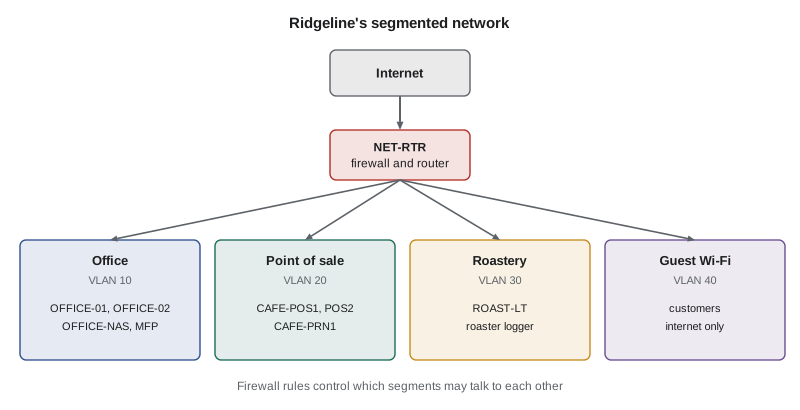
| Segment | VLAN | Address range | May reach |
|---|---|---|---|
| Office | 10 | 192.168.10.0/24 | Internet; roastery logger reports |
| Point of sale | 20 | 192.168.20.0/24 | Payment provider and POS cloud only |
| Roastery | 30 | 192.168.30.0/24 | Internet; NAS for roast-log backup |
| Guest Wi-Fi | 40 | 192.168.40.0/24 | Internet only, with each device isolated |
Segmentation serves two purposes. It contains incidents: if a customer's phone is infected, it cannot reach Ridgeline's computers; if ransomware lands on an office PC, it cannot spread to the tills. And it reduces the scope of compliance. PCI DSS applies to every system that stores, processes or transmits card data, or that can connect to those systems. By isolating the point-of-sale segment, Ridgeline keeps the office computers out of that scope, which makes compliance far simpler. The broader idea behind segmentation, never trusting a device just because it is inside the network, is called zero trust, and NET-210 covers it in depth.
Try it yourself
Which segment is this device on?
Complete segment_of(address) so that it returns the name of the segment whose network contains the given IP address, or "unknown" if none does. Use the ipaddress module.
import ipaddress

SEGMENTS = {
    "office": "192.168.10.0/24",
    "pos": "192.168.20.0/24",
    "roastery": "192.168.30.0/24",
    "guest": "192.168.40.0/24",
}

def segment_of(address):
    ip = ipaddress.ip_address(address)
    # check each network in SEGMENTS
    return "unknown"

for a in ["192.168.20.15", "192.168.40.201", "10.0.0.5"]:
    print(a, segment_of(a))
Firewalls and rules
A firewall controls which traffic may pass between networks, based on rules. A basic packet-filtering rule looks at the source and destination addresses, the protocol and the port, and either allows or denies the traffic. Modern firewalls are stateful: they remember outgoing connections and automatically allow the replies, so that a rule allowing office computers to browse the web does not also need a rule letting web servers start connections inward. Next-generation firewalls add inspection of applications and content, intrusion prevention and threat feeds.
Firewall rules are usually checked in order from the top, and the first rule that matches decides what happens. The last rule should be a default deny: anything not explicitly allowed is blocked. This is called an allow-list approach, and it is much safer than trying to list everything bad. Each rule should be as narrow as possible, should have a recorded reason, and should be reviewed regularly; old rules that nobody remembers adding are a common weakness.
import ipaddress
RULES = [   # (action, source network, destination network, port)
    ("allow", "192.168.20.0/24", "0.0.0.0/0", 443),        # POS to payment and POS cloud
    ("deny",  "192.168.40.0/24", "192.168.0.0/16", None),  # guests to any internal network
    ("allow", "192.168.40.0/24", "0.0.0.0/0", None),       # guests to the internet
    ("allow", "192.168.30.0/24", "192.168.10.20/32", 445), # roastery to NAS file share
    ("deny",  "0.0.0.0/0", "0.0.0.0/0", None),             # default deny
]
def decide(src, dst, port):
    for action, s, d, p in RULES:
        if (ipaddress.ip_address(src) in ipaddress.ip_network(s)
                and ipaddress.ip_address(dst) in ipaddress.ip_network(d)
                and (p is None or p == port)):
            return action
for case in [("192.168.40.77", "192.168.10.20", 445), ("192.168.40.77", "142.250.1.1", 443),
             ("192.168.30.12", "192.168.10.20", 445), ("192.168.20.15", "192.168.10.20", 445)]:
print(case, "->", decide(*case))('192.168.40.77', '192.168.10.20', 445) -> deny
('192.168.40.77', '142.250.1.1', 443) -> allow
('192.168.30.12', '192.168.10.20', 445) -> allow
('192.168.20.15', '192.168.10.20', 445) -> denyLook closely: the guest-to-internal deny rule sits above the guest-to-internet allow rule. If they were the other way round, the broad allow rule would match first and guests could reach internal systems, because 0.0.0.0/0 includes every address. Rule order is one of the most common sources of firewall mistakes.
Try it yourself
Write the firewall decision function
Rules are tuples of (action, source network, destination network, port), where port None means any port. Complete decide(rules, src, dst, port) so that it returns the action of the first matching rule, or "deny" if no rule matches.
import ipaddress

rules = [
    ("deny", "192.168.40.0/24", "192.168.0.0/16", None),
    ("allow", "192.168.40.0/24", "0.0.0.0/0", None),
    ("allow", "192.168.20.0/24", "0.0.0.0/0", 443),
]

def decide(rules, src, dst, port):
    # return the first matching action, otherwise deny
    return "allow"

print(decide(rules, "192.168.40.9", "192.168.10.20", 445))
Secure Wi-Fi
Wireless networks reach beyond the walls, so they need care. Use WPA3 where all devices support it, or WPA2 with AES (often shown as WPA2-Personal with AES or CCMP) where they do not; older WEP and WPA with TKIP are broken and must not be used. On a personal network, the security of WPA2 and WPA3 depends on the passphrase, which should be long and random and changed when staff who know it leave. WPA3's Simultaneous Authentication of Equals (SAE) resists the offline guessing that weak WPA2 passphrases allow. Larger organizations use WPA2 or WPA3 Enterprise, where each person signs in with their own account through a RADIUS server, so there is no shared passphrase to leak.
Other good practices include disabling Wi-Fi Protected Setup (WPS), whose PIN method has long been weak; turning on client isolation for the guest network, so that customers' devices cannot see each other; changing the access point's admin password and keeping its firmware updated; and watching for rogue access points, such as a staff member's travel router plugged into a wall port, or a look-alike network named to trick customers. Hiding the network name provides almost no security, because the name still appears in normal wireless traffic.
Secure remote access
Theo sometimes updates stock from home, and Sam needs to reach the router and NAS for maintenance. Remote access is a common way in for attackers, especially remote desktop exposed directly to the internet, which is one of the most frequent entry points for ransomware. Ridgeline's rule is simple: nothing internal is exposed directly to the internet. Cloud services such as the shop admin and Microsoft 365 are reached over HTTPS with MFA. Access to internal devices goes through a VPN, an encrypted tunnel that requires the person to authenticate, with MFA, before any internal system is reachable.
A VPN can be configured as a full tunnel, sending all of the remote device's traffic through the office, or a split tunnel, sending only traffic for internal addresses. Many organizations are moving to zero trust network access services, which grant access to one application at a time after checking the user and device, rather than placing the remote device on the whole internal network. For administration, Sam uses encrypted protocols only: SSH and HTTPS rather than Telnet and plain HTTP, which send passwords in clear text.
Try it yourself
Check a Wi-Fi configuration
Complete wifi_problems(cfg) so that it returns a list of problems with a Wi-Fi network configuration (a dictionary), in this order: "weak security" if security is not "WPA3" or "WPA2-AES"; "short passphrase" if the passphrase has fewer than 16 characters; "WPS enabled" if wps is True; "no client isolation" if the network is a guest network (guest True) and isolation is False.
def wifi_problems(cfg):
    problems = []
    # add the four checks in order
    return problems

guest = {"security": "WPA2-TKIP", "passphrase": "coffee123", "wps": True, "guest": True, "isolation": False}
print(wifi_problems(guest))
Protecting the network devices
Routers, switches, firewalls and access points are computers too, and an attacker who controls them controls everything that passes through. Change default admin passwords immediately, preferably to unique ones stored in the password manager. Keep firmware updated, and replace devices that no longer receive updates; old home-grade routers are a frequent target of automated attacks. Turn off management from the internet side, and manage devices only from the office segment or over the VPN. Disable services you do not use, such as UPnP, which lets devices open ports in the firewall automatically, and remote management features. Back up device configurations so that a failed router can be replaced quickly.
Network services need attention as well. DNS translates names into addresses, and if an attacker can change which DNS servers a network uses, they can quietly redirect staff to fake sites. Using a filtering DNS service, which refuses to resolve known malicious domains, adds a cheap and effective layer. Ridgeline's router now sends all DNS queries to a filtering service, and blocks devices from using other DNS servers directly. Finally, unused switch ports should be disabled, and the network closet kept locked, so that nobody can simply plug in.
Worked problem
Planning Ridgeline's segmentation change
Sam must move Ridgeline from one flat network to four segments without disrupting the cafe. Outline the steps.
Show solution
- Inventory every device and decide its segment: office, point of sale, roastery or guest. The music box goes to the guest segment.
- Create VLANs 10, 20, 30 and 40 on the router, switch and access point, each with its own address range and DHCP scope.
- Write the firewall rules, starting from default deny, allowing only what each segment needs, such as point of sale to the payment provider on port 443.
- Move devices one segment at a time after closing on a Sunday, test card payments and receipts, and keep the old configuration ready to restore.
- Record the design, rules and reasons, and schedule a rule review every six months.
Answer: Inventory, design, build the VLANs, write default-deny rules, migrate carefully with a rollback plan, then document and review.
Common mistakes
MistakeKeeping every device on one flat network for simplicity.
InsteadSegment by purpose and trust, and control traffic between segments with firewall rules.
MistakePutting a broad allow rule above a specific deny rule.
InsteadRules match from the top; place specific denies before broad allows, and end with a default deny.
MistakeExposing remote desktop directly to the internet.
InsteadRequire a VPN or zero trust access with MFA for anything internal.
MistakeUsing WPA2 with TKIP, or leaving WPS turned on.
InsteadUse WPA3 or WPA2 with AES, a long passphrase, and disable WPS.
MistakeAssuming a hidden network name keeps people out.
InsteadRely on strong encryption and authentication; the name is still visible in wireless traffic.
MistakeLeaving router admin passwords and firmware at factory settings.
InsteadChange default passwords, update firmware and replace unsupported devices.
Summary and key terms
- Flat networks let any compromised device reach everything; segmentation contains incidents.
- VLANs create separate segments on shared hardware, joined through a firewall.
- Isolating the point-of-sale segment reduces PCI DSS scope.
- Firewall rules match from the top; end with a default deny and keep rules narrow and documented.
- Use WPA3 or WPA2 with AES, long passphrases, no WPS and client isolation for guests.
- Reach internal systems only through a VPN or zero trust access with MFA; never expose remote desktop.
- Harden network devices: unique passwords, current firmware, no internet-side management, filtering DNS.
- segmentation
- Dividing a network into zones whose traffic is controlled.
- VLAN
- A virtual LAN that separates traffic on shared switches and access points.
- firewall
- A device or program that allows or denies traffic based on rules.
- stateful firewall
- A firewall that tracks connections and allows their replies automatically.
- default deny
- Blocking all traffic not explicitly allowed.
- WPA3
- The current Wi-Fi security standard, using SAE for personal networks.
- client isolation
- Preventing devices on the same Wi-Fi network from reaching each other.
- VPN
- An encrypted tunnel giving authenticated remote users network access.
- zero trust
- Never trusting a device or user just because it is inside the network.
- rogue access point
- An unauthorized wireless access point on or near a network.
Practice problems
Work each problem on paper first, then reveal the answer to check.
Why does isolating the point-of-sale segment help with PCI DSS?
Show answer
Systems that cannot connect to card-handling systems fall outside PCI DSS scope, so fewer systems must meet its requirements.
A rule list starts with allow guest to any, then deny guest to internal. What goes wrong?
Show answer
The first rule matches all guest traffic, so guests can reach internal systems; the deny must come first.
Which Wi-Fi security settings are unacceptable today?
Show answer
WEP and WPA with TKIP; WPS should also be disabled.
Theo wants remote desktop to OFFICE-02 from home. What should Sam set up instead of opening the port?
Show answer
A VPN or zero trust access with MFA, so nothing internal is exposed directly to the internet.
What does client isolation on the guest network prevent?
Show answer
Customers' devices reaching or attacking one another on the same Wi-Fi network.
Give two hardening steps for the office router.
Show answer
Any two of: unique admin password, current firmware, no management from the internet, UPnP disabled, configuration backed up.
Lesson quiz · 5 questions
Score 60% or more to complete this lesson.
Create a free account to save your progress, take quizzes and earn a certificate.