
CYB-101 · Lesson 11 of 12 · 25 min
Incident response basics
▶ Video coming soon A video version of this lesson is on the way.
A security incident is any event that actually or potentially harms the confidentiality, integrity or availability of information or systems, or breaks security policy. Not every event is an incident: a single mistyped password is an event; fourteen failed sign-ins from an unknown address in eight minutes is worth investigating; a successful sign-in followed by a new mailbox forwarding rule is an incident. Incident response is the organized way an organization handles incidents to limit the damage, recover quickly, meet its legal duties and learn from what happened.
On a busy Saturday in November, Ridgeline had its first real test. Theo noticed that OFFICE-02, the shipping PC, was showing renamed files with an unfamiliar extension, and a text file on the desktop demanded payment. This lesson uses that incident to walk through the incident response life cycle, the roles people play, how evidence is handled, and the notification rules that may apply in Canada and the United States.
The incident response life cycle
Incident response frameworks, such as NIST's guidance in SP 800-61 and the version used in the CompTIA Security+ exam, describe a cycle of phases. Preparation happens before anything goes wrong. Detection and analysis identify that an incident is happening and work out its scope. Containment stops it spreading. Eradication removes the cause. Recovery restores normal operation. And lessons learned feed improvements back into preparation. In practice the middle phases overlap, and a team may loop back to analysis when it finds something new, but the order is a reliable guide under pressure.
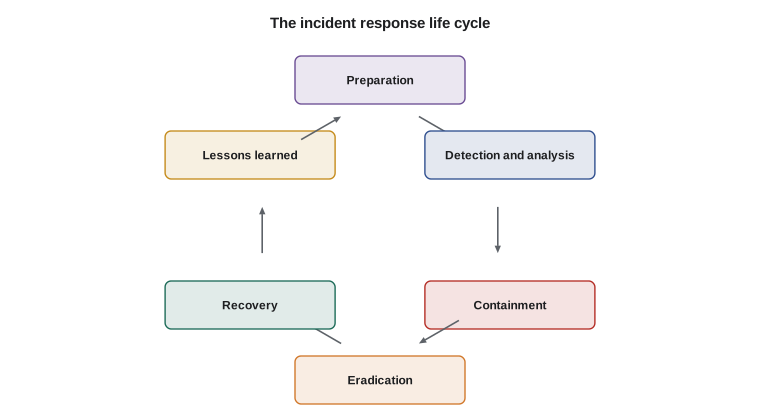
Preparation
Preparation is the phase that makes all the others work, and most of it has already appeared in this course: backups that cannot be altered, logs collected in one place, endpoint protection that can isolate a device, and an inventory of systems. Preparation also includes a written incident response plan, which does not need to be long. Ridgeline's plan fits on two pages. It lists who to call and in what order, with phone numbers that do not depend on the company's own email or computers; who has authority to make decisions such as disconnecting the shop or contacting the police; contact details for the insurer, the bank, the payment provider and the payroll provider; and short playbooks for the most likely incidents: a compromised email account, ransomware, a lost device, a suspected card skimmer and a payment fraud attempt.
A plan that has never been practiced tends to fail when it is needed. Sam ran a one-hour tabletop exercise with Rosa, Jordan and Anita, talking through a pretend ransomware morning step by step. It revealed that the insurer's phone number was only stored in Rosa's email, which might be unavailable, and that nobody knew how to take card payments if the internet went down. Both gaps were fixed before the real incident.
| Role | Who at Ridgeline | Responsibilities |
|---|---|---|
| Incident lead | Sam (Jordan as deputy) | Coordinates the response and makes technical decisions |
| Business decision maker | Rosa | Approves shutdowns, spending, outside help and notifications |
| Technical responder | Jordan, Sam's company | Containment, evidence, eradication and recovery |
| Communications | Rosa, with Anita | Staff, customers, suppliers, insurer and regulators |
| Outside help | Insurer's response firm, police | Forensics, legal advice, law enforcement reports |
Detection and analysis
Incidents are detected through alerts, reviews and, very often, people noticing something odd, as Theo did. The first job of analysis is to confirm that an incident is real, then to understand its scope and severity: which systems and accounts are affected, what data is involved, whether the attacker is still active, and how it started. Analysis uses the logs from lesson 10, endpoint protection records and conversations with the people involved. Every observation, decision and action should be written down with the time, starting from the first moment. Notes taken on paper or on a phone are fine; memory is not.
Severity guides how fast and how big the response must be. Ridgeline uses three levels. High means business operations are stopped, confidential data such as payroll or customer data may be exposed, or an attacker is active; Sam and Rosa are called immediately, day or night. Medium means a contained problem with possible data exposure, such as a compromised email account caught quickly; Sam is called within the hour. Low means a minor event with no data at risk, such as a blocked phishing email or a single malware detection that was stopped; it is handled in normal working hours.
Try it yourself
Classify incident severity
Complete severity(incident) using Ridgeline's rules. The incident is a dictionary with three True/False values: operations_stopped, data_exposed and attacker_active, and one value contained. Return "high" if operations are stopped, or data may be exposed while the attacker is active. Otherwise return "medium" if data may be exposed, or if the problem is not yet contained. Otherwise return "low".
def severity(incident):
    # apply the high rule first, then medium, then low
    return "low"

ransomware = {"operations_stopped": True, "data_exposed": True, "attacker_active": False, "contained": False}
mailbox = {"operations_stopped": False, "data_exposed": True, "attacker_active": False, "contained": True}
blocked = {"operations_stopped": False, "data_exposed": False, "attacker_active": False, "contained": True}
print(severity(ransomware), severity(mailbox), severity(blocked))
Containment
Containment stops the incident from spreading while preserving the ability to investigate. For ransomware on one computer, the first step is to disconnect it from the network, by unplugging the cable and turning off Wi-Fi, or by using endpoint protection to isolate it, but to leave it switched on, because shutting down destroys evidence held in memory and some ransomware damages files further during shutdown. Other containment steps include disabling compromised accounts, resetting passwords and ending active sessions, blocking malicious addresses at the firewall, and, if needed, temporarily disconnecting the internet connection or a cloud integration.
Containment decisions have business costs, which is why the plan names who may make them. Disconnecting OFFICE-02 stopped Ridgeline shipping online orders that afternoon, and Rosa approved it in under a minute because the decision had been discussed in the tabletop exercise. Containment is also the moment to protect backups: Jordan confirmed that the NAS had not been reached and that the cloud copy's protected versions were intact before anything else touched them.
Evidence and chain of custody
Even when a small business does not expect to involve the police, it should handle evidence carefully, because insurers, payment card investigators and lawyers may need it later. Good practice is to collect the most volatile evidence first, such as memory contents and running processes, which a specialist can capture before a device is powered off, then disk images, then logs. Original evidence is preserved and analysis is done on copies. Each item is hashed, as in lesson 5, so that anyone can verify later that it has not changed.
Chain of custody is the record of who collected each piece of evidence, when, how it was stored and every person who handled it since. A gap in the chain can make evidence unusable. For Ridgeline, chain of custody meant labeling the shipping PC, recording its condition and the times it was disconnected and handed to the insurer's forensic firm, and keeping copies of the ransom note, the logs and screenshots with their hashes in a protected folder.
import hashlib
evidence = {
    "ransom_note.txt": "Your files are encrypted. Contact us at the address below.\n",
    "signin_log_2026-11-14.csv": "2026-11-14T08:02:11Z,OK,theo,203.0.113.24\n",
}
custody = []
for name, content in evidence.items():
    digest = hashlib.sha256(content.encode()).hexdigest()
    custody.append(("2026-11-14T15:40Z", "Jordan Reyes", name, digest[:16]))
for when, who, name, digest in custody:
print(f"{when} {who:<13} {name:<26} sha256 {digest}...")2026-11-14T15:40Z Jordan Reyes ransom_note.txt sha256 e54c606b0b9e3ad5... 2026-11-14T15:40Z Jordan Reyes signin_log_2026-11-14.csv sha256 1072ee69a345d10c...
Eradication and recovery
Eradication removes the cause of the incident: the malware, the attacker's access and the weakness that let them in. For ransomware, it is far safer to wipe and rebuild an affected computer from a known clean source than to try to clean it, because attackers often leave additional ways back in. Eradication also means finding the entry point. The forensic firm found that OFFICE-02 had been infected through a malicious attachment opened from a personal webmail account in the browser, which the email client's filtering never saw. Ridgeline's response included blocking personal webmail on office computers and tightening the endpoint protection settings.
Recovery restores normal operation and confirms it is safe. OFFICE-02 was rebuilt to the baseline, its shipping data restored from the previous night's backup, and the label printer and scale reconnected. Accounts used on it had their passwords reset. Jordan watched the logs and endpoint alerts closely for two weeks afterwards, in case the attacker tried to return. Restoring from backup worked because the backups had been tested monthly since lesson 1 of this course; untested backups are a hope, not a plan. Ridgeline did not pay the ransom: paying funds criminals, does not guarantee working decryption or the deletion of stolen data, and in some circumstances can raise legal issues. Decisions about payment should involve the insurer, lawyers and, where appropriate, the police.
Notification and reporting
Some incidents create legal duties to notify others, and the rules differ by country and region. The key questions are whether personal information was involved and whether it was accessed, disclosed or lost, and what harm could result. Ridgeline's forensic firm found that the shipping PC held customer names and addresses for recent orders, but that there was no sign the attackers had copied data off it before encrypting it. That assessment, made with the insurer's lawyers, shaped the decisions that followed.
In the United States, every state has its own data breach notification law, and the law of each affected person's state applies, so a business with customers in several states may have several sets of rules to follow. The laws generally require notifying affected residents when certain personal information, such as names combined with Social Security numbers, driver's license numbers or financial account numbers, is acquired or reasonably believed to have been acquired by an unauthorized person, often within a set number of days, and some also require notifying the state attorney general. Ridgeline's lawyer checked the rules for Idaho and for the other states where its online customers live. Sector rules such as HIPAA apply to health information. Cybercrime can be reported to the FBI's Internet Crime Complaint Center (IC3), and CISA accepts incident reports.
Card payment incidents have their own path. If card data might be involved, the business must contact its payment provider or acquiring bank promptly, and PCI DSS rules on investigation apply. Ridgeline's card data never touches its own computers, because the card readers send it encrypted straight to the provider, so the shipping PC incident did not involve card data. Contracts may also require notifying partners, and cyber insurance policies usually require prompt notice to the insurer, often before outside firms are hired, so the insurer's number belongs near the top of the call list.
Try it yourself
Build the incident timeline
During the incident, notes came from several people in no particular order. Complete timeline(notes) so that it returns the notes sorted by time, where each note is a tuple ("HH:MM", who, what). Then gap(notes) returns the number of minutes between the first and last note.
notes = [
    ("14:12", "Jordan", "Isolated OFFICE-02 from the network"),
    ("13:58", "Theo", "Noticed renamed files and a ransom note"),
    ("14:25", "Rosa", "Called the insurer"),
    ("14:05", "Jordan", "Confirmed ransomware on OFFICE-02"),
]

def timeline(notes):
    return notes

def gap(notes):
    return 0

for n in timeline(notes):
    print(n)
print(gap(notes), "minutes")
Lessons learned
Within two weeks of recovery, Sam ran a lessons-learned meeting. The tone matters: the aim is to improve the system, not to blame Theo, who did exactly the right thing by reporting quickly. The meeting asked what happened and when, what went well, what went badly, and what should change. What went well: Theo reported within minutes, the plan's call list worked, isolation stopped the spread, and tested backups meant only an afternoon of shipping was lost. What went badly: personal webmail bypassed the email filtering, and the endpoint protection had been set to alert rather than block for some behaviors.
The actions were specific, owned and dated: block personal webmail on office computers (Jordan, this week), set endpoint protection to block by default (Sam, this week), add a short refresher on attachments to the next staff meeting (Rosa, next month), and add the shipping data to the hourly backup instead of nightly (Sam, this month). Those actions went into preparation, closing the loop. Ridgeline also kept its record of the incident, as Canadian law requires for breaches of security safeguards and as good practice everywhere.
Worked problem
Ordering the first hour of the ransomware response
Put Ridgeline's first actions in a sensible order and explain why.
Show solution
- Theo reports immediately and does not turn off or keep using the computer.
- Jordan confirms the incident and starts a written timeline.
- Jordan isolates OFFICE-02 from the network but leaves it powered on, and checks that the NAS and cloud backups are untouched.
- Rosa, as decision maker, approves stopping shipping and calls the insurer, whose response firm takes over forensics.
- Later steps follow: evidence, eradication by rebuilding, recovery from backup, notification decisions and lessons learned.
Answer: Report, confirm and record, contain while preserving evidence, protect backups, then involve the decision maker and insurer.
Common mistakes
MistakeSwitching off an infected computer straight away.
InsteadIsolate it from the network but leave it on, so memory evidence is preserved, unless a specialist advises otherwise.
MistakeKeeping the incident plan only on the company network or email.
InsteadKeep contact lists and the plan available offline and on phones.
MistakeCleaning malware off a compromised computer and returning it to use.
InsteadWipe and rebuild from a known clean source, and find and fix the entry point.
MistakeRelying on memory for what happened.
InsteadWrite a timeline with times, observations, decisions and actions from the first moment.
MistakeForgetting legal and contractual notifications.
InsteadAssess personal data involvement early and check privacy law, card rules, contracts and insurance requirements.
MistakeUsing the lessons-learned meeting to assign blame.
InsteadFocus on improving the system, and give every action an owner and a date.
Summary and key terms
- An incident actually or potentially harms confidentiality, integrity or availability, or breaks policy.
- The life cycle is preparation, detection and analysis, containment, eradication, recovery and lessons learned.
- Preparation includes a short written plan, roles, offline contacts, playbooks and tabletop exercises.
- Contain by isolating systems and disabling accounts while preserving evidence and protecting backups.
- Handle evidence with hashes and a chain of custody; analyze copies, not originals.
- Rebuild rather than clean, find the entry point, and restore from tested backups.
- Notification duties depend on personal data, location, card rules, contracts and insurance.
- security incident
- An event that harms or threatens information or systems, or breaks policy.
- incident response plan
- A written plan for handling incidents, including roles and contacts.
- playbook
- Step-by-step instructions for a particular kind of incident.
- tabletop exercise
- A discussion-based rehearsal of an incident.
- containment
- Stopping an incident from spreading.
- eradication
- Removing the cause of an incident.
- chain of custody
- The record of who handled evidence, when and how.
- volatile evidence
- Evidence lost when power is removed, such as memory contents.
- breach notification
- Legally required notice to regulators or individuals after certain breaches.
- lessons learned
- The review that turns an incident into improvements.
Practice problems
Work each problem on paper first, then reveal the answer to check.
Why did Ridgeline leave OFFICE-02 powered on after disconnecting it?
Show answer
To preserve volatile evidence in memory and avoid further damage some ransomware causes on shutdown.
What gaps did the tabletop exercise reveal?
Show answer
The insurer's number was only in Rosa's email, and nobody knew how to take card payments without the internet.
Why rebuild a compromised PC rather than clean it?
Show answer
Attackers may leave hidden ways back in; a rebuild from a known clean source removes them.
Why is each piece of evidence hashed?
Show answer
So anyone can later verify it has not changed since it was collected.
Why was card data not involved in the shipping PC incident?
Show answer
Card readers send card data encrypted directly to the payment provider; it never touches Ridgeline's computers.
Give two actions from Ridgeline's lessons-learned meeting.
Show answer
Any two of: block personal webmail, set endpoint protection to block, staff refresher on attachments, hourly backup of shipping data.
Lesson quiz · 5 questions
Score 60% or more to complete this lesson.
Create a free account to save your progress, take quizzes and earn a certificate.