
CYB-101 · Lesson 7 of 12 · 25 min
Identity, authentication and multi-factor
▶ Video coming soon A video version of this lesson is on the way.
When Sam ranked Ridgeline's risks in lesson 4, the top of the list was not a technical flaw. It was accounts: the payroll login protected only by a password, the shop admin account shared by Theo and Rosa, the former barista who could still sign in to the shop, and the email accounts that receive every invoice. Attackers want accounts more than anything else, because a working login lets them walk in through the front door, past firewalls and filters, looking exactly like a legitimate user. This lesson covers how systems decide who you are and what you may do, how passwords should be handled today, and why multi-factor authentication is the single most effective control most small businesses can add.
Identification, authentication, authorization and accounting
Four separate steps happen whenever someone uses a system, often summarized as IAAA. Identification is claiming an identity, such as typing the username anita@ridgelinecoffee.example. Authentication is proving the claim, with a password, a code, a fingerprint or a security key. Authorization decides what the authenticated person may do: Anita may open the accounting files but not the roaster settings. Accounting, also called auditing, records what was done, so that actions can be traced later (lesson 10).
Keeping these steps distinct clarifies many problems. A user who signs in successfully but cannot open a shared folder has an authorization problem, not an authentication problem. A shared account breaks accounting, because the logs cannot say which person acted. And strong authentication is wasted if authorization gives every account administrator rights.
Authentication factors
Authentication factors fall into three main categories. Something you know includes passwords, passphrases and PINs. Something you have includes a phone running an authenticator app, a hardware security key or a smart card. Something you are means biometrics, such as a fingerprint or face. Some systems also consider somewhere you are, such as the country or network a sign-in comes from, as an extra signal, though it is not normally counted as a factor on its own.
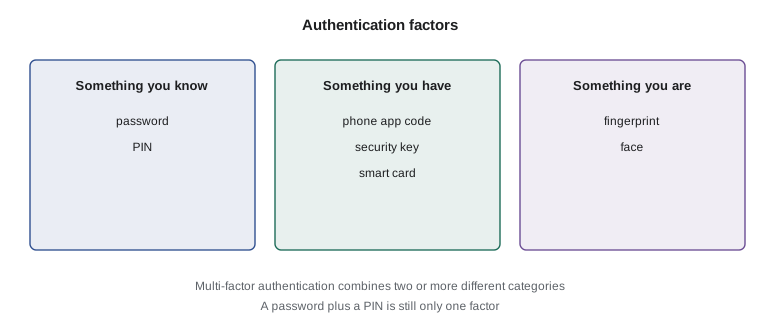
Multi-factor authentication (MFA) requires factors from at least two different categories. A password plus a code from an app on your phone is MFA. A password plus a security question is not, because both are things you know. MFA works because an attacker who steals a password from a phishing page or a breached website still lacks the second factor. Studies by major account providers have repeatedly found that MFA blocks the overwhelming majority of automated account takeover attempts.
Passwords done right
Passwords will be around for years yet, and the advice about them has changed a great deal. For a long time, organizations required short passwords with a capital letter, a number and a symbol, changed every 90 days. Research showed this produced predictable passwords such as Ridgeline1! followed by Ridgeline2!, written on sticky notes. Current guidance from the US National Institute of Standards and Technology, in SP 800-63B-4, which many organizations in Canada also follow, takes a different approach.
Length matters most. When a password is the only factor, NIST calls for at least 15 characters; when it is used together with a second factor, at least 8, and systems should accept long passwords of at least 64 characters. Composition rules, such as requiring symbols, should not be imposed. Passwords should not be changed on a schedule, only when there is evidence of compromise. New passwords should be checked against lists of passwords known to be common, expected or exposed in breaches, and rejected if they appear. Users should be allowed to paste passwords so that password managers work, and password hints and knowledge-based security questions should not be used.
For people, the practical result is simple. Use a password manager to generate and store a unique, long random password for every account, protected by one strong passphrase that you memorize, such as four or five unrelated words. Never reuse passwords across sites. Ridgeline adopted a business password manager with shared vaults, so that the shop admin, the router and the supplier portals each have a unique password that Sam, Jordan and Rosa can access according to their role, without anyone writing passwords down.
import math
def guesses(length, alphabet):
    return alphabet ** length

for label, length, alphabet in [("8 characters, all keyboard symbols", 8, 95),
                                 ("15 lowercase letters", 15, 26),
                                 ("4 random words from 7,776", 4, 7776),
                                 ("5 random words from 7,776", 5, 7776)]:
    n = guesses(length, alphabet)
print(f"{label:<36} about 2^{math.log2(n):.0f} possibilities")8 characters, all keyboard symbols about 2^53 possibilities 15 lowercase letters about 2^71 possibilities 4 random words from 7,776 about 2^52 possibilities 5 random words from 7,776 about 2^65 possibilities
Try it yourself
A modern password check
Complete check_password(pw, mfa) following current NIST-style guidance. Return a list of problems (an empty list means the password is acceptable):
"too short" if it has fewer than 15 characters when mfa is False, or fewer than 8 when mfa is True; "too long" if it has more than 64 characters; "known weak" if its lowercase form is in BLOCKED or contains the word ridgeline. Do not require symbols, digits or capitals.
BLOCKED = {"password", "password123", "qwerty123", "summer2026!", "letmein"}

def check_password(pw, mfa):
    problems = []
    # add the three checks
    return problems

print(check_password("Ridgeline2026!", True))
print(check_password("green kettle walks slowly home", False))
Kinds of second factor
Second factors are not all equally strong. Codes sent by SMS text message are much better than nothing, but they can be intercepted or redirected, for example when criminals talk a phone company into moving a number to a new SIM card. Authenticator apps generate time-based one-time passwords (TOTP) on the phone itself, so nothing travels over the phone network. Push notifications ask the user to approve a sign-in in an app; they are convenient, but attackers have learned to send repeated requests until a tired user taps approve, a technique called MFA fatigue. Number matching, where the user must type a number shown on the sign-in screen, defeats that trick.
The strongest common option is phishing-resistant authentication using FIDO2 and WebAuthn: hardware security keys and passkeys. A passkey is a key pair created for one specific website and stored on a device or in a password manager; signing in uses the private key, unlocked by a fingerprint, face or device PIN. Because the browser only uses the passkey with the genuine website's name, a look-alike phishing page simply cannot trigger it, which is exactly the protection Anita needed. Ridgeline turned on passkeys or authenticator apps for email, payroll, banking and the shop, and keeps SMS only where a provider offers nothing better.
How authenticator app codes work
The six-digit codes in an authenticator app look like magic, but the method is public and simple, defined in a standard called RFC 6238. When you set up the app, usually by scanning a QR code, the website and your phone share a secret key. Every 30 seconds both sides take the current time, count how many 30-second steps have passed since 1 January 1970, combine that counter with the secret using a keyed hash called HMAC, and turn part of the result into a six-digit number. Because both sides have the same secret and the same clock, they get the same code without any communication. A stolen code is useless within a minute or so, and the secret itself never leaves the phone after setup.
Try it yourself
Generate an authenticator code
Complete totp(secret, unix_time, digits=6) following RFC 6238 with SHA-1 and 30-second steps:
1. counter = unix_time // 30, packed as an 8-byte big-endian number with struct.pack(">Q", counter). 2. h = hmac.new(secret, packed, hashlib.sha1).digest(). 3. offset = the last byte of h AND 15. 4. Take the 4 bytes starting at offset as a big-endian number and clear the top bit (AND 0x7FFFFFFF). 5. The code is that number modulo 10 to the power digits, padded with leading zeros.
The test values come from the RFC itself.
import hmac, hashlib, struct

def totp(secret, unix_time, digits=6):
    counter = unix_time // 30
    packed = struct.pack(">Q", counter)
    # steps 2 to 5
    return "000000"

secret = b"12345678901234567890"
print(totp(secret, 59, 8))
Authorization and least privilege
Once someone is authenticated, authorization decides what they can reach. The guiding rule is least privilege: every person and every program gets only the access needed for its job, and no more. At Ridgeline, baristas need the point-of-sale app, not the accounting files; Theo needs shipping and stock, not payroll; and nobody needs to work every day in an administrator account. Least privilege limits the damage from mistakes, malware and stolen accounts, because a compromised barista login cannot reach payroll.
Access is easier to manage by role than person by person. In role-based access control, permissions are assigned to roles such as cafe staff, shipping, bookkeeping and owner, and people are placed in roles. When a new barista starts, they get the cafe staff role and everything that comes with it; when they leave, removing them from the role removes everything at once. Ridgeline also adopted two related rules. Separation of duties means no single person can complete a sensitive process alone, so the person who adds a new supplier cannot also approve its first payment. And regular access reviews, every three months, check that every account still belongs to a current person with a current need.
| Role | Point of sale | Shop admin | Accounting | Payroll | Router and NAS |
|---|---|---|---|---|---|
| Cafe staff | Use | No | No | No | No |
| Shipping (Theo) | No | Products and orders | No | No | No |
| Bookkeeping (Anita) | Reports | No | Full | Prepare | No |
| Owner (Rosa) | Reports | Full | View | Approve | No |
| IT (Jordan, Sam) | Settings | Settings | No | No | Administer |
Account life cycle and single sign-on
Accounts have a life cycle: created when someone joins (provisioning), changed when their job changes, and disabled when they leave (deprovisioning). Most of the account problems Sam found sat at the end of that cycle. The former barista's shop login had survived because nobody owned the leaver checklist. Ridgeline now uses a one-page checklist, run on a person's last day, covering email, the shop, the point-of-sale system, the password manager, door codes and any keys. Shared accounts were replaced with individual ones, and the few accounts that genuinely must be shared, such as the emergency administrator account, are kept in the password manager with access logged.
Single sign-on (SSO) lets people sign in once with a central identity, such as their Microsoft business account, and reach other services without separate passwords. Behind the scenes, standards such as SAML and OpenID Connect let the identity provider vouch for the user to each service, a relationship called federation. SSO improves security as well as convenience: there are fewer passwords to steal, MFA is enforced in one place, and disabling one account on the last day cuts access to everything connected to it.
Try it yourself
Lock out repeated failures
Complete process(attempts, limit). Each attempt is a tuple (username, succeeded). Count consecutive failures per user; a success resets that user's count to zero. Once a user reaches limit consecutive failures they are locked, and stay locked for the rest of the list even if a later attempt succeeds. Return a sorted list of locked usernames.
attempts = [("theo", False), ("theo", True), ("admin", False), ("admin", False),
            ("admin", False), ("theo", False), ("admin", True)]

def process(attempts, limit):
    fails = {}
    locked = set()
    for user, ok in attempts:
        pass  # update fails and locked
    return sorted(locked)

print(process(attempts, 3))
Worked problem
Fixing the shared shop account
Theo and Rosa share one shop admin login with a password both have memorized, and there is no MFA. Plan the fix using the ideas in this lesson.
Show solution
- Identification and accounting: create separate accounts for Theo and Rosa so that every change is traceable to one person.
- Authorization: give Theo a role limited to products and orders; Rosa keeps full admin rights for settings and payments.
- Authentication: generate new unique passwords in the password manager and turn on passkeys or an authenticator app for both accounts.
- Life cycle: retire the old shared login, add both accounts to the leaver checklist and the quarterly access review.
Answer: Individual accounts, role-limited rights, unique managed passwords with MFA, and a place in the account life cycle.
Common mistakes
MistakeForcing frequent password changes and symbol rules.
InsteadRequire length, check against breached and common passwords, and change only on evidence of compromise.
MistakeTreating a password plus a security question as MFA.
InsteadMFA needs factors from different categories, such as a password and an authenticator app.
MistakeApproving an MFA push notification you did not start.
InsteadDeny it and report it: someone has your password. Prefer number matching or passkeys.
MistakeGiving everyone administrator rights to avoid support requests.
InsteadApply least privilege and role-based access; use separate admin accounts only when needed.
MistakeLeaving accounts active after people leave.
InsteadRun a leaver checklist on the last day and review access every quarter.
MistakeWriting passwords in a notebook or spreadsheet.
InsteadUse a password manager with shared vaults for team credentials.
Summary and key terms
- Identification claims an identity, authentication proves it, authorization limits it and accounting records it.
- Factors are something you know, have and are; MFA combines different categories.
- Current NIST guidance favors length, blocklists and password managers over complexity rules and forced changes.
- Authenticator apps, security keys and passkeys are stronger than SMS; passkeys resist phishing.
- TOTP codes come from a shared secret and the current time, using HMAC.
- Least privilege, role-based access, separation of duties and access reviews limit what accounts can do.
- Accounts need a managed life cycle; single sign-on centralizes MFA and removal.
- authentication
- Proving a claimed identity.
- authorization
- Deciding what an authenticated identity may do.
- MFA
- Multi-factor authentication, using factors from two or more categories.
- TOTP
- Time-based one-time password, the codes shown in authenticator apps.
- passkey
- A phishing-resistant credential using a key pair tied to one website.
- MFA fatigue
- Sending repeated approval requests until a user accepts one.
- least privilege
- Giving each person or program only the access it needs.
- role-based access control
- Assigning permissions to roles and people to roles.
- separation of duties
- Splitting sensitive tasks so no single person can complete them alone.
- single sign-on
- Signing in once to reach several services through a central identity.
Practice problems
Work each problem on paper first, then reveal the answer to check.
Anita signs in successfully but cannot open the payroll folder. Is this an authentication or authorization issue?
Show answer
Authorization: her identity was proven, but her permissions do not include that folder.
Is a fingerprint plus a face scan multi-factor authentication?
Show answer
No; both are something you are, the same category.
Why are passkeys resistant to phishing?
Show answer
The browser only uses a passkey with the genuine website's name, so a look-alike site cannot trigger it.
Under current NIST guidance, what is the minimum length for a password used without a second factor?
Show answer
15 characters.
Rosa gets five MFA approval requests at midnight that she did not start. What does this mean and what should she do?
Show answer
Someone has her password; deny the requests, change the password and report it.
Give one example of separation of duties at Ridgeline.
Show answer
The person who adds a new supplier cannot also approve that supplier's first payment.
Lesson quiz · 5 questions
Score 60% or more to complete this lesson.
Create a free account to save your progress, take quizzes and earn a certificate.