
CSCO-122 · Lesson 8 of 12 · 22 min
Monitoring and log basics
▶ Video coming soon A video version of this lesson is on the way.
On Saturday, November 7, 2026, Brightline's managed detection partner sent an overnight summary that Keisha opened with her coffee. Between 2:10 and 2:24 in the morning, the remote desktop gateway at Prairie Paws Veterinary Clinic had recorded 61 failed sign-in attempts for nine different user names, all from addresses outside North America. None had succeeded, and the account lockout policy had locked two real accounts after five failures each. Keisha showed Jordan the raw log lines and asked him what he saw. A lot of noise, he said. She agreed, and then pointed out the three facts that mattered: the attempts failed, they targeted real user names, and the gateway was reachable from the whole internet. That last fact, she said, is the real finding. The logs did their job by telling us.
This lesson explains what logs are and where they come from, how to read common log entries, why accurate time matters, how logs are collected and analyzed in a SIEM, how alerts are triaged and when they must be escalated. The exam expects you to interpret system logs and to monitor security events well enough to know when escalation is required.
What logs are
A log is a time-stamped record of an event: a sign-in, a file opened, a connection allowed or blocked, a service started, a setting changed or an error. Operating systems, applications, network devices, security tools and cloud services all write logs. Individually, most log entries are dull. Together, they let defenders reconstruct what happened, detect attacks in progress and prove that controls were working. Logs are also evidence, so Lesson 10 returns to how they must be protected.
Common log sources
| Source | Examples of what it records | Where to find it |
|---|---|---|
| Windows event logs | Sign-ins, account changes, service installs, application errors | Event Viewer: Security, System and Application logs |
| Linux and macOS system logs | Authentication, services, kernel messages | The journal (journalctl), files such as /var/log/auth.log or /var/log/secure, and the macOS unified log |
| Firewalls and routers | Allowed and blocked connections, VPN sign-ins, configuration changes | Device log buffer or a remote syslog server |
| Endpoint protection and EDR | Detections, blocked actions, isolation events | The security console |
| Email and web filters | Blocked messages, suspicious links, quarantined attachments | The filtering service's console |
| Cloud and identity services | Sign-ins, MFA results, admin changes, file sharing | The provider's audit and sign-in logs |
| Applications | User actions, errors, record access | Application-specific logs or databases |
Reading Windows security events
Windows records security events with numeric event IDs that every analyst learns to recognize. A handful cover most of what a technician needs.
| Event ID | Meaning |
|---|---|
| 4624 | An account successfully signed in |
| 4625 | An account failed to sign in |
| 4634 | An account signed out |
| 4672 | Special privileges were assigned to a new sign-in, typical of administrator accounts |
| 4720 | A user account was created |
| 4732 | A member was added to a security-enabled local group, such as Administrators |
| 4740 | A user account was locked out |
| 1102 | The audit log was cleared |
Each event includes more detail than its ID. A failed sign-in event, for example, records the account name, the source computer or address, the sign-in type and a status code explaining why it failed, such as an unknown user name or a bad password. Sign-in type 3 is a network sign-in, such as accessing a shared folder; type 10 is a remote interactive sign-in, such as remote desktop. Event 1102 deserves special attention: legitimate administrators rarely clear the security log, and attackers sometimes do it to hide their tracks.
Syslog and severity levels
Network devices, Linux systems and many appliances send logs using syslog, a long-standing standard for log messages. Each message carries a facility, which says what kind of program sent it, and a severity from 0 to 7. Lower numbers are more serious.
| Level | Name | Typical meaning |
|---|---|---|
| 0 | emergency | The system is unusable |
| 1 | alert | Action must be taken immediately |
| 2 | critical | Critical conditions, such as a hardware failure |
| 3 | error | Error conditions |
| 4 | warning | Something may become a problem |
| 5 | notice | Normal but significant conditions |
| 6 | informational | Routine operational messages |
| 7 | debug | Detailed messages used for troubleshooting |
On Cisco devices, the logging level setting chooses how much detail is sent. Setting a remote syslog server to level 6, informational, sends everything from emergencies down to routine messages but not debugging chatter, which is a common choice. A device's local log buffer is small and is lost when the device restarts, so important devices should send their logs to a central server.
logging host 10.20.0.15
logging trap informational
service timestamps log datetime msec localtime show-timezone
ntp server 10.20.0.1
show logging
Time: the thread that ties logs together
When Jordan compared the gateway's log with the EDR console, the times did not line up. The gateway said the attempts began at 2:10, the EDR showed related activity at 3:10, and the firewall said 8:10. Keisha explained that the gateway used local time, the EDR console displayed a different time zone and the firewall logged in Coordinated Universal Time, or UTC. Without accurate, consistent time, events from different systems cannot be put in order, and the story of an incident falls apart.
The fix is twofold. Every device should synchronize its clock with a trusted time source using the Network Time Protocol, or NTP. And every log should record its time zone, ideally with timestamps stored in UTC and converted for display. Brightline's standard, added to the baseline from Lesson 1, required NTP on every device and server and UTC timestamps on every central log.
Collecting logs centrally: the SIEM
Looking at logs device by device does not scale. A security information and event management system, or SIEM, collects logs from many sources into one place, normalizes them into a common format, stores them for a set retention period and runs correlation rules that look for patterns across sources. A single failed sign-in is noise; fifty failed sign-ins followed by one success from the same address, then a new administrator account, is a pattern a correlation rule can catch.
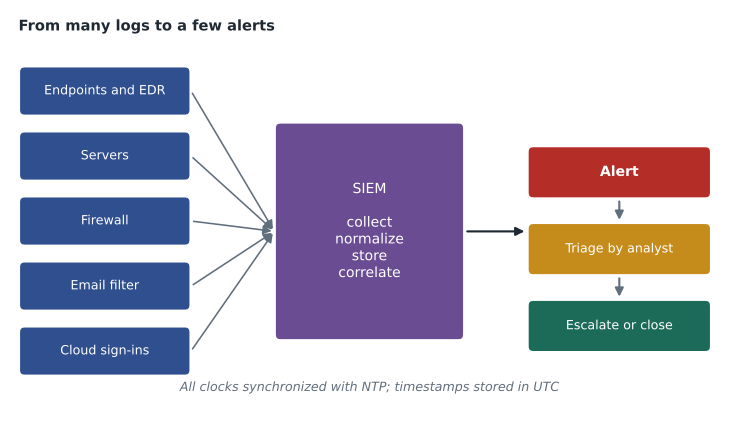
SIEMs need tuning. Out of the box, they can generate far more alerts than a small team can review, and an analyst who sees hundreds of low-value alerts a day stops reading them carefully, a problem called alert fatigue. Good practice is to start with a small set of high-value rules, such as sign-ins from unusual countries, new administrator accounts, cleared audit logs and EDR detections, and add more as the team learns what is normal. Security orchestration, automation and response tools, or SOAR, can then automate routine steps, such as looking up an address's reputation or disabling an account after a confirmed compromise.
Baselines and anomalies
Detecting the unusual requires knowing what usual looks like. A baseline of normal activity records things like typical sign-in times, usual source locations, normal data volumes and which accounts use administrator rights. Anomalies stand out against it. At Prairie Paws, staff never signed in between midnight and 6 a.m., so any sign-in attempt in those hours was worth a look, and attempts from overseas addresses were almost certainly hostile.
from collections import Counter
from datetime import datetime

log = """2026-11-07T08:10:04Z FAIL user=reception src=203.0.113.45
2026-11-07T08:10:09Z FAIL user=admin src=203.0.113.45
2026-11-07T08:10:15Z FAIL user=drpatel src=203.0.113.45
2026-11-07T08:11:02Z FAIL user=reception src=198.51.100.7
2026-11-07T08:11:40Z FAIL user=reception src=203.0.113.45
2026-11-07T08:12:13Z FAIL user=backup src=198.51.100.7
2026-11-07T08:13:30Z FAIL user=reception src=203.0.113.45
2026-11-07T08:14:51Z FAIL user=reception src=203.0.113.45
2026-11-07T14:02:10Z OK user=drpatel src=10.20.0.31"""

fails_by_user = Counter()
fails_by_source = Counter()
for line in log.splitlines():
    stamp, result, user, src = line.split()
    if result == 'FAIL':
        fails_by_user[user.split('=')[1]] += 1
        fails_by_source[src.split('=')[1]] += 1

print('Failed sign-ins by user:', dict(fails_by_user))
print('Failed sign-ins by source:', dict(fails_by_source))
for source, count in fails_by_source.items():
    if count >= 5:
        print('ALERT: possible password guessing from', source, '-', count, 'failures')
first = datetime.fromisoformat(log.splitlines()[0].split()[0].replace('Z', '+00:00'))
print('First failure (UTC):', f'{first.hour:02d}:{first.minute:02d}')Failed sign-ins by user: {'reception': 5, 'admin': 1, 'drpatel': 1, 'backup': 1}
Failed sign-ins by source: {'203.0.113.45': 6, '198.51.100.7': 2}
ALERT: possible password guessing from 203.0.113.45 - 6 failures
First failure (UTC): 08:10The short program above shows the idea behind a correlation rule. It counts failed sign-ins per user and per source address, then flags any source with five or more failures. Real SIEMs do the same thing across millions of events with time windows, allow-lists and enrichment such as address location, but the logic is the same. The example addresses come from ranges reserved for documentation, so they will never belong to a real attacker.
Triage and escalation
Monitoring only helps if someone acts on what it finds. Triage is the quick assessment of each alert: is it real, how serious is it, and what should happen next? Brightline's triage questions were short: What happened? Which systems and accounts are involved? Did anything succeed? Is it still happening? How sensitive are the affected assets?
Escalation means passing an event to someone with more authority or expertise, and knowing when to do it is an exam objective. Brightline's rules told a technician to escalate to the security analyst immediately when any of these were true: a sign-in succeeded from an unexpected place, malware ran rather than being blocked, an administrator account was created or changed unexpectedly, an audit log was cleared, personal or confidential data may have been exposed, or the technician was simply unsure. Escalation is not an admission of failure. Escalating too late is far worse than escalating something that turns out to be harmless.
Worked problem
Deciding whether to escalate
Jordan reviews three overnight alerts. Alert 1: 61 failed remote desktop sign-ins at Prairie Paws from overseas addresses, none successful. Alert 2: an EDR detection at Kettle & Crumb, blocked and quarantined, of a known adware installer. Alert 3: a successful sign-in to Riverside Family Law's email from a country where nobody at the firm travels, followed by a new mail-forwarding rule. Which should he escalate immediately?
Show solution
- Alert 1: no success, accounts locked as designed. It is not an active compromise, but the exposed gateway is a risk to raise with Keisha in the morning.
- Alert 2: blocked and quarantined, low severity. Record it, confirm a clean scan and follow up on the software policy.
- Alert 3: a successful sign-in from an unexpected country plus a new forwarding rule is a classic sign of a compromised mailbox. Escalate immediately.
- For Alert 3, escalation starts incident response: reset the password, revoke sessions, remove the rule and review what was accessed.
Answer: Escalate Alert 3 immediately; handle Alert 2 as routine; raise Alert 1 as a risk finding about the exposed gateway.
Prairie Paws' gateway was fixed on Tuesday, November 10. Brightline moved remote access behind a VPN that required multi-factor authentication, so the remote desktop service was no longer reachable from the internet at all. The overnight failures stopped, which Keisha said was the best kind of quiet.
Retention and protection of logs
Logs must be kept long enough to investigate incidents that are discovered late, and many intrusions are found weeks or months after they begin. Compliance frameworks often set minimums: PCI DSS, for example, requires audit logs to be kept for at least twelve months, with the most recent three months immediately available for analysis. Logs must also be protected from tampering, which is why central collection matters. An attacker who controls a server can erase its local logs, but not the copies already sent to the SIEM.
Common mistakes
MistakeLeaving devices with unsynchronized clocks.
InsteadUse NTP everywhere and record time zones, ideally storing timestamps in UTC.
MistakeKeeping logs only on the devices that create them.
InsteadSend logs to a central, protected server or SIEM.
MistakeTurning on every SIEM rule at once.
InsteadStart with a few high-value rules and tune to avoid alert fatigue.
MistakeIgnoring a cleared audit log.
InsteadTreat event 1102 and similar events as possible signs of an intruder.
MistakeWaiting to escalate until you are sure.
InsteadEscalate quickly when success, data exposure or doubt is involved.
Summary and key terms
- Logs are time-stamped records of events from operating systems, applications, network devices, security tools and cloud services.
- Key Windows security events include 4624 and 4625 for sign-ins, 4720 and 4732 for account and group changes, 4740 for lockouts and 1102 for a cleared log.
- Syslog severities run from 0, emergency, to 7, debug; lower numbers are more serious.
- Accurate time from NTP and consistent time zones are essential for putting events in order.
- A SIEM collects, normalizes, stores and correlates logs; tuning prevents alert fatigue.
- Triage decides what an alert means; escalate immediately when something succeeded, data may be exposed or you are unsure.
- Logs must be retained long enough and protected from tampering.
- Log
- A time-stamped record of an event.
- Event ID
- A number identifying a type of Windows event.
- Syslog
- A standard for sending log messages, with facilities and severity levels.
- NTP
- Network Time Protocol, used to keep device clocks accurate.
- SIEM
- Security information and event management: central log collection and correlation.
- Correlation rule
- Logic that detects patterns across multiple log events or sources.
- Alert fatigue
- Reduced attention caused by too many low-value alerts.
- Escalation
- Passing an event to someone with more authority or expertise.
Practice problems
Work each problem on paper first, then reveal the answer to check.
What does Windows event ID 4625 record?
Show answer
A failed sign-in attempt.
Which syslog severity number is more serious, 2 or 5?
Show answer
2, critical; lower numbers are more serious.
Why must logs from different devices use synchronized time?
Show answer
So that events can be put in the correct order across systems.
What does a SIEM correlation rule do?
Show answer
It looks for patterns that span several events or sources, such as many failures followed by a success.
Give two conditions that require immediate escalation.
Show answer
For example, a successful sign-in from an unexpected place, malware that ran, a cleared audit log or possible data exposure.
Why is central log collection important during an incident?
Show answer
An attacker who controls a device can erase its local logs but not copies already sent elsewhere.
Lesson quiz · 5 questions
Score 60% or more to complete this lesson.
Create a free account to save your progress, take quizzes and earn a certificate.