
CSCO-122 · Lesson 5 of 12 · 21 min
Interpreting vulnerability scan results
▶ Video coming soon A video version of this lesson is on the way.
The Prairie Paws scan finished at 1:15 in the morning on Friday, October 30, 2026. When Jordan opened the report later that day, his heart sank. It listed 214 findings across 22 devices, sorted into colors from red to blue, and ran to more than ninety pages. Keisha laughed when she saw his face. Nobody fixes ninety pages, she said. The skill is not reading the report; it is turning it into a short list of the right things to do first. This lesson is about that skill: understanding what a finding says, how severity scores are built, which findings are real, and how to decide what gets fixed this week, what gets fixed this month and what gets accepted.
Anatomy of a finding
Every scanner formats its reports differently, but each finding contains the same core pieces of information. Learning to read them quickly is the first step.
- Title and identifier: a short name and usually one or more CVE identifiers, plus the scanner's own plugin or check number.
- Affected asset: the device name or address, and the port or software where the problem was found.
- Severity and score: a rating such as critical, high, medium or low, usually based on a CVSS score.
- Description: what the weakness is and what an attacker could do with it, in general terms.
- Evidence: what the scanner observed, such as an installed version number or a response from a service. This is what lets you confirm or dispute the finding.
- Solution: the recommended fix, such as a specific update, a configuration change or removal of the software.
- References: links to vendor advisories and vulnerability databases.
The evidence section is the one beginners skip and experienced analysts read first. If a finding says a server runs a vulnerable version of a web server, the evidence should show which version the scanner saw and how. If the evidence is a guess from a banner on the network rather than a read of the installed files, the finding deserves a second look.
How CVSS scores are built
The Common Vulnerability Scoring System gives each vulnerability a score from 0.0 to 10.0. The version most scanners and databases still display is CVSS 3.1. Version 4.0, released by FIRST in November 2023, is being adopted gradually, so analysts see both. Both versions start from base metrics that describe the vulnerability itself, independent of any particular organization.
| CVSS 3.1 base metric | Question it answers | Values |
|---|---|---|
| Attack Vector (AV) | From where can it be exploited? | Network, Adjacent, Local, Physical |
| Attack Complexity (AC) | Does exploitation need special conditions? | Low, High |
| Privileges Required (PR) | What access must the attacker already have? | None, Low, High |
| User Interaction (UI) | Must a user do something, such as open a file? | None, Required |
| Scope (S) | Can it affect components beyond the vulnerable one? | Unchanged, Changed |
| Confidentiality, Integrity, Availability (C, I, A) | How badly is each affected? | High, Low, None |
The metrics are written as a vector string, such as AV:N/AC:L/PR:N/UI:N/S:U/C:H/I:H/A:H. Reading it aloud helps: exploitable over the network, low complexity, no privileges needed, no user interaction, scope unchanged, and high impact on confidentiality, integrity and availability. That combination scores 9.8, which is critical. The vector is more useful than the number, because it tells you why the score is high.
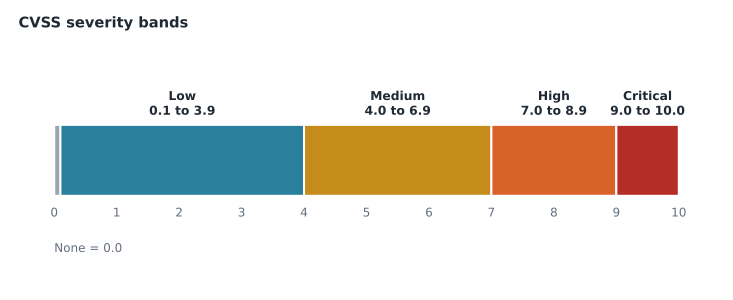
Scores fall into bands that most tools use to label severity.
The calculation itself combines weights for each metric. You will not need to compute it by hand on the exam, but seeing it once makes the score less mysterious. The short program below implements the published CVSS 3.1 base-score formula. You can edit the vector strings and run it again.
import math

W = {'AV': {'N': 0.85, 'A': 0.62, 'L': 0.55, 'P': 0.2}, 'AC': {'L': 0.77, 'H': 0.44},
     'UI': {'N': 0.85, 'R': 0.62}, 'CIA': {'H': 0.56, 'L': 0.22, 'N': 0.0}}

def roundup(x):
    # CVSS rounds up to one decimal place
    i = round(x * 100000)
    return i / 100000.0 if divmod(i, 10000)[1] == 0 else (math.floor(i / 10000) + 1) / 10.0

def base_score(vector):
    m = dict(part.split(':') for part in vector.split('/'))
    changed = m['S'] == 'C'
    pr = {'N': 0.85, 'L': 0.68 if changed else 0.62, 'H': 0.5 if changed else 0.27}[m['PR']]
    iss = 1 - (1 - W['CIA'][m['C']]) * (1 - W['CIA'][m['I']]) * (1 - W['CIA'][m['A']])
    impact = 7.52 * (iss - 0.029) - 3.25 * (iss - 0.02) ** 15 if changed else 6.42 * iss
    exploitability = 8.22 * W['AV'][m['AV']] * W['AC'][m['AC']] * pr * W['UI'][m['UI']]
    if impact <= 0:
        return 0.0
    total = 1.08 * (impact + exploitability) if changed else impact + exploitability
    return roundup(min(total, 10))

for v in ['AV:N/AC:L/PR:N/UI:N/S:U/C:H/I:H/A:H',
          'AV:L/AC:L/PR:L/UI:N/S:U/C:H/I:H/A:H',
          'AV:N/AC:L/PR:N/UI:R/S:C/C:L/I:L/A:N']:
print(v, base_score(v))AV:N/AC:L/PR:N/UI:N/S:U/C:H/I:H/A:H 9.8 AV:L/AC:L/PR:L/UI:N/S:U/C:H/I:H/A:H 7.8 AV:N/AC:L/PR:N/UI:R/S:C/C:L/I:L/A:N 6.1
The three results show how the metrics trade off. The second vector has the same high impact as the first, but the attacker must already be logged in locally, so it drops to 7.8, high rather than critical. The third needs a user to click something and affects only a little confidentiality and integrity, so it lands at 6.1, medium, even though its scope is changed.
CVSS 4.0 and the other metric groups
CVSS 4.0 keeps the idea of base metrics but refines them. It adds an Attack Requirements metric, splits user interaction into passive and active, and replaces Scope with separate impact ratings for the vulnerable system and for subsequent systems. It also renames scores to show which metric groups were used: CVSS-B for base only, CVSS-BT when threat metrics are added and CVSS-BTE when environmental metrics are added too. Version 3.1 had similar optional groups, called temporal and environmental.
The point of those extra groups is important for interpretation. A base score describes the worst reasonable case for everyone. Threat metrics adjust it for whether exploit code exists and attacks are happening. Environmental metrics adjust it for your own situation: how important the affected system is and what protections surround it. A critical base score on a test machine with no network access may matter less to you than a high score on an internet-facing server.
Beyond the score: exploitation and exposure
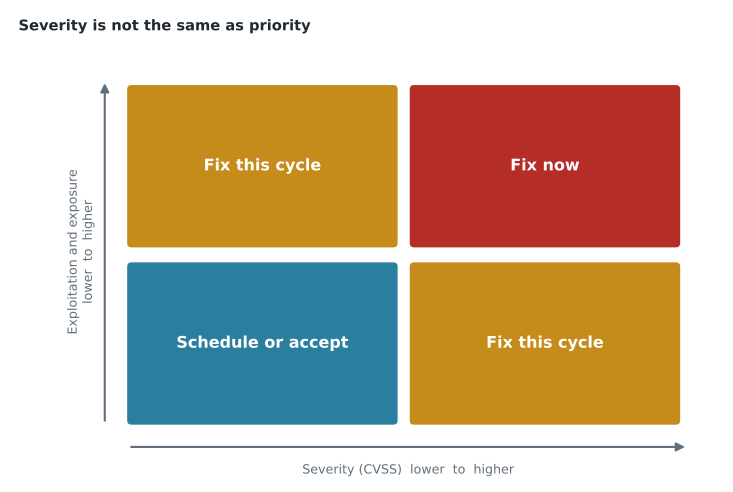
Keisha's biggest lesson for Jordan was that severity is not the same as priority. Thousands of vulnerabilities are rated high or critical every year, but only a small fraction are ever exploited in real attacks. Three questions sharpen the list.
- Is it known to be exploited? Check the government lists and vendor advisories from Lesson 4. A flaw on a known-exploited list moves to the top regardless of its exact score.
- How likely is exploitation soon? The EPSS probability helps rank flaws that are not yet known to be exploited.
- How exposed and important is the asset? An internet-facing device or a server holding sensitive records outranks an isolated workstation.
True and false positives
Scanners make mistakes in both directions. A false positive is a finding for a weakness that is not really there. A common cause is a backported fix: Linux distributions often fix a vulnerability in an older version number without changing the version, so a scanner that only reads the version reports a flaw that has already been patched. Another is a service that reports a misleading version banner. A false negative is a real weakness the scanner missed, often because it could not log in, the device was off, or the check did not exist yet.
Confirming a finding means checking the evidence against the device itself: the installed package version and its changelog, the vendor's advisory, or the configuration setting in question. Confirmed false positives should be marked in the scanner with a note, so they do not reappear next quarter. Suspected false negatives are handled by fixing the cause, such as a failed scan login, which shows up in the report as an authentication failure and is itself a finding worth acting on.
Worked problem
Turning 214 findings into a plan
The Prairie Paws report lists 214 findings: 3 critical, 19 high, 87 medium and 105 low. Investigation shows that 2 of the critical findings and 11 of the high findings are all the same missing browser update on 13 PCs, and the third critical finding is on the clinic's internet-facing firewall and appears on a known-exploited list. Six of the high findings are on the practice-management server, and 4 of the medium findings are confirmed false positives. How should Jordan organize the work?
Show solution
- Group by fix, not by finding: one browser update fixes 2 critical and 11 high findings at once.
- Top priority: the firewall flaw, because it is internet-facing and known to be exploited. Use the emergency patch path from Lesson 2 and apply any vendor workaround until the update is installed.
- Next: the browser update on 13 PCs and the 6 server findings, scheduled through rings and a server change request this cycle.
- Mark the 4 confirmed false positives in the scanner with notes.
- Remaining medium and low findings: group them by fix and schedule them over the next cycles, or document risk acceptance where a fix is not practical.
- Count what the first steps clear: 1 + 2 + 11 + 6 = 20 findings, which covers all 3 critical findings and 17 of the 19 high findings.
Answer: Fix the exploited firewall flaw immediately, then the browser update and server findings this cycle, mark false positives, and schedule or accept the rest.
Jordan checked the arithmetic before the plan went to Owen. Of the 22 critical and high findings, the first steps covered 20. The other 2 high findings were both on the old waiting-room PC, which could no longer run a supported browser, so they went into the client report as a replacement recommendation. Keisha said that kind of checking is exactly what a report deserves before it reaches a client.
Remediation, mitigation and acceptance
Every finding ends in one of a small number of outcomes. Remediation removes the vulnerability, usually by updating, reconfiguring or uninstalling. Mitigation reduces the risk without removing the flaw, for example by blocking a port, disabling a feature or isolating the device. Acceptance means the organization knowingly decides to live with the risk, which must be approved by someone with authority and recorded with a review date. Transferring risk, such as through insurance, is a fourth option that Lesson 6 explains. There is no outcome called ignoring it.
Remediation is not finished until it is verified. Brightline rescanned each fixed device or checked it through the device-management agent, and closed the ticket only when the finding disappeared. The rescan sometimes revealed new findings, because fixing one thing can expose another, which is one more reason the vulnerability management cycle never really ends.
Reporting to the client
The client does not need ninety pages. Owen's rule was that every quarterly report started with one page in plain language: how many critical and high items were found, what was fixed, what remains, what the client needs to decide, and how the numbers compare with last quarter. The full technical detail went into an appendix for anyone who wanted it. A clinic owner can act on a page that says: one urgent firewall issue was fixed within a day, thirteen PCs needed a browser update that is now installed, and the old waiting-room PC cannot be updated and should be replaced or removed.
Common mistakes
MistakeSorting work only by CVSS score.
InsteadCombine severity with exploitation evidence, exposure and asset importance.
MistakeTreating every finding as a separate task.
InsteadGroup findings by the fix that resolves them.
MistakeAccepting scanner results without reading the evidence.
InsteadConfirm findings, especially version-based ones that may be backported fixes.
MistakeClosing a finding when the fix is scheduled.
InsteadClose it only after a rescan or agent check confirms it is gone.
MistakeSending the client the raw report.
InsteadLead with a one-page summary of decisions, progress and remaining risk.
Summary and key terms
- A finding contains an identifier, affected asset, severity, description, evidence, solution and references; read the evidence first.
- CVSS base scores run from 0.0 to 10.0 in bands: low 0.1 to 3.9, medium 4.0 to 6.9, high 7.0 to 8.9, critical 9.0 to 10.0.
- The vector string explains the score; CVSS 4.0 refines the metrics and labels scores as B, BT or BTE.
- Priority combines severity with known exploitation, EPSS likelihood, exposure and asset criticality.
- Confirm findings to weed out false positives such as backported fixes, and fix causes of false negatives such as failed logins.
- Every finding ends in verified remediation, mitigation, transfer or documented acceptance, reported clearly to the client.
- Finding
- One reported weakness on one asset in a scan report.
- CVSS
- The Common Vulnerability Scoring System, which rates severity from 0 to 10.
- Vector string
- The encoded list of metric values used to calculate a CVSS score.
- Base score
- The CVSS score for the vulnerability itself, independent of any one organization.
- False positive
- A reported weakness that is not actually present.
- Backported fix
- A security fix applied to an older version without changing its version number.
- Remediation
- Removing a vulnerability, for example by patching.
- Mitigation
- Reducing the risk of a vulnerability without removing it.
Practice problems
Work each problem on paper first, then reveal the answer to check.
What does the vector AV:N/AC:L/PR:N/UI:N tell you about exploitation?
Show answer
It can be exploited over the network, easily, without privileges or user interaction.
Which CVSS band does a score of 7.5 fall into?
Show answer
High, which runs from 7.0 to 8.9.
Why might a critical finding not be the first thing to fix?
Show answer
Another finding may be known to be exploited or sit on a more exposed, more important asset.
What commonly causes false positives on Linux servers?
Show answer
Backported fixes that leave the old version number in place.
What is the difference between remediation and mitigation?
Show answer
Remediation removes the flaw; mitigation reduces its risk while the flaw remains.
When can a remediation ticket be closed?
Show answer
After a rescan or agent check confirms the finding is gone.
Lesson quiz · 5 questions
Score 60% or more to complete this lesson.
Create a free account to save your progress, take quizzes and earn a certificate.