
CSCO-122 · Lesson 11 of 12 · 23 min
Business continuity and disaster recovery
▶ Video coming soon A video version of this lesson is on the way.
On Wednesday, November 4, 2026, Jordan spent the evening at Prairie Paws Veterinary Clinic pretending the practice-management server had died. Nothing was actually broken. Keisha had scheduled a restore test: take last night's backup, restore it to a spare machine, and see whether the clinic could open patient records, book appointments and print invoices from the restored copy. It took three hours and forty minutes, and it found two problems. The license file for the practice software was not included in the backup, and nobody had written down the order in which the database and application services had to start. Both were fixed by Friday. Keisha said the test was a success precisely because it found problems on a quiet Wednesday rather than on the day the server really failed.
This lesson covers how organizations keep operating when something goes badly wrong, whether a cyberattack, a hardware failure, a fire, a flood or a long power cut. The exam expects you to explain why disaster recovery and business continuity planning matter. You also need the vocabulary used to describe recovery goals, backup methods and recovery sites.
Continuity and recovery
Business continuity and disaster recovery are related but different. A business continuity plan, or BCP, describes how the organization keeps its most important functions running during and after a disruption, including manual workarounds, alternative locations and how people communicate. A disaster recovery plan, or DRP, is narrower: it describes how IT systems and data are restored after a disruption. The DRP is usually one part of the BCP. A bakery that keeps selling bread with a cash box and a paper order book while its point-of-sale system is down is following its continuity plan; the technician restoring the point-of-sale software from backup is following the recovery plan.
Incident response, from Lesson 9, overlaps with both. A ransomware attack starts as an incident and quickly becomes a recovery problem, which is why many organizations test all three plans together.
Business impact analysis
Planning starts with a business impact analysis, or BIA. It identifies the organization's critical functions, the systems and people each one depends on, and the impact of losing each function over time: money lost, customers lost, legal or safety consequences and damage to reputation. From the BIA come the recovery targets that drive every technical decision.
| Term | Meaning | Example at Prairie Paws |
|---|---|---|
| Maximum tolerable downtime (MTD) | The longest a function can be unavailable before the damage becomes unacceptable | Patient records: about 1 business day before appointments cannot safely continue |
| Recovery time objective (RTO) | The target time to restore a system after a disruption; must be shorter than the MTD | Practice-management server: 6 hours |
| Recovery point objective (RPO) | The maximum acceptable amount of data loss, measured as time | Practice-management data: 4 hours of entries |
| Mean time to repair (MTTR) | The average time it actually takes to restore a failed component | Measured in tests: about 3 hours 40 minutes for a full server restore |
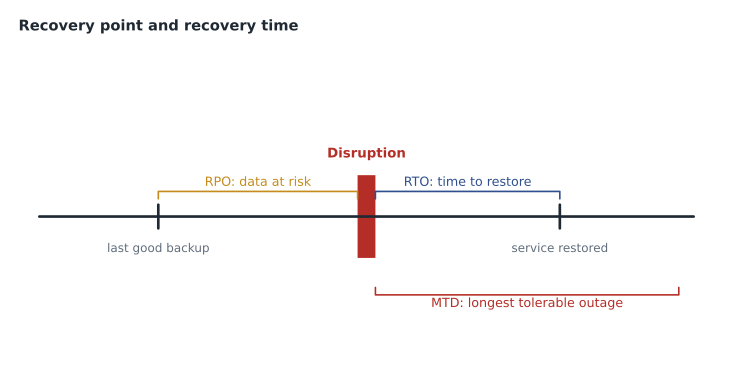
The two objectives drive different choices. RPO decides how often data must be backed up or copied: an RPO of four hours means backups or replication at least every four hours. RTO decides how fast restoration must be: an RTO of six hours rules out a plan that depends on ordering new hardware. Before the November test, the clinic's backups ran only once a night, which meant a failure late in the afternoon could lose a whole day of records, far outside the four-hour RPO. After the test, Brightline added backups every three hours during clinic hours.
Backup types
A backup is a copy of data that can be used to restore it. There are three classic types, and they differ in how much they copy and how many pieces are needed to restore.
- A full backup copies everything selected. It is the simplest to restore but the slowest and largest.
- An incremental backup copies only what changed since the last backup of any kind. Each one is small and fast, but a restore needs the last full backup plus every incremental since.
- A differential backup copies everything that changed since the last full backup. Each one grows during the week, but a restore needs only the last full backup and the latest differential.
Modern backup tools often blur these lines with techniques such as synthetic full backups, which assemble a new full backup from earlier pieces without copying everything again. Snapshots, which capture the state of a disk or virtual machine at a point in time, are fast and useful, but a snapshot stored on the same system is not a backup on its own, because losing the system loses the snapshot too.
Worked problem
Restore chains and storage
A server takes a full backup every Sunday night of 400 GB. Each weeknight, Monday to Saturday, about 20 GB of data changes. The server fails on Friday morning, before Friday night's backup. How many backup sets are needed to restore with an incremental scheme, and with a differential scheme? How large is Thursday's backup under each?
Show solution
- Incremental: the restore needs Sunday's full backup plus the incrementals from Monday, Tuesday, Wednesday and Thursday: 5 sets.
- Thursday's incremental holds only Thursday's changes: about 20 GB.
- Differential: the restore needs Sunday's full backup plus Thursday's differential: 2 sets.
- Thursday's differential holds everything changed since Sunday: Monday to Thursday is 4 × 20 = 80 GB.
Answer: Incremental needs 5 sets and Thursday's backup is about 20 GB; differential needs 2 sets and Thursday's backup is about 80 GB.
The 3-2-1 rule and ransomware
The best-known rule of thumb for backups is 3-2-1: keep at least three copies of important data, on two different types of storage, with one copy offsite. Ransomware has added a fourth requirement. Attackers who reach a network now look for backups and try to delete or encrypt them before deploying ransomware, so at least one copy must be offline or immutable. Immutable storage cannot be changed or deleted until a set retention period ends, even by an administrator. Some guidance extends the rule to 3-2-1-1-0: one copy offline or immutable, and zero errors when backups are tested.
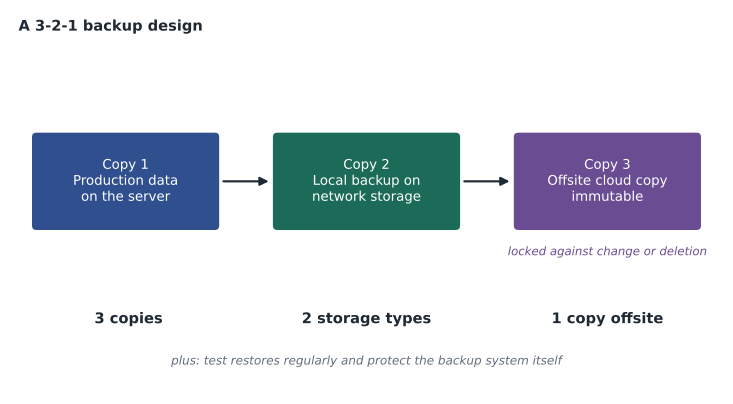
Backup systems must also be protected like any other critical system. Brightline used separate accounts with multi-factor authentication for its backup console, kept those accounts out of the clients' normal directory, encrypted backup data and alerted on any attempt to delete backups or shorten retention. Cloud services such as hosted email and file storage also need backups. Providers keep their services running, but under the shared responsibility model they usually do not promise to restore data that a customer, or an attacker using the customer's account, deleted.
Redundancy and high availability
Redundancy reduces the chance that one failure stops a system. Examples include RAID disk arrays, two power supplies, an uninterruptible power supply, a second internet connection and clustered servers. Redundancy is valuable, but it is not a backup. A RAID array copies a deleted or encrypted file to every disk instantly. A backup is a separate copy from an earlier point in time, and that time difference is what makes recovery possible.
At Kettle & Crumb, redundancy was mostly about keeping sales going. The card terminals could switch to a cellular connection if a shop's internet failed, and they could store a limited number of transactions offline for a short time. A small uninterruptible power supply kept the network equipment running long enough to close the till cleanly during a power cut.
Recovering from ransomware
Ransomware recovery differs from recovery after a hardware failure in one important way: the attacker may still be inside. Restoring systems onto a network the attacker still controls invites a second attack. Recovery therefore waits until the incident response team is confident the attacker's access has been removed, compromised accounts have been reset and the way in has been closed. Backups are restored to clean, rebuilt systems, starting with the most critical functions identified in the BIA, and each restored backup is scanned before use, because the malware may have been present for days before the encryption began. That is another reason to keep backups for several weeks: the newest backup is not always a clean one. Paying a ransom does not guarantee working decryption, may break sanctions or other laws, and leaves the organization a known payer, which is why tested, protected backups are the most important ransomware control a small business can have.
Recovery sites
If a whole location is lost, systems must run somewhere else. Recovery sites are described by how ready they are.
| Site | What it has | Time to recover | Cost |
|---|---|---|---|
| Hot site | Equipment and current data, ready to take over | Minutes to hours | Highest |
| Warm site | Equipment and connectivity, with data that must be restored | Hours to a day or two | Medium |
| Cold site | Space, power and connectivity, but no equipment or data | Days to weeks | Lowest |
| Cloud recovery | Virtual machines started from replicated or backed-up data when needed | Minutes to hours, depending on design | Pay mainly when used |
Small organizations rarely own a second site. For Prairie Paws, Brightline's plan was to restore the server to a cloud virtual machine if the clinic building was unusable, with staff working from the second location. That plan only works if the cloud restore has been tested, which was the next item on Keisha's list.
Writing and testing the plans
A continuity plan should be short enough to use under stress. It names who declares a disruption and who leads the response, lists the critical functions with their recovery targets, gives manual workarounds, sets out how staff, customers and suppliers will be contacted, and points to the technical recovery procedures. Printed copies and offline contact lists are essential, because the plan is most needed exactly when systems are down.
Plans are tested at increasing levels of realism. A checklist review confirms that the plan is current. A tabletop exercise walks the team through a scenario in a meeting room. A walkthrough or simulation practices specific steps. A parallel test runs recovered systems alongside production to compare results. A full interruption test actually switches over, which is rare because of the risk. The restore test at Prairie Paws was a simulation of one system. A tabletop exercise on a ransomware scenario with the clinic's owner and office manager is planned for January 2027, and Lesson 12 uses a similar scenario.
Worked problem
Checking backups against an RPO
Prairie Paws' new schedule takes backups at 9:00, 12:00, 15:00 and 18:00 during clinic hours, plus a full backup at 23:00. The RPO is 4 hours. If the server fails at 17:40, how much data could be lost, and does the schedule meet the RPO?
Show solution
- The last backup before 17:40 was at 15:00.
- Data entered between 15:00 and 17:40 could be lost: 2 hours 40 minutes.
- The largest gap during clinic hours is 3 hours, between backups, which is within the 4-hour RPO.
- Overnight, the gap from 23:00 to 9:00 is longer, but the clinic is closed, so almost no data changes.
Answer: Up to 2 hours 40 minutes of entries could be lost, and the schedule meets the 4-hour RPO during clinic hours.
Common mistakes
MistakeTreating RAID or replication as a backup.
InsteadRedundancy copies mistakes instantly; backups keep earlier points in time.
MistakeNever testing restores.
InsteadTest restores regularly and fix what the tests reveal.
MistakeKeeping every backup reachable from the main network.
InsteadKeep at least one copy offline or immutable.
MistakeSetting an RTO longer than the MTD.
InsteadRecovery time targets must fit inside the maximum tolerable downtime.
MistakeStoring the only copy of the plan on the server it protects.
InsteadKeep printed and offline copies of plans and contacts.
Summary and key terms
- A BCP keeps critical functions running; a DRP restores IT systems and data, and is usually part of the BCP.
- A business impact analysis sets the MTD, RTO and RPO for each critical function.
- RPO sets how often data must be copied; RTO sets how fast systems must be restored, inside the MTD.
- Full, incremental and differential backups trade backup size against the number of sets needed to restore.
- Follow 3-2-1 with at least one offline or immutable copy, and protect the backup system itself.
- Redundancy keeps systems running but is not a backup.
- Hot, warm, cold and cloud recovery sites trade readiness against cost; plans must be written briefly and tested regularly.
- Business continuity plan (BCP)
- How an organization keeps critical functions running during a disruption.
- Disaster recovery plan (DRP)
- How IT systems and data are restored after a disruption.
- Business impact analysis (BIA)
- An assessment of critical functions and the impact of losing them over time.
- Recovery time objective (RTO)
- The target time to restore a system.
- Recovery point objective (RPO)
- The maximum acceptable data loss, measured as time.
- Incremental backup
- A backup of changes since the last backup of any kind.
- Differential backup
- A backup of changes since the last full backup.
- Immutable backup
- A backup that cannot be changed or deleted until its retention period ends.
Practice problems
Work each problem on paper first, then reveal the answer to check.
What is the difference between RTO and RPO?
Show answer
RTO is how quickly a system must be restored; RPO is how much data, measured in time, can be lost.
Why must the RTO be shorter than the MTD?
Show answer
If recovery takes longer than the maximum tolerable downtime, the damage becomes unacceptable.
Which backup type needs the fewest sets to restore after several days?
Show answer
Differential: the last full backup plus the latest differential.
Why is RAID not a backup?
Show answer
It copies deletions and encryption to every disk instantly, so there is no earlier copy to restore.
What does the extra 1 in 3-2-1-1-0 stand for?
Show answer
One copy offline or immutable.
Name the test levels from least to most realistic.
Show answer
Checklist review, tabletop, walkthrough or simulation, parallel test, full interruption.
Lesson quiz · 5 questions
Score 60% or more to complete this lesson.
Create a free account to save your progress, take quizzes and earn a certificate.