
CSCO-122 · Lesson 2 of 12 · 23 min
Operating system and application updates
▶ Video coming soon A video version of this lesson is on the way.
The second week of November brought what Keisha called the busiest Tuesday of the month. Microsoft releases most of its security updates on the second Tuesday of each month, a schedule the industry calls Patch Tuesday, and Adobe, SAP and several other vendors publish on the same day. By Wednesday morning Brightline's patch dashboard showed hundreds of pending updates across forty clients. Jordan asked whether they could simply approve everything at once. Keisha smiled and pulled up a ticket from the previous spring, when a printer driver update had stopped every label printer at Prairie Paws Veterinary Clinic on a Saturday morning. Updates fix problems, she said, but they are also changes, and changes need a process.
This lesson covers that process: why updates matter so much for security, what kinds of updates exist, how to test and deploy them without breaking the business, how to handle firmware and third-party software, and what to do about systems that can no longer be updated at all.
Why updates are a security control
Software has flaws. Some flaws only cause crashes, but others let an attacker read data, run their own code or gain more rights than they should have. When a vendor learns of such a flaw, it fixes the code and releases an update, usually with an advisory that describes the problem in general terms and assigns it a CVE identifier, which Lesson 4 explains. The moment the update is public, attackers can compare the old and new code to work out what was fixed. That means the gap between a fix being released and a fix being installed is exactly the window attackers aim for.
Government agencies and incident responders report the same pattern year after year: a large share of successful intrusions use known vulnerabilities for which a fix already existed. CISA lists prompt patching among the most effective things a small organization can do, alongside multi-factor authentication and backups. Keisha summed it up for Jordan this way: most attackers are not geniuses with secret tools; they are opportunists checking for doors that the owner forgot to lock.
Kinds of updates
Jordan learned to sort updates by what they change and how urgent they are.
- Security updates fix vulnerabilities. They are the most urgent kind, especially when the vendor or a government agency reports that a flaw is already being exploited.
- Quality or bug-fix updates correct problems that are not security flaws. They are often bundled with security fixes in a monthly cumulative update.
- Feature updates add or change functionality. On Windows they arrive about once a year and are larger, so they usually get more testing.
- Out-of-band updates are released outside the normal schedule because a problem is serious and urgent.
- Firmware updates change the low-level software inside a device, such as a laptop's UEFI firmware, a router or a printer.
- Driver updates change the software that lets the operating system talk to hardware, like the printer driver that caused the Prairie Paws outage.
Operating systems differ in how they package these. Windows uses monthly cumulative updates, so installing the latest one brings a device fully current. macOS delivers security responses and point releases. Linux distributions publish updated packages through their repositories, installed with tools such as apt or dnf. Phones and tablets receive updates from the platform vendor and, for many Android devices, from the device manufacturer and carrier, which is why some Android phones stop receiving updates sooner than others.
The patch management cycle
A patch management process turns a flood of updates into a routine. Brightline's version had six steps, and Keisha drew them as a circle on the whiteboard because the cycle never ends.
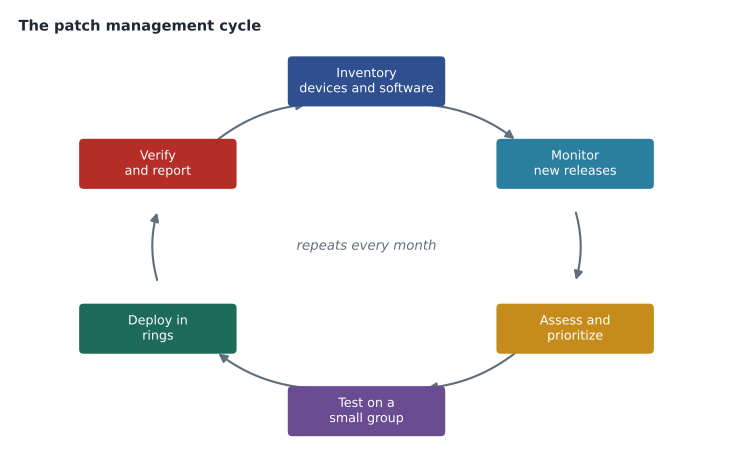
- Inventory. You cannot patch what you do not know about, so every device and installed application must be listed.
- Monitor. Watch vendor advisories, government alerts and the patch tool's reports for new releases.
- Assess and prioritize. Decide which updates are urgent, using severity, whether the flaw is being exploited and how exposed the affected systems are.
- Test. Install updates on a small group of devices first and confirm that important applications still work.
- Deploy. Roll the updates out to the rest of the devices during an agreed maintenance window.
- Verify and report. Confirm that updates actually installed, follow up on failures, and record the results.
The verify step is the one busy teams skip. A patch tool may report that an update was approved, but approval is not installation. Devices that are turned off, out of the office or low on disk space can miss updates for weeks. Brightline's monthly report listed every device that was more than one cycle behind, and each became a ticket.
Testing and deployment rings
The safest way to deploy updates is in rings, or waves. A small first ring of test devices gets updates as soon as they are approved. If nothing breaks after a day or two, a larger second ring follows, and the remaining devices follow after that. Critical servers and specialized systems, such as the practice-management server at Prairie Paws, come last or are patched by hand with a tested rollback plan. Rings spread risk: a bad update hurts a few devices that someone is watching, not the whole business at once.
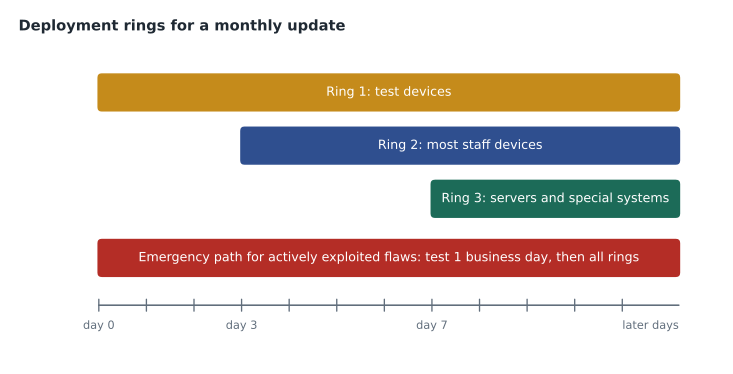
Rings must be balanced against urgency. When a vendor reports that a flaw is being actively exploited, waiting a week for ring three may be the bigger risk. Brightline's policy had an emergency path: for flaws listed as actively exploited, the test ring got one business day and everything else followed immediately afterward, with extra monitoring. The decision to use the emergency path was made by Keisha or Owen and recorded in the ticket.
Worked problem
Building a deployment schedule
Brightline approves the November cumulative update on Wednesday, November 11, 2026. Ring 1 installs it the same day. Ring 2 follows three days after Ring 1, and Ring 3 follows four days after Ring 2. On which dates do Rings 2 and 3 install, and how many days pass between approval and full deployment?
Show solution
- Ring 1: Wednesday, November 11.
- Ring 2: three days later, Saturday, November 14. Because staff devices are often off on weekends, Brightline moves it to the next business day, Monday, November 16.
- Ring 3: four days after Ring 2. Counting from Monday, November 16, that is Friday, November 20.
- From approval on November 11 to Ring 3 on November 20 is 9 days.
Answer: Ring 2 installs Monday, November 16 and Ring 3 Friday, November 20, nine days after approval. An actively exploited flaw would use the emergency path instead.
Maintenance windows and change management
Updates often need a restart, and restarts interrupt work. A maintenance window is an agreed time when changes may be made, such as after closing at the Kettle & Crumb Bakery shops or overnight for office laptops. Agreeing windows in advance with each client prevents the most common complaint about patching, which is a laptop restarting in the middle of a meeting.
Updates to servers and critical systems usually go through change management, the process for planning, approving and recording changes. A change request states what will change, why, when, who will do it, how it will be tested, how it will be reversed if something goes wrong and who approved it. Change management can feel like paperwork, but it is what lets a technician answer the question every manager asks after an outage: what changed?
Firmware, drivers and network devices
Firmware is easy to forget because it lives below the operating system. Laptop manufacturers publish UEFI firmware updates that fix security flaws in the boot process, and routers, firewalls, switches, printers and wireless access points all run firmware that needs updating. Network devices deserve special attention because they sit at the edge of the network and are often reachable from the internet. Several of the most serious attacks of recent years used flaws in firewalls and VPN appliances.
Firmware updates carry their own risks. A power cut during a firmware update can leave a device unable to start, so laptops should be plugged in and network devices updated during a window with someone on hand. Many vendors also require updates to be applied in a particular order. Jordan learned to read the release notes first, check the current version, download only from the vendor's official site and record the version before and after.
show version
show running-config | include boot
Third-party applications
Operating system updates are only part of the picture. Browsers, PDF readers, office suites, video-meeting tools, compression utilities and the runtime environments that other programs depend on all have vulnerabilities. Many attacks arrive through a document or a web page that exploits an out-of-date application rather than the operating system. Modern browsers update themselves, but other applications may not, and users rarely notice. Brightline's patch tool covered the common third-party applications, and the monthly report listed any application it could not update.
Removing software is often better than patching it. If nobody at the bakery uses an old PDF editor, uninstalling it closes every future flaw in that program at once. This is the hardening principle from Lesson 1 applied to updates: the smallest attack surface is also the easiest to patch.
End of support
Every product eventually reaches end of support, after which the vendor no longer releases security updates. Windows 10 reached end of support on October 14, 2025, and Microsoft offered paid extended security updates for organizations that needed more time. Older versions of server operating systems, database engines and applications reach the same point on published dates. A device running unsupported software will collect new, unfixable vulnerabilities for the rest of its life.
The Northfield Community Center computer lab still had six older PCs that could not run a supported operating system. Keisha explained the options in order of preference: replace the hardware; move the workload to a supported platform; isolate the old devices on their own network segment with no internet access and strict controls; or, for a limited time, pay for extended support where it exists. Doing nothing is also a choice, but it must be written in the risk register and accepted by someone with the authority to accept it, a topic Lesson 6 covers.
Worked problem
Counting devices behind on updates
Brightline's report for Kettle & Crumb lists 14 devices. Eleven are current. Two missed last month's update because they were switched off, and one is a point-of-sale terminal waiting for the vendor's approved build. What should Jordan do for each group?
Show solution
- The 11 current devices need no action beyond normal monitoring.
- The 2 devices that were off: schedule them to be turned on during a window, push the update and confirm installation.
- The point-of-sale terminal: check the vendor's support portal for the approved build, record the expected date and note any compensating control, such as keeping it on the isolated payment network.
- Record all three exceptions in the client's monthly report.
Answer: Leave the 11 current devices, push updates to the 2 that were off and confirm them, and track the point-of-sale terminal as a documented exception with a compensating control.
Common mistakes
MistakeAssuming an approved update has been installed.
InsteadVerify installation and chase failures; approval is not deployment.
MistakePushing every update to every device at once.
InsteadUse rings so a bad update affects only a few watched devices.
MistakeWaiting a full cycle for an actively exploited flaw.
InsteadUse an emergency path for flaws known to be exploited.
MistakePatching only the operating system.
InsteadInclude firmware, drivers, browsers, readers and other third-party applications.
MistakeIgnoring unsupported systems because they still work.
InsteadReplace, isolate or formally accept the risk of end-of-support software.
Summary and key terms
- Updates close known vulnerabilities, and the gap between release and installation is the window attackers target.
- Security, quality, feature, out-of-band, firmware and driver updates differ in urgency and risk.
- The patch cycle is inventory, monitor, assess, test, deploy, then verify and report.
- Deployment rings and maintenance windows limit the damage from a bad update; an emergency path handles exploited flaws.
- Change management records what changed, why, who approved it and how to reverse it.
- Firmware, network devices and third-party applications need the same discipline as the operating system.
- End-of-support systems must be replaced, isolated or formally accepted as a risk.
- Patch Tuesday
- The second Tuesday of each month, when Microsoft and several other vendors release updates.
- Cumulative update
- An update that includes all earlier fixes, bringing a device fully current.
- Out-of-band update
- An urgent update released outside the normal schedule.
- Firmware
- Low-level software stored in a device that controls its hardware and boot process.
- Deployment ring
- A group of devices that receives updates at a set stage of a rollout.
- Maintenance window
- An agreed time when changes such as restarts may be made.
- Change management
- The process for planning, approving, recording and reversing changes.
- End of support
- The date after which a vendor stops releasing security updates for a product.
Practice problems
Work each problem on paper first, then reveal the answer to check.
Why do attackers pay attention to newly released security updates?
Show answer
The update shows what was fixed, and many systems stay unpatched for days or weeks.
What is the purpose of a test ring?
Show answer
To catch a harmful update on a few watched devices before it reaches everyone.
When should Brightline skip the normal ring timing?
Show answer
When a flaw is reported as actively exploited, using the documented emergency path.
Give two precautions before a firmware update.
Show answer
Read the release notes and record the current version; keep the device powered and download only from the vendor.
Why can uninstalling software be better than patching it?
Show answer
It removes every future vulnerability in that program and shrinks the attack surface.
List the options for a PC that cannot run a supported operating system.
Show answer
Replace it, move the workload, isolate it, pay for extended support for a time, or formally accept the risk.
Lesson quiz · 5 questions
Score 60% or more to complete this lesson.
Create a free account to save your progress, take quizzes and earn a certificate.