
CSCO-112 · Lesson 8 of 12 · 18 min
Wireless security settings
▶ Video coming soon A video version of this lesson is on the way.
Northfield Community Center has three wireless networks. Staff use one for the front-desk laptops and the booking tablets. Lab computers fall back to a second when a cable is unplugged. The public uses the third, which has no password but asks visitors to accept the center's terms of use. Last month a volunteer posted the staff Wi-Fi password on the community bulletin board so that a visiting instructor could connect. Dev and Jordan have been asked to fix the immediate problem and to redesign the wireless so that it cannot happen again. Wireless networks reach beyond the walls of a building, so their security settings carry more weight than any cable's.
SSIDs and what they are not
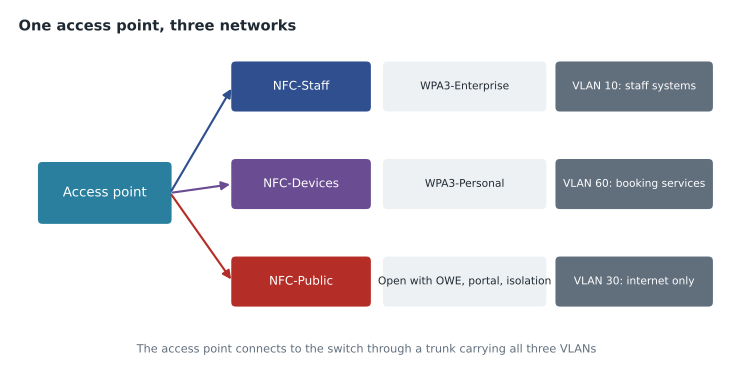
Each wireless network is identified by its SSID (service set identifier), the network name users see in their list of networks. One access point can broadcast several SSIDs at once, each mapped to its own VLAN through a trunk to the switch, which is how Northfield's three networks share the same access points. Some administrators hide the SSID by turning off its broadcast, but hidden SSIDs are still revealed whenever a device connects, so hiding is not a security control. Neither is MAC address filtering, allowing only listed MAC addresses, because MAC addresses are visible in the air and easily copied, and modern phones use randomized MAC addresses that change from network to network.
Real wireless security rests on two things: authentication, proving that a device or user may join, and encryption, protecting the traffic so that anyone listening cannot read or alter it. Both are set by the security mode chosen for each SSID.
The history: WEP, WPA, WPA2 and WPA3
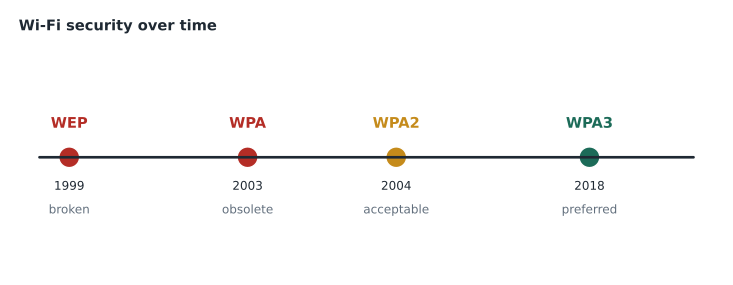
The first Wi-Fi security standard, WEP, was broken in the early 2000s and can be cracked in minutes; it must never be used. WPA was an interim fix that is also obsolete. WPA2, introduced in 2004, uses strong AES-based encryption (CCMP) and was the standard for well over a decade. WPA3, introduced in 2018, strengthens both personal and enterprise modes and is now required for new Wi-Fi certified devices. Equipment that offers only WEP or the original WPA is too old to secure and should be replaced.
| Standard | Status | Notes |
|---|---|---|
| Open (no security) | Only for public networks, ideally with OWE | Traffic is unencrypted unless OWE is used |
| WEP | Broken; never use | Can be cracked quickly |
| WPA (TKIP) | Obsolete | Interim fix from 2003 |
| WPA2 (AES/CCMP) | Widely used, acceptable with a strong passphrase | Personal mode vulnerable to offline guessing of weak passphrases |
| WPA3 | Current, preferred | SAE in personal mode; stronger enterprise options |
| WPA2/WPA3 transition mode | Common during upgrades | Lets older devices join with WPA2 while newer ones use WPA3 |
Personal and Enterprise modes
WPA2 and WPA3 each come in two modes. Personal mode, also called PSK (pre-shared key), uses one passphrase shared by everyone who joins. It is simple and suits homes and very small offices, but it has weaknesses: everyone knows the same secret, removing one person means changing the passphrase on every device, and anyone who learns it, as Northfield discovered, can join. With WPA2-Personal, an attacker who captures a device connecting can try to guess the passphrase offline, so short or common passphrases are quickly broken. WPA3-Personal replaces the old method with SAE (Simultaneous Authentication of Equals), which resists offline guessing and gives each session its own keys.
Enterprise mode, also called 802.1X mode, gives each user their own credentials, checked by a RADIUS server against the organization's directory, as lesson 7 described. Removing a person means disabling one account; the logs show who connected; and the RADIUS server can place each user in the right VLAN. Enterprise mode needs more setup, including a RADIUS server or a cloud service that provides one and certificates so that devices can tell they are talking to the real network, but it is the right choice for staff networks in most businesses.
| Personal (PSK or SAE) | Enterprise (802.1X) | |
|---|---|---|
| Credentials | One shared passphrase | Individual username and password, or a certificate |
| Removing a user | Change the passphrase everywhere | Disable that user's account |
| Needs a server | No | Yes, RADIUS (on-site or cloud) |
| Best for | Homes, very small offices, some device-only networks | Staff networks in most organizations |
For Northfield's staff network, Dev chooses WPA3-Enterprise, with each staff member signing in with their own center account through a cloud RADIUS service included with the access points' management subscription. The booking tablets, which cannot use individual logins easily, go on a separate SSID with WPA3-Personal and a long random passphrase stored only in Brightline's password vault and in the tablets' managed configuration.
Guest networks
A guest network has a different goal: convenience for visitors while keeping them away from everything else. Good guest networks share several features. They are placed in their own VLAN with firewall rules that allow only internet access. Client isolation stops guest devices from reaching each other, so a visitor cannot attack another visitor's phone. Bandwidth limits stop one person from using the whole connection. A captive portal, the web page that appears when a guest connects, can present terms of use, ask for a code or record acceptance, which many organizations want for legal reasons.
Open guest networks have traditionally sent traffic unencrypted, so anyone nearby could read it. Enhanced Open, based on OWE (Opportunistic Wireless Encryption), fixes this by encrypting each guest's connection without needing a password. Where devices support it, Northfield's public SSID will use OWE in transition mode, alongside the captive portal for the terms of use.
Other settings that matter
Several other settings affect security. WPS (Wi-Fi Protected Setup), the push-button or PIN method of joining a network found on home routers, has well-known weaknesses in its PIN mode and should be turned off. Management frame protection, required by WPA3, stops attackers from forging the control messages that disconnect users. Firmware on access points and controllers should be updated, because vulnerabilities are found in wireless equipment too. Administrative access to the access points or dashboard needs strong passwords and MFA, exactly like any other network device.
Placement and power also matter. Access points placed near outside walls and turned up to full power spread the signal into the parking lot, where anyone can try to connect. Lower power and better placement give good coverage inside with less leakage outside. Wireless management systems scan for rogue access points, devices that are not part of the network, and evil twins, fake access points broadcasting a legitimate SSID to lure users into an on-path attack.
Bands and channels
Wireless security and wireless performance are connected, because a network that users find slow tempts them to plug in their own devices. Wi-Fi uses three bands. The 2.4 GHz band reaches farthest but has only three channels that do not overlap (1, 6 and 11 in North America) and is crowded with older devices, Bluetooth and microwave ovens. The 5 GHz band has many more channels and higher speeds but shorter range. The 6 GHz band, opened for Wi-Fi 6E and Wi-Fi 7 devices, adds wide, clean channels and requires WPA3, so older security modes cannot be used there at all.
| Band | Range | Channels | Security note |
|---|---|---|---|
| 2.4 GHz | Longest | Three non-overlapping (1, 6, 11) | Supports older devices and older security modes |
| 5 GHz | Medium | Many, including wider channels | WPA2 or WPA3 |
| 6 GHz | Shortest | Many wide channels | WPA3 (or OWE for open networks) required |
Redesigning Northfield's wireless
The final design gives each group the right mode. Staff connect to NFC-Staff with WPA3-Enterprise and their own accounts. Booking tablets use NFC-Devices with WPA3-Personal and a long passphrase no person needs to know. The public uses NFC-Public, an open network with OWE where supported, a captive portal, client isolation, bandwidth limits and access only to the internet. The lab computers are moved back to cables, with a fallback SSID removed altogether. The posted password no longer matters, because the network it opened has been retired.
Common mistakes
MistakeHiding the SSID or filtering MAC addresses and calling the network secure.
InsteadUse WPA2 or WPA3 with strong authentication; hiding and filtering are easily bypassed.
MistakeSharing a staff Wi-Fi passphrase with visitors.
InsteadGive visitors the guest network; use Enterprise mode for staff so each person has their own login.
MistakeLeaving WPS enabled on a small office router.
InsteadTurn WPS off.
MistakePutting the guest SSID in the staff VLAN.
InsteadMap the guest SSID to its own VLAN with internet-only rules and client isolation.
Wireless controllers and site surveys
A single access point can be managed on its own, but a building with several needs them to work together. Wireless LAN controllers, either physical appliances, virtual machines or cloud services, configure all the access points at once, choose channels and power levels automatically so that neighboring access points do not interfere, and let devices roam from one access point to the next without dropping calls. When security settings change, the controller pushes the change to every access point, which avoids the inconsistent settings that creep in when each access point is configured by hand.
Before installing or redesigning a wireless network, technicians carry out a site survey: walking the building with a laptop or phone running survey software to measure signal strength and interference, and marking problem areas on a floor plan. A survey shows where access points are needed, where walls or equipment block the signal and how far the signal reaches outside. At Northfield, the survey showed that the gymnasium's concrete walls left the upstairs meeting room with almost no signal, which explained why staff there had been tempted to use the public network.
Troubleshooting wireless connections
When a device cannot join a secure network, the cause is usually one of a few things: the wrong passphrase or account, a device too old to support the security mode (a common problem when moving to WPA3 only), a certificate warning the user did not accept on an Enterprise network, or an expired account. Transition mode, which allows WPA2 and WPA3 together, helps during upgrades, but the goal is to retire WPA2-only devices over time. Signal problems show different symptoms: connections that drop when people move, slow speeds at the edge of coverage and many retries in the access point's statistics. The controller's client view usually shows which access point a device is joined to, its signal strength and its security mode, which separates a security problem from a coverage problem quickly.
A final consideration is how passphrases are shared. For a WPA3-Personal network used by devices, the passphrase should be long and random, at least twenty characters, and stored only where it is needed: the password vault and the devices' management system. It should be changed whenever someone who knew it leaves, which is one more reason to keep the number of people who know it small. Guest passphrases, where a guest network uses one, can be changed regularly and displayed on a sign, because the guest network gives access to nothing but the internet.
Printed QR codes that join a network automatically are convenient for guests, but they contain the passphrase in readable form. They are fine for a guest network and a poor idea for anything else.
Worked problem
Choosing a mode
Kettle & Crumb wants Wi-Fi for its point-of-sale tablets, its staff phones and its customers. Which security mode suits each group?
Show solution
- Point-of-sale tablets are managed devices without personal logins; WPA3-Personal with a long random passphrase on their own SSID and VLAN suits them.
- Staff phones belong to people who come and go; WPA3-Enterprise with individual accounts lets one account be disabled when someone leaves.
- Customers need easy access and must be kept away from business systems; an open network with OWE, a captive portal and client isolation suits them.
Answer: POS: WPA3-Personal on a separate VLAN. Staff: WPA3-Enterprise. Customers: OWE guest network with isolation.
Summary and key terms
- Wireless security depends on authentication and encryption, not on hiding SSIDs or filtering MAC addresses.
- WEP and WPA are broken or obsolete; WPA2 with AES is acceptable with strong passphrases; WPA3 is preferred, using SAE in personal mode.
- Personal mode shares one passphrase, while Enterprise mode uses individual credentials through 802.1X and RADIUS.
- Guest networks belong in their own VLAN with client isolation, a captive portal and OWE where possible.
- Turn off WPS, use management frame protection, update firmware, watch for rogue access points and evil twins, and remember that 6 GHz requires WPA3.
- SSID
- The name of a wireless network.
- WPA3
- The current Wi-Fi security standard.
- SAE
- Simultaneous Authentication of Equals, WPA3-Personal's method of resisting password guessing.
- PSK
- Pre-shared key, one passphrase shared by all users of a network.
- Enterprise mode
- Wi-Fi security using 802.1X and individual credentials.
- Captive portal
- A web page shown before a guest gets internet access.
- Client isolation
- A setting that stops wireless clients on the same network reaching each other.
- Evil twin
- A fake access point broadcasting a legitimate network's name.
Practice problems
Work each problem on paper first, then reveal the answer to check.
Why is MAC address filtering not a strong control?
Show answer
MAC addresses can be seen and copied, and many devices randomize theirs.
What does WPA3-Personal use instead of the WPA2 pre-shared key handshake?
Show answer
SAE, Simultaneous Authentication of Equals.
Which band requires WPA3 or OWE?
Show answer
The 6 GHz band.
Lesson quiz · 5 questions
Score 60% or more to complete this lesson.
Create a free account to save your progress, take quizzes and earn a certificate.