
CSCO-112 · Lesson 1 of 12 · 19 min
Connecting to and managing Cisco devices
▶ Video coming soon A video version of this lesson is on the way.
Jordan Pelletier has spent his first months at Brightline IT Services in Omaha on the help desk, resetting passwords, swapping printer toner and chasing slow laptops. Now Dev Anand, the company's network technician, wants help. Prairie Paws Veterinary Clinic is replacing the tired switch in its main clinic, and Dev has a new Cisco switch still in its box on the bench. "Before we plug this into anything," Dev says, "you need to be able to talk to it. A switch has no screen and no keyboard. Everything you will ever do to it happens through a connection you open yourself." This lesson follows that first conversation with a device, and the habits that keep management access safe for the life of the network.
CSCO-111 covered how networks are built: the models, the addressing and the media. CSCO-112 turns to the devices that sit in the middle of those networks, the services that make them usable and the methods technicians use to find out why something has stopped working. The CCST Networking exam groups these skills under infrastructure, security and diagnosing problems. Every one of them begins with getting a management session open on the device.
Ways to reach a network device
A managed switch, a router, a firewall or a wireless controller can usually be reached in several ways. The console connection is a direct cable from a laptop to a dedicated port on the device. It works even when the device has no configuration at all, no IP address and no working network, which makes it the connection of first and last resort. Remote connections such as SSH, a web interface or a cloud dashboard travel over the network itself, so they need the device to have an IP address, a route back to the technician and credentials already configured. A third option, the auxiliary port found on some older routers, was meant for a modem and is rarely used today.
Technicians also distinguish in-band from out-of-band management. In-band management uses the same network that carries the users' traffic: Dev connects over SSH through the clinic's own switches. Out-of-band management uses a separate path, such as a console server, a dedicated management network or a cellular modem attached to the console port. Out-of-band access matters most when the production network is broken, because that is exactly when in-band access disappears. Larger organizations keep a separate management network for this reason; small clients like Prairie Paws usually rely on a console cable and a technician on site.
| Method | Needs an IP address? | Typical use |
|---|---|---|
| Console port (RJ-45 or USB) | No | First setup, password recovery, a device that is unreachable over the network |
| SSH | Yes | Everyday remote command-line management, encrypted |
| Telnet | Yes | Legacy remote access; sends passwords in clear text, so avoid it |
| Web interface (HTTPS) | Yes | Graphical setup on small business and wireless devices |
| Cloud dashboard | Yes, plus internet access | Cloud-managed switches and access points, many sites from one screen |
| Console server or cellular modem | Separate path | Out-of-band access when the production network is down |
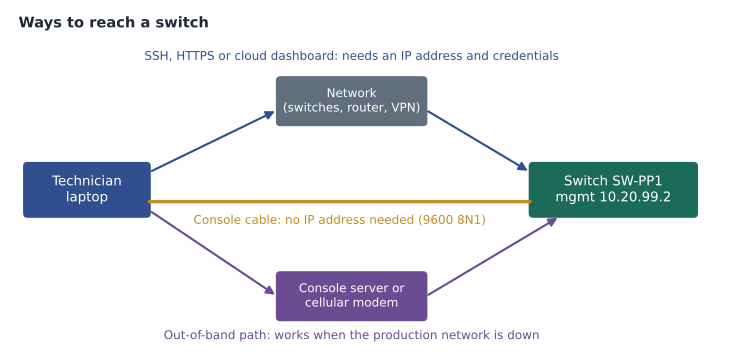
The console connection
Cisco devices have traditionally used an RJ-45 console port that looks like an Ethernet jack but is not one. It carries a slow serial signal, and it needs a console cable (often called a rollover cable because its wires are reversed end to end) with an RJ-45 plug on one end and a serial or USB connector on the other. Most current devices also offer a USB console port that appears on the laptop as a serial device once a driver is installed. Laptops no longer have serial ports, so technicians carry a USB-to-serial adapter or a USB console cable in their kits.
On the laptop, a terminal emulator program opens the serial line. Common choices are PuTTY or Tera Term on Windows and screen or minicom on macOS and Linux. The settings for a Cisco console are almost always 9600 bits per second, 8 data bits, no parity, 1 stop bit and no flow control, often written as 9600 8N1. If the screen stays blank, the usual causes are the wrong serial port selected in the program, the wrong speed, a missing driver or a cable plugged into an Ethernet port instead of the console port. Pressing Enter a couple of times wakes a console that is already running.
Windows: find the COM port number in Device Manager under "Ports (COM & LPT)",
then in PuTTY choose Connection type: Serial, Serial line: COM3, Speed: 9600

macOS or Linux: list serial devices, then open one at 9600
ls /dev/tty.usb*          (macOS)
ls /dev/ttyUSB*           (Linux)
screen /dev/ttyUSB0 9600
When a brand-new switch boots, the console shows its startup messages: the hardware check, the operating system loading from flash memory, and finally a prompt. A device with no saved configuration may offer an initial configuration dialog that asks questions one at a time. Dev answers no, because he prefers to type the configuration himself and know exactly what it contains. Jordan watches the boot messages scroll past and Dev points out the line that names the software version, which they will need later for the ticket.
Configuration files and memory
A Cisco device keeps two copies of its configuration. The running configuration lives in RAM and is what the device is using right now; every command typed in configuration mode changes it immediately. The startup configuration is stored in NVRAM, memory that survives a power cycle, and is loaded when the device boots. Changes do not reach the startup configuration until someone saves them. If the power fails before the save, the device boots with the old configuration and every unsaved change is lost.
The operating system image itself is stored in flash memory, and boot settings in a configuration register or boot variable tell the device where to find it. For CCST purposes the main point is the difference between running and startup. A technician who forgets to save will appear to have fixed a problem, only for it to return after the next power outage, often weeks later and with no one remembering what was changed.
| Memory | Holds | Survives a reboot? |
|---|---|---|
| RAM | Running configuration, routing and MAC tables, packet buffers | No |
| NVRAM | Startup configuration | Yes |
| Flash | Operating system image and other files | Yes |
| ROM | Boot code and basic recovery tools | Yes |
Switch# show running-config        (what the device is using now)
Switch# show startup-config        (what it will load at the next boot)
Switch# copy running-config startup-config
Destination filename [startup-config]?
Building configuration...
[OK]
Remote management with SSH
Once a switch has a working configuration, technicians rarely use the console again. They connect over the network with Secure Shell (SSH), which encrypts the whole session, including the username and password. SSH replaced Telnet, which sends everything in clear text; anyone who can capture the traffic can read the password. Telnet is still enabled by default on some older equipment, and disabling it is one of the first hardening steps covered in lesson 7.
For SSH to work, the device needs several things: a hostname and a domain name (used to name its encryption keys), an RSA key pair, at least one local user account or a connection to a central authentication server, the virtual terminal (VTY) lines set to accept SSH, and a management IP address the technician can reach. On a switch, the management address is usually placed on a switch virtual interface (SVI), a virtual interface for one VLAN, together with a default gateway so that replies can reach technicians on other networks. Lesson 3 explains VLANs in detail; for now it is enough to know that Brightline puts management addresses for client switches in a separate management VLAN.
Switch(config)# hostname SW-PP1
SW-PP1(config)# ip domain-name prairiepaws.local
SW-PP1(config)# crypto key generate rsa modulus 2048
SW-PP1(config)# username brightline privilege 15 secret <strong-password>
SW-PP1(config)# line vty 0 15
SW-PP1(config-line)# transport input ssh
SW-PP1(config-line)# login local
SW-PP1(config-line)# exit
SW-PP1(config)# interface vlan 99
SW-PP1(config-if)# ip address 10.20.99.2 255.255.255.0
SW-PP1(config-if)# no shutdown
SW-PP1(config-if)# exit
SW-PP1(config)# ip default-gateway 10.20.99.1
Jordan asks why a switch, which forwards frames within a network, needs a default gateway at all. Dev explains that the switch is not routing users' traffic; the gateway is only for the switch's own management traffic. Without it, the switch can answer an SSH session from a laptop in the same management subnet but not from Dev's desk at the Brightline office, which is reached through the clinic's router and a VPN.
From a Windows, macOS or Linux laptop, the built-in ssh command opens a session: ssh brightline@10.20.99.2. The first connection shows the device's key fingerprint and asks whether to trust it. Technicians who manage many devices record fingerprints when they set the device up, so that a changed fingerprint later is noticed rather than clicked past.
Graphical and cloud management
Not every device is managed from a command line. Small business switches, wireless routers and many firewalls offer a web interface reached by typing the device's address into a browser, preferably over HTTPS so the login is encrypted. Web interfaces are convenient for occasional changes, but they hide detail, and their menus change from one software version to the next. Technicians who know the command line can work on any device; those who know only one vendor's menus are lost on another.
Cloud-managed devices take a different approach. The switch or access point contacts the vendor's cloud service as soon as it has internet access, and technicians configure it from a dashboard in a browser. Cisco's Meraki line works this way, and Kettle & Crumb Bakery's three shops use cloud-managed access points so that Brightline can see all of them on one screen. The trade-offs are a subscription, dependence on the vendor's service and the need to think about where the management data is stored. For US clients, contracts and industry rules such as HIPAA for health information can affect which cloud services a business may use.
Many organizations also use central tools that sit above individual devices: network management systems that poll devices with SNMP and raise alerts, configuration backup tools that save every switch's configuration each night, and controllers that push settings to many access points at once. Lesson 11 returns to these tools when it covers documentation.
Accounts, privilege and access control
Management access is powerful, so it must be controlled. Cisco devices use privilege levels from 0 to 15. Level 1 is user EXEC mode, which allows only basic monitoring; level 15 is full administrative access. Small networks often use local user accounts stored on each device. Larger networks use AAA (authentication, authorization and accounting) with a central server, typically RADIUS or TACACS+, so that each technician has a personal login, access can be removed in one place when someone leaves, and every command can be logged.
Whatever the method, a few rules hold everywhere. Each technician should have a personal account rather than a shared one, so that logs show who did what. Passwords should be long and stored with the device's strongest available hashing, which on Cisco devices means the secret keyword rather than the older password keyword. Management access should be limited to known networks, for example with an access list on the VTY lines. Brightline keeps every client's device credentials in a password vault rather than in spreadsheets or sticky notes, and Marisol Tran reviews who has access each quarter.
Common mistakes
MistakePlugging the console cable into an Ethernet port and wondering why nothing appears.
InsteadFind the port labeled CONSOLE (or the USB console port) and check the terminal emulator's COM port and speed.
MistakeMaking changes and walking away without saving.
InsteadRun copy running-config startup-config, then confirm with show startup-config.
MistakeLeaving Telnet enabled because it is easier.
InsteadUse SSH only, set transport input ssh on the VTY lines and turn off Telnet.
MistakeUsing one shared admin account for every technician.
InsteadGive each person their own account, or use central AAA, so changes can be traced.
Worked problem
Choosing the right connection
The Prairie Paws switch has been factory reset by mistake. Dev is at the Brightline office and Jordan is on site with a laptop. Which connection should Jordan use first, and why?
Show solution
- A factory-reset switch has no management IP address, no user accounts and no SSH keys.
- SSH, the web interface and any cloud dashboard all need an IP address and a configuration, so none of them can work yet.
- The console port needs no configuration at all and works with a console cable and a terminal emulator at 9600 8N1.
Answer: Jordan connects with a console cable, applies or restores the configuration, saves it, and only then can Dev reach the switch over SSH.
Summary and key terms
- Network devices are managed through a console connection, which needs no network and is used for first setup and recovery, or remotely through SSH, web interfaces and cloud dashboards, which need an IP address and credentials.
- The running configuration in RAM is what the device uses now; the startup configuration in NVRAM is what it loads at boot, so changes must be saved.
- SSH replaces Telnet because it encrypts the session.
- Switches need a management address, usually on an SVI, and a default gateway for remote access.
- Personal accounts, strong secrets, AAA and restricted management networks keep that access safe.
- Console port
- A serial management port that works without any network configuration.
- Terminal emulator
- Software such as PuTTY or screen that opens a console or SSH session.
- Running configuration
- The active configuration held in RAM.
- Startup configuration
- The saved configuration in NVRAM, loaded at boot.
- SSH
- Secure Shell, an encrypted remote command-line protocol.
- SVI
- Switch virtual interface, a virtual interface for a VLAN, often used for the management address.
- Out-of-band management
- Management access over a path separate from the production network.
- AAA
- Authentication, authorization and accounting, often provided by a RADIUS or TACACS+ server.
Practice problems
Work each problem on paper first, then reveal the answer to check.
Why does a switch need a default gateway if it does not route user traffic?
Show answer
So that its own management traffic, such as replies to an SSH session, can reach technicians on other networks.
A technician changes a VLAN on a switch and the change works, but it is gone after a power outage. What happened?
Show answer
The change was in the running configuration but was never saved to the startup configuration.
Name two reasons to prefer SSH over Telnet.
Show answer
SSH encrypts the whole session, including passwords, and it verifies the device with a key fingerprint.
Lesson quiz · 5 questions
Score 60% or more to complete this lesson.
Create a free account to save your progress, take quizzes and earn a certificate.