
CSCO-112 · Lesson 10 of 12 · 18 min
A troubleshooting method for networks
▶ Video coming soon A video version of this lesson is on the way.
Back at the Prairie Paws branch, the VPN tunnel to the main clinic is down and the staff cannot reach the practice-management server. Jordan's first instinct is to restart the branch router, because restarting fixed the last three printer problems he handled. Dev stops him. "Maybe a restart fixes it," he says, "and then we'll never know why it broke, and it'll break again on Friday afternoon. Let's do it properly." Proper, in networking, means a method: a repeatable sequence of steps that turns a vague complaint into a known cause, a tested fix and a record that helps the next person. This lesson describes that method and the strategies that make it efficient.
Why a method matters
Networks are made of many parts, and a single symptom such as the internet being slow can have dozens of causes. Without a method, technicians jump to the cause they saw most recently, change several things at once and cannot tell which change helped. They may fix the symptom and leave the cause, or make the problem worse. A method keeps the work focused, avoids unnecessary changes, protects the client from surprises and produces documentation that makes the next problem faster to solve.
Cisco, CompTIA and most training programs describe broadly the same steps. The names vary; the logic does not.
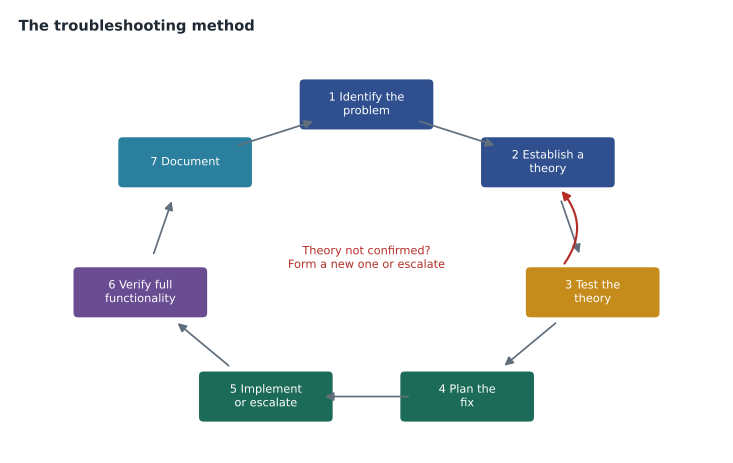
Step 1: Identify the problem
Start by gathering information. Ask the user what exactly is not working, what they were doing, when it started, whether it ever worked, and whether anything changed: new equipment, a software update, an office move, a storm. Find out the scope: is it one user, one room, one VLAN, one site or everyone? Can the problem be reproduced? Check the obvious things the user can see, such as link lights and error messages, and look at monitoring tools and logs for alerts around the time the problem began.
At the branch, Dev and Jordan establish that every user at the branch has the same problem, that it started at about 7:40 that morning, that internet browsing is slow but works, and that nothing was changed at Brightline's end. The scope is the whole site, and only traffic to the main clinic is fully broken.
Step 2: Establish a theory of probable cause
Next, form a theory. Start with the simple and likely before the complex and rare, a principle often summed up as "question the obvious." Use what was learned in step 1: a problem affecting one PC points to that PC or its cable; one affecting a whole VLAN points to the switch, the gateway or DHCP for that VLAN; one affecting a whole site points to the router, the firewall or the internet connection. Several theories may be listed and ranked.
With the whole branch affected and the tunnel down, Dev ranks three theories: the branch's internet connection is failing, the main clinic's internet connection is failing, or something changed in the VPN configuration at one end.
Step 3: Test the theory
Test the theory without changing anything if possible. Use the diagnostic tools from lesson 9 to confirm or rule it out. If the test confirms the theory, move on to planning the fix. If it does not, go back to step 2 with the new information and form another theory. If no theory survives, escalate: pass the problem to someone with more experience or access, with everything learned so far.
R-PPB# show ip interface brief | include Tunnel|GigabitEthernet0/0
GigabitEthernet0/0     203.0.113.2     YES NVRAM  up        up
Tunnel1                10.255.0.2      YES NVRAM  up        down

R-PPB# ping 203.0.113.10 repeat 100
!!!!.!!..!!!!.!!!.!!!!!..!!!.!!!!!!.!!.!!!!....!!!!!.!!!!.!!!!!!!!
...

R-PPB# ping 203.0.113.1 repeat 100       (the provider's own gateway)
!!!!!.!!!!..!!!.!!!!!!!!..!!!!.!!!.!!!!!!!!.!!!.!!!!!!.!!!!!!!.!!!
...
The branch's internet interface is up, but pings to the main clinic's public address drop many replies, and so do pings to the provider's own gateway, the very first hop. The main clinic's connection tests clean from Brightline's office. The tests confirm the first theory: the branch's internet connection is losing packets, and the VPN, which needs a stable path, keeps failing. The VPN configuration was not the problem, which is why restarting the router would have done nothing useful.
Strategies for testing
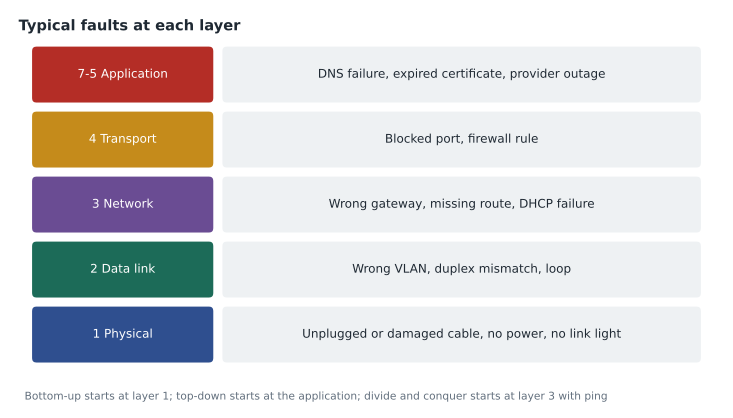
Several strategies help decide where to test first. The bottom-up approach starts at layer 1 and works up through the OSI model: cable and link lights, then switching and VLANs, then addressing and routing, then services and applications. It is thorough and suits problems with no obvious clue. The top-down approach starts at the application and works down, useful when only one application fails while others work. Divide and conquer starts in the middle, often with a ping: if the ping works, layers 1 to 3 are fine and the problem is higher; if not, look lower. Follow the path traces traffic hop by hop from source to destination, and compare with a working example looks for differences between a device that works and one that does not, such as two PCs in the same room.
| Strategy | Start at | Best when |
|---|---|---|
| Bottom-up | Layer 1: cables, lights, power | There is no clear clue, or physical work was done recently |
| Top-down | The application | One application fails while others work |
| Divide and conquer | The middle, usually with ping | You want to rule out half the layers quickly |
| Follow the path | The source, hop by hop | Traffic crosses several devices or sites |
| Compare with a working example | A similar device that works | Some devices work and others do not |
Step 4: Establish a plan of action
Once the cause is known, plan the fix and think about its effects. Who will be affected, and for how long? Does it need a maintenance window, a change approval or the client's consent? Is there a way back if it goes wrong, such as a saved configuration? Some fixes are not yours to make: a provider's line fault needs the provider, a client's own equipment may need the client's approval, and a change to a shared system may need a colleague. Planning also means considering a workaround that restores service while the permanent fix is arranged.
Dev's plan has two parts. The permanent fix is the provider's: he opens a fault ticket with the branch's internet provider, giving the loss figures and the times. The workaround is Brightline's: the branch router has a cellular backup modem that Brightline installed last year but configured only for internet failover. With Marisol's approval and a call to the clinic manager, Dev will let the VPN use the cellular link until the provider repairs the line.
Step 5: Implement the solution or escalate
Make the change carefully, one change at a time, and keep notes as you go. If the change is outside your authority or skill, escalate to the person who can make it, passing on the full history so they do not start from scratch. Escalation is not failure; holding on to a problem beyond your ability wastes the client's time.
Step 6: Verify full system functionality
After the fix, check that the original problem is solved and that nothing else broke. Ask the user to test the thing that was failing, not just watch a ping succeed. Check related services: if the VPN is back, can the branch also print to the main clinic's shared printer, and do the phones still work? Where it makes sense, add preventive measures so the problem does not return, such as monitoring that alerts Brightline when packet loss on the branch link rises above a threshold.
At the branch, the tunnel comes up over the cellular link, the receptionist confirms that the practice-management system opens, and Dev sets an alert on the link quality. Two days later the provider replaces a corroded connector at the street box, the tunnel moves back to the wired connection automatically, and the alert stays quiet.
Step 7: Document findings, actions and outcomes
The final step is to write it down: the symptoms, the scope, the theories tested and their results, the cause, the fix, the workaround, the people contacted and the time each step happened. Good documentation lets the next technician solve the same problem in minutes, lets managers see recurring faults, and protects everyone when a client later asks what happened. Lesson 11 covers how to write this up and hand it off.
Common mistakes
MistakeRestarting equipment before gathering any information.
InsteadIdentify the problem and its scope first; a restart may erase the evidence.
MistakeChanging several settings at once.
InsteadChange one thing, test, and record the result before the next change.
MistakeStopping when the user's symptom disappears.
InsteadVerify full functionality and add preventive measures where possible.
MistakeKeeping a problem too long instead of escalating.
InsteadEscalate with full notes when the next step is beyond your access or skill.
Gathering good information from users
Users rarely describe problems in network terms, and the quality of the first conversation decides how quickly the problem is found. Good questions are open and specific: what were you trying to do, what did you see, has it ever worked, does it happen on another computer, did anything change? Asking the user to read out an error message, or to send a screenshot, is far more useful than "is it working now?" Technicians also listen for clues the user does not realize are important, such as "it only happens in the afternoon" (a congested link or a scheduled backup) or "it started when we moved desks" (a different wall jack and possibly a different VLAN).
It also helps to reproduce the problem yourself, from the user's device if possible. A problem that cannot be reproduced may be intermittent, and intermittent problems call for monitoring or logging over time rather than a single test. Dev's rule is that an intermittent problem needs evidence collected while it happens: a ping running continuously with timestamps, a log of interface flaps or a capture taken during the fault.
Avoiding common traps
Several traps catch technicians at every level. Confirmation bias is seeing only the evidence that fits the first theory. Multiple causes happen: fixing one fault may reveal a second one hiding behind it, so verify after every fix. Coincidence is common: a problem that began just after a change was probably caused by it, but not always, so test rather than assume. And the most dangerous trap is changing a production system to "see what happens". Tests should be safe and reversible, and anything that may interrupt users should be planned and agreed first.
Time limits matter too. Many managed-services contracts set a time after which an unresolved problem must be escalated, and Brightline's rule for tier 1 is to escalate any high-priority ticket that has not found its cause within thirty minutes. Escalating on time keeps the client's outage short, even when the original technician was getting close.
Finally, the method applies to small problems as much as large ones. A single printer that will not print deserves the same sequence in miniature: scope, theory, test, fix, verify and a one-line note. The steps take a few minutes, and they stop small problems from returning as large ones.
Worked problem
Choosing a strategy
At Riverside Family Law, email and web browsing work on every PC, but the document management application fails to connect on all of them since this morning. Which strategy should the technician start with, and what is a reasonable first theory?
Show solution
- The whole office is affected, but only one application fails while others work.
- That pattern points above the network layers: start top-down with the application.
- Reasonable first theories are an outage at the SaaS provider, an expired certificate, or a firewall rule or DNS record the application needs.
Answer: Start top-down: check the provider's status page and the application's error, then test name resolution and the port the application uses.
Summary and key terms
- A troubleshooting method keeps work focused and repeatable: identify the problem by gathering information and scope; establish a theory, starting with the obvious; test it, returning to new theories or escalating if it fails; plan the fix and its effects; implement it or escalate; verify full functionality and add preventive measures; and document everything.
- Strategies such as bottom-up, top-down, divide and conquer, follow the path and comparing with a working example decide where to test first, often using the OSI model as a guide.
- Scope
- How widely a problem is felt: one user, one VLAN, one site or everyone.
- Theory of probable cause
- A ranked guess about what is causing a problem, to be tested.
- Escalation
- Passing a problem to someone with more skill or access, with full notes.
- Bottom-up
- Troubleshooting from the physical layer upward.
- Top-down
- Troubleshooting from the application downward.
- Divide and conquer
- Starting in the middle of the OSI model to rule out half the layers.
- Workaround
- A temporary way to restore service while the permanent fix is arranged.
- Preventive measure
- A change that stops a problem from happening again or warns early.
Practice problems
Work each problem on paper first, then reveal the answer to check.
What should a technician do if testing does not confirm the theory?
Show answer
Form a new theory using what was learned, or escalate.
Why should a technician avoid restarting equipment as the first step?
Show answer
It may destroy evidence of the cause and does not explain why the problem happened.
What does verifying full system functionality include besides checking the original symptom?
Show answer
Checking related services and adding preventive measures where appropriate.
Lesson quiz · 5 questions
Score 60% or more to complete this lesson.
Create a free account to save your progress, take quizzes and earn a certificate.