
CRE-499 · Lesson 7 of 12 · 29 min
Publishing, optimization and community
Once the channel is live, most of your weeks follow the same rhythm: publish on schedule, help the right viewers find each piece, look after the people who respond and learn from each release. This lesson covers the publishing routine, packaging (titles, thumbnails and descriptions), a simple thumbnail or title test, and the community side: replying, moderating and keeping yourself and your viewers safe. It draws on CRE-202 for packaging and analytics, CRE-301 for community, CRE-440 for experiments and CRE-350 and CRE-430 for safety and reputation. The deliverables are a community moderation policy and, over the run phase, published content with logged results.
A weekly publishing routine
A routine reduces decisions and keeps quality steady. Many creators use a fixed weekly pattern: plan and script early in the week, film mid-week, edit and package before the weekend and publish at a consistent time. Publishing at the same time each week helps returning viewers, and your analytics will show when your audience is most active. Schedule uploads in advance from your buffer rather than publishing the moment an edit is finished, so that a late night never decides your release time.
After publishing, follow your post-publish checklist: pin a comment that adds value (a question, a correction or a resource), reply to early comments, share to your owned channel and repurpose clips. Then leave the video alone. Changing titles and thumbnails every hour in a panic makes it impossible to learn what works and rarely helps.
Packaging: titles, thumbnails and descriptions
Packaging decides whether people click. A title and thumbnail work together as one promise: the thumbnail shows the result or the tension, the title adds the specifics. For search-driven help content, include the words people actually type ('fix squeaky disc brakes') and make the benefit clear. For browse and recommendation, curiosity and emotion matter more. In every case, the content must deliver what the packaging promises; misleading packaging raises clicks briefly and then damages retention, trust and recommendations, as CRE-202 explained.
Descriptions help search and viewers. Put a one- or two-sentence summary with key terms at the top, then chapters with timestamps, links to related videos and resources, your disclosures, credits for music or footage and your newsletter link. Chapters help viewers find the step they need and can appear in search results.
| Element | Good practice | Avoid |
|---|---|---|
| Title | Clear benefit, searchable words, under about 60 characters | Clickbait that the video does not deliver |
| Thumbnail | One focal subject, high contrast, few words, readable at small size | Cluttered images, tiny text, misleading scenes |
| Description | Summary first, chapters, links, disclosures and credits | Keyword stuffing, missing disclosures |
| Pinned comment | A question, resource or correction that adds value | A bare request to subscribe |
Reading click-through rate correctly
Click-through rate (CTR) is the share of impressions that become views. It is useful but easily misread. CTR depends on where impressions come from: search impressions often have high CTR because viewers asked for the topic, while browse impressions shown to broader audiences usually have lower CTR. A video's CTR often falls as it reaches wider audiences, even while total views rise. CRE-440 explained this traffic-mix effect; compare CTR within the same traffic source, and look at views and watch time alongside it.
Worked problem
CTR and its uncertainty
A video receives 4,200 impressions and 231 views from those impressions. Calculate the CTR and an approximate 95 % confidence interval.
Show solution
- CTR: \( p = 231 / 4{,}200 = 0.055 \), or 5.5 %.
- Standard error: \( \sqrt{0.055 \times 0.945 / 4{,}200} \approx \sqrt{0.0000124} \approx 0.0035 \).
- Margin: \( 1.96 \times 0.0035 \approx 0.0069 \).
- Interval: about 4.8 % to 6.2 %.
Answer: The CTR is about 5.5 %, with a plausible range of 4.8 % to 6.2 %. A difference of half a percentage point from another video is within normal noise; do not change your whole packaging style on that basis.
Running a thumbnail or title test
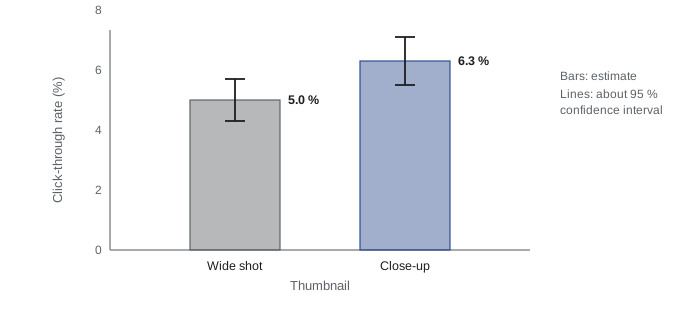
Your capstone should include at least one well-designed experiment, and packaging is an ideal candidate. At the time of writing (October 2026), YouTube's Test & Compare feature lets eligible creators upload up to three thumbnails, and in some cases titles, for one video; the platform shows them to different viewers and picks a winner based on watch time share rather than clicks alone. Check the current help pages for eligibility and limits, because they change. On platforms without built-in testing, you can compare packaging styles across similar videos, but such comparisons are weaker because the topics differ.
Follow the method from CRE-440: write a hypothesis ('a close-up of the fixed part will earn a higher watch time share than a wide shot of me holding the bike'), change only one thing, decide in advance what result would change your practice, and record the result even if it is disappointing. A built-in test's reported winner should still be read with caution when impressions are small.
Worked problem
How many impressions does a test need?
Jordan's typical CTR is about 5 %. To detect an improvement of 1.5 percentage points (from 5 % to 6.5 %) with reasonable reliability, CRE-440 gave the rule of thumb \( n \approx 16\,p(1-p)/\delta^2 \) per variant. How many impressions does each thumbnail need?
Show solution
- Use \( p \approx 0.05 \) and \( \delta = 0.015 \).
- \( p(1-p) = 0.05 \times 0.95 = 0.0475 \).
- \( n \approx 16 \times 0.0475 / 0.015^2 = 0.76 / 0.000225 \approx 3{,}378 \).
Answer: Each variant needs about 3,400 impressions, so a two-way test needs about 6,800 impressions. A new channel may only reach that on its better-performing videos, so choose a video likely to get enough impressions, or test a larger difference that needs fewer.
Replying to comments
Early comments are precious. Reply to as many as you reasonably can in the first day or two, especially questions. Replies show viewers that a real person is listening, encourage more conversation and often generate ideas for future videos. Use the voice from your brand guide. Thank people for corrections and fix errors openly using your corrections policy. Heart or pin helpful comments from viewers to show what kind of community you want.
Set limits. Decide how much time you will spend on comments each day, for example twenty minutes, and stick to it. CRE-350 explained how endless comment-checking feeds stress and comparison. Turn off notifications outside your chosen times.
Writing a community moderation policy
A moderation policy turns your community guidelines into decisions. It says what is welcome, what is removed, what leads to a block and how you handle difficult situations. Publish the short guidelines; keep the full policy for yourself and any helpers. CRE-301 and CRE-350 covered moderation tools and moderator wellbeing; here you write the policy you will actually use.
- Welcome: questions, respectful disagreement, sharing experiences, corrections.
- Removed: spam and scam links, hate and harassment, sexual content, threats, doxxing (sharing personal information), dangerous advice that could cause harm.
- Escalation: warning for borderline behavior, removal and block for repeat or serious violations, report to the platform for threats, harassment campaigns or impersonation.
- Tools: blocked words list, holding links for review, slow mode or member-only chat for live sessions, trusted moderators with defined permissions.
- Safety: never reveal personal details; report credible threats to the platform and, where appropriate, police; keep records with screenshots and dates.
Worked problem
Estimating moderation workload
Jordan's videos average 40 comments in the first week, and analytics suggest comments will grow to about 120 per video by week 12. Each comment takes about 20 seconds to read and about 25 % need a reply averaging 1 minute. With one long video and three shorts a week, and shorts averaging a third of the long-video comment count, estimate weekly comment time at week 12.
Show solution
- Comments per week: \( 120 + 3 \times 40 = 240 \).
- Reading time: \( 240 \times 20 = 4{,}800 \) seconds, or 80 minutes.
- Replies: \( 0.25 \times 240 = 60 \) replies at 1 minute each, 60 minutes.
- Total: \( 80 + 60 = 140 \) minutes, about 2.3 hours a week.
Answer: By week 12, comments may take about 2.3 hours a week, a big share of Jordan's capacity. Filters for spam, replying to a selection rather than every comment and grouping common questions into a pinned answer or a short keep this manageable.
Handling negativity and criticism
Every public channel attracts some negativity. Distinguish useful criticism (a viewer pointing out an unsafe step), honest disagreement and abuse. Thank people for useful criticism and act on it. Engage with disagreement briefly and respectfully, or not at all. Do not engage with abuse; remove it, block if needed and move on. CRE-430 described how a small issue can grow into a pile-on; most negative comments are not crises, and responding emotionally is the most common way to make them worse.
Watch for signs that the channel is affecting your wellbeing: checking comments compulsively, losing sleep over a single remark, dreading upload day. Use the boundaries and support options from CRE-350, and talk to your instructor if something serious happens, such as harassment that targets you personally or a threat. If you are ever in crisis, contact a crisis line such as 9-8-8 in Canada or 988 in the US.
Safety basics for public creators
Protect your privacy from the start. Avoid showing your home address, the outside of your home, your school schedule, license plates or anything that reveals where you live or will be at a given time. Check the background of every shot and remove location data from photos before posting. Post travel or event content after you have left. Use a business email and, if you need a mailing address for a newsletter or packages, a post office box or similar service. CRE-350 covers this in depth; add a safety item to your pre-publish checklist.
Logging results week by week
Each week, record a few key figures for every new piece: impressions, CTR by main traffic source, views, average view percentage, watch time, subscribers gained and newsletter sign-ups, plus notes on comments and anything unusual such as an external share. This log becomes the raw material for your mid-term review in the next lesson. Recording the same metrics in the same way each week matters more than recording many metrics.
Turning comments into content
Comments are one of the richest sources of ideas you have. Once a week, read through recent comments and tag them by type: questions, requests, corrections, stories and complaints. Questions asked by more than one viewer are strong candidates for shorts or future videos, and answering a viewer's question on camera, with their permission to mention their username, shows the community that you listen. Corrections can become a short follow-up or an updated description. Stories, such as a viewer describing a repair that worked, are useful evidence for your media kit if the viewer agrees to be quoted. Keep the tags in your log; over the term, they show what your audience values and feed the backlog with ideas that already have demand behind them.
Moderators, if you have any, need the same guidance you follow. Share the moderation policy, agree what they can remove without asking and what they should escalate, and check in regularly about how the work is affecting them, as CRE-350 advised for moderator wellbeing.
Common mistakes
MistakeChanging titles and thumbnails every few hours.
InsteadPublish, wait for enough data, and change packaging deliberately or through a proper test.
MistakeComparing CTR across different traffic sources.
InsteadCompare CTR within the same source and alongside views and watch time.
MistakeRunning a test with too few impressions.
InsteadEstimate the impressions needed and choose a video or difference large enough to detect.
MistakeReplying emotionally to abusive comments.
InsteadRemove and block abuse, thank useful critics and follow the moderation policy.
MistakeRevealing location details in the background of videos.
InsteadCheck backgrounds, strip location data and post travel content after leaving.
Summary and key terms
- A weekly routine and scheduled uploads keep publishing consistent.
- Titles and thumbnails make one honest promise; descriptions add summary, chapters, links, credits and disclosures.
- CTR depends on traffic source and has uncertainty; compare like with like.
- A packaging test needs a hypothesis, one change, a pre-set rule and enough impressions.
- Reply to early comments within time limits and act on useful criticism.
- A moderation policy defines what is welcome, removed and escalated, with tools and safety steps.
- Protect privacy, look after wellbeing and log the same metrics every week.
- Packaging
- The title, thumbnail and other elements that persuade viewers to click.
- Click-through rate (CTR)
- The share of impressions that become views.
- Impression
- An instance of a thumbnail being shown to a viewer.
- Traffic source
- Where views come from, such as search, browse or external links.
- Test & Compare
- A YouTube feature that tests thumbnails or titles by watch time share.
- Watch time share
- The proportion of total watch time earned by each test variant.
- Moderation policy
- Rules and procedures for managing comments and community spaces.
- Doxxing
- Publishing someone's personal information without consent.
- Pile-on
- A sudden wave of criticism or abuse from many accounts.
- Chapters
- Timestamped sections in a video description that help navigation.
Practice problems
Work each problem on paper first, then reveal the answer to check.
Why publish at a consistent time?
Show answer
Returning viewers form habits and analytics show when the audience is active.
5,000 impressions and 300 views. CTR?
Show answer
6 %.
Why might CTR fall as views rise?
Show answer
The video reaches broader browse audiences, who click less often than searchers.
For p = 0.04 and δ = 0.01, impressions per variant?
Show answer
16 × 0.0384 / 0.0001 ≈ 6,144.
What does Test & Compare use to choose a winner?
Show answer
Watch time share, at the time of writing.
Name three things a moderation policy removes.
Show answer
Spam, hate, harassment, threats, doxxing, sexual content, dangerous advice (any three).
200 comments at 15 seconds each plus 40 one-minute replies. Time?
Show answer
50 + 40 = 90 minutes.
How should you respond to useful criticism?
Show answer
Thank the viewer and act on it, correcting errors openly.
Give two privacy precautions for public creators.
Show answer
Avoid showing home or plates, strip location data, post travel later, use a business email and PO box (any two).
Name four metrics to log each week.
Show answer
Impressions, CTR, views, average view percentage, watch time, subscribers, sign-ups (any four).
Lesson quiz · 5 questions
Score 60% or more to complete this lesson.
Create a free account to save your progress, take quizzes and earn a certificate.