
CRE-301 · Lesson 6 of 12 · 25 min
Owned channels: websites, search and direct relationships
An owned channel is one where you control the relationship with your audience: the address, the content, the data and the rules. No channel is perfectly owned, since websites rely on hosting companies and email relies on delivery providers, but owned channels are far more portable and stable than platform followings. If a platform suspends your account or changes its algorithm, your website, email list and community spaces you control still connect you to the people who care about your work. This lesson covers why owned channels matter, websites and domains, what a creator website should include, link pages, search engine optimization for creators, capturing visitors, apps, text messaging and other direct channels, analytics and privacy on your own site, and the costs and maintenance of owning infrastructure. Lesson 7 focuses on email.
What owning means
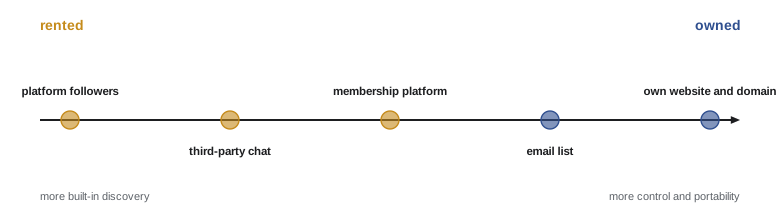
Ownership comes in degrees. A personal domain name, such as yourname.com, is the most important asset: you can move it between hosting providers and email services while keeping the same address. A website on your domain lets you publish without an algorithm deciding who sees your work, and can host your portfolio, articles, shop and sign-up forms. An email list, held by a service but exportable, lets you contact supporters directly. A community space, such as a forum on your own domain or a membership platform where you can export member data, keeps members reachable. Each step toward ownership trades some convenience and built-in discovery for control and resilience. A useful rule is to rent reach and own relationships.
Domains and hosting
Register a domain name that matches your creator name or brand, ideally short, easy to spell and available as a handle on major platforms. Common top-level domains include .com and country domains such as .ca or .us; for Canadian creators, a .ca domain signals local identity and is administered by the Canadian Internet Registration Authority (CIRA), which requires a Canadian presence. Register the domain in your own name or your business's name, not a designer's, enable auto-renewal and registrar lock, and use two-factor authentication on the registrar account, since losing a domain can take your website and email with it. Hosting options range from website builders such as Squarespace, Wix or Shopify, to creator-focused platforms such as Ghost, Kajabi or Podia, to WordPress on managed hosting. Choose based on what you need to publish or sell, your technical comfort and the ability to export your content.
What a creator website should include
A creator website does not need to be elaborate, but it should do a few things well:
- Explain who you are and what you make in a sentence, with a clear photo and links to your main channels.
- Offer an obvious way to join your email list, ideally with a specific benefit.
- Showcase your best work, organized for newcomers: start-here pages, series and playlists.
- Provide a media kit or partnership page for brands and press (CRE-310), with contact details.
- Host anything you sell or offer: shop, courses, memberships, bookings (CRE-302).
- Include legal pages where needed: privacy policy, terms for purchases and contests, and accessibility information.
Design for phones first, keep pages fast and accessible, and update the site whenever your offerings change. An out-of-date website with broken links undermines trust.
| Page | Purpose | Key element |
|---|---|---|
| Home | Orient newcomers quickly | One-line promise, start here, sign-up |
| Start here | Guide new visitors to best work | Curated list by need or interest |
| Newsletter | Convert visitors to subscribers | Clear benefit and simple form |
| Work or archive | Searchable library | Categories, series, search |
| Partnerships | Brand and press enquiries | Audience summary, contact, media kit |
| Shop or offers | Revenue | Clear pricing and checkout |
| Privacy and terms | Legal compliance | Plain-language policies |
Link pages
Many platforms allow only one link in a profile, so creators use link pages, either on a service such as Linktree, Beacons or Stan, or better, on their own domain. A link page on your own domain keeps visitors on your site, lets you track visits with your own analytics, and remains under your control if a link service changes its terms. Keep link pages short and prioritized: your newest or most important offer first, then your newsletter, community and main platforms. Too many links overwhelm visitors and reduce clicks on what matters most.
Search engine optimization for creators
Search engines remain one of the largest sources of long-term discovery. Search engine optimization (SEO) is the practice of making pages easy for search engines to understand and useful enough to rank. For creators, the basics are:
- Publish pages that answer specific questions people search for, such as written versions of tutorials, guides and reviews.
- Use clear, descriptive titles and headings that match how people phrase searches.
- Write original, accurate, helpful content, which search engines increasingly reward over thin or copied pages.
- Embed your videos or podcasts on pages with transcripts or summaries, giving search engines text to index.
- Make pages fast, mobile-friendly and accessible, with descriptive image alt text (CRE-230).
- Earn links from reputable sites through collaborations, press coverage and genuinely useful resources.
Search is changing as search engines add AI-generated answers, such as Google's AI Overviews, that may answer some questions without a click. Content that offers depth, personal experience, original research or strong opinions remains valuable, and being cited in AI answers can still drive visits. SEO is a long game: pages may take months to rank but can bring visitors for years.
Worked problem
Estimating search traffic from an archive
A cooking creator writes recipe pages to accompany 80 existing videos. After six months, the average page receives 400 search visits a month, and 2 % of visitors join the email list. How many new subscribers does the archive bring each month and each year?
Show solution
- Monthly visits: 80 × 400 = 32,000.
- Monthly sign-ups: 32,000 × 0.02 = 640.
- Yearly sign-ups: 640 × 12 = 7,680.
Answer: About 640 new subscribers a month, or roughly 7,700 a year, from pages that keep working without new effort.
Capturing visitors
Website visitors are valuable only if some of them stay connected. Offer a clear reason to subscribe on relevant pages, such as a checklist, template, early access or a newsletter that continues the topic. Embedded forms at the end of articles, a simple banner and a dedicated newsletter page work better than aggressive pop-ups that appear immediately, which annoy visitors and can be penalized by search engines on mobile. Lead magnets, free resources in exchange for an email address, should be genuinely useful and related to your newsletter, so that people who sign up want what you will send next.
Apps, text messages and other direct channels
Beyond websites and email, creators use other direct channels:
- Text messaging (SMS) services let creators send messages to fans' phones. Open rates are high, but texting is intrusive and tightly regulated, with consent requirements under anti-spam and telemarketing laws in both countries, so it suits occasional, high-value messages.
- Messaging app channels, such as broadcast channels on Instagram, WhatsApp or Telegram, combine direct reach with platform dependence.
- Podcast RSS feeds are a form of owned distribution: your feed URL, ideally on your own domain, can move between hosting providers (CRE-240).
- Custom apps make sense only for large creators with substantial communities or products, given their cost.
- Physical channels, such as events, printed zines and postcards, can deepen connection with core supporters.
Analytics and privacy on your own site
Owning a website means owning its data responsibilities. Analytics tools show which pages attract visitors and convert them, but many collect personal data through cookies and trackers. Privacy laws in both countries require that you tell visitors what you collect and why, protect it and respect their choices; Lesson 8 covers community data in more detail. Privacy-focused analytics tools collect less personal data and can simplify compliance. Avoid collecting information you do not need, secure your site with HTTPS and keep plugins and software updated to prevent breaches, which can expose your audience's data and damage trust.
Costs and maintenance
Owned channels cost money and attention. Typical costs include domain registration, hosting, a website builder or theme, email service fees that rise with list size, payment processing for sales, and occasional design or development help. Maintenance includes updating software, checking links, renewing domains and certificates, backing up content and reviewing privacy policies. These costs are usually modest compared with the resilience they bring, but plan for them, choose tools you can manage, and avoid building complex systems you cannot maintain.
Start-here pages and evergreen hubs
A start-here page is one of the most useful pages a creator can build. It greets newcomers, explains what you make and for whom, and guides them to a small selection of your best work organized by need: "new to sourdough? start with these three videos", "troubleshooting? see these guides". It ends with an invitation to join your newsletter or community. Similar topic hubs gather everything you have made on a subject into one well-organized page, with short introductions and links. Hubs serve visitors well, help search engines understand your expertise and give you a natural place to link from videos, emails and community posts. Update them as you publish new work, and retire pieces that are out of date.
Measuring your website
A small set of website measures tells you whether your owned channels are working. Track visits by source, such as search, social platforms, email and direct visits; the pages that attract the most visitors; the sign-up conversion rate on key pages; and sales or bookings if you sell through your site. The sign-up conversion rate is the number of new subscribers divided by visitors to a page, and it shows which pages and offers persuade people to stay in touch. Compare conversion rates between pages and test changes, such as a clearer benefit statement or a more relevant lead magnet, one at a time. Use tagged links (CRE-202) so that you can see which videos, posts or partners send visitors who sign up.
Accessibility and inclusion
Owned channels should be accessible to everyone in your audience, including people with disabilities. Accessible websites use clear headings, sufficient color contrast, descriptive link text, alt text for meaningful images, captions and transcripts for video and audio, and forms that work with keyboards and screen readers. Accessibility helps all visitors, including people on small screens or slow connections, and supports search engines. Some jurisdictions have accessibility laws that may apply to businesses, such as the Accessibility for Ontarians with Disabilities Act, and US courts have considered website accessibility under the Americans with Disabilities Act; even where laws do not apply directly, accessible design is good practice and widens your audience.
Domains and email addresses
Your domain also supports a professional email address, such as hello@yourname.com, which looks more credible to brands and press than a free webmail address and stays with you if you change email providers. Using your own domain to send newsletters also improves deliverability once authentication is set up (Lesson 7). Keep business and personal email separate, protect the business account with strong authentication, and consider role addresses, such as partnerships@ or support@, that can be forwarded to team members as your business grows.
A minimum viable website
A creator website can start small and grow. A minimum viable site might have just four pages: a home page with a one-line promise and sign-up form, a start-here page, a partnerships page with contact details, and a privacy policy. This can be built in a day with a website builder and expanded later with an archive, shop or community links. Launching something simple and useful is better than waiting months for a perfect site.
Common mistakes
MistakeLetting a designer register your domain in their name.
InsteadRegister domains in your own name with auto-renewal and two-factor.
MistakeA website with no clear sign-up.
InsteadOffer an obvious, specific reason to join your list.
MistakeUsing only third-party link pages.
InsteadHost your link page on your own domain.
MistakeAggressive pop-ups on arrival.
InsteadUse relevant embedded forms and useful lead magnets.
MistakeCollecting visitor data carelessly.
InsteadMinimize data, disclose it and keep software updated.
Summary and key terms
- Owned channels give control, portability and resilience; rent reach, own relationships.
- Your own domain is the foundation of owned channels.
- A creator website orients newcomers, captures sign-ups and supports partnerships and sales.
- Link pages on your own domain stay under your control.
- SEO brings long-term discovery through helpful, searchable pages.
- Capture visitors with relevant offers rather than aggressive pop-ups.
- Owning channels brings privacy duties, costs and maintenance.
- Owned channel
- Channel where the creator controls the relationship and data.
- Domain name
- An internet address such as yourname.com.
- Registrar
- Company that registers domain names.
- Hosting
- Service that stores and serves a website.
- Link page
- Page listing a creator's links for profiles.
- SEO
- Making pages easy to find through search engines.
- Lead magnet
- Free resource offered for an email sign-up.
- AI Overviews
- AI-generated summaries in search results.
- HTTPS
- Encrypted connection for websites.
- Privacy policy
- Statement of what data is collected and how it is used.
Practice problems
Work each problem on paper first, then reveal the answer to check.
What does "rent reach, own relationships" mean?
Show answer
Use platforms for discovery and owned channels for connection.
Why register a domain in your own name?
Show answer
To keep control of your website and email.
Name four pages a creator website should have.
Show answer
Home, start here, newsletter, work, partnerships, shop, privacy.
Why host a link page on your own domain?
Show answer
Control, tracking and independence from link services.
Name three SEO basics.
Show answer
Answer searched questions, clear titles, helpful content, transcripts, speed, links.
Monthly sign-ups from 50 pages at 300 visits and 1.5 %?
Show answer
225.
What makes a good lead magnet?
Show answer
Genuinely useful and related to the newsletter.
Why use text messaging sparingly?
Show answer
It is intrusive and tightly regulated.
Why choose privacy-focused analytics?
Show answer
They collect less personal data and ease compliance.
Name three ongoing website costs.
Show answer
Domain, hosting, builder, email service, payment fees.
Lesson quiz · 5 questions
Score 60% or more to complete this lesson.
Create a free account to save your progress, take quizzes and earn a certificate.