
CMPUT-404 · Lesson 5 of 12 · 32 min
Front-end architecture and frameworks
As web interfaces grew from pages with a few scripts into applications with dozens of screens, developers needed better ways to keep the user interface consistent with changing data. Manually updating the DOM after every change, as in lesson 2's booking form, works for small features but becomes error-prone at scale: forget one update and the screen shows stale information. Front-end frameworks address this with a shared idea: describe what the interface should look like for a given state, and let the framework work out how to update the DOM. This lesson explains that idea, the major rendering strategies, how frameworks implement reactivity, and how to choose an architecture, staying neutral between frameworks because they change faster than the principles.
Components and declarative UI
A component is a reusable piece of interface with its own markup, styling and behavior: a room picker, a calendar, a navigation bar. Components take inputs (often called props) and may hold local state. They are composed into trees mirroring the page, and they are declarative: a component is a function from inputs and state to a description of the interface, not a sequence of DOM commands. When state changes, the framework re-evaluates the affected components and updates the page to match. This makes interfaces easier to reason about, because what you see is always a function of the current state.
// A component in React-style JSX (listing). Vue, Svelte, Solid and Angular express the same idea.
function RoomPicker({ rooms, onBook }) {
  const [selected, setSelected] = useState(null);        // local UI state
  const free = rooms.filter(r => r.seats > r.booked);    // derived, not stored
  return (
    <form onSubmit={e => { e.preventDefault(); onBook(selected); }}>
      <label htmlFor="room">Room</label>
      <select id="room" value={selected ?? ''} onChange={e => setSelected(e.target.value)} required>
        <option value="">Choose a room</option>
        {free.map(r => <option key={r.id} value={r.id}>{r.id} ({r.seats - r.booked} free)</option>)}
      </select>
      <button type="submit" disabled={!selected}>Book room</button>
    </form>
  );
}
Two habits distinguish good component code. First, store the minimal state and derive the rest: the list of free rooms is computed from rooms rather than stored separately, so the two can never disagree. Second, keep data flowing in one direction, from parents to children through props, with children reporting events upward through callbacks such as onBook. When many distant components share state, such as the signed-in user or a shopping cart, applications use a context mechanism or a store (Redux, Pinia, Zustand, signals), but most state should stay local to the component that owns it.
How frameworks update the DOM
React popularized the virtual DOM: components return lightweight JavaScript objects describing elements; on each update the framework builds a new tree, compares it with the previous one (diffing, or reconciliation) and applies only the differences to the real DOM. Keys on list items, such as key={r.id}, tell the diff which items are the same across renders so it can move rather than recreate them. The toy below builds two virtual trees and computes the patches between them.
// A toy virtual DOM: describe the UI as data, diff two descriptions, emit minimal patches.
const h = (tag, props, ...children) => ({ tag, props: props || {}, children });

function diff(oldNode, newNode, path = 'root') {
  const patches = [];
  if (oldNode === undefined) return [{ op: 'create', path, node: render(newNode) }];
  if (newNode === undefined) return [{ op: 'remove', path }];
  if (typeof oldNode === 'string' || typeof newNode === 'string') {
    if (oldNode !== newNode) patches.push({ op: 'text', path, value: newNode });
    return patches;
  }
  if (oldNode.tag !== newNode.tag) return [{ op: 'replace', path, node: render(newNode) }];
  for (const k of new Set([...Object.keys(oldNode.props), ...Object.keys(newNode.props)]))
    if (oldNode.props[k] !== newNode.props[k]) patches.push({ op: 'attr', path, name: k, value: newNode.props[k] });
  const n = Math.max(oldNode.children.length, newNode.children.length);
  for (let i = 0; i < n; i++) patches.push(...diff(oldNode.children[i], newNode.children[i], `${path}/${i}`));
  return patches;
}
const render = n => typeof n === 'string' ? n : `<${n.tag}>${n.children.map(render).join('')}</${n.tag}>`;

const view = state => h('ul', { class: 'rooms' },
  ...state.rooms.map(r => h('li', { 'aria-current': r.id === state.selected ? 'true' : undefined }, `${r.id} (${r.seats})`)));

const before = view({ rooms: [{ id: 'L201', seats: 6 }, { id: 'S105', seats: 12 }], selected: 'L201' });
const after  = view({ rooms: [{ id: 'L201', seats: 6 }, { id: 'S105', seats: 10 }, { id: 'G010', seats: 4 }], selected: 'S105' });
for (const p of diff(before, after)) console.log(JSON.stringify(p));{"op":"attr","path":"root/0","name":"aria-current"}
{"op":"attr","path":"root/1","name":"aria-current","value":"true"}
{"op":"text","path":"root/1/0","value":"S105 (10)"}
{"op":"create","path":"root/2","node":"<li>G010 (4)</li>"}A newer approach skips the virtual tree entirely. With fine-grained reactivity, popularized by SolidJS and adopted in various forms by Vue, Svelte 5, Angular and Preact, state lives in signals: values that know which pieces of code read them. When a signal changes, only those readers re-run, updating exactly the affected DOM nodes. A TC39 proposal to standardize signals in JavaScript itself was at stage 1 in 2024. Svelte also compiles components ahead of time into direct DOM operations. The toy signal system below shows the mechanism.
// Fine-grained reactivity with signals: only the code that reads a value re-runs when it changes.
let current = null;                               // the effect currently running
function signal(value) {
  const subs = new Set();
  return {
    get() { if (current) subs.add(current); return value; },
    set(v) { if (v !== value) { value = v; [...subs].forEach(fn => fn()); } },
  };
}
function effect(fn) { const run = () => { current = run; fn(); current = null; }; run(); }
function computed(fn) { const s = signal(); effect(() => s.set(fn())); return s; }

const seats = signal(6), booked = signal(2);
const free = computed(() => seats.get() - booked.get());
let renders = 0;
effect(() => { renders++; console.log(`render #${renders}: ${free.get()} of ${seats.get()} seats free`); });

booked.set(3);        // free changes -> one re-render
booked.set(3);        // same value -> nothing happens
seats.set(8);         // both seats and free change
console.log('total renders:', renders);render #1: 4 of 6 seats free render #2: 3 of 6 seats free render #3: 5 of 8 seats free render #4: 5 of 8 seats free total renders: 4
Look closely at the last two renders. Setting seats to 8 notified two subscribers: the computed value free, which re-ran the render effect when it changed, and the render effect itself, which also reads seats directly. The result is a redundant render #4 that shows the same text as #3. In a slightly different subscription order the effect could even run once with the new seats and the old free value, briefly showing an inconsistent mix called a glitch. Production signal libraries avoid both by batching updates and running dependants in topological order, so each effect runs once, after everything it depends on is up to date. The toy is useful precisely because it exposes the problem those libraries solve.
Rendering strategies
Where and when HTML is produced is the most consequential front-end decision. With client-side rendering (CSR), the classic single-page application, the server sends an almost empty HTML shell and a JavaScript bundle; the browser downloads, parses and runs the bundle, fetches data and only then shows content. Navigation afterwards is fast, but the first view waits for all of that, and users on slow phones or networks wait longest. With server-side rendering (SSR), the server produces complete HTML for each request, so content appears as soon as HTML arrives; the browser then downloads the JavaScript and hydrates the page, attaching event handlers to the existing markup so it becomes interactive.
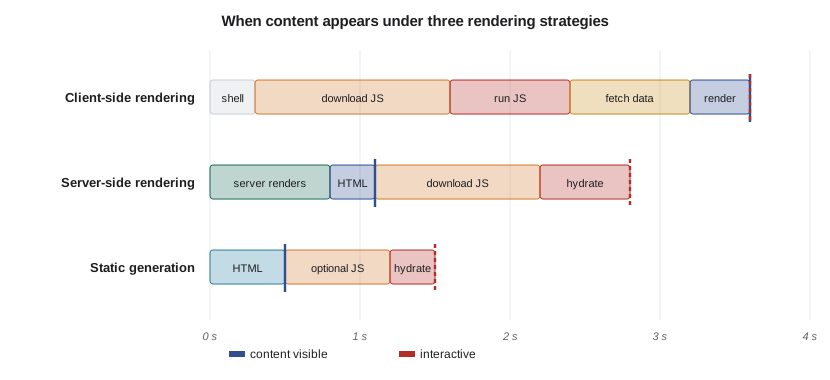
Static site generation (SSG) renders pages at build time, giving the fastest first view and simplest hosting, at the cost of rebuilding when content changes; incremental static regeneration rebuilds individual pages on a schedule or on demand. The islands architecture, used by Astro and similar tools, renders mostly static HTML and hydrates only the interactive islands, such as a search box or a booking widget, shipping far less JavaScript. React Server Components go further, running some components only on the server so their code never reaches the browser. At the other end, libraries such as htmx return server-rendered HTML fragments in response to clicks and form submissions, giving SPA-like interaction with almost no client-side JavaScript; this site's PHP pages work in a similar spirit, with full pages rendered on the server.
# Server-side rendering with automatic escaping, then the data a client needs to hydrate.
import html, json

def esc(x):
    return html.escape(str(x), quote=True)

def room_list(rooms, selected):
    items = "".join(
        f'<li{" aria-current=\"true\"" if r["id"] == selected else ""}>{esc(r["id"])} (capacity {esc(r["seats"])})</li>'
        for r in rooms)
    return f'<ul class="rooms">{items}</ul>'

rooms = [{"id": "L201", "seats": 6}, {"id": "S105", "seats": 12},
         {"id": "<img src=x onerror=alert(1)>", "seats": 1}]          # hostile data from a database
page = room_list(rooms, "L201")
print(page)
print()
# Embed initial state for hydration; escape "<" so a "</script>" inside data cannot end the script element.
state = json.dumps({"rooms": rooms, "selected": "L201"}).replace("<", "\\u003c")
print(f'<script type="application/json" id="state">{state}</script>')<ul class="rooms"><li aria-current="true">L201 (capacity 6)</li><li>S105 (capacity 12)</li><li><img src=x onerror=alert(1)> (capacity 1)</li></ul>
<script type="application/json" id="state">{"rooms": [{"id": "L201", "seats": 6}, {"id": "S105", "seats": 12}, {"id": "\u003cimg src=x onerror=alert(1)>", "seats": 1}], "selected": "L201"}</script>The SSR example shows two security details frameworks handle for you. Every value inserted into HTML is escaped, so hostile data from the database appears as harmless text. And the initial state embedded for hydration escapes the less-than character, because a string such as </script> inside JSON would otherwise end the script element early and let the rest run as markup. Hand-written templating must do both; lesson 10 returns to this.
Routing, data fetching and state
Single-page applications handle navigation in the browser with the History API: clicking a link updates the URL with history.pushState and swaps components without a full page load, while the back button fires a popstate event. Good client-side routers keep URLs meaningful and shareable, restore scroll position, move keyboard focus to the new content and announce the change to screen readers, details often missed. Data fetching libraries such as TanStack Query and SWR cache server data on the client, deduplicate requests, refetch when data may be stale and handle loading and error states; they treat server data as a cache of the backend rather than as application state to manage by hand.
State falls into categories worth keeping separate: server state (data owned by the backend, cached on the client), URL state (filters and pages that belong in the address so they can be shared), form state (what the user is typing), and UI state (which dialog is open). Putting each in its natural home avoids most state-management complexity. Global stores are for genuinely shared client state, which is usually small.
Choosing a framework, or none
React, maintained by Meta, has the largest ecosystem and job market, and meta-frameworks such as Next.js and Remix add routing, SSR and data loading. Vue, created by Evan You, is approachable and popular in Asia and Europe, with Nuxt as its meta-framework. Angular, from Google, is a complete, opinionated platform favored by large enterprises. Svelte compiles components to efficient JavaScript and has SvelteKit; SolidJS offers React-like syntax with signals. Web Components, a set of browser standards for custom elements and shadow DOM, let teams build framework-independent widgets. Industry surveys such as Stack Overflow's annual developer survey consistently rank React most used, but popularity is not the only criterion.
Good questions to ask: how interactive is the application really; how important are first-load speed and search indexing; what does the team already know; how large is the ecosystem for needed features (forms, accessibility-tested components, testing tools); and how much JavaScript will users on modest phones have to download? For many content-heavy or form-based applications, server-rendered HTML with a little JavaScript, or an islands approach, gives better performance and accessibility with less complexity than a full SPA. For highly interactive tools such as editors and dashboards, a component framework earns its cost. Whatever the choice, accessible component libraries and automated tests (CMPUT-301) matter more than the framework brand.
Worked examples
Worked problem
Reading a diff
In the virtual DOM run, the list changed from rooms L201 and S105 (selected L201) to L201, S105 with 10 seats, and a new G010 (selected S105). Explain each patch.
Show solution
- attr at root/0: aria-current on the first item becomes undefined, because L201 is no longer selected.
- attr at root/1: aria-current on the second item becomes "true".
- text at root/1/0: the second item's text changes from 12 seats to 10.
- create at root/2: the third item is new and is created; nothing else in the DOM is touched.
Answer: Four patches update the page; the unchanged parts of the list are left alone.
Worked problem
Choosing a rendering strategy
A province's campground site has public pages listing parks (updated monthly) and a reservation flow that must handle a burst of traffic when bookings open. Recommend strategies.
Show solution
- Park pages are public, change monthly and must load quickly and be indexed: generate them statically and serve from a CDN.
- The reservation flow is per-user and transactional: server-rendered pages or an islands approach keep it fast on phones.
- The availability picker is interactive, so hydrate it as an island or build it as a component.
- Under burst traffic, static pages offload the servers so capacity goes to reservations (lesson 11).
Answer: Static generation for park pages; SSR or islands with an interactive availability widget for reservations.
Worked problem
Spotting duplicated state
A component stores rooms, freeRooms and freeCount in state and updates all three whenever a booking happens. What can go wrong and how should it be restructured?
Show solution
- Three copies of related data can drift apart if one update is forgotten.
- freeRooms is derivable: rooms.filter(r => r.seats > r.booked).
- freeCount is derivable: freeRooms.length.
- Store only rooms; compute the others during rendering, or with computed signals as in the example.
Answer: Keep the minimal state (rooms) and derive the rest, eliminating inconsistency bugs.
Common mistakes
MistakeSingle-page applications are always faster.
InsteadThey often have a slower first view; SSR, static generation or islands are faster for many content-heavy sites.
MistakeHydration makes server-rendered pages interactive instantly.
InsteadPages look ready before hydration finishes; heavy JavaScript can leave them unresponsive for seconds.
MistakeEverything should go in a global store.
InsteadMost state is local, server, URL or form state; global stores are for small, genuinely shared client state.
MistakeList keys can be array indexes.
InsteadIndexes change when items are inserted or reordered; use stable identifiers such as database IDs.
MistakeClient-side routing needs nothing beyond changing the URL.
InsteadIt must also manage focus, scroll position and announcements so keyboard and screen-reader users know the view changed.
Summary and key terms
- Frameworks let developers declare the interface as a function of state.
- Components compose into trees; derive data rather than duplicating state.
- Virtual DOM diffing and fine-grained signals are two ways to update the DOM efficiently.
- CSR, SSR, static generation, islands and HTML-over-the-wire trade first-view speed, interactivity and server cost.
- SSR must escape output and embed hydration state safely.
- Separate server, URL, form and UI state; use data-fetching caches for server data.
- Choose architecture by interactivity, performance needs, team skills and ecosystem, not popularity alone.
- Component
- A reusable piece of interface with its own markup, style and behavior.
- Props
- Inputs passed from a parent component to a child.
- Virtual DOM
- A lightweight in-memory description of the interface used to compute DOM updates.
- Reconciliation
- Comparing old and new virtual trees to find the minimal DOM changes.
- Signal
- A reactive value that notifies the code that reads it when it changes.
- Hydration
- Attaching client-side behavior to server-rendered HTML.
- Static site generation
- Rendering pages to HTML at build time.
- Islands architecture
- Mostly static pages with small, independently hydrated interactive regions.
- History API
- Browser methods such as pushState for changing the URL without a page load.
- Server state
- Data owned by the backend and cached on the client.
Practice problems
Work each problem on paper first, then reveal the answer to check.
Why are keys needed when rendering lists?
Show answer
They let the framework match items across renders so it can move, update or remove them correctly.
In the signals run, why did booked.set(3) the second time cause no render?
Show answer
The value was unchanged, so set did not notify subscribers.
What is hydration?
Show answer
Attaching event handlers and state to HTML rendered on the server, making it interactive.
Name one advantage and one cost of client-side rendering.
Show answer
Advantage: fast in-app navigation; cost: slow first view and large JavaScript bundles.
What does the islands architecture ship less of, and why does it matter?
Show answer
JavaScript, which speeds loading and interaction on slow devices.
Why does the SSR example escape < in embedded JSON?
Show answer
So a string containing </script> cannot close the script element and inject markup.
Where should a search filter that users may want to share be stored?
Show answer
In the URL, as query parameters.
Name two meta-frameworks and the libraries they build on.
Show answer
Next.js (React), Nuxt (Vue), SvelteKit (Svelte), Remix (React).
What must a client-side router do for accessibility after navigation?
Show answer
Move focus to the new content and announce the change, and restore scroll position.
Give one situation where a full SPA framework is justified.
Show answer
A highly interactive tool such as an editor, design tool or real-time dashboard.
Lesson quiz · 5 questions
Score 60% or more to complete this lesson.
Create a free account to save your progress, take quizzes and earn a certificate.