
CINE-220 · Lesson 7 of 12 · 25 min
Dimming and lighting control systems
Modern sets are increasingly controlled from a console or tablet. A single operator can set the intensity, color temperature, tint and effects of dozens or hundreds of fixtures, build cues that change the lighting during a shot, and adjust lights rigged high in the ceiling without a ladder. Control systems save enormous time, make complex effects possible and allow the DP to make fine adjustments instantly. This lesson covers traditional dimmers, the DMX512 protocol, addressing and fixture modes, RDM, networked control with Art-Net and sACN, wireless DMX and Bluetooth apps, consoles and the role of the board operator, programming cues and effects, practical lamps and household dimmers, and troubleshooting control systems.
Traditional dimmers
Before digital control, lights were dimmed with resistance dimmers and later with variacs (variable autotransformers) and silicon-controlled rectifier (SCR) dimmers, which reduce the voltage or chop the waveform supplied to tungsten lamps. Dimmer packs, cases containing several dimmer channels, were controlled by analog signals or later by DMX. Dimmers for tungsten remain common for practicals and small fixtures: hand-held "flicker boxes" and household-style dimmers, and larger SCR dimmer packs of 2.4 kW or 6 kW per channel. Remember that dimming tungsten warms it (Lesson 2). HMIs dim through their ballasts, typically to about 50 %, and LEDs dim electronically within the fixture. Plugging an LED fixture or a ballast into a traditional dimmer can damage it; such fixtures should be run on non-dim or "relay" channels or controlled digitally.
DMX512
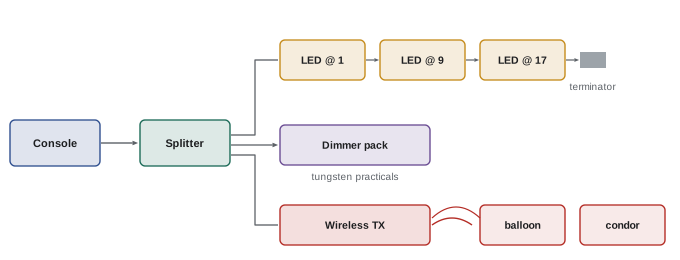
DMX512, usually called DMX, is the standard digital control protocol for entertainment lighting, developed by the United States Institute for Theater Technology in 1986 and later standardized by ANSI. A DMX signal carries a universe of 512 channels, each with a value from 0 to 255, sent in a continuous stream many times per second from a controller to fixtures connected in a daisy chain. Cables use five-pin XLR connectors (three-pin versions are also common on inexpensive equipment), and the last fixture in the chain should have a terminator, a resistor that prevents signal reflections. A DMX chain should not exceed 32 devices or several hundred meters without a splitter or booster. Each fixture listens to a block of channels starting at its DMX address and responds to the values on those channels.
Addressing and fixture modes
A fixture's DMX footprint, the number of channels it uses, depends on its mode. A simple LED panel in a basic mode might use two channels: intensity and color temperature. In an extended mode it might use eight or more channels for intensity, fine intensity, color temperature, tint, crossfade between modes, strobe and effects; in an RGB or HSI mode it uses channels for each color. Pixel-mapped tubes might use dozens or hundreds of channels to control each segment. The gaffer and board operator plan an address map, a table listing each fixture, its mode, footprint and start address, so that fixtures do not overlap. Sixteen-bit "fine" channels provide 65,536 steps rather than 256, giving smooth fades at low levels, which matters for slow dimming on camera.
Worked problem
Planning DMX addresses
A universe will control six LED panels in an 8-channel mode, four LED Fresnels in a 6-channel mode and eight tubes in a 12-channel mode. What addresses should they use, and how many channels remain?
Show solution
- Panels: 6 × 8 = 48 channels, addresses 1, 9, 17, 25, 33, 41 (channels 1–48).
- Fresnels: 4 × 6 = 24 channels, addresses 49, 55, 61, 67 (channels 49–72).
- Tubes: 8 × 12 = 96 channels, addresses 73, 85, 97, 109, 121, 133, 145, 157 (channels 73–168).
- Total used: 168 of 512, leaving 344 channels.
Answer: Panels at 1–41 in steps of 8, Fresnels at 49–67 in steps of 6, tubes at 73–157 in steps of 12; 344 channels remain.
RDM
Remote Device Management (RDM) is an extension of DMX that allows two-way communication: the controller can discover fixtures on the line, read their status, temperature, errors and lamp hours, and set their DMX addresses and modes remotely. RDM is especially useful when fixtures are rigged high or hidden in sets, where walking to each fixture to change its address would take time. Not all fixtures and splitters support RDM, so check compatibility.
Networked control: Art-Net and sACN
Large lighting systems need many universes: a big LED volume, a stage full of pixel-mapped tubes or a large set with hundreds of fixtures may require dozens or hundreds of universes. Ethernet-based protocols carry many universes over standard network cables and switches. Art-Net, developed by Artistic License, and sACN (Streaming ACN, ANSI E1.31) are the two most common. Nodes convert network data into DMX lines near the fixtures, and many modern fixtures accept Art-Net or sACN directly over Ethernet. Networked control requires basic network skills: IP addressing, switches and avoiding network congestion, and many productions have a dedicated lighting network technician.
Wireless DMX and apps
Running DMX cables to every fixture is slow and impractical for fixtures on balloons, cranes, vehicles or across a location. Wireless DMX systems, such as LumenRadio CRMX and W-DMX, transmit DMX universes over radio, with receivers built into many professional fixtures or attached as small adapters. They are robust and widely used on sets. Many LED fixtures also support Bluetooth or Wi-Fi control through manufacturer apps on phones and tablets, which is convenient for small setups, interviews and quick adjustments by the gaffer or DP, though app control is usually limited to one brand and is less reliable for large systems. Some productions combine a central console with handheld tablet control for the gaffer.
| Control method | Typical use | Strengths | Limitations |
|---|---|---|---|
| Hard-wired DMX | Studio sets, rigs | Reliable, standard | Cable runs, 512 channels per universe |
| Wireless DMX (e.g. CRMX) | Locations, balloons, vehicles | No cables, robust | Radio interference, pairing |
| Art-Net / sACN | Large rigs, LED volumes | Many universes over Ethernet | Network setup skills |
| Manufacturer apps | Small setups, interviews | Quick, intuitive | Usually one brand, limited scale |
Consoles and the board operator
Lighting consoles, from compact controllers to full theatrical desks such as ETC Eos, grandMA and Avolites, and software-based systems running on laptops and tablets, send DMX to fixtures. On a film set, the board operator, also called the dimmer board operator or lighting programmer, is a member of the electric department who patches fixtures (assigning them to console channels), builds presets and cues, and responds to the gaffer's and DP's requests, such as "bring the kicker down 20 %" or "warm the window to 4,300". Good board operators label fixtures clearly, keep presets for each scene and setup so that lighting can be recalled for pickups, and document settings for continuity. They also manage effects, such as television flicker, police lights and lightning, timed precisely to the action.
Cues and effects
Control systems make lighting changes during shots possible and repeatable. Cues are recorded lighting states with fade times; a cue can, for example, dim the room lights as an actor switches off a lamp, then fade up moonlight through the window. Effects include flicker for firelight and television, pulsing for emergency lights, chases across tubes for passing cars or trains, and lightning flashes. Many fixtures have built-in effects, but programming them on the console allows precise timing and synchronization across fixtures. A light switch on set can be wired as a "practical cue" or triggered by the board operator watching the actor's hand, a classic task for which timing rehearsals are essential.
Practical lamps
Practicals, the lamps, sconces, signs and screens visible in the frame, need control too. Household bulbs are replaced with film-quality tungsten or LED bulbs of known color temperature and high CRI, often dimmable, and controlled by small dimmers hidden behind furniture or by DMX-controlled bulbs and in-line dimmers. Practicals often need to be dimmed well below full brightness so that they read as glowing sources without clipping; dimming tungsten practicals warms them attractively. Lampshades may be lined with diffusion or blackwrap to control spill, and screens on televisions and computers are set to appropriate brightness or replaced with graphics played back from a computer.
Troubleshooting control systems
Control problems are common and can stop a set. Typical issues include fixtures not responding because of wrong addresses or modes; overlapping addresses causing two fixtures to respond together; missing terminators or damaged cables causing flicker or erratic behavior; too many devices on one chain; wireless receivers not linked or suffering interference; and network configuration errors. A systematic approach helps: confirm the fixture works locally, check its address and mode against the address map, check cables and splitters, test with a simple DMX tester, and check wireless links and network settings. Keeping spare cables, terminators, splitters and receivers on the cart avoids delays.
Lighting control on location
Control systems are as valuable on location as on stages. A gaffer on a location shoot might set up a small wireless DMX transmitter and control all LED fixtures from a tablet, adjusting color and intensity without sending electricians up ladders or out into the rain. Practicals can be fitted with wireless dimmers, and battery-powered tubes controlled by app. This flexibility allows lighting to keep pace with changing natural light, for example warming and dimming window sources as the real sun sets, and speeds up the many small adjustments that every setup needs.
Presets for continuity
Saving lighting states as presets is invaluable for continuity. When a scene is shot over two days, or when pickups are needed weeks later, recalling the exact intensities and colors of every fixture saves time and ensures a match. Board operators label presets with scene and setup numbers and keep records alongside the lighting plot. Presets also help when the director wants to return to an earlier look, or when the same set is used for different times of day.
Integrating practicals and effects with control
Practical lamps fitted with DMX-controlled bulbs or in-line dimmers can be included in the console patch, so that turning on a lamp, dimming a chandelier or flickering a television becomes a cue. For example, an actor switching on a bedside lamp triggers a cue that fades the lamp up and simultaneously raises a hidden LED that represents its light on the actor's face. Timing such cues to the action requires rehearsal with the actor, and many board operators watch a monitor to follow the action precisely.
Data and network safety
As lighting systems become networked, they share many of the risks of computer networks: misconfigured devices, conflicting addresses, interference from other wireless systems, and, on large systems, the possibility that a fault causes many fixtures to behave unpredictably at once. Good practice includes keeping the lighting network separate from other production networks, using reliable switches and backup consoles, documenting the network configuration, and testing the system thoroughly during pre-rigging. A fixture going dark or flashing unexpectedly in the middle of a take is costly, so robust systems are worth the effort.
The board operator's kit
A board operator's kit typically includes a console or laptop with control software, a backup controller, DMX and network cables, splitters and nodes, wireless transmitters and receivers, terminators, a DMX tester, spare batteries and a printed address map. Keeping the kit organized and labeled lets the operator respond quickly when the gaffer calls for a change or a fixture misbehaves.
Learning control systems
Control systems reward practice. Lighting students can learn the basics with inexpensive DMX interfaces, free control software and a few LED fixtures, experimenting with addressing, modes, presets and simple cues. Manufacturers and rental houses run training sessions on consoles and wireless systems, and theater and concert lighting offer excellent experience with advanced programming that is increasingly used on film sets.
Whatever the system, the goal is the same: fast, reliable control that lets the DP and gaffer shape light as quickly as the scene demands, without delaying the shooting schedule.
Common mistakes
MistakePlugging LEDs or ballasts into tungsten dimmers.
InsteadUse non-dim channels or digital control.
MistakeOverlapping DMX addresses.
InsteadPlan and document an address map.
MistakeOmitting terminators on long chains.
InsteadTerminate the last fixture and use splitters.
MistakeUsing 8-bit channels for slow low-level fades.
InsteadUse 16-bit fine channels for smooth fades.
MistakeUndocumented console settings.
InsteadSave presets per setup for continuity and pickups.
Summary and key terms
- Traditional dimmers suit tungsten; LEDs and HMIs dim internally.
- DMX512 carries 512 channels per universe to addressed fixtures.
- Fixture modes determine footprints; plan an address map.
- RDM enables remote discovery and addressing.
- Art-Net and sACN carry many universes over Ethernet.
- Wireless DMX and apps free fixtures from cables.
- Board operators program cues and effects and document settings.
- Dimmer pack
- Case of dimmer channels for tungsten lights.
- DMX512
- Standard digital lighting control protocol.
- Universe
- Set of 512 DMX channels.
- DMX address
- Starting channel a fixture listens to.
- Footprint
- Number of channels a fixture uses.
- Terminator
- Resistor ending a DMX chain.
- RDM
- Remote Device Management for two-way DMX.
- sACN
- Streaming ACN network lighting protocol.
- CRMX
- Common wireless DMX system.
- Cue
- Recorded lighting state with fade time.
Practice problems
Work each problem on paper first, then reveal the answer to check.
What happens if you put an LED fixture on a tungsten dimmer?
Show answer
It may be damaged; use non-dim or digital control.
How many channels in a DMX universe?
Show answer
512.
Value range of a DMX channel?
Show answer
0–255.
Why use 16-bit channels?
Show answer
Smoother fades with 65,536 steps.
Address of the third 8-channel fixture starting at 1?
Show answer
17.
What does RDM allow?
Show answer
Remote discovery, status and addressing.
Name two network lighting protocols.
Show answer
Art-Net and sACN.
When is wireless DMX useful?
Show answer
Balloons, cranes, vehicles, locations.
What does a board operator do?
Show answer
Patches fixtures, builds presets and cues, adjusts on request.
Name two DMX troubleshooting steps.
Show answer
Check address and mode, cables, terminators, wireless links.
Lesson quiz · 5 questions
Score 60% or more to complete this lesson.
Create a free account to save your progress, take quizzes and earn a certificate.