
BAS-320 · Lesson 5 of 12 · 25 min
Alarm management and routing
▶ Video coming soon A video version of this lesson is on the way.
On Monday, October 19, Callie spent the day at Ninefield with Prakash, swinging the chillers over for winter and testing the secondary pump failover. In the evening, Sophie had a spreadsheet waiting: every alarm the Tilden Hall front end had recorded in the previous week, Monday, October 12 to Sunday, October 18, exported from the server's alarm database. On Saturday she and Callie would sit down with Nell Nakagawa's list and sort Tilden's alarms into what to keep, change, suppress or delete, as BAS-220 described. Tonight was for the numbers. "Nell says she ignores most of them," Sophie said. "Let's find out whether she's right to."
BAS-220 dealt with alarm logic inside the controllers: limits, delays, deadbands, inhibits and the Notification Class objects that give each alarm its priority. This lesson is about the other end: what happens to an alarm once it reaches the front end, how it is shown, acknowledged and sent to people, and how a site measures whether its alarms are helping or hurting.
The life of an alarm at the front end
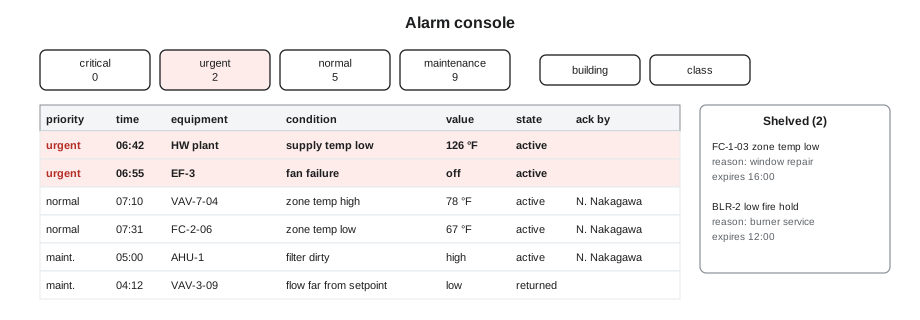
An alarm arriving at the front end goes through a series of states. The names vary between products, but the states are standard in alarm management practice and in BACnet itself.
| State | Meaning | What the operator sees |
|---|---|---|
| Active, unacknowledged | The condition is present and nobody has responded | Alarm in the list, flashing or bold, with its priority |
| Active, acknowledged | Someone has seen it and taken responsibility | Alarm stays in the list, no longer flashing, with who acknowledged and when |
| Returned to normal, unacknowledged | The condition cleared before anyone responded | Alarm stays until acknowledged, so a brief event is not missed |
| Cleared | Normal and acknowledged | Removed from the active list; kept in the history |
| Shelved | Deliberately hidden for a set time by an authorized person | Moved to a shelved list with a reason and an expiry time |
| Suppressed by design | Hidden automatically because a related condition makes it meaningless | Not shown, but recorded, for example low supply air while the fan is off |
Acknowledging an alarm does not fix anything. It records that a named person has seen it and is dealing with it, which is why a front end should require the person to be logged in as themselves, not as a shared account, and why many sites ask for a short comment. Lesson 7 returns to shared accounts.
Measuring an alarm system
Alarm management in the process industries developed a set of measurements for judging whether a site's alarms are usable. The most widely used guidance comes from EEMUA 191, a guide from the Engineering Equipment and Materials Users Association, and from the standards ANSI/ISA-18.2 and IEC 62682, which describe the alarm management life cycle. Building operators are not refinery operators, but their limits as people are the same, and the measurements transfer well.
| Measurement | Typical guidance | What it tells you |
|---|---|---|
| Average alarm rate | About one every ten minutes, six an hour, in steady operation is comfortable; about 12 an hour is often quoted as the most an operator can manage | Whether the operator can respond to each alarm |
| Alarm flood | More than 10 new alarms in 10 minutes | Whether important alarms are being buried by a burst |
| Priority mix | Roughly 80 in 100 low, 15 medium and 5 high is the usual rule of thumb | Whether priorities still mean anything |
| Stale alarms | Active for more than 24 hours | Conditions nobody is fixing, which train operators to ignore the list |
| Chattering alarms | Three or more activations in one minute | Missing deadband or delay |
| Top ten | The ten alarms that occur most often | Where most of the noise comes from; usually a few chronic faults |
The first row reads oddly, so it is worth putting plainly: guidance suggests one alarm about every ten minutes, six an hour, is a rate an operator can handle comfortably in steady operation, and about twelve an hour is near the limit. A building operator who also has a plant to run, tenants to see and work orders to close has less attention to spare than a control-room operator, so a building's target should if anything be lower.
Tilden's week in numbers
Sophie's spreadsheet had 1,512 rows. She and Callie worked through the measurements one at a time.
Worked problem
Average rate and the top ten
Tilden Hall's front end recorded 1,512 alarms from Monday, October 12 to Sunday, October 18. The ten points that alarmed most often accounted for 1,089 of them. What was the average rate per hour, and what share came from the top ten?
Show solution
- Hours in the week: 7 × 24 = 168.
- Average rate: 1,512 ÷ 168 = 9.0 alarms an hour.
- Top-ten share: 1,089 ÷ 1,512 = 0.72, or 72 in 100.
Answer: Nine an hour, round the clock, well above the comfortable rate, and nearly three quarters of them from just ten points. Fixing those ten would do more than any amount of tuning elsewhere.
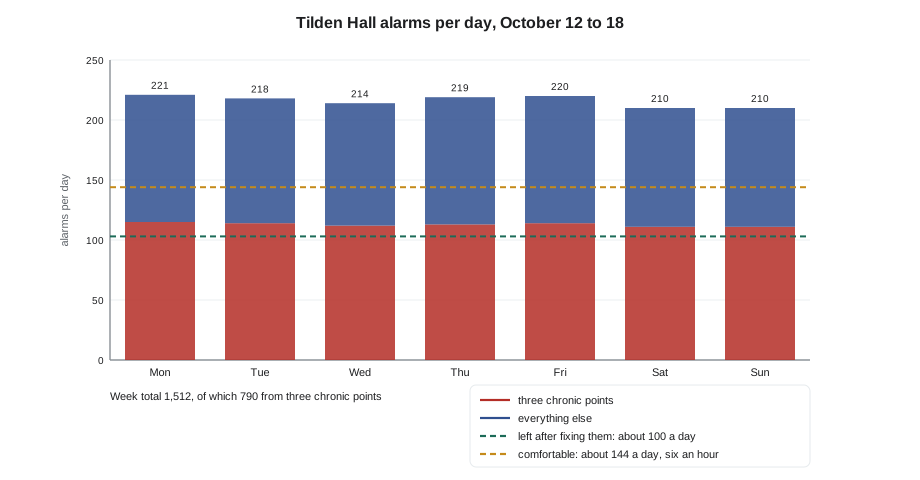
The top of the list was predictable once they looked at it. A low supply temperature alarm on one of the west stair fan coils, FC-W3, had fired 412 times, because its alarm had no deadband and the reading hovered right at the limit during the morning warm-up. A dirty-filter differential pressure switch on AHU-1 had chattered 230 times, flapping open and closed as the fan ramped. An outdoor humidity sensor that had failed in August accounted for 148 sensor-failure alarms, re-raised every time the server polled it. Those three points alone made up 790 of the week's alarms.
Worked problem
What fixing three points would do
If the FC-W3, AHU-1 filter and outdoor humidity alarms were fixed, so that they raised no alarms in a normal week, what would the average rate become?
Show solution
- Alarms removed: 412 + 230 + 148 = 790.
- Remaining: 1,512 − 790 = 722.
- New average: 722 ÷ 168 = 4.3 alarms an hour.
Answer: About 4.3 an hour, already below the comfortable rate, from fixing three things: a deadband on FC-W3, a delay or a replacement switch on the filter, and a new humidity sensor. The rest of the cleanup could then focus on making each remaining alarm meaningful.
Floods were the second finding. The spreadsheet showed nine ten-minute periods in the week with more than ten new alarms. Six were at the morning start, between 6:00 and 6:20, when air handlers, fan coils and boxes all left unoccupied mode together and their deviation alarms fired before the loops had caught up. Two were during a five-second power dip on the Thursday afternoon, when every controller on one trunk restarted. One was a real failure, a hot water pump trip, buried among 23 other alarms from the boxes and fan coils that lost heat. The restart inhibits and state-based suppression that BAS-220 described were the fix for the first eight; for the ninth, suppression would have left the pump trip as the only alarm, where it belonged.
The priority mix was the third. Of the 1,512 alarms, 31 were urgent or critical, 410 normal and 1,071 maintenance, roughly 2, 27 and 71 in 100. That looked close to the rule of thumb, but Callie noticed that the 31 urgent alarms included the 23 heating alarms from the pump trip, so in an ordinary week the urgent count would have been only eight. A low urgent count is good, as long as the urgent ones are never buried.
Shelving and suppression
Two tools let a site hide alarms without deleting them, and both need rules. Shelving is a deliberate, temporary action by a person: an operator who knows a sensor is broken and has ordered a replacement shelves its alarm for a week, with a reason, so that it stops cluttering the list. A shelved alarm must expire on its own and appear on a list of shelved alarms, or shelving becomes a way of hiding problems forever. Only people with the right role should be able to shelve, and the alarm philosophy should say for how long.
Suppression by design is automatic and built into the logic: an alarm that only makes sense in certain states is suppressed in others. A discharge air low alarm is meaningless while the fan is off; zone deviation alarms are meaningless for the first half hour after a morning start; every alarm on a trunk is meaningless for a few minutes after a power restart. BAS-220 showed how to build these inhibits in the controllers. At the front end, Sophie's job was to make sure suppressed alarms were still recorded in the history, so that a review could see what had been suppressed and why.
| Tool | Who decides | Duration | Safeguard |
|---|---|---|---|
| Shelving | An authorized operator | Fixed time, such as 8 hours or 7 days | Expires automatically; appears on a shelved list; reason recorded |
| Suppression by state | The designer, in the alarm philosophy | While the state lasts | Documented; suppressed alarms still logged |
| Out of service | A technician during work | During the work | Appears on the override report until returned |
| Deleting the alarm | The owner, through the review | Permanent | Only when the alarm has no response worth taking |
Routing: who hears about it, and how
An alarm on the console only helps if someone is looking. Outside working hours, or for people who are not at a desk, the front end must route alarms to them: by e-mail, by text message, through a phone app, to a work-order system, or by an automated phone call. Routing depends on priority and time of day, and it is set up in the front end's routing or notification settings, often built on the BACnet Notification Class recipient lists that BAS-220 described.
| Class | Working hours | Nights and weekends |
|---|---|---|
| Critical | Console, text to the day operator and the chief operator | Text to the on-call operator; phone call if not acknowledged |
| Urgent | Console, then text to the day operator if not acknowledged in 30 minutes | Text to the on-call operator |
| Normal | Console | Held for the morning |
| Maintenance | Work-order system | Work-order system |
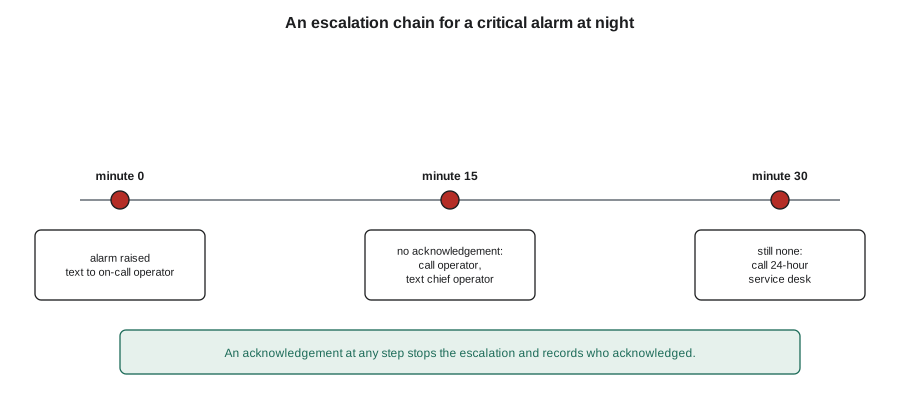
Escalation is the safeguard against an alarm nobody answers. If the first person on the list does not acknowledge within a set time, the front end sends it to the next, and so on. The escalation chain should end with someone who will always answer, such as a service company's 24-hour desk.
Worked problem
How long before the service desk hears?
A critical alarm at night goes to the on-call operator at once; if not acknowledged in 15 minutes, to the chief operator; if not acknowledged 15 minutes after that, to Quillon's 24-hour desk. The front end checks for acknowledgments once a minute and text messages take up to 2 minutes to arrive. What is the longest time between the alarm and Quillon's desk receiving it?
Show solution
- First wait: 15 minutes, plus up to 1 minute for the check.
- Second wait: 15 minutes, plus up to 1 minute.
- Delivery: up to 2 minutes.
- Total: 15 + 1 + 15 + 1 + 2 = 34 minutes.
Answer: Up to about 34 minutes. For a boiler failure on a winter night that is acceptable; for a freeze protection trip in an air handler, Nell wanted the chief operator texted at the same moment as the on-call operator, which shortens the chain.
Routing must be tested. Phone numbers change, people leave, e-mail filters catch automated messages and text services change their rules. Sophie's routine at every site was a monthly test alarm, raised deliberately, that had to reach every person on the critical list and be acknowledged by each.
What Saturday would be about
By the end of the evening, Sophie had three pages of notes for Saturday: the rate, the top ten, the floods, the priority mix, and the routing table. Callie had a question. "If the three chronic alarms are fixed and the floods are suppressed, are we done?" Sophie shook her head. "Then we start on the alarms that are quiet but useless. An alarm nobody can act on is noise, even if it only fires once a month." That, and the alarm philosophy that came out of it, is the subject BAS-220 left off with: every alarm with a written reason, a priority, a recipient and a response.
Common mistakes
MistakeTreating acknowledgment as a fix.
InsteadAcknowledgment records who is responding; the cause still needs fixing.
MistakeLetting chronic alarms fire for months.
InsteadReview the top ten every month and fix their causes first.
MistakeShelving alarms with no expiry.
InsteadShelve only with a reason, a time limit and a visible shelved list.
MistakeRouting every alarm to everyone's phone.
InsteadRoute by class and time of day, with escalation for unacknowledged critical alarms.
MistakeAssuming routing works because it did once.
InsteadSend a monthly test alarm to every person on the critical list.
MistakeSuppressing alarms without recording them.
InsteadKeep suppressed alarms in the history so reviews can see them.
Summary and key terms
- Front-end alarm states include active, acknowledged, returned to normal, cleared, shelved and suppressed.
- Acknowledgment records who is responding; it should use personal accounts.
- Process-industry guidance gives targets for alarm rate, floods, priority mix, stale and chattering alarms.
- A few chronic alarms usually cause most of the noise; the top-ten review finds them.
- Floods follow morning starts, power restarts and single failures; inhibits and suppression keep the real alarm visible.
- Shelving is temporary and controlled; suppression by state is designed and documented.
- Routing sends alarms by class and time, with escalation and regular testing.
- Acknowledge
- To record that a named person has seen an alarm and is responding.
- Alarm rate
- The number of alarms per hour or per ten minutes reaching an operator.
- Alarm flood
- A burst of alarms faster than an operator can handle, often more than ten in ten minutes.
- Chattering alarm
- An alarm that repeatedly activates and clears in a short time.
- Stale alarm
- An alarm that stays active for a long time, often more than a day.
- Shelving
- Temporarily hiding an alarm, by an authorized person, with a reason and an expiry.
- State-based suppression
- Automatically hiding alarms that are meaningless in the current equipment state.
- Escalation
- Sending an unacknowledged alarm to the next person after a set time.
- Alarm philosophy
- A site document setting the rules for what is alarmed, how and to whom.
Practice problems
Work each problem on paper first, then reveal the answer to check.
A building logs 840 alarms in a week. What is the average rate per hour?
Show answer
840 ÷ 168 = 5 an hour.
The top ten points caused 600 of 840 alarms. What share is that?
Show answer
600 ÷ 840 ≈ 0.71, about 71 in 100.
Fourteen new alarms arrive between 6:00 and 6:10. What is it, and what is the usual fix?
Show answer
A flood at the morning start; delays or inhibits on deviation alarms after a mode change.
An operator shelves a broken sensor's alarm. What three safeguards should apply?
Show answer
A recorded reason, an automatic expiry and a visible shelved list.
Escalation waits 10 minutes at each of two steps, checks every minute and texts take 1 minute. Worst case to the third person?
Show answer
10 + 1 + 10 + 1 + 1 = 23 minutes.
Lesson quiz · 5 questions
Score 60% or more to complete this lesson.
Create a free account to save your progress, take quizzes and earn a certificate.