
BAS-320 · Lesson 2 of 12 · 24 min
Supervisory controllers and servers
▶ Video coming soon A video version of this lesson is on the way.
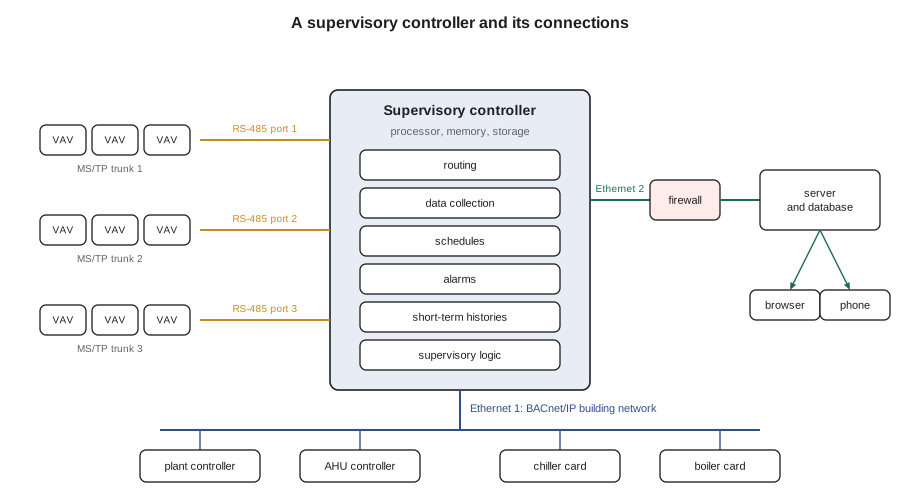
Callie had spent the daytime of Monday, September 21 at Ninefield Tower with Prakash, touring the building's architecture from the front-end server in the building engineer's office to the penthouse supervisory controller and the small BACnet routers in each floor's electrical closet. The afternoon had ended on the seventh floor, chasing the trunk fault that BAS-310 described. That evening at Quillon's office, Sophie asked her to describe the penthouse controller. "Gray box, din rail, two Ethernet ports, three RS-485 ports, a lot of blinking lights," Callie said. "And nobody could tell me how full it was." Sophie laughed. "That is tonight's lesson."
What a supervisory controller is made of
A supervisory controller is a small industrial computer built to sit in a panel for fifteen years. It has the same parts as any computer, chosen for reliability rather than speed, and knowing them helps a technician judge what it can do.
| Part | Typical in a current supervisory controller | Why a technician cares |
|---|---|---|
| Processor | Low-power processor built for embedded use | Busy controllers respond slowly and miss polls |
| Working memory | A few hundred megabytes to a few gigabytes | Each device, point and history uses some; full memory means a restart or a crash |
| Storage | Flash memory or a small solid-state disk | Holds the database, programs and recent histories; flash has a limited number of writes |
| Ethernet ports | One or two, sometimes on separate networks | Connect to the BACnet/IP network and, separately, to the owner's IT network or the server |
| RS-485 ports | Two to four, each a separate MS/TP or Modbus trunk | One port per trunk; each trunk gets its own network number |
| Battery and clock | A real-time clock kept running by a battery or supercapacitor | Schedules and time stamps depend on the clock |
| Power | 24 V AC or DC, from a dedicated transformer or a supply | Same rules as any controller in BAS-210 |
Its software usually runs as a "station" or an application: a database of every device, point, schedule, alarm class and history the controller looks after, plus the services that act on them. The station can be opened and edited with the maker's engineering tool, and it is the station, not the hardware, that a backup saves.
What it does all day
A supervisory controller is always busy, even when nobody is looking at a graphic. Its regular jobs are these.
- It routes BACnet messages between its MS/TP trunks and the IP network, so that the server and other controllers can reach the field controllers below it.
- It collects data: reading or subscribing to the points it needs for histories, alarms, supervisory logic and the server.
- It runs supervisory logic, such as a chilled water reset based on the most-open cooling valve, or a building-wide demand limit, and writes the results down to the field controllers.
- It holds schedules and calendars, either running them itself or writing them to the controllers that run their own.
- It detects or receives alarms, records them, and passes them up to the server.
- It stores histories, usually for days or weeks, until the server collects them for long-term keeping.
- It keeps time for the controllers below it, sending BACnet time synchronization messages.
The balance between these jobs matters. A supervisory controller asked to poll hundreds of points every few seconds, run dozens of histories at one-minute intervals and serve graphics to several browsers can run out of processing time. The symptoms are slow graphics, late alarms, gaps in histories and, in the worst case, a controller that restarts itself. Makers publish limits for each model, and the most important are the number of devices it may supervise, the number of points or proxy points, and the number of histories.
Capacity and licensing
Many supervisory controllers and front-end servers are licensed, as well as limited, by size. The license might count field devices, points, histories or connected users, and a controller that reaches its license limit refuses to add more, whatever its hardware could handle. The license is a file tied to the controller or server, and losing it, or replacing the hardware without transferring it, can stop a station from starting.
Worked problem
Headroom on Ninefield's front-end license
Ninefield's front-end server is licensed for 200 BACnet devices. On September 21 its device list showed 141 VAV controllers, the two programmable plant controllers, the basement plant controller, the two chiller cards, the penthouse supervisory controller, nine floor routers and the podium protocol converter. RTU-1's new controller would be added in November, and RTU-2 to RTU-4 in December, after which the protocol converter would be removed. How many devices will the license be using in January, and how much headroom will be left?
Show solution
- Now: 141 + 2 + 1 + 2 + 1 + 9 + 1 = 157 devices.
- Add four RTU controllers: 157 + 4 = 161.
- Remove the protocol converter: 161 − 1 = 160.
- Headroom: 200 − 160 = 40 devices, or 20 in 100 of the license.
Answer: 160 devices in January, with 40 to spare. That is enough for the planned work, but a tenant fit-out that added 30 boxes would use most of it, so Declan noted the license size in the retro-commissioning file.
Licenses are also tied to software maintenance. Many front-end products only allow upgrades while a software maintenance agreement is current, and lesson 11 covers what happens when one lapses. A technician who adds devices without checking the license can find, on the day of a handover, that the new controllers will not appear on the front end.
The server
The server is the computer that runs the front-end software for the whole site. On a small job it may be a single workstation in the building engineer's office; on a campus it is usually a proper server, either a physical machine in a secure room or a virtual machine on the owner's IT infrastructure. Its jobs overlap with the supervisory controllers but at a larger scale.
| Server job | What it involves |
|---|---|
| Database | Every device, point, graphic, alarm class, user and history for the site, usually in a relational or time-series database |
| Long-term histories | Collecting histories from the supervisory controllers and keeping them for years |
| Graphics and web serving | Sending pages and live values to browsers and apps |
| Alarm routing | Sending e-mails, text messages or work orders, with escalation |
| Reports | Running scheduled reports of energy, runtime, alarms and overrides |
| User management | Accounts, roles and the audit trail of who changed what |
| Integration | Exchanging data with other systems: analytics, maintenance software, utility meters |
A server needs the things every server needs: an operating system kept patched, enough disk space for years of histories, a backup plan, an uninterruptible power supply, and an owner who knows who is responsible for it. That last point causes more trouble than any technical one. At many sites the controls contractor installed the server, the owner's IT department runs the network, and nobody has written down who patches the operating system or replaces the disk. Margit Brodeur's rule at Quillon was that every service agreement must say, in one line, who owns the server's hardware, its operating system and its front-end software.
Harcastle's front-end server sat in the central plant on the campus controls subnet, beside the BBMD that BAS-310 described. Its disk had been 80 in 100 full on September 14, and Sophie had already planned to archive older histories and move the server's backups to the college's file storage. Harcastle's IT department had suggested moving the whole server to a virtual machine in their data center in 2027, which Sophie thought was a good idea as long as the controls network and the IT network stayed properly separated.
Time
Every schedule, every history time stamp and every alarm time depends on the clocks in the controllers. A controller whose clock has drifted ten minutes starts its air handler ten minutes late; one set to the wrong time zone starts it hours wrong; one that does not apply daylight saving time is an hour off for half the year.
The normal arrangement is that the server, or the supervisory controller, gets accurate time from a network time server using NTP, the internet's network time protocol, and passes it down to the field controllers with BACnet time synchronization messages, usually daily and after every restart. The controllers must know their time zone and daylight saving rules, or be sent local time. Columbus is on Eastern time, and in 2026 daylight saving time ended on Sunday, November 1, a weekend Quillon's service desk always watched for start-up complaints on the Monday morning.
Worked problem
A drifting clock
A field controller's clock gains 4 seconds a day. Its supervisory controller sends time synchronization once a day. Another controller on a site where synchronization was never configured has gained 4 seconds a day for three years. How far off is each?
Show solution
- With daily synchronization, it never drifts more than about 4 seconds.
- Without: 4 × 365 × 3 = 4,380 s.
- 4,380 ÷ 60 = 73 minutes.
Answer: The synchronized controller is within seconds; the other is more than an hour fast, so its 7:00 start happens before 6:00. Checking controller clocks against the server is on Quillon's first-visit checklist.
Where supervisory logic should live
Supervisory logic is the logic that looks across many controllers: resets based on demand from many zones, building-wide demand limiting, staging of central plant from requests, optimal start based on many zones. It needs data from several controllers, so it cannot live in any one field controller, but it should not live in the server either if the server is less reliable than the controllers. The usual home is the supervisory controller, or a programmable plant controller, which is as dependable as the equipment it serves.
Wherever it lives, supervisory logic must have a safe fallback. If the chilled water reset stops arriving, the plant controller should hold the last value for a time and then go to a fixed safe setpoint. Lesson 12 of BAS-310 showed the same principle for the chiller integration at Ninefield: the hardwired enable, status and alarm points were kept as a backup, and the plant program had a fallback if the network data failed.
| Logic | Best home | Fallback if the source fails |
|---|---|---|
| Discharge air temperature loop | Air handler controller | Not applicable: it runs locally |
| Supply air temperature reset from zone requests | Air handler controller or supervisory controller | Hold last value, then a fixed design setpoint |
| Chilled water reset from valve positions | Plant controller | Fixed design setpoint |
| Building demand limit | Supervisory controller | Release all limits |
| Daily energy report | Server | None needed: nothing in the building depends on it |
Checking a supervisory controller on a visit
Sophie ended the evening with the checks she made whenever she connected to an unfamiliar supervisory controller, which Callie copied into her notebook.
- Look at the controller's own health page: processor load, memory used, storage used, uptime since the last restart.
- Check the clock and time zone against the server and a phone.
- Check the license: how many devices or points it allows and how many are used.
- Look at the device list for offline devices and at the history list for histories that have stopped.
- Check when it was last backed up and that the backup is somewhere other than the controller.
- Read the alarm list for its own alarms: low memory, failed history collection, license warnings.
"Uptime is my favorite," Sophie said. "If a controller says it has been running for four days and nobody restarted it, it restarted itself, and you want to know why." When Callie checked Ninefield's penthouse controller remotely the next week with Prakash, its uptime was 412 days and its memory 61 in 100 used. Nobody had to explain anything.
Redundancy and what happens when parts fail
Sophie finished the evening by asking Callie to walk through failures, one part at a time, and say what the building would notice. It is a useful exercise on any site, because it shows quickly whether the management level has been designed so that the building does not depend on it.
| Part that fails | What should happen | What goes wrong on a badly designed site |
|---|---|---|
| Front-end server | Controllers keep running; supervisory controllers keep alarms and histories until the server returns | Schedules stop because they lived only in the server; alarms are lost |
| Supervisory controller | Field controllers keep running their programs on their own schedules and fallbacks | Boxes lose their occupancy commands and fall back to unoccupied; resets stop with no fallback |
| IP network switch | Each building or floor keeps running locally | Plant controllers that need shared values, such as outdoor air temperature, use stale or bad data |
| One MS/TP trunk | Only the controllers on that trunk are unreachable; they keep running | A trunk feeding plant interlocks stops the plant |
Some sites, usually hospitals, laboratories and data centers, pay for redundancy at the management level: two servers, one standing by to take over, or supervisory controllers paired so that one takes over if the other fails. Most commercial buildings do not need it, provided the field controllers are designed to run alone. The cheaper protection is to make sure every value a controller receives over the network, such as outdoor air temperature or an occupancy command, has a sensible default if it stops arriving, and that schedules are held in the controllers as well as the front end. Lesson 8 returns to schedules, and lesson 11 to how quickly a failed server or supervisory controller can be rebuilt from its backups.
Common mistakes
MistakeAdding devices without checking the license.
InsteadCheck the license count before a job and allow for planned additions.
MistakePolling everything fast because the network allows it.
InsteadSize polling, histories and graphics to the supervisory controller's published limits.
MistakePutting building-wide logic in the server with no fallback.
InsteadPut supervisory logic in a dependable controller and give it a safe fallback.
MistakeIgnoring controller clocks.
InsteadSynchronize time from a reliable source and check the time zone and daylight saving settings.
MistakeLeaving server ownership unwritten.
InsteadRecord who owns the server hardware, operating system and front-end software.
Summary and key terms
- A supervisory controller is an embedded computer with RS-485 and Ethernet ports, memory, storage and a clock.
- It routes, collects data, runs supervisory logic, schedules and alarms, and stores short-term histories.
- Makers publish limits on devices, points and histories; licenses may limit them further.
- The server holds the site database, long-term histories, graphics, alarm routing, reports and users.
- Time comes from NTP to the server and supervisory controllers, and down to field controllers by BACnet time synchronization.
- Supervisory logic belongs in a dependable controller with a safe fallback.
- Health checks include load, memory, storage, uptime, clock, license, offline devices and backups.
- Station
- The database and running application of a supervisory controller or server.
- License limit
- The number of devices, points or histories the software is allowed to handle.
- Uptime
- How long a controller or server has run since it last started.
- NTP
- Network time protocol, used to get accurate time from a time server.
- Time synchronization
- BACnet messages that set the clocks of field controllers.
- Virtual machine
- A server that runs as software on shared hardware in a data center.
- Fallback
- The safe value or mode logic uses when its input or source fails.
Practice problems
Work each problem on paper first, then reveal the answer to check.
A server licensed for 250 devices has 212 in use. What fraction of the license is free?
Show answer
38 ÷ 250 = 0.152, about 15 in 100.
A controller gains 6 s a day with no synchronization. How far off is it after one year?
Show answer
6 × 365 = 2,190 s, about 36.5 minutes.
Where should a building-wide demand limit run, and what should it do if its source fails?
Show answer
In the supervisory controller; release all limits.
What does a short uptime on a controller nobody restarted suggest?
Show answer
It restarted itself; look for the cause, such as memory or power.
Name three things a backup of a supervisory controller should include.
Show answer
The station database, programs and configuration, with the firmware version recorded.
Lesson quiz · 5 questions
Score 60% or more to complete this lesson.
Create a free account to save your progress, take quizzes and earn a certificate.