
BAS-130 · Lesson 2 of 12 · 25 min
Setpoint, process variable and error
▶ Video coming soon A video version of this lesson is on the way.
The following Friday, September 18, Prakash opened the Tilden Hall front end on the laptop in the mechanical room and brought up three trends side by side: the AHU-1 supply air temperature, the hot water supply temperature from last week, and room 214, the north office whose occupant had complained of the cold on Callie's first Thursday. "Every loop has three numbers that matter," he said. "What it wants, what it's got, and the difference. If you can read those three off a trend, you can tell me whether the loop is healthy before you open the program." This lesson is about those three numbers and the vocabulary used to describe how a loop behaves over time.
Lesson 1 introduced the parts of a closed loop. Here the focus is on the signals that pass through it: the setpoint and where it comes from, the process variable and how trustworthy it is, the error and its sign, and the measures used to judge a loop's performance: offset, overshoot, rise time and settling time. These terms appear in every controller manual, every commissioning report and every conversation between technicians about a misbehaving loop.
The setpoint
The setpoint is the value the loop is trying to hold. It sounds simple, but in a modern building the setpoint is often itself the output of other logic. A fixed setpoint never changes: a duct high-static safety limit or a domestic hot water temperature. A scheduled setpoint changes with occupancy: a classroom held at one temperature during the day and allowed to drift further at night. A reset setpoint is calculated continuously from other conditions, such as hot water temperature from outdoor air temperature, covered in lesson 7. A user-adjustable setpoint lets an occupant nudge the value from a wall sensor within limits that the controls technician sets.
When a loop misbehaves, the first check is whether the setpoint is what it should be. Callie found during her second week that a surprising number of comfort complaints came from setpoints rather than from loops. A wall sensor's adjustment knob had been turned to its limit, a schedule had a holiday entered on the wrong date, or a reset schedule had been edited and never put back. The front end usually shows the effective setpoint, the one the loop is actually using, as well as the base setpoint. The two can differ.
| Kind of setpoint | How it is set | Example |
|---|---|---|
| Fixed | Entered once and left alone | Domestic hot water storage temperature |
| Scheduled | Changes with time of day or occupancy | Classroom occupied and unoccupied temperatures |
| Reset | Calculated from other measurements | Hot water supply temperature from outdoor temperature |
| User-adjustable | An occupant offsets it within limits | Office wall sensor with a small adjustment range |
| Cascaded | Set by the output of another loop | Supply air setpoint set by a room temperature loop |
Heating and cooling setpoints and the deadband
Rooms that can be both heated and cooled have two setpoints, one for heating and one for cooling, with a gap between them called the deadband. Inside the deadband neither heating nor cooling runs. The deadband saves energy, because the system does not heat a room only to cool it a few minutes later, and it keeps heating and cooling loops from fighting each other. Energy codes require a deadband for zones that have both heating and cooling. Typical office deadbands are a couple of degrees during occupied hours, and much wider when the building is unoccupied.
Worked problem
Reading a zone's setpoints
A Tilden office has a heating setpoint of 70.0 °F and a cooling setpoint of 74.5 °F during occupied hours. Unoccupied, the heating setpoint drops by 7 °F and the cooling setpoint rises by 7 °F. What are the deadbands occupied and unoccupied?
Show solution
- Occupied deadband: 74.5 − 70.0 = 4.5 °F.
- Unoccupied setpoints: 70.0 − 7 = 63.0 °F heating, 74.5 + 7 = 81.5 °F cooling.
- Unoccupied deadband: 81.5 − 63.0 = 18.5 °F.
Answer: 4.5 °F occupied and 18.5 °F unoccupied. In either band the zone neither heats nor cools.
Some controllers express this as a single setpoint with a deadband around it; others store separate heating and cooling setpoints. The effect is the same. What matters is that the cooling setpoint can never be pushed below the heating setpoint by a user adjustment, which good programs prevent with limits.
The process variable
The process variable is the measured value of the controlled quantity, as the controller sees it. Note the words as the controller sees it. The process variable is only as good as the sensor, its location, its wiring and its scaling, all of which BAS-120 covered. A loop that holds its process variable perfectly at setpoint can still deliver a cold room if the sensor is mounted on a warm wall, reads two degrees high, or is measuring the wrong thing. The controller has no way of knowing.
A few points about the process variable matter for control. It may be filtered: many controllers average an input over a few seconds to smooth electrical noise, which helps, but heavy filtering adds delay and can make a loop sluggish or unstable. It may be sampled: a controller reads its inputs and calculates its outputs on a fixed cycle, often once a second or faster for air and water loops. And it may be stale: if the sensor fails, a well-written program holds a safe output and raises an alarm rather than chasing a reading that no longer means anything. BAS-120 lesson 1 showed how a live zero lets the controller detect a broken wire.
Error and its sign
The error is the difference between the setpoint and the process variable. Most controllers define it as setpoint minus process variable, so that a positive error means the process variable is below setpoint. Some define it the other way round. The definition does not change how the loop behaves, as long as the action, direct or reverse, is set to match. What matters to a technician is knowing, for any loop, whether the process variable is above or below setpoint and by how much.
Worked problem
Calculating error
Room 214's heating setpoint is 70.0 °F and its sensor reads 68.9 °F. What is the error, and which way should the heating loop move its output?
Show solution
- Error = 70.0 − 68.9 = +1.1 °F.
- A positive error means the room is below setpoint.
- The heating loop is reverse acting, so it raises its output as the temperature falls below setpoint.
Answer: An error of 1.1 °F below setpoint; the reheat or radiation valve should open further.
On the room 214 trend, the error had sat at about this value through most of each cold morning, with the radiation valve at 100 in 100. A loop at full output that still cannot reach setpoint is not a tuning problem: the equipment does not have the capacity, or something is limiting it. In room 214's case, it was the single-glazed window that Callie had noted on her first Thursday. No setting would fix it, and Prakash added it to Declan's list of envelope items for Gus Thibodeaux, the facilities manager.
Steady state and offset
When the load stops changing and the loop settles, it reaches steady state: the process variable and output both stop moving. If the process variable settles exactly at setpoint, the steady-state error is zero. If it settles some distance away and stays there, that persistent difference is called offset. Lesson 4 shows that offset is built into proportional-only control and lesson 5 shows how integral action removes it. On a trend, offset looks like a flat process variable line sitting parallel to the setpoint line but not on it.
A small offset is sometimes acceptable. A loop that holds a supply air temperature a few tenths of a degree from setpoint does no harm, and a sensor's own accuracy may be no better than that. A large offset is a sign that the loop needs integral action, the output has hit a limit, or the setpoint is unreachable.
How a loop responds to a change
A good way to judge a loop is to watch what it does after a change, either a step in the setpoint or a sudden change in load, such as a fan start. Four measures describe the response. Rise time is how long the process variable takes to get most of the way to the new setpoint. Overshoot is how far it goes past the setpoint before coming back, often expressed as a fraction of the size of the step. Settling time is how long it takes to stay within a small band around the setpoint. Steady-state error is whatever offset remains once it has settled.
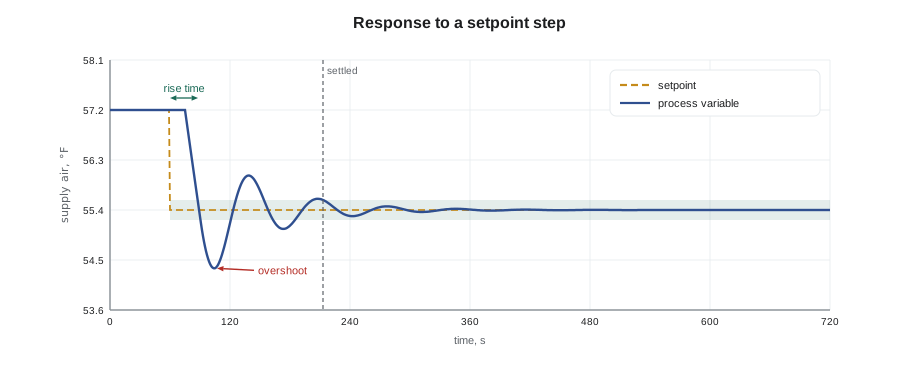
These measures trade against each other. A loop tuned to rise quickly usually overshoots more. A loop tuned never to overshoot is usually slow to recover from a disturbance. For most building loops, a small overshoot and a reasonably quick settle is the goal. A supply air loop that overshoots by a few tenths of a degree and settles in a few minutes is doing well. A loop that swings by several degrees and never settles is hunting, the subject of lesson 10.
Worked problem
Overshoot from a trend
Prakash lowers AHU-1's supply air setpoint from 57.0 °F to 55.0 °F for a test. The trend shows the supply air falling to a lowest point of 53.9 °F before settling at 55.0 °F. What was the overshoot, as a temperature and as a fraction of the step?
Show solution
- Size of the step: 57.0 − 55.0 = 2.0 °F.
- Overshoot past the new setpoint: 55.0 − 53.9 = 1.1 °F.
- As a fraction of the step: 1.1 ÷ 2.0 = 0.55, or 55 in 100.
Answer: An overshoot of 1.1 °F, which is 55 in 100 of the step. That is larger than most technicians would want; lesson 6 shows how to tame it.
Reading trends well
A trend is a record of a point's value over time, and it is the main tool for judging a loop. Three settings affect what a trend can show. The sample interval is how often the value is recorded. A one-minute interval is fine for a room temperature but can miss a supply air loop that swings every 40 seconds, which may then look like random noise or not show at all. A change-of-value trend records only when the value moves by more than a set amount, which saves storage but can flatten small swings. And the time span shown on screen matters: a 24-hour view reveals daily patterns, while a 30-minute view reveals hunting.
Prakash's rule was to trend the process variable, the setpoint and the output together on one graph, at a sample interval shorter than the fastest swing he expected. "A process variable without its output is half a story," he said. "If the temperature's steady but the valve's slamming end to end, the loop's not healthy. You just can't see it yet." He set up a trend group for AHU-1 with a 10-second interval for the coming week, so that Callie would have something to study at the next Friday loop.
| What the trend shows | Likely meaning |
|---|---|
| Process variable flat on setpoint, output moving smoothly | Healthy loop following the load |
| Process variable flat but away from setpoint | Offset, or output at a limit |
| Output at 100 in 100 and process variable short of setpoint | Capacity problem, not tuning |
| Process variable and output swinging regularly | Hunting: gain too high, integral too fast or a mechanical problem |
| Process variable slow to recover after every upset | Loop too sluggish |
| Output steady, process variable wandering | Sensor, actuator or valve not doing what the output says |
Error at a glance on the front end
Many front ends can display a loop's error directly, or color a point when the process variable strays more than a set amount from setpoint. These deviation alarms are useful, but they need sensible limits and delays. A supply air loop that is briefly two degrees off setpoint during a fan start is normal; one that is two degrees off for an hour is not. Quillon's practice was to set deviation alarms with a delay longer than the loop's normal recovery time, so that operators saw real problems rather than every start-up. Callie set one up on room 214 as a test: an alarm if the room stayed more than 3 °F below its heating setpoint for more than 45 minutes during occupied hours. It fired twice in the following week, both times on the coldest mornings, which matched what Prakash already knew about the window.
Common mistakes
MistakeAssuming the setpoint shown on a graphic is the one in use.
InsteadCheck the effective setpoint; schedules, resets and user offsets may change it.
MistakeTrusting a perfect process variable as proof of comfort.
InsteadThe process variable is only as good as the sensor and its location.
MistakeTreating a loop at 100 in 100 output as a tuning problem.
InsteadIf the output is at a limit and the setpoint is not reached, look at capacity or a mechanical fault.
MistakeTrending at a one-minute interval to look for fast hunting.
InsteadUse a sample interval shorter than the fastest swing you expect.
MistakeTrending the process variable alone.
InsteadTrend the setpoint, process variable and output together.
Summary and key terms
- The setpoint may be fixed, scheduled, reset, user-adjustable or set by another loop; always check the effective setpoint.
- Zones with heating and cooling have two setpoints separated by a deadband in which neither runs.
- The process variable is the measurement as the controller sees it, after sensing, scaling, filtering and sampling.
- Error is usually setpoint minus process variable; positive means below setpoint.
- Offset is a steady error that remains once a loop has settled.
- Rise time, overshoot, settling time and steady-state error describe a loop's response to a change.
- Trend setpoint, process variable and output together at a short enough sample interval.
- Effective setpoint
- The setpoint a loop is actually using after schedules, resets and adjustments are applied.
- Deadband
- The range between the heating and cooling setpoints in which neither heating nor cooling runs.
- Error
- The difference between the setpoint and the process variable.
- Steady state
- The condition when a loop's process variable and output have stopped changing.
- Offset
- A steady-state error that remains after a loop has settled.
- Overshoot
- How far the process variable goes past the setpoint after a change, often as a fraction of the step.
- Rise time
- The time the process variable takes to get most of the way to a new setpoint.
- Settling time
- The time until the process variable stays within a small band around the setpoint.
- Sample interval
- How often a trend records a value.
Practice problems
Work each problem on paper first, then reveal the answer to check.
A heating setpoint is 69.0 °F and the cooling setpoint is 73.5 °F. What is the deadband?
Show answer
73.5 − 69.0 = 4.5 °F.
Setpoint 55.0 °F, process variable 56.4 °F. What is the error, using setpoint minus process variable?
Show answer
55.0 − 56.4 = −1.4 °F; the air is warmer than setpoint.
What does a flat process variable sitting away from setpoint usually mean?
Show answer
Offset, or an output held at a limit.
Why trend the output as well as the process variable?
Show answer
A steady process variable can hide an output that is swinging or stuck.
A loop swings every 40 seconds. Is a one-minute trend interval good enough?
Show answer
No. It can miss or disguise the swing; use 10 seconds or less.
Lesson quiz · 5 questions
Score 60% or more to complete this lesson.
Create a free account to save your progress, take quizzes and earn a certificate.