
AWS-109 · Lesson 8 of 12 · 22 min
Commonly confused services
▶ Video coming soon A video version of this lesson is on the way.
By the end of November, Mateo has a page in his study log headed "Pairs I keep mixing up". It started with CloudTrail and CloudWatch and has grown to fourteen pairs. Gwen asks to see it and smiles, because almost every candidate's list looks the same. "The exam knows which services sound alike," she says, "and it puts them side by side as options. If you can separate each pair in one sentence, you will pick up marks other candidates throw away." This lesson works through the most commonly confused services, with the deciding difference for each and a signpost phrase that tells you which one a question wants.
The method is the same for every pair. First, say what each service does in one sentence. Second, find the deciding difference: the one property that separates them. Third, write the signpost phrase that would appear in a question about each. If you can do all three from memory, the pair is safe. If not, it goes on your review list for the final weeks.
Monitoring and audit
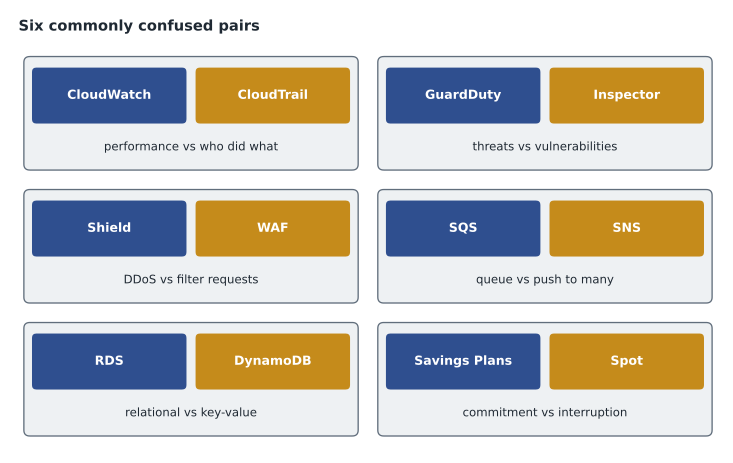
Amazon CloudWatch and AWS CloudTrail are the pair candidates confuse most. CloudWatch collects metrics, logs and events from resources and applications, displays dashboards and raises alarms: it answers "how is it performing?" CloudTrail records API calls and account activity: it answers "who did what, and when?" If a question mentions CPU utilization, an alarm or a dashboard, it wants CloudWatch. If it mentions auditing, tracking changes made by a user, or investigating who deleted a resource, it wants CloudTrail. AWS Config adds a third angle: it records the configuration of resources over time and checks them against rules, answering "what did this resource look like, and is it compliant?"
| Service | One-line job | Signpost |
|---|---|---|
| Amazon CloudWatch | Metrics, logs, dashboards and alarms | Performance, CPU, alarm, dashboard |
| AWS CloudTrail | Records API calls and account activity | Who did what, audit trail, investigate a change |
| AWS Config | Records resource configuration and checks rules | Configuration history, compliance with rules |
Security services
Amazon GuardDuty and Amazon Inspector both find security problems, but different kinds. GuardDuty is threat detection: it analyses account activity, network flow logs and DNS queries for signs of malicious behavior, such as an instance communicating with a known bad address. Inspector is vulnerability management: it scans EC2 instances, container images and Lambda functions for known software vulnerabilities and unintended network exposure. Amazon Macie is a third neighbor: it finds sensitive data, such as personal information, in S3. AWS Security Hub sits above them all, collecting findings in one place. Signposts: "suspicious activity" for GuardDuty, "software vulnerabilities" or "CVEs" for Inspector, "personal data in S3" for Macie, "single view of findings" for Security Hub.
AWS Shield and AWS WAF are another pair. Shield protects against distributed denial-of-service attacks, which try to overwhelm a service with traffic; Shield Standard is automatic and free. WAF is a web application firewall that filters individual web requests based on rules, such as blocking requests from certain countries or with suspicious patterns. Signposts: "DDoS" for Shield, "filter web requests" or "block specific patterns" for WAF. Security groups and network ACLs make a fourth pair: security groups work at the instance level and are stateful, network ACLs work at the subnet level and are stateless.
AWS KMS and AWS Secrets Manager also get mixed up. KMS creates and manages encryption keys used to encrypt data. Secrets Manager stores secrets such as database passwords and API keys and can rotate them automatically. AWS Artifact and AWS Audit Manager round out the security list: Artifact is where you download AWS's own compliance reports; Audit Manager helps you collect evidence about your own use of AWS.
Compute and containers
Amazon EC2, AWS Lambda and AWS Fargate are three ways to run code. EC2 gives you virtual servers you manage. Lambda runs functions in response to events, with no servers to manage, and is suited to short tasks; a single invocation has a maximum run time. Fargate runs containers without managing the servers underneath, and suits longer-running containerized applications. Amazon ECS and Amazon EKS both orchestrate containers; the deciding difference is that EKS uses Kubernetes. AWS Elastic Beanstalk and AWS CloudFormation both create resources, but Beanstalk deploys an application and manages its environment for you, while CloudFormation provisions any infrastructure from a template you write. Amazon Lightsail is the simple, bundled option for small sites and is often a distractor in questions that need full EC2 flexibility.
Storage
Amazon S3, Amazon EBS and Amazon EFS are the storage trio. S3 is object storage accessed over the web, for files of any kind at any scale. EBS is block storage attached to one EC2 instance in one Availability Zone, like a disk. EFS is a shared file system many Linux instances can mount at once, across Availability Zones. Instance store is the fourth option and a common trap: fast, but temporary. Among S3 classes, S3 Standard-Infrequent Access and S3 Glacier are often confused: Standard-IA gives immediate access at a lower storage price with a retrieval charge, while Glacier classes are for archives, with Glacier Flexible Retrieval and Deep Archive taking minutes to hours to retrieve. AWS Storage Gateway and AWS DataSync are another pair: Storage Gateway gives on-premises applications ongoing access to cloud storage, while DataSync moves data between on-premises storage and AWS.
| Service | Deciding difference | Signpost |
|---|---|---|
| Amazon S3 | Object storage over the web | Images, backups, static website files |
| Amazon EBS | Block disk for one instance in one zone | Boot volume, database disk on EC2 |
| Amazon EFS | Shared file system for many Linux instances | Several servers need the same files |
| Instance store | Temporary block storage on the host | Scratch data that can be lost |
Databases
Amazon RDS and Amazon DynamoDB are the classic database pair. RDS is relational: tables, SQL and joins, with a choice of engines. DynamoDB is NoSQL key-value and document storage, serverless, with consistent low latency at any scale. Amazon Aurora versus RDS is a finer distinction: Aurora is an AWS-built engine within the RDS family, compatible with MySQL and PostgreSQL, with higher performance and storage that grows automatically. Amazon Redshift is often a distractor for database questions: it is a data warehouse for analytics, not a transactional database for an application. Amazon ElastiCache is a cache in front of a database, not a primary store.
Networking and integration
Amazon CloudFront and AWS Global Accelerator both improve performance for global users. CloudFront is a content delivery network that caches content at edge locations, which suits websites, images and video. Global Accelerator routes traffic over the AWS global network to the best endpoint, which suits applications that need static IP addresses or fast failover, including non-web traffic. Amazon Route 53 is DNS, not a content cache. AWS Site-to-Site VPN and AWS Direct Connect both connect on-premises networks: VPN is encrypted and runs over the internet, quick to set up; Direct Connect is a dedicated private connection, more consistent, longer to arrange. Internet gateways and NAT gateways differ in direction: an internet gateway allows two-way internet access for public subnets, while a NAT gateway allows private resources to start outbound connections only.
In integration, Amazon SQS and Amazon SNS are the pair. SQS is a queue: messages wait until a consumer pulls and processes them, one consumer per message. SNS is publish and subscribe: one message is pushed to many subscribers at once. Amazon EventBridge routes events from many sources to targets by rules, and is often the answer when a question mentions reacting to events from AWS services or SaaS applications.
Pricing and support
Savings Plans and Reserved Instances both discount steady use for one or three years. The deciding difference is flexibility: Savings Plans commit to a spending rate and can apply across instance families and services such as Fargate and Lambda, while Reserved Instances apply to a specific instance configuration. Spot versus On-Demand differs by interruption: both have no commitment, but Spot can be reclaimed. AWS Cost Explorer versus the AWS Pricing Calculator differs by time: Cost Explorer looks at past and forecast spending, while the Pricing Calculator estimates a design before you build it. AWS Budgets versus Cost Explorer differs by action: Budgets alerts you when a limit is crossed. AWS Trusted Advisor versus the AWS Health Dashboard: Trusted Advisor recommends improvements to your account, while the Health Dashboard reports AWS events that may affect you.
# A quick self-test: shuffle the pairs and check your one-line answers
import random
pairs = {
    "CloudWatch vs CloudTrail": "performance metrics vs API audit trail",
    "GuardDuty vs Inspector": "threat detection vs vulnerability scanning",
    "SQS vs SNS": "queue for one consumer vs push to many subscribers",
    "S3 vs EBS": "object storage vs block disk for one instance",
}
random.seed(7)
for name in random.sample(list(pairs), k=len(pairs)):
print(name, "->", pairs[name])SQS vs SNS -> queue for one consumer vs push to many subscribers CloudWatch vs CloudTrail -> performance metrics vs API audit trail GuardDuty vs Inspector -> threat detection vs vulnerability scanning S3 vs EBS -> object storage vs block disk for one instance
What this code does
It holds pairs of easily confused AWS services, each with a one-line way to tell them apart. It shuffles the pairs into a fixed random order and prints each pair with its answer, so learners can cover the answers and test themselves.
Building and using your own pairs list
The pairs in this lesson are the ones most candidates confuse, but your list will have its own entries. Gwen suggests a simple format for each line: the two names, a deciding difference of ten words or fewer, and a signpost for each. "Config versus CloudTrail: settings history versus API activity; 'compliant with rules' versus 'who did it'." Short lines are easier to recall under pressure than paragraphs. Keep the list on one page, and when a new confusion appears in a practice set, add it at once, with the question that caught you as an example.
Use the list actively. Cover the right-hand side and say the deciding difference aloud for each pair. Shuffle the order so you are not relying on position. Once a week, ask someone to read you a signpost and name the service. When a pair has been safe for two weeks in a row, move it to the bottom of the page; when one catches you again, move it back to the top. In the final week, the top third of the page becomes part of your final review sheet.
Some confusions come from names rather than functions. Amazon Elastic Block Store, Elastic File System, Elastic Load Balancing, Elastic Beanstalk and Elastic Container Service all begin with the same word, but do completely different jobs. Amazon Simple Storage Service, Simple Queue Service, Simple Notification Service and Simple Email Service share "Simple". When names look alike, anchor each one to its last word: block, file, load balancing, beanstalk, container; storage, queue, notification, email. The last word usually tells you the job.
Gwen's last piece of advice on pairs is to watch for options that are both real and both relevant. When two options seem to fit, the exam is usually testing exactly one deciding difference between them. Find it, and the question answers itself.
Worked problem
Separating three monitoring answers
A practice question reads: "A company's security team needs to find out which user terminated a production EC2 instance last Tuesday. Which service provides this information?" The options are Amazon CloudWatch, AWS CloudTrail, AWS Config and AWS Trusted Advisor.
Show solution
- The ask is "which user" did something: an identity and an action.
- CloudWatch would show the instance's metrics stopping, but not who stopped it.
- Config would show the instance's configuration changing, and can link to the event, but its job is configuration history.
- CloudTrail records the API call, the user or role that made it, and the time: exactly the ask.
Answer: AWS CloudTrail.
Common mistakes
MistakeChoosing CloudWatch for "who did it" questions.
InsteadWho did what is CloudTrail; how it is performing is CloudWatch.
MistakeChoosing Inspector for suspicious activity.
InsteadSuspicious activity is GuardDuty; known software vulnerabilities are Inspector.
MistakeChoosing Redshift for an application database.
InsteadRedshift is an analytics warehouse; use RDS, Aurora or DynamoDB for applications.
MistakeChoosing SNS when messages must wait for a worker.
InsteadWaiting messages are SQS; pushing to many subscribers is SNS.
MistakeChoosing Route 53 to cache content.
InsteadRoute 53 is DNS; CloudFront caches content at the edge.
Summary and key terms
- Separate each confused pair with a one-line job, a deciding difference and a signpost.
- CloudWatch is performance; CloudTrail is who did what; Config is configuration history.
- GuardDuty detects threats, Inspector finds vulnerabilities, Macie finds sensitive data, Shield stops DDoS, WAF filters requests.
- EC2 is servers, Lambda is event functions, Fargate is serverless containers.
- S3 is objects, EBS is one instance's disk, EFS is shared files; RDS is relational, DynamoDB is NoSQL, Redshift is analytics.
- SQS queues, SNS pushes; Savings Plans are flexible commitments, Spot can be interrupted.
- Deciding difference
- The single property that separates two similar services.
- Threat detection
- Spotting signs of malicious activity, the job of GuardDuty.
- Vulnerability scanning
- Finding known software weaknesses, the job of Inspector.
- Publish and subscribe
- A messaging pattern where one message goes to many subscribers, as in SNS.
- Message queue
- A buffer where messages wait for a consumer, as in SQS.
- Data warehouse
- A store optimized for analytics on large data sets, such as Redshift.
Practice problems
Work each problem on paper first, then reveal the answer to check.
Which service answers who deleted a resource?
Show answer
AWS CloudTrail.
Which service raises an alarm on high CPU?
Show answer
Amazon CloudWatch.
GuardDuty or Inspector for a known software vulnerability?
Show answer
Amazon Inspector.
Shield or WAF for a DDoS attack?
Show answer
AWS Shield.
SQS or SNS to push one alert to many subscribers?
Show answer
Amazon SNS.
Which storage lets many Linux instances share files?
Show answer
Amazon EFS.
Cost Explorer or Pricing Calculator for a design not yet built?
Show answer
AWS Pricing Calculator.
Lesson quiz · 5 questions
Score 60% or more to complete this lesson.
Create a free account to save your progress, take quizzes and earn a certificate.