
AWS-109 · Lesson 5 of 12 · 22 min
Domain 3 review: compute and storage
▶ Video coming soon A video version of this lesson is on the way.
Domain 3, cloud technology and services, is the largest domain on the exam, with a weight of 34. It covers more services than the other three domains combined, so this course splits the review across two lessons. This lesson covers how you deploy and operate in AWS, the global infrastructure, compute and storage. Lesson 6 covers databases, networking, analytics, artificial intelligence and the other in-scope service families. Gwen opens with a whiteboard sketch of the Cascade Ridge plan: VetLedger's application servers on EC2, its database on Amazon RDS, the imaging archive in Amazon S3, BookVet on EC2 behind a load balancer, and AWS Backup replacing the weekly tapes. "Almost every service on this sketch is a Domain 3 question," she says. "Let us make sure you can explain each one in a sentence."
Ways to deploy and operate
Task statement 3.1 asks how you interact with AWS. The AWS Management Console is the web interface. The AWS Command Line Interface, the AWS CLI, runs commands from a terminal. The AWS software development kits, the SDKs, let programs call AWS from languages such as Python, Java and JavaScript. Infrastructure as code describes resources in templates so they can be created repeatably; AWS CloudFormation is AWS's native service for this. Access to the console uses a sign-in; programmatic access through the CLI and SDKs uses credentials such as temporary role credentials or access keys. The exam may ask which approach suits a need: a one-off change suits the console, a repeatable environment suits infrastructure as code, and an application that creates resources suits an SDK.
The same task statement covers cloud deployment models. A cloud deployment runs entirely in the cloud. A hybrid deployment connects cloud resources with on-premises systems, like Cascade Ridge keeping the pharmacy label printer on site while VetLedger moves to AWS. An on-premises or private cloud deployment uses cloud-style tools in the organization's own data center. AWS Outposts brings AWS infrastructure and services into a customer's own facility for workloads that must stay on site.
The global infrastructure
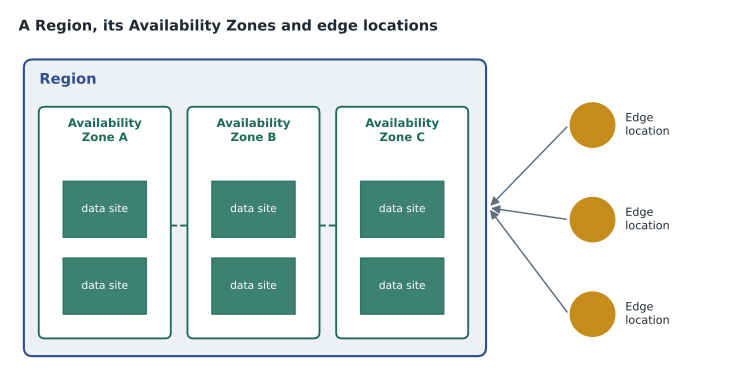
A Region is a physical location in the world containing multiple Availability Zones. At the time of writing AWS listed 39 Regions and 124 Availability Zones, with more announced; the numbers grow every year, so the exam asks about ideas rather than counts. Each Region has at least three Availability Zones. An Availability Zone is one or more discrete data centers with redundant power, networking and connectivity, physically separated from the other zones in the Region but connected to them by low-latency links. Running across more than one Availability Zone protects against the failure of a single zone. Running in more than one Region protects against a regional problem and can serve users in different parts of the world.
Edge locations are sites in many cities that Amazon CloudFront and Amazon Route 53 use to serve content and answer DNS queries close to users. Local Zones place compute and storage closer to large population centers for low-latency applications. Wavelength Zones put AWS services inside telecommunications networks for very low latency to mobile devices. When choosing a Region, consider four factors: compliance and data residency, proximity to users, which services are available in that Region, and price, which varies between Regions. Cascade Ridge chose us-west-2 for latency to Colorado, service breadth and price, with a disaster recovery copy in us-east-2.
| Term | What it is | Why you would use it |
|---|---|---|
| Region | A geographic area with multiple Availability Zones | Data residency, proximity, service choice, price |
| Availability Zone | One or more isolated data centers within a Region | High availability across zones |
| Edge location | A site that caches content and answers DNS near users | Low latency for global users with CloudFront |
| Local Zone | AWS infrastructure close to a large city | Very low latency for local users |
| Wavelength Zone | AWS services inside a telecom network | Very low latency for mobile devices |
| AWS Outposts | AWS hardware in the customer's facility | Workloads that must stay on site |
Compute
Amazon EC2 provides virtual servers called instances. Instance types are grouped into families for different needs: general purpose for balanced workloads, compute optimized for heavy processing, memory optimized for large in-memory data, storage optimized for high disk throughput, and accelerated computing with GPUs or other hardware for graphics and machine learning. You choose an instance type to match the workload, which is rightsizing. EC2 Auto Scaling adds or removes instances as demand changes, and Elastic Load Balancing spreads traffic across healthy instances, often across Availability Zones. Together they make a workload elastic and highly available, which is the design Cascade Ridge plans for BookVet.
Containers package an application with its dependencies so it runs the same everywhere. Amazon Elastic Container Service, ECS, and Amazon Elastic Kubernetes Service, EKS, run containers; EKS uses the open-source Kubernetes system. AWS Fargate runs containers without managing the servers underneath. AWS Lambda runs code in response to events without provisioning servers at all, and you pay only for the compute time used; this is serverless computing, and it is the plan for BookVet's phase 2. Other compute services appear on the exam too. AWS Elastic Beanstalk deploys web applications and handles the provisioning for you. Amazon Lightsail offers simple virtual servers and bundles at a predictable monthly price for small projects. AWS Batch runs batch computing jobs at scale.
| Need | Compute choice |
|---|---|
| Full control of a virtual server and its operating system | Amazon EC2 |
| Add and remove servers with demand | EC2 Auto Scaling with Elastic Load Balancing |
| Run containers without managing servers | AWS Fargate with ECS or EKS |
| Run code on events with no servers to manage | AWS Lambda |
| Deploy a web app with provisioning handled for you | AWS Elastic Beanstalk |
| A simple, low-cost server bundle for a small site | Amazon Lightsail |
Storage
AWS offers three broad kinds of storage. Object storage keeps data as objects in buckets, accessed over the web; Amazon S3 is the main example, designed for very high durability. Block storage provides volumes attached to an instance, like a hard drive; Amazon Elastic Block Store, EBS, is the main example, and EBS volumes live in one Availability Zone and can be backed up with snapshots. Instance store provides temporary block storage physically attached to the host; its data is lost when the instance stops or terminates. File storage provides a shared file system that many instances can use at once; Amazon Elastic File System, EFS, serves Linux workloads, and Amazon FSx offers file systems such as Windows File Server and others.
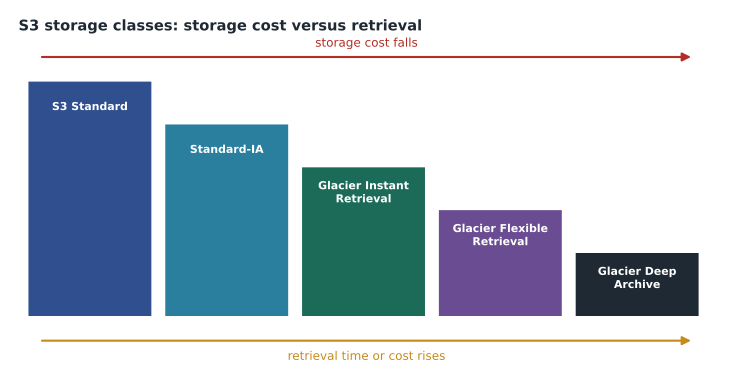
Amazon S3 has storage classes for different access patterns. S3 Standard is for frequently accessed data. S3 Standard-Infrequent Access and S3 One Zone-Infrequent Access are for data accessed less often, at lower storage cost but with a retrieval charge; One Zone keeps data in a single Availability Zone. S3 Intelligent-Tiering moves objects between tiers automatically based on access. The S3 Glacier classes are for archives, from Glacier Instant Retrieval to Glacier Flexible Retrieval and Glacier Deep Archive, with lower storage cost and slower or more costly retrieval as you go deeper. Life cycle rules move objects between classes automatically, which is exactly the plan for the radiograph images: Standard for the first 30 days, then an infrequent-access class, then an archive class after a year.
# Illustrative monthly storage cost for 38 TB of images (prices are examples only)
tb = 38
gb = tb * 1000
prices = {"S3 Standard": 0.023, "Standard-IA": 0.0125, "Glacier Deep Archive": 0.001}
for name, per_gb in prices.items():
print(name, round(gb * per_gb), "USD per month (illustrative)")S3 Standard 874 USD per month (illustrative) Standard-IA 475 USD per month (illustrative) Glacier Deep Archive 38 USD per month (illustrative)
What this code does
It multiplies 38,000 gigabytes by illustrative monthly prices for three S3 storage classes. It prints the monthly cost of keeping the whole archive in each class. The coldest archive class costs a tiny fraction of Standard, which is the trade-off of cheaper storage for slower retrieval.
The prices in the example are illustrative, not current AWS prices, but the pattern is real: archive classes cost a small fraction of Standard to store. The trade-off is retrieval. A vet who needs a three-year-old radiograph during an emergency appointment cannot wait hours for a deep archive retrieval, which is why Cascade Ridge plans to keep recent images in a class with immediate access and only archive the oldest.
Hybrid and backup storage services complete the picture. AWS Storage Gateway connects on-premises applications to cloud storage. AWS Backup centrally manages backups across services such as EBS, RDS, EFS and S3, with backup plans and retention rules; it replaces Cascade Ridge's tapes. AWS Elastic Disaster Recovery replicates servers so they can be recovered quickly in AWS.
Elasticity, scaling and high availability together
Several Domain 3 questions combine ideas from this lesson, so it helps to see how they fit together in one design. Picture BookVet after the pilot. Two or more EC2 instances run the application, each in a different Availability Zone. An Application Load Balancer sits in front of them, sending each request to a healthy instance and stopping traffic to any instance that fails its health check. An Auto Scaling group watches demand: when Monday morning bookings surge after the weekend, it adds instances; when traffic falls overnight, it removes them. The database runs on Amazon RDS with a Multi-AZ standby in a second zone. Images and static files sit in S3, delivered to clients through CloudFront.
Each part answers a different exam phrase. "Distribute traffic across instances" is Elastic Load Balancing. "Add capacity when demand rises and remove it when demand falls" is Auto Scaling, and the property it gives is elasticity. "Keep working if one data center fails" is the multi-zone design, and the property is high availability. "Survive a whole Region failing" is the disaster recovery copy in the second Region. Scaling up, also called vertical scaling, means a bigger instance; scaling out, or horizontal scaling, means more instances. The cloud makes scaling out easy, and the Well-Architected reliability pillar favors it, because many small instances fail more gracefully than one large one.
Mateo notices that the old server room had none of these properties. VetLedger ran on two physical servers in one room, so the July overheating took both down at once. The AWS design spreads the same work across buildings that do not share power or cooling. That single comparison, he decides, is the best answer he can give if anyone at the clinics asks why the move was worth it.
Mateo adds one caution to his notes. Not every service is offered in every Region, and new services often launch in a few Regions first. Before Cascade Ridge commits to a design, Gwen checks that each service it needs is available in both Regions of its pair. On the exam, a question that mentions a service missing from a Region is pointing at the service availability factor in choosing a Region.
Worked problem
Choosing storage for each need
Mateo lists four needs from the migration plan and chooses a storage service for each: the VetLedger application server's operating system disk; a shared folder that several Linux servers read at once; the imaging archive; and nightly protection for all of it.
Show solution
- The operating system disk for an EC2 instance needs block storage that persists: Amazon EBS.
- A shared folder read by several Linux servers needs file storage: Amazon EFS.
- The imaging archive is large, grows steadily and is read over the web by the viewer: Amazon S3 with life cycle rules.
- Central, policy-based protection across these services: AWS Backup.
Answer: EBS, EFS, S3 with life cycle rules, and AWS Backup.
Common mistakes
MistakeThinking an Availability Zone is a single building.
InsteadAn Availability Zone is one or more data centers, isolated from other zones in the Region.
MistakeUsing instance store for data that must survive a stop.
InsteadInstance store is temporary; use EBS for persistent volumes.
MistakeAssuming EBS volumes span Availability Zones.
InsteadAn EBS volume lives in one zone; use snapshots to copy it.
MistakeChoosing Glacier Deep Archive for data needed quickly.
InsteadDeep archive retrieval takes hours; match the class to access needs.
MistakeTreating Lambda and Fargate as the same.
InsteadLambda runs functions on events; Fargate runs containers without managing servers.
Summary and key terms
- Domain 3 carries a weight of 34, the largest on the exam.
- You can use AWS through the console, the CLI, SDKs and infrastructure as code such as CloudFormation.
- A Region has at least three isolated Availability Zones; edge locations, Local Zones and Wavelength Zones extend reach.
- Choose a Region by compliance, proximity, service availability and price.
- EC2 gives virtual servers; Auto Scaling and load balancing add elasticity; Lambda and Fargate remove server management.
- S3 is object storage with classes for access patterns; EBS is block storage; EFS and FSx are file storage; AWS Backup protects them centrally.
- Availability Zone
- One or more isolated data centers within a Region, with redundant power and networking.
- Edge location
- A site that caches content and answers DNS queries close to users.
- Instance type
- A combination of CPU, memory, storage and networking for an EC2 instance.
- Serverless
- Running code or containers without provisioning or managing servers.
- Storage class
- An S3 option that sets cost, availability and retrieval for an object.
- Life cycle rule
- An S3 rule that moves or deletes objects automatically over time.
Practice problems
Work each problem on paper first, then reveal the answer to check.
Name the four factors for choosing a Region.
Show answer
Compliance, proximity to users, service availability and price.
How many Availability Zones does each Region have at minimum?
Show answer
Three.
Which service runs code without servers on events?
Show answer
AWS Lambda.
Which storage is lost when an instance stops?
Show answer
Instance store.
Which service provides shared file storage for Linux instances?
Show answer
Amazon EFS.
What moves S3 objects between classes automatically by rule?
Show answer
S3 life cycle rules.
Which service manages backups across many AWS services?
Show answer
AWS Backup.
Lesson quiz · 5 questions
Score 60% or more to complete this lesson.
Create a free account to save your progress, take quizzes and earn a certificate.