
AWS-101 · Lesson 4 of 12 · 19 min
Regions, Availability Zones and edge locations
▶ Video coming soon A video version of this lesson is on the way.
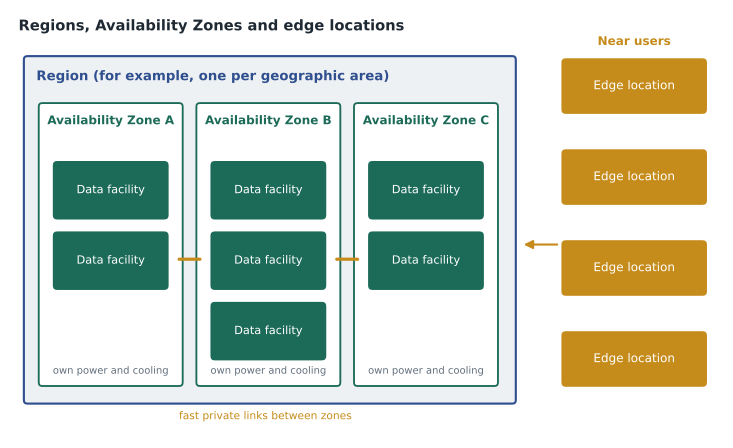
Dr. Simone Kaur runs the emergency hospital, and her concern is simple. On July 18 one hot room took VetLedger down for three hours. What stops one hot room, or one flood, or one power cut, from doing the same thing in AWS? Gwen answers by drawing AWS's global infrastructure from the outside in: Regions, then Availability Zones inside each Region, then the data centers inside each zone, and finally the edge locations that sit closer to users. The CLF-C02 exam expects candidates to know each level, what it is for and how it relates to the others.
Regions
An AWS Region is a physical location in the world where AWS clusters its data centers. Each Region is a separate geographic area, isolated from the others, with its own name and code, such as Canada (Central), whose code is ca-central-1, or US West (Oregon), whose code is us-west-2. At the time of writing, AWS listed 39 Regions around the world, with more announced. The numbers grow every year, so the exam does not expect anyone to memorize them.
Isolation is the point. Resources created in one Region stay in that Region unless the customer deliberately copies or moves them. An outage or disaster in one Region does not spread to another, and data stored in one Region is not moved elsewhere by AWS without the customer's action. This is what makes Regions useful both for resilience and for data residency, a theme of lesson 5.
The United States has several AWS Regions, among them US East (N. Virginia), us-east-1, the oldest and largest; US East (Ohio), us-east-2; US West (N. California), us-west-1; and US West (Oregon), us-west-2. AWS also runs separate GovCloud Regions for US government workloads. For Cascade Ridge, whose head office is in Denver, Oregon is the nearest large Region and Ohio is far enough away to act as a recovery site.
Availability Zones
Inside each Region are several Availability Zones (AZs). Each Region has at least three. An Availability Zone is one or more discrete data centers with redundant power, networking and connectivity. AWS states that the zones in a Region are physically separated by a meaningful distance, many kilometers from each other, yet all within about 100 kilometers (about 60 miles), and that they are linked by high-bandwidth, low-latency private networking. At the time of writing AWS listed 124 Availability Zones worldwide.
The design gives each zone its own power supply, cooling and physical security, so a fire, flood or power failure that takes one zone down should not affect the others. At the same time the zones are close enough that data can be copied between them almost instantly. That combination is what makes high availability practical: an application that runs in two or three zones keeps running when one zone has a problem.
Zones are named by adding a letter to the Region code, such as ca-central-1a or us-west-2b. Gwen mentions a detail that surprises Mateo: the letters are mapped independently for each AWS account, so one account's zone a may not be the same physical zone as another account's zone a. AWS provides zone IDs that are the same for every account, for teams that need to coordinate across accounts. It is a small detail, but it explains why two teams sometimes disagree about which zone is which.
# Why run in more than one Availability Zone?
# Suppose each zone, independently, is available 99.5 of every 100 hours.
p_zone_up = 0.995
for zones in (1, 2, 3):
    p_all_down = (1 - p_zone_up) ** zones
    p_service_up = 1 - p_all_down
    hours_down_per_year = round(p_all_down * 8760, 2)
    print(zones, "zone(s): available", round(p_service_up * 100, 4), "of 100 hours;",
"about", hours_down_per_year, "hours a year with every zone down")1 zone(s): available 99.5 of 100 hours; about 43.8 hours a year with every zone down 2 zone(s): available 99.9975 of 100 hours; about 0.22 hours a year with every zone down 3 zone(s): available 100.0 of 100 hours; about 0.0 hours a year with every zone down
What this code does
It assumes each Availability Zone is up 99.5 hours in every 100 and that zones fail independently. For one, two and three zones it calculates the chance that every zone is down at once, the resulting availability and the hours per year with no zone running. One zone means about 44 hours of outage a year, while two zones cut it to minutes, which is why critical systems run in more than one zone.
The numbers are illustrative and assume zones fail independently, which is what their separate power, cooling and buildings are designed to achieve. Real availability also depends on the application being built to use more than one zone, which lesson 7 covers.
Data centers
Customers never choose an individual data center. They choose Regions and, for some services, zones. AWS does not publish data center addresses and limits physical access tightly, with layers of security, staff screening and monitoring. Inside, AWS uses its own server, storage and network designs, and it replaces failed hardware continuously. Mateo's job of replacing failed disks simply stops existing.
Edge locations
Some services work best when they run as close to users as possible. Edge locations are sites, many of them in large cities, where AWS caches content and handles network traffic near the people using it. There are far more edge locations than Regions, and they sit in cities that have no Region at all.
- Amazon CloudFront is AWS's content delivery network (CDN). It caches copies of web pages, images and video at edge locations, so a visitor in Cheyenne receives the BookVet home page from a nearby site instead of from the Region. Regional edge caches sit between edge locations and the origin to hold less popular content.
- Amazon Route 53 is AWS's domain name system (DNS) service. It answers the question 'what address does bookvet example dot com have?' from a global network of locations, and it can route users to healthy endpoints.
- AWS Global Accelerator directs users' traffic onto the AWS global network at the nearest edge location, improving performance and availability for applications in one or more Regions.
- AWS Shield and AWS WAF can protect applications at the edge from attacks, a topic for AWS-102.
Bringing AWS closer: Local Zones, Wavelength and Outposts
For workloads that need very low latency or must stay in a particular place, AWS extends its infrastructure in three further ways that the exam may mention.
| Option | What it is | Typical use |
|---|---|---|
| Local Zones | Extensions of a Region placed in a large city, offering selected compute, storage and database services near users | Video editing, gaming or other single-digit-millisecond needs in that city |
| Wavelength Zones | AWS infrastructure inside telecommunications providers' 5G networks | Mobile applications that need very low latency to devices |
| AWS Outposts | AWS-designed racks or servers installed in the customer's own facility and managed by AWS | Workloads that must stay on site but should use AWS services and tools |
| Edge locations | Sites for caching and network services near users | CloudFront, Route 53 and Global Accelerator |
Gwen asks whether the pharmacy dispensing PC could run on Outposts. The answer is no: it is a small vendor-supplied computer tied to one machine, not a workload worth an AWS rack. Outposts suits organizations with many on-site workloads, such as a factory or a hospital network with strict latency needs. Knowing the option exists, though, is part of the exam.
Global, Regional and zonal services
AWS services differ in scope. Most are Regional: an RDS database or an S3 bucket lives in one Region, and the console shows only the resources of the Region currently selected. Some resources are zonal: an EC2 instance and its EBS volumes live in one Availability Zone. A few services are global: AWS Identity and Access Management (IAM), Route 53 and CloudFront are not tied to a Region, so the console shows Global in place of a Region name when they are open.
Mateo learns this the hard way in the sandbox account. He creates a test instance, switches the console to another Region to look at something else, and panics when the instance seems to have vanished. It has not; the console is simply showing a different Region. Gwen tells him it happens to everyone once.
| Scope | Examples | What it means |
|---|---|---|
| Global | IAM, Route 53, CloudFront | Configured once for the account, not per Region |
| Regional | S3 buckets, RDS databases, Lambda functions, VPCs | Lives in one Region; copies to other Regions are deliberate |
| Zonal | EC2 instances, EBS volumes, subnets | Lives in one Availability Zone; spread across zones for availability |
Common mistakes
MistakeTreating an Availability Zone as a single building.
InsteadA zone is one or more data centers with redundant power and networking; a Region has at least three zones.
MistakeAssuming AWS copies data between Regions automatically.
InsteadRegions are isolated. Data leaves a Region only when the customer copies or replicates it.
MistakeConfusing edge locations with Regions.
InsteadEdge locations cache content and run network services near users; Regions host the full range of services.
MistakeThinking a resource has disappeared when the console Region changes.
InsteadThe console shows one Region at a time; switch back to see the resource.
How many zones to use
Mateo asks whether VetLedger should run in all three of the Region's Availability Zones rather than two. Gwen explains the trade-off. Two zones protect against the failure of any single zone, which is the event the design targets. A third zone adds protection against two zones failing at once, which is far less likely, and adds cost for a third set of servers. For many systems two zones are enough; services that must survive more, or that need a majority of copies to agree, such as some databases, use three. Amazon S3 and many managed services already spread data across three or more zones without any extra work.
For Cascade Ridge, VetLedger and BookVet will use two zones, and the decision is recorded so that it can be revisited if the emergency hospital's needs change. The decision record lists the reason, the cost of the alternative and who agreed, a habit from the operational excellence pillar in lesson 6.
Regions and the console
The Region selector shapes almost everything Mateo sees. When he opens the EC2 console with one Region selected, he sees only that Region's instances, security groups and volumes. The billing pages, by contrast, show costs across all Regions, and global services such as IAM show the same users and roles whichever Region is selected. A useful habit, Gwen says, is to read the Region name at the top of the page before creating anything, because a resource created in the wrong Region is easy to forget and keeps costing money.
Some organizations go further and disable Regions they will never use, or block resource creation in them with policies. AWS keeps some newer Regions disabled until an account opts in. Cascade Ridge will block all Regions except its two chosen ones, a control Hannah will set up in AWS-102.
Latency at the edge
Edge locations matter for the parts of a system that the public uses. BookVet's home page, its images and its scripts are the same for every visitor, so CloudFront can serve them from an edge location near each client, while only the booking requests themselves travel to the Region. Kwame estimates that most of the bytes a visitor downloads could come from the edge, which makes the page feel faster and reduces load on BookVet's own servers. VetLedger, used only by staff, gains less from the edge; its performance depends mainly on the distance from the clinics to the Region.
Worked problem
Explaining the July outage risk
Dr. Kaur asks what would happen in AWS if one data center lost cooling the way the server room did in July.
Show solution
- If VetLedger runs in a single Availability Zone and that zone is affected, the application could stop, just as before.
- If VetLedger runs across two zones, with its database on Amazon RDS in a Multi-AZ configuration, the standby in the other zone takes over automatically, usually within a minute or two.
- If a whole Region were affected, which is very rare, Cascade Ridge could recover from the copy kept in its second Region, at the cost of some time and possibly the most recent data.
- The protection therefore comes from how the system is designed across zones and Regions, not from AWS alone.
Answer: Mateo promises Dr. Kaur a Multi-AZ design for VetLedger and a recovery plan in a second Region; lesson 7 explains both.
Mateo adds a new page to his notebook titled Where AWS lives, with four nested boxes: Region, zone, data center and edge. Next to it he writes the two Region codes Cascade Ridge is likely to use. Lesson 5 explains how Gwen chose them.
Summary and key terms
- A Region is an isolated geographic area containing at least three Availability Zones; data stays in a Region unless the customer copies it.
- An Availability Zone is one or more data centers with redundant power, networking and connectivity, separated from other zones but linked by fast private networking.
- Edge locations near users serve CloudFront, Route 53 and Global Accelerator.
- Local Zones, Wavelength Zones and Outposts bring AWS services closer to users or on site.
- Services are global (IAM, Route 53, CloudFront), Regional (S3, RDS, Lambda) or zonal (EC2 instances, EBS volumes).
- Region
- An isolated geographic area where AWS clusters data centers, with at least three Availability Zones.
- Availability Zone
- One or more discrete data centers with redundant power, networking and connectivity within a Region.
- Edge location
- A site near users where AWS caches content and runs network services.
- Amazon CloudFront
- AWS's content delivery network.
- Amazon Route 53
- AWS's DNS service.
- Local Zone
- An extension of a Region in a large city for low-latency workloads.
- AWS Outposts
- AWS infrastructure installed in the customer's facility and managed by AWS.
- Zone ID
- An identifier for an Availability Zone that is the same in every account.
Practice problems
Work each problem on paper first, then reveal the answer to check.
What is the minimum number of Availability Zones in an AWS Region?
Show answer
Three.
Which service caches web content at edge locations?
Show answer
Amazon CloudFront.
Is IAM a Regional or a global service?
Show answer
Global.
Lesson quiz · 5 questions
Score 60% or more to complete this lesson.
Create a free account to save your progress, take quizzes and earn a certificate.