
AWS-101 · Lesson 11 of 12 · 18 min
Ways to access AWS: console, CLI and SDKs
▶ Video coming soon A video version of this lesson is on the way.
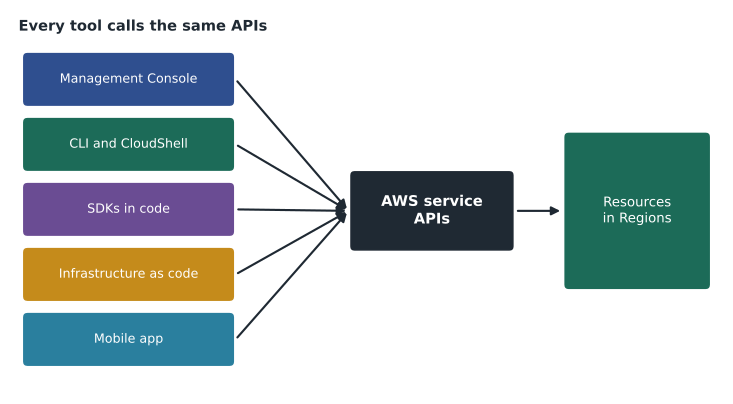
In the first week Mateo clicked through everything in the AWS Management Console. By the sixth week Gwen is steering him away from it. "The console is where you learn and where you look," she says. "It is not where you build production." Every way of working with AWS ends in the same place, a call to an AWS API, and each tool suits different jobs. The CLF-C02 exam expects candidates to know the main access methods and when to use each; this lesson covers them, and AWS-102 covers the identities and permissions behind them.
Signing in: root user and IAM identities
Every AWS account has one root user, the identity created with the account's email address. It has complete, unrestricted access, including closing the account and changing billing details. AWS's advice is firm: protect the root user with multi-factor authentication (MFA), do not use it for everyday work, and reserve it for the few tasks that require it. Gwen locks the root user credentials for Cascade Ridge's accounts in Lorraine's office safe, with the MFA device in a second safe.
Everyday work uses IAM identities, preferably people signing in through AWS IAM Identity Center, which gives each person one sign-in for all the accounts and roles they are allowed to use, with short-lived credentials. Mateo now signs in through a portal, chooses the Cascade Ridge account and the role he needs, and is sent to the console. AWS-102 explains IAM users, groups, roles and policies.
The AWS Management Console
The AWS Management Console is a web interface for nearly every AWS service. It is the best place to learn how a service works, to look at resources, to view dashboards and bills, and to make occasional changes. Its features include a search bar for finding services, a Region selector at the top of the page, recently visited services, customizable dashboards and AWS CloudShell, a browser-based terminal. The console also has an AWS Console Mobile Application for viewing resources, alarms and billing on a phone, which Dr. Kaur installs so she can see whether VetLedger is healthy without calling anyone.
The console's weakness is repetition. Creating twelve similar resources by clicking is slow and error-prone, and nothing records exactly which settings were chosen. For anything done more than once, a scripted method is better.
The AWS Command Line Interface
The AWS CLI is a tool for running AWS commands from a terminal. Each command names a service, an action and parameters, and returns results as text, a table or JSON. It is ideal for quick queries, for scripting repeated tasks and for automation run from a schedule. It needs credentials, which IAM Identity Center can supply as short-lived tokens through a single sign-in command.
aws configure sso
aws sso login --profile cascade-prod
aws ec2 describe-instances --profile cascade-prod \
    --query "Reservations[].Instances[].[InstanceId,State.Name,Placement.AvailabilityZone]" \
    --output table
aws s3 ls s3://cascade-ridge-images-archive/2026/ --profile cascade-prod
AWS CloudShell runs the CLI in the browser with the signed-in user's permissions already available, so nothing needs to be installed and no keys need to be stored on a laptop. Mateo uses CloudShell for one-off checks and the installed CLI for his scripts.
Many CLI commands return JSON, which scripts can read. The example below parses output of the kind returned by an EC2 listing; it is a local copy of such output, so it runs without an AWS account.
import json
# Example output in the shape returned by "aws ec2 describe-instances" (trimmed).
output = """
{"Reservations": [
  {"Instances": [{"InstanceId": "i-0a1", "State": {"Name": "running"}, "Placement": {"AvailabilityZone": "zone-a"}}]},
  {"Instances": [{"InstanceId": "i-0b2", "State": {"Name": "running"}, "Placement": {"AvailabilityZone": "zone-b"}}]},
  {"Instances": [{"InstanceId": "i-0c3", "State": {"Name": "stopped"}, "Placement": {"AvailabilityZone": "zone-a"}}]}
]}
"""
data = json.loads(output)
instances = [i for r in data["Reservations"] for i in r["Instances"]]
running = [i for i in instances if i["State"]["Name"] == "running"]
zones = sorted({i["Placement"]["AvailabilityZone"] for i in running})
print("Running:", len(running), "of", len(instances))
print("Zones with a running instance:", zones)
print("Spread across at least two zones:", len(zones) >= 2)Running: 2 of 3 Zones with a running instance: ['zone-a', 'zone-b'] Spread across at least two zones: True
What this code does
It reads a trimmed example of the JSON text the AWS command-line tool returns when listing EC2 instances. It pulls out every instance, counts how many are running and lists the Availability Zones that have a running instance. The final line confirms the service is spread across at least two zones, the kind of quick check administrators script against real command output.
The AWS SDKs
The AWS SDKs (software development kits) let programs call AWS services in their own language. AWS provides SDKs for Python (known as Boto3), JavaScript, Java, .NET, Go, Ruby, PHP, C++, Rust and others. An SDK handles the details of signing requests, retrying when a call fails temporarily and turning responses into objects the program can use. Kwame's BookVet code will use the Python SDK to read and write appointment data and to place confirmation messages on a queue.
import boto3

session = boto3.Session(profile_name="cascade-dev")
s3 = session.client("s3", region_name="us-west-2")
response = s3.list_objects_v2(Bucket="cascade-ridge-bookvet-dev", Prefix="exports/")
for item in response.get("Contents", []):
    print(item["Key"], item["Size"])
Gwen insists on one rule for every program: credentials never go in code. On AWS, programs running on EC2 or Lambda receive temporary credentials automatically through IAM roles; on a laptop, the SDK reads the same profile the CLI uses. A secret key pasted into a source file is one of the most common causes of cloud security incidents, because code gets copied, shared and published.
Infrastructure as code
Infrastructure as code (IaC) means describing resources in files that a tool turns into real infrastructure. The files can be reviewed, versioned, tested and reused, so the same environment can be built again, identically, in minutes. AWS CloudFormation reads templates written in YAML or JSON and creates, updates or deletes the resources they describe as a single unit called a stack. The AWS Cloud Development Kit (AWS CDK) lets developers define infrastructure in programming languages and generates CloudFormation templates. Third-party tools such as Terraform do the same job across several providers.
AWSTemplateFormatVersion: "2010-09-09"
Description: Archive bucket for radiograph images (example)
Resources:
  ImageArchive:
    Type: AWS::S3::Bucket
    Properties:
      BucketName: cascade-ridge-images-archive
      VersioningConfiguration:
        Status: Enabled
      PublicAccessBlockConfiguration:
        BlockPublicAcls: true
        BlockPublicPolicy: true
        IgnorePublicAcls: true
        RestrictPublicBuckets: true
Gwen's plan is that every production resource for Cascade Ridge is created from templates kept in a version-controlled repository. The operational excellence pillar's principle of performing operations as code becomes a daily habit: a change is proposed in a template, reviewed by a second person, then applied. If the recovery Region ever has to be built in a hurry, the same templates build it.
Choosing the right tool
| Method | Best for | Cascade Ridge use |
|---|---|---|
| Management Console | Learning, exploring, dashboards, billing, occasional changes | Lorraine's cost views; Mateo checking alarms |
| Console Mobile Application | Checking resources and alarms on the go | Dr. Kaur's VetLedger health check |
| AWS CLI and CloudShell | Quick queries and scripted, repeatable tasks | Mateo's nightly checks and reports |
| AWS SDKs | Applications that call AWS services from code | BookVet reading and writing data |
| Infrastructure as code | Building and changing environments repeatably | Every production resource, via CloudFormation |
Endpoints and quotas
Behind every tool, requests go to service endpoints, web addresses for each service in each Region. Tools choose the endpoint from the selected Region, which is why the Region setting matters so much. Accounts also have service quotas, limits on how many of a resource can be created or how fast an API can be called, such as the number of instances of a type in a Region. Quotas protect both AWS and customers from runaway usage; many can be raised on request through the Service Quotas console. Mateo checks the quotas for the instance types Cascade Ridge needs before the pilot.
Common mistakes
MistakeUsing the root user for daily work.
InsteadProtect it with MFA, store its credentials safely and use IAM identities for everyday tasks.
MistakeBuilding production by clicking in the console.
InsteadUse infrastructure as code so changes are reviewed, repeatable and recorded.
MistakePutting access keys in source code.
InsteadUse IAM roles for code on AWS and single sign-on profiles on laptops.
MistakeForgetting that the CLI and SDKs act on a Region.
InsteadSet a default Region and override it deliberately when needed.
Tags and naming from the first day
Every tool can attach tags, key and value labels, to most resources, and Gwen asks Mateo to agree a tagging standard before anything is built. Cascade Ridge's standard has four required tags: the system (for example VetLedger or BookVet), the environment (production, test or development), the owner, and the cost center that pays. CloudFormation templates apply the tags automatically, so nobody has to remember them. Lorraine's cost reports in AWS-104 will group spending by these tags, and Hannah's security reviews will use them to find every production resource quickly.
Names follow a pattern too: the organization, the system, the environment and the purpose, joined by hyphens, such as cascade-vetledger-prod-app. Consistent names and tags sound like housekeeping, but they are what make an account with hundreds of resources understandable a year later.
Working safely while learning
Mateo is still learning, so Gwen sets up guard rails around his practice. He works in a separate sandbox account, not in production. The sandbox has a budget with an email alert at a small threshold, so a forgotten resource cannot run up a large bill. His role in the sandbox can create most resources but cannot change billing or account settings. At the end of each practice session he deletes what he created, and once a week a script lists anything still running in the sandbox so that nothing is left behind.
The same habits will carry into production with stricter limits: changes through templates and review, permissions that match each person's job, and alarms that tell someone when something unexpected happens. Learning safely, Gwen says, is the first operational skill.
Gwen also shows Mateo how to check what a role is allowed to do before he needs it, using the IAM policy simulator in the console, and how to read the error message when a request is denied. An access denied error, she explains, is the permissions system working as intended; the fix is to request the specific permission needed, not a broader role. Mateo keeps a list of the permissions he asks for, which later helps Hannah design the production roles with least privilege in mind, a topic AWS-102 takes up in detail.
Worked problem
Choosing a method for each task
Mateo has four tasks this week: show Lorraine last month's costs by service; check every morning that both VetLedger servers are running; give BookVet the ability to store exported reports in S3; and create the same network setup in the recovery Region as in the primary one.
Show solution
- Lorraine's cost view is a one-time look at a dashboard, so the console's Billing and Cost Management pages suit it.
- The morning check repeats daily, so a short CLI script, run on a schedule, suits it.
- BookVet storing reports is application code, so the Python SDK with an IAM role suits it.
- Building an identical network in another Region is a repeatable build, so a CloudFormation template suits it.
Answer: Console, CLI, SDK and infrastructure as code, one for each kind of job.
Mateo's last notebook page for the course is a cheat sheet: root user locked away; Identity Center for sign-in; console to look; CLI to check; SDK in code; templates to build. Lesson 12 puts all eleven lessons together in one case study.
Summary and key terms
- Every AWS tool calls AWS service APIs.
- The root user has full access and should be protected with MFA and used rarely; people should sign in through IAM Identity Center.
- The Management Console suits learning, viewing and occasional changes, and the mobile app shows resources and alarms.
- The AWS CLI and CloudShell run commands and scripts.
- The AWS SDKs let applications call AWS in many languages, using IAM roles rather than stored keys.
- Infrastructure as code with AWS CloudFormation or the AWS CDK builds environments repeatably.
- Requests go to Regional service endpoints, and service quotas limit resource counts and request rates.
- Root user
- The account's original identity with complete access; to be used rarely and protected with MFA.
- AWS IAM Identity Center
- Single sign-on for people across AWS accounts and roles.
- AWS Management Console
- The web interface for AWS services.
- AWS CLI
- The command line interface for AWS.
- AWS CloudShell
- A browser-based terminal with the AWS CLI ready to use.
- AWS SDK
- A software development kit for calling AWS services from code.
- Infrastructure as code
- Describing infrastructure in files that tools turn into resources.
- AWS CloudFormation
- Creates and manages resources as stacks from templates.
- Service quota
- A limit on resources or request rates in an account and Region.
Practice problems
Work each problem on paper first, then reveal the answer to check.
Which access method is best for building the same environment repeatedly?
Show answer
Infrastructure as code, such as AWS CloudFormation.
How should code running on EC2 get AWS credentials?
Show answer
Through an IAM role attached to the instance, which supplies temporary credentials automatically.
What should be done with the root user?
Show answer
Protect it with MFA, store its credentials securely and use it only for tasks that require it.
Lesson quiz · 5 questions
Score 60% or more to complete this lesson.
Create a free account to save your progress, take quizzes and earn a certificate.